-
-
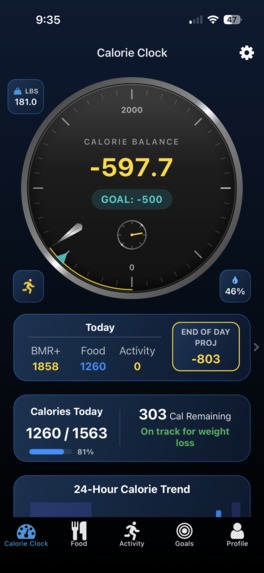
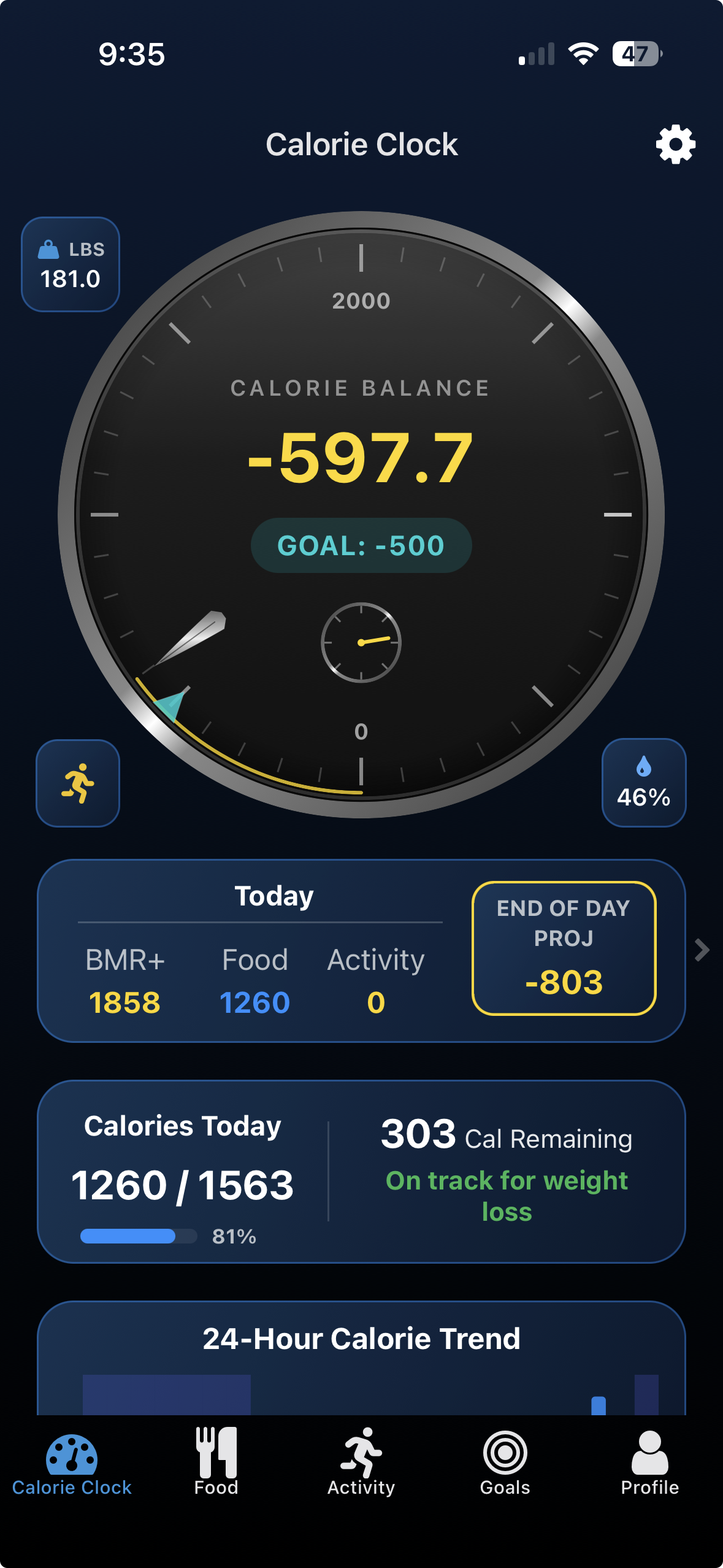
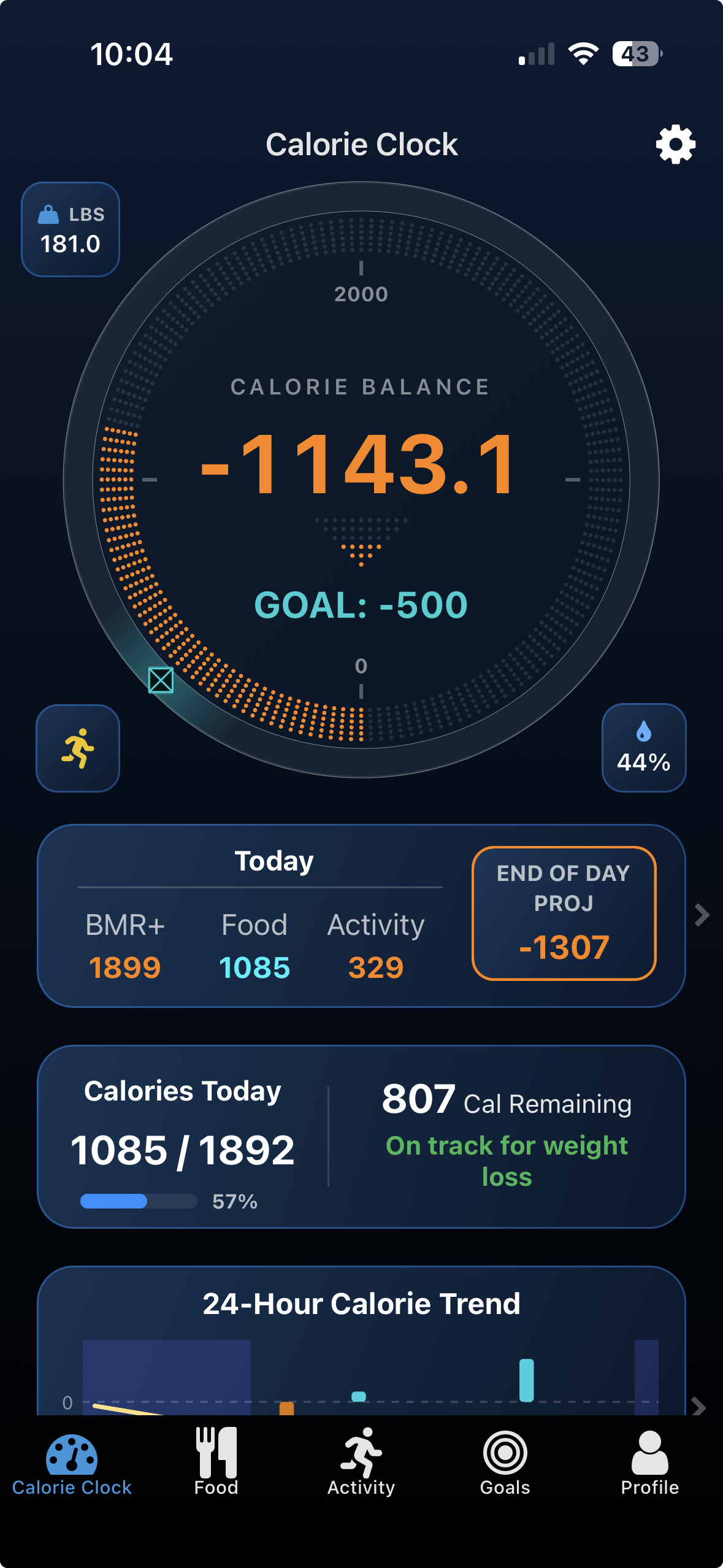
Dashboard - Dark
-
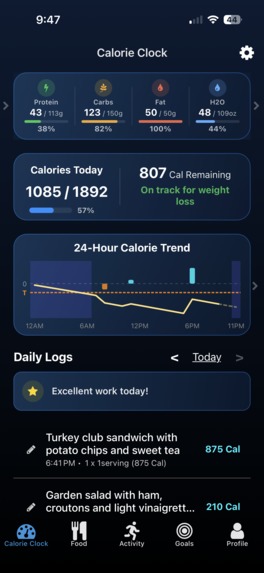
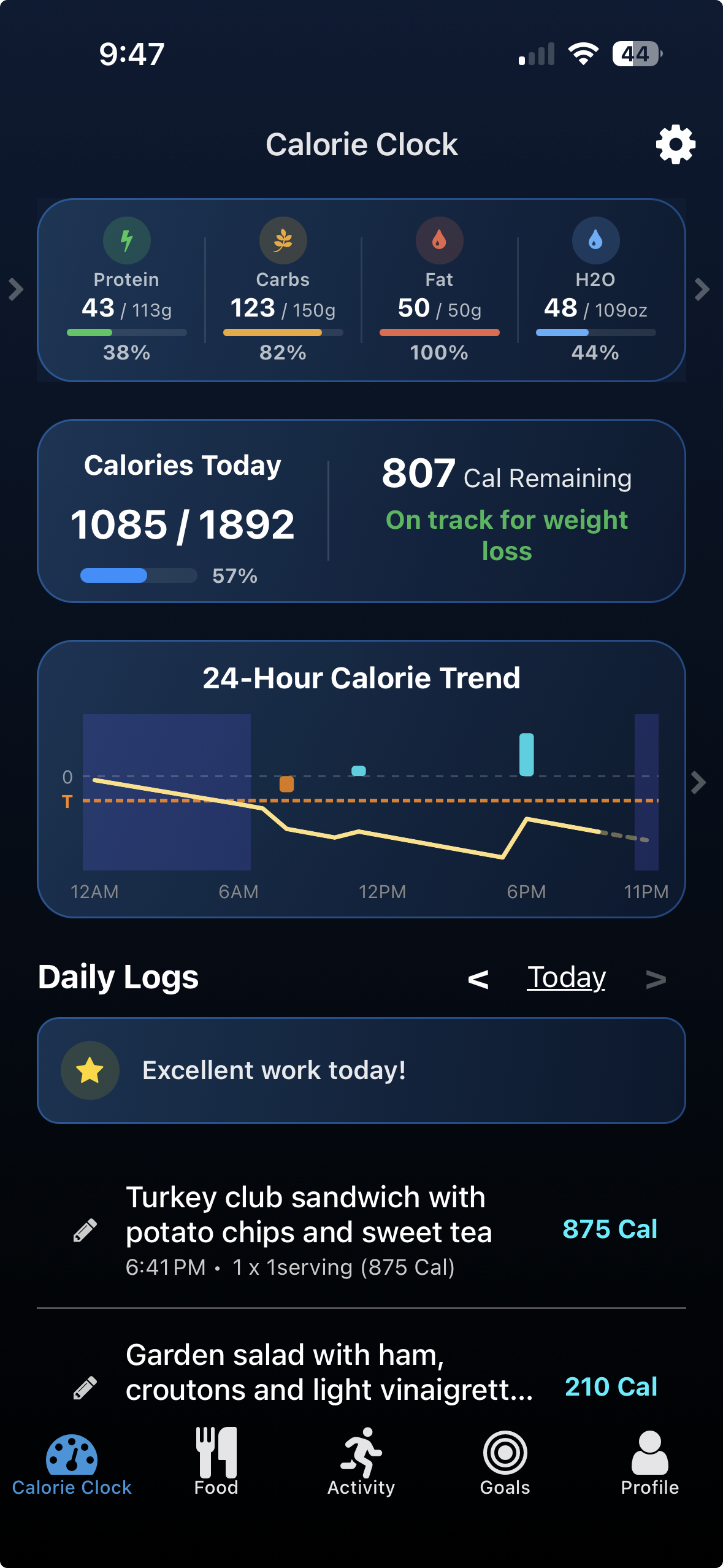
Macros & 24-hr Trend Chart
-
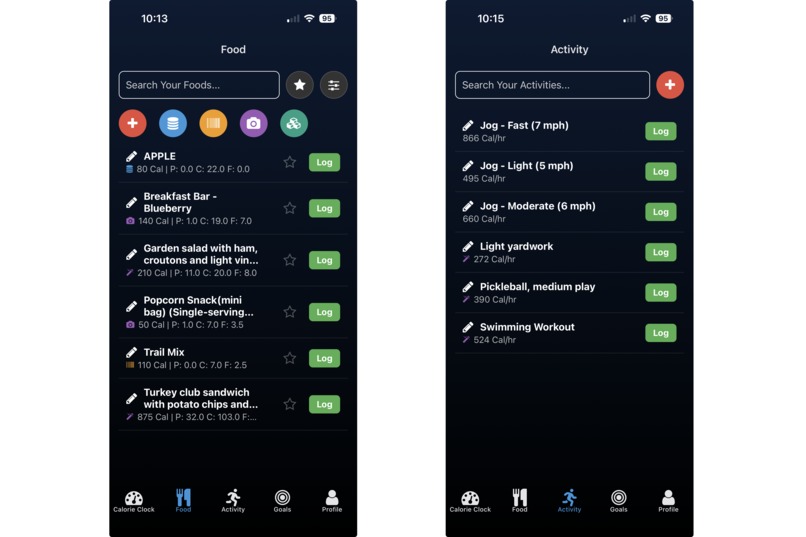
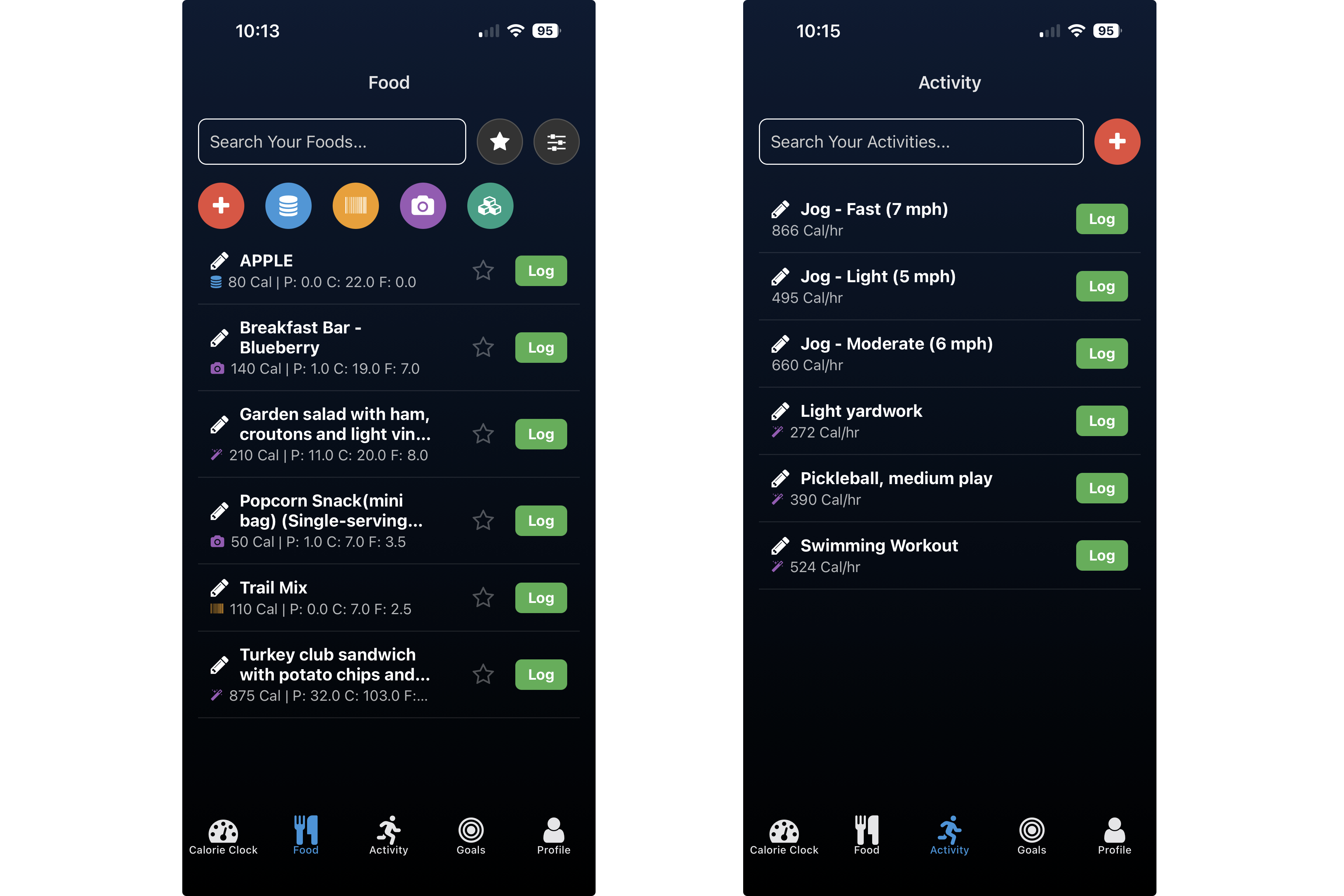
Food & Activity Library
-
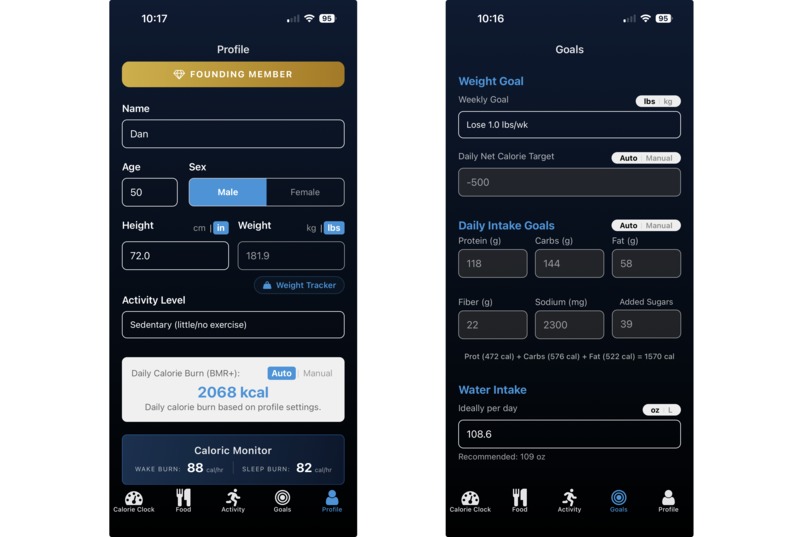
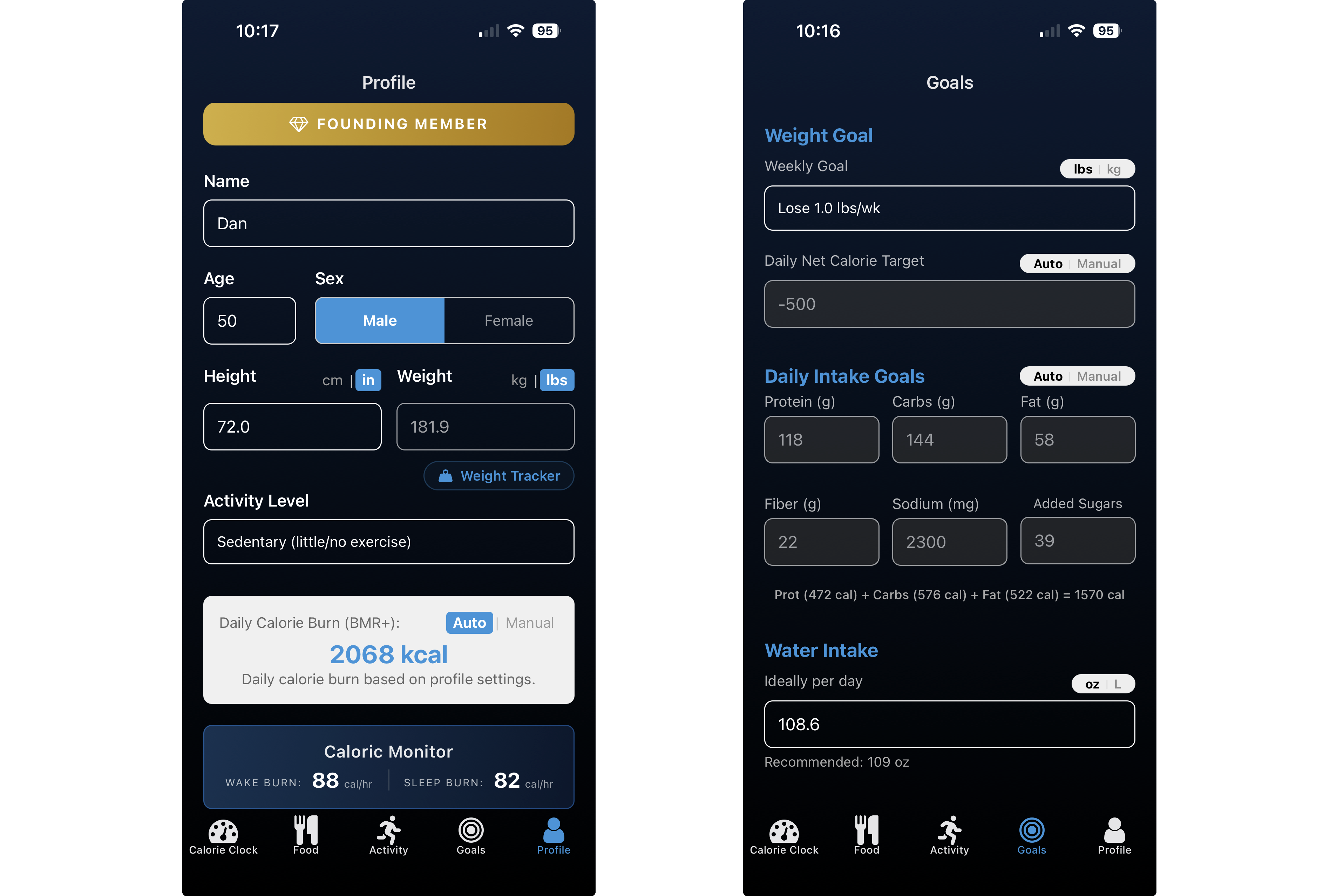
Profile & Goals
-
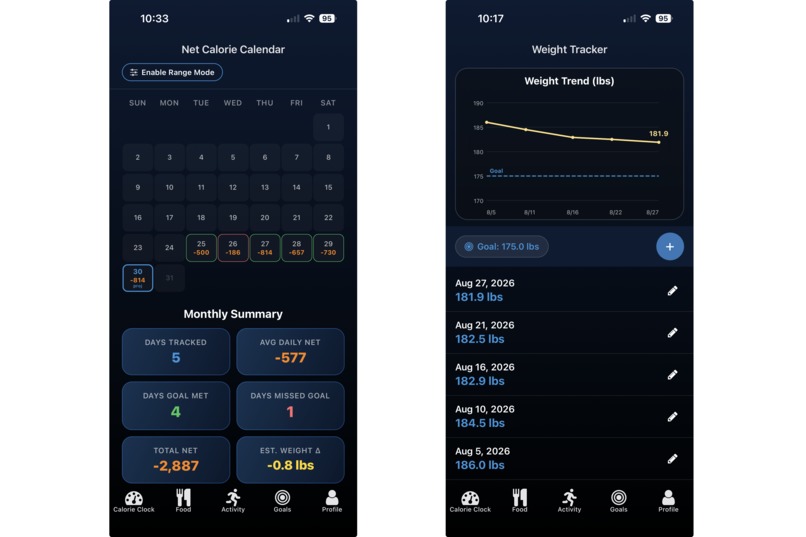
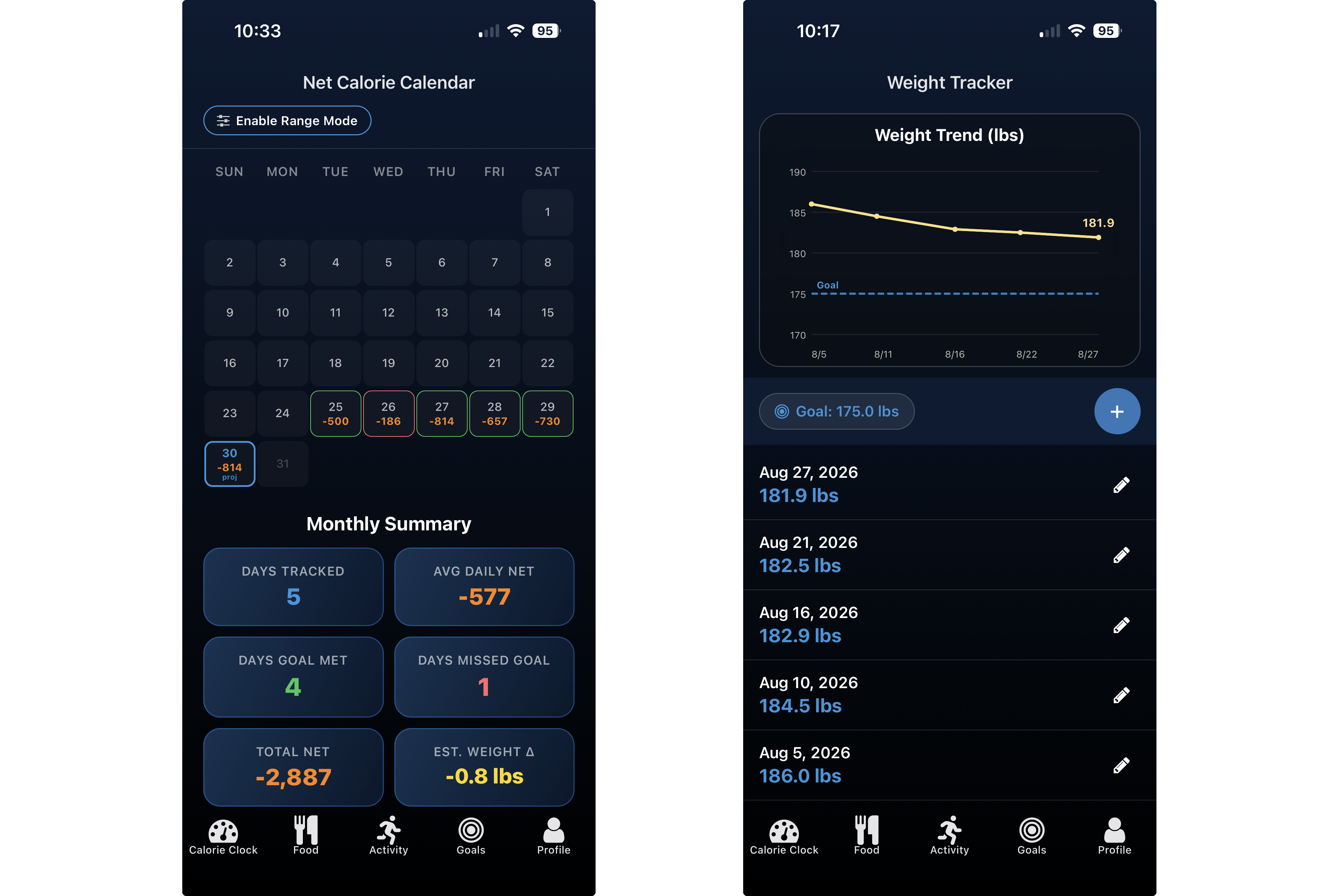
Calorie Calendar & Weight Tracker
-
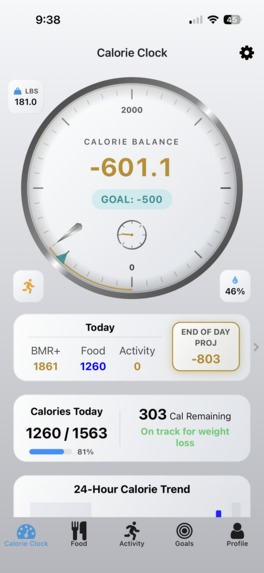
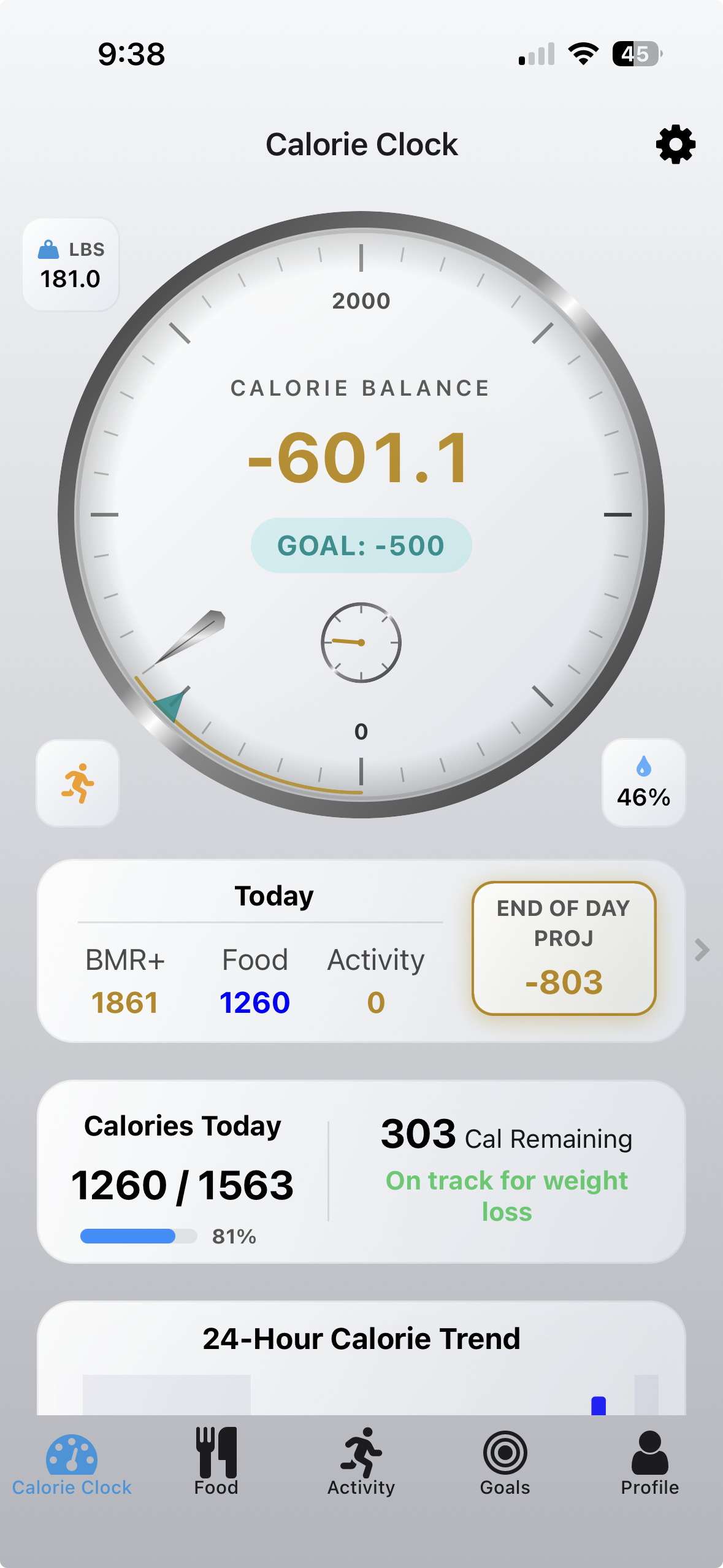
Dashboard - Light
-
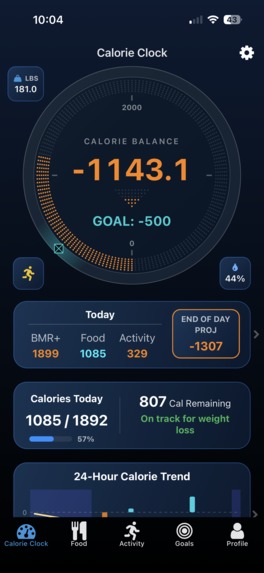
Clockface Option - PRISM
-
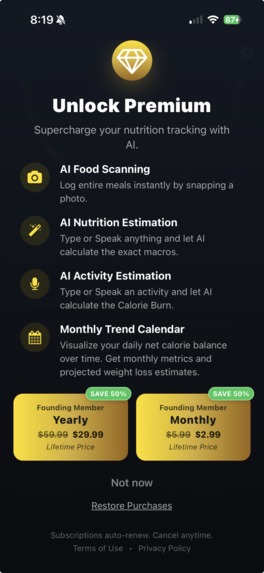
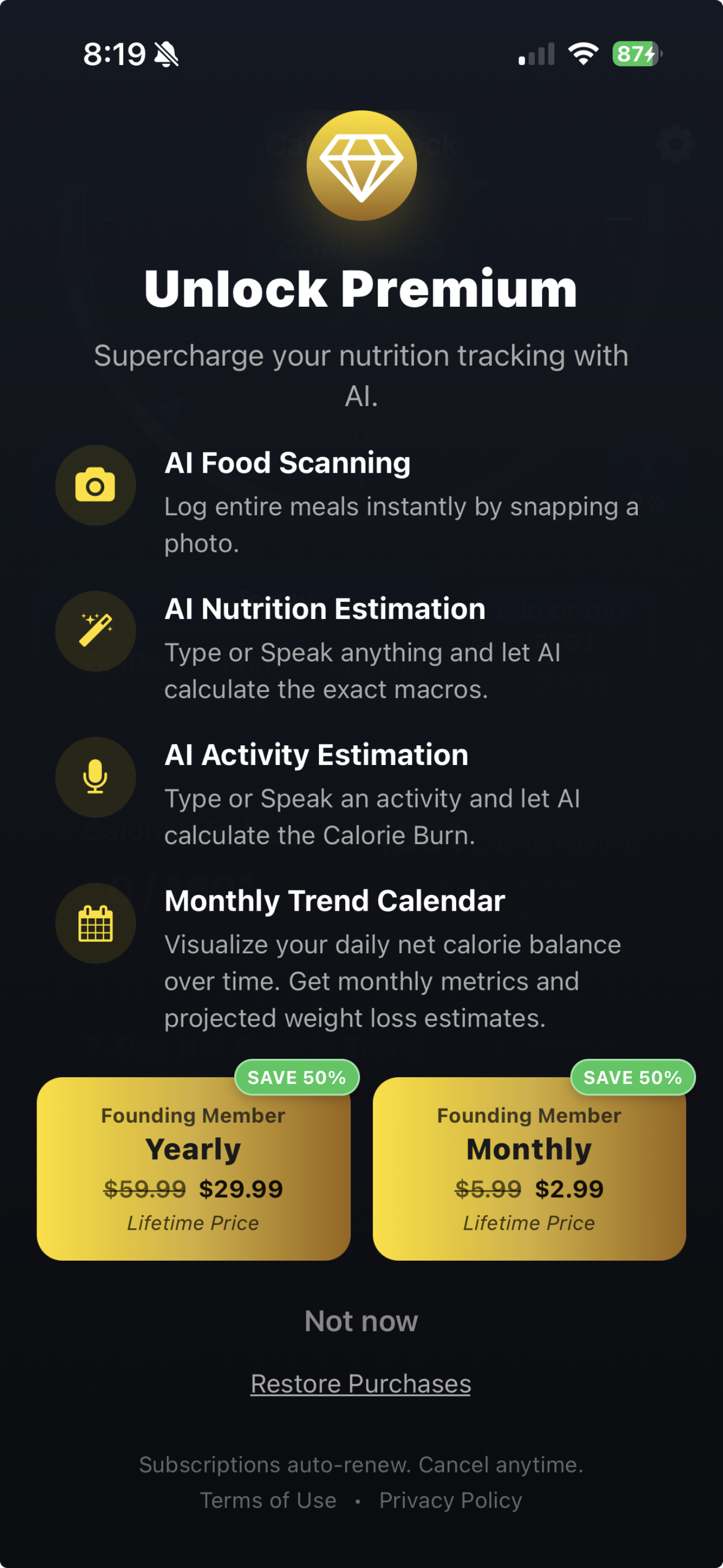
Founding Member Promotion
-
Calorie Clock Icon
Inspiration
Most calorie trackers turn nutrition into a data-entry chore: lists, databases, numbers, and the generic circular progress bars.
We wanted to flip that paradigm.
Our bodies don't consume energy in daily increments. They burn it continuously—every minute, awake or asleep. So why do calorie trackers make users think in disconnected numbers?
That question inspired Calorie Clock: a living visualization of the body's energy balance that continuously shows calories coming in and energy being burned.
Instead of asking users to constantly interpret numbers, we wanted them to be able to see their energy balance happening in real time.
Then we tackled the second problem: logging food and activity is tedious. We used multimodal AI to make that part nearly effortless—turning a photo, a sentence, or a description of an activity into structured nutrition and calorie data.
The result is a new kind of personal energy monitor—one that feels less like a spreadsheet and more like a living instrument.
What it does
Calorie Clock is a premium, local-first iOS and Android application that reimagines nutritional tracking around one simple idea: your calorie balance is always moving.
The Calorie Clock: Instead of a conventional progress bar, users see an animated clock that continuously visualizes their daily energy balance as their basal metabolic rate progresses throughout the day and night. Analog and Digital clock faces make the core concept immediately understandable and visually engaging.
Real-Time Energy Tracking: Calories consumed and calories burned are continuously brought together into a single visual experience, allowing users to understand where they stand without repeatedly doing the math themselves.
Health Syncing: Calorie Clock uses Apple HealthKit and Android Health Connect to seamlessly import workout and activity data from popular wearables and fitness devices. This allows workouts recorded by the user's existing ecosystem to automatically flow into Calorie Clock, where they are incorporated into the user's real-time calorie balance—without requiring duplicate manual entry.
AI Food Logging: Users can describe a meal in natural language or take a photo of their food. Gemini's multimodal AI analyzes the meal, estimates portions, and extracts calories and nutritional information including protein, carbohydrates, fat, and fiber.
Complete Food Library: Calorie Clock gives users virtually every way they might want to add food to their personal library. They can enter foods manually, search the USDA food database, scan a barcode, describe a food or meal using AI speech/text, or use AI image recognition to analyze a photo.
Users can also combine individual foods into reusable Meals and Recipes, storing them in their personal library so an entire meal can be logged as a single entry. This makes Calorie Clock flexible enough to handle everything from a packaged snack scanned by barcode to a home-cooked recipe built from multiple ingredients.
AI Activity Estimation: Users don't need a wearable—or even need to remember to wear one—to account for their activity. They can simply describe what they did, such as “Intense pickup basketball,” and Calorie Clock uses their personal biometric profile to estimate the calories burned.
This is especially valuable for activities that aren't captured by a wearable, or for users who don't consistently wear their device. Instead of searching through exercise databases, entering MET values, or accepting a generic calorie estimate, users get a personalized estimate simply by describing the activity.
We believe this represents a fundamentally new interaction model for calorie tracking: describe what you did, and AI turns it into personalized energy expenditure.
The goal throughout the product is the same: less logging, more understanding.
How we built it
Frontend: Built with React Native, using react-native-reanimated and SVG manipulation to create smooth 60fps clock animations, dynamic visualizations, and glassmorphic micro-interactions.
Local-First Architecture: Drizzle ORM over SQLite keeps the core experience fast and resilient, including seamless offline operation.
AI & Backend: Firebase Cloud Functions securely connect the application to the Google Gemini API. Gemini's multimodal capabilities power both food recognition/extraction and natural-language activity calorie calculations.
Security & Infrastructure: Firebase App Check protects our AI endpoints using Google Play Integrity on Android and App Attest on iOS.
Monetization: RevenueCat powers our premium subscription infrastructure, paywalls, and offering management across platforms. To accelerate our initial customer acquisition, we launched a Founding Member promotion targeting our first 1,000 customers with special promotional pricing.
Rather than hard-coding the introductory offer into the application, we designed the pricing strategy around RevenueCat's offering management. Once we reach our first 1,000 customers, we can transition to standard pricing directly through the RevenueCat Dashboard. The in-app paywall automatically updates to reflect the new pricing and messaging—with no app update or code change required.
This gives us the flexibility to experiment with pricing and messaging, reward our earliest customers, and seamlessly evolve from launch pricing to our long-term subscription model while keeping the monetization infrastructure completely decoupled from the app release cycle.
Challenges we ran into
Building an ambitious, cross-platform application around a continuously updating visual interface and multimodal AI created challenges well beyond a typical CRUD-style app.
Making AI Reliable: Gemini needed to consistently return structured nutritional data rather than free-form responses. We developed rigorous prompting, schema enforcement, and fallback parsing to make multimodal AI usable inside a deterministic application.
Camera & Memory Management: High-resolution food photos created significant memory pressure across different devices. We implemented image compression and optimized the camera pipeline to prevent crashes while maintaining enough image quality for reliable food recognition.
Cross-Platform UI: Android camera integration introduced difficult SurfaceView and modal-layout issues that could cause portions of the interface to collapse or render incorrectly. Resolving these required device-specific testing and careful control of the rendering hierarchy.
Securing AI Infrastructure: Protecting cloud-based AI endpoints required us to work through Firebase App Check, device integrity services, authentication tokens, Google Cloud configuration, and aggressive device caching behavior.
These weren't just development obstacles—they forced us to turn an ambitious prototype into a production-ready application.
Accomplishments that we're proud of
We created a new visual language for calorie tracking.
Traditional trackers revolve around lists, numbers, and generic progress bars. Calorie Clock revolves around a continuously moving visual representation of energy.
The clock isn't simply decoration. It is the product's primary mental model.
A user can glance at the screen and immediately understand that their calorie balance is changing with time—because their body is constantly burning energy.
We turned calorie tracking from a chore into an experience.
AI removes much of the friction that makes traditional tracking tedious. A user can photograph a meal instead of searching a database, or describe a meal and get immediate calorie and macro estimates.
The result is a workflow measured in seconds rather than minutes.
Personalized Activity Estimation:
We extended AI beyond food recognition to solve another major source of friction: tracking exercise. Wearables are powerful, but users don't always wear them, and many activities aren't captured automatically. Calorie Clock lets users simply describe an activity and receive a calorie-burn estimate based on their individual profile.
Calorie Clock translates the user's words into personalized energy expenditure. This makes activity tracking accessible even without a wearable and keeps the real-time energy balance complete when wearable data isn't available.
Integration & Architecture
We're proud of how we brought together RevenueCat, Firebase, Gemini, HealthKit, Health Connect, and other platform services into a cohesive cross-platform application.
The challenge wasn't simply integrating individual APIs—it was making them work together as a secure, reliable foundation for the entire product. Our architecture connects AI-powered food and activity analysis, real-time health data, local data storage, cloud functions, security controls, and subscription monetization into a single experience.
We designed these integrations so that critical services remain protected behind our backend while still giving us the flexibility to evolve the product and its business model independently of the app release cycle.
We used AI where it creates leverage—not because AI is fashionable.
Calorie Clock isn't an "AI app" searching for a reason to use AI.
AI is applied at the exact points where it eliminates friction: understanding what a user ate and understanding what a user did.
That keeps the technology in the background while making the experience feel almost instantaneous.
What we learned
We learned that the hardest part of multimodal AI isn't getting an impressive response—it is getting a response that can be trusted inside a real application.
That led us deep into structured prompting, JSON schema enforcement, validation, fallback parsing, and defensive handling of unpredictable model output.
We also learned how much engineering is required to make a highly visual mobile experience feel effortless. Maintaining smooth, continuously updating SVG animations while managing camera memory, cross-platform rendering, and offline data storage pushed our React Native performance work considerably further than we expected.
Most importantly, we learned that a strong product concept becomes much more powerful when every part of the experience reinforces the same mental model.
For Calorie Clock, that mental model is simple:
Your body is always burning energy. Your clock is always moving.
What's next for Calorie Clock
We're continuing to evolve Calorie Clock from a calorie tracker into a continuous personal energy monitor.
Next, we're expanding the clock system with additional interactive faces, richer visualizations, and Home Screen widgets so the user's energy balance is available without opening the app.
We're also developing a dedicated Apple Watch experience—bringing continuous energy monitoring to the place where a clock naturally belongs: the wrist.
On the intelligence side, we're expanding our use of Apple Health and Health Connect data to generate increasingly personalized insights from the user's activity, nutrition, and energy patterns.
Our long-term goal is simple:
Make calorie balance something people can see, understand, and act on—not something they have to calculate.
Built With
- android-health-connect
- apple-healthkit
- drizzle-orm
- expo.io
- firebase
- firebase-app-check
- firebase-cloud-functions
- google-cloud
- google-gemini-api
- node.js
- react
- react-native
- react-native-reanimated
- revenuecat
- sqlite
- typescript

Log in or sign up for Devpost to join the conversation.