Inspiration Almost everyone has put off a phone call for a week. For some people, though, the phone isn't just annoying. It's a locked door.
If you're Deaf or hard of hearing, calling the dentist usually means a relay operator: a stranger in the middle of your conversation, reading your words out loud. If you have a speech impairment, a stutter, or phone anxiety, or English isn't your first language, you know the dread of fast talk, hold music, and "sorry, can you repeat that?"
And yet the calls that matter most still happen by phone: booking an appointment, checking a prescription, cancelling a subscription that only lets you cancel by calling. Putting those calls off isn't just stressful. It delays care.
We wanted to redesign the phone call for the people it shuts out. The idea became our tagline: type it, and we'll say it.
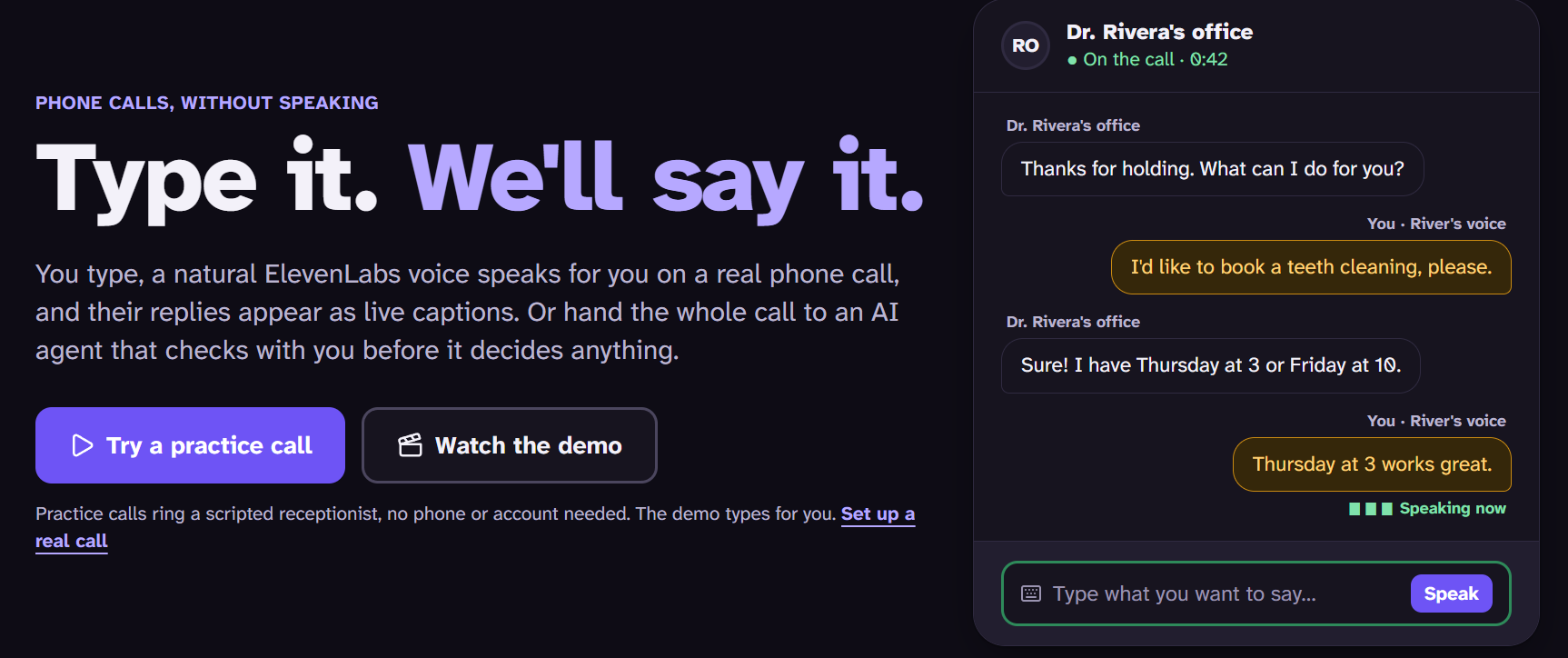
What it does CallProxy places real phone calls that you never have to speak on.
You type, a natural voice speaks. Each line you type is read on the call in a natural ElevenLabs voice that you choose. Any voice in your ElevenLabs library works, including a cloned one. Someone losing their voice could bank it and keep calling as themselves. Their replies come back as live captions. A "who's talking" indicator and four bouncing voice bars show when the other person is speaking, before their words even arrive. Hearing callers get that signal for free; Deaf callers usually don't. An AI agent is on standby. One tap hands the call to an AI agent that picks up from what's already been said. It never decides for you. When it hits a real choice ("Thursday at 3 or Friday at 10?"), your screen flashes, the phone vibrates, and a decision card appears. You tap, and the agent carries on. Take the call back any time. One-tap phrases for the moments that stress people out most: "Introduce me", "Could you repeat that?", "Please speak slower." A summary at the end with the booked time, the confirmation number, Add to calendar, and the full transcript. It's honest by design. The typed voice introduces itself as a voice reading your words, and the agent says it's an AI in its first sentence. It will never read out card numbers, SSNs, or passwords, even if you enter them. Calls are capped at 5 minutes and only go to allowlisted numbers.
How we built it Backend (Python, FastAPI). One bridge sits between three websockets: Twilio's call audio, the voice model, and your browser.
Twilio Media Streams carry the phone audio: 8 kHz μ-law in both directions. ElevenLabs does three jobs: Text-to-speech (Flash v2.5) speaks your typed lines, generated directly in phone format. Scribe realtime speech-to-text captions the other side while you have the call. An ElevenLabs agent with client tools (ask_user, record_outcome, end_call) runs the conversation when you hand it off. The backend creates the agent and its tools through the API and keeps them in sync, so there's nothing to set up by hand in a dashboard. OpenAI Realtime is supported as a fallback agent. Call state lives in memory. The browser gets a live stream of events: status changes, transcript lines, who's speaking, decision cards, and the outcome. Frontend (React, Vite, Tailwind v4). It has three screens:
a compose page with a live preview of how the call will open, what the agent may share, and what it will never say; the live call, built around the typing box; the summary. We used Atkinson Hyperlegible Next, a typeface designed for low-vision readers, plus light and dark themes checked against WCAG AA, and three caption sizes.
A demo that works with nothing plugged in. A scripted practice receptionist reacts to whatever you type. It books when you ask, asks for a date of birth, offers two slots, and repeats herself when you ask her to. We also ported it to TypeScript so the whole practice call runs in the browser on GitHub Pages, with no server. A one-click Demo button plays the full story. It types Jordan's lines keystroke by keystroke, hands off to the agent, and lands on the booked summary.
Challenges we ran into Phone audio. Twilio sends 8 kHz μ-law in base64 frames. We chose models and TTS output formats that take μ-law natively (ulaw_8000, audio/pcmu), so there's no resampling step to add latency or artifacts. Knowing what the callee actually heard. Audio queued in Twilio isn't audio that's been played. We place Twilio marks after each chunk and wait for them to echo back. That lets us hang up only after the goodbye has finished playing. It also means that when someone talks over the agent, we can clear the queue and trim the agent's memory of what it said. We estimate how much was heard as t
heard
min ( t now − t first chunk ,
bytes sent
8
bytes/ms
)
t
heard
=min(t
now
−t
first chunk
,
8 bytes/ms
bytes sent
)
Two voices on one line. Your typed lines and the agent's speech share a single audio stream, so typed audio waits for the agent to finish its sentence. Any agent audio that arrives meanwhile is held back so the two never interleave. Making the decision card actually fire. Our first prompt let the agent book a slot on its own whenever only one option fit your constraints. Great logic, but it hid the most important moment in the product. Now any multiple-choice offer goes to you, with the options that fit your constraints noted. Captions that stay put. Opening the decision card or growing the text box fires "scroll" events that look like a reader scrolling up, so the transcript kept unpinning itself. It now only lets go of the bottom when a real person scrolls, via wheel, touch, or keyboard. Accessibility with motion. The decision alert flashes at most twice, slowly, well under WCAG's three-flashes-per-second limit. With reduced motion turned on, it becomes a steady frame instead. What we learned Designing for accessibility made the product better for everyone. The "who's talking" indicator, one-tap phrases, and big decision buttons help anyone on a noisy train, not just Deaf users. The hard part of a voice agent is the plumbing, not the AI. That means buffers, marks, turn-taking, and knowing exactly what the other person heard. Human-in-the-loop is a design problem as much as a technical one. The agent's most important skill turned out to be knowing when to stop and ask. What's next Navigating phone menus ("press 1") and leaving voicemails. A callback when you can't answer a decision in time. Saved voices, phrases, and call history for people who make these calls every week.

Log in or sign up for Devpost to join the conversation.