Inspiration
For most people, "just call them" takes five minutes: reschedule a doctor's appointment, dispute a late fee, cancel a gym membership. For Deaf and hard-of-hearing adults, a lot of those calls are a wall. There's no chat option, and the phone menu, the hold music, and the rep are all sound.
Relay services help, but they don't take the call off your hands. A relay operator sits in the middle, and you still have to stay present through every menu option and every minute of hold. We wanted what hearing people already have: hand the call off, glance at it now and then, and step in only when you're needed.
We also noticed that the AI calling assistants now appearing all report back after the call ends. For a Deaf user, that isn't good enough. If the rep asks a question only you can answer, or offers something you'd never agree to, you need to see it while it's happening. That idea became call4me.
What it does
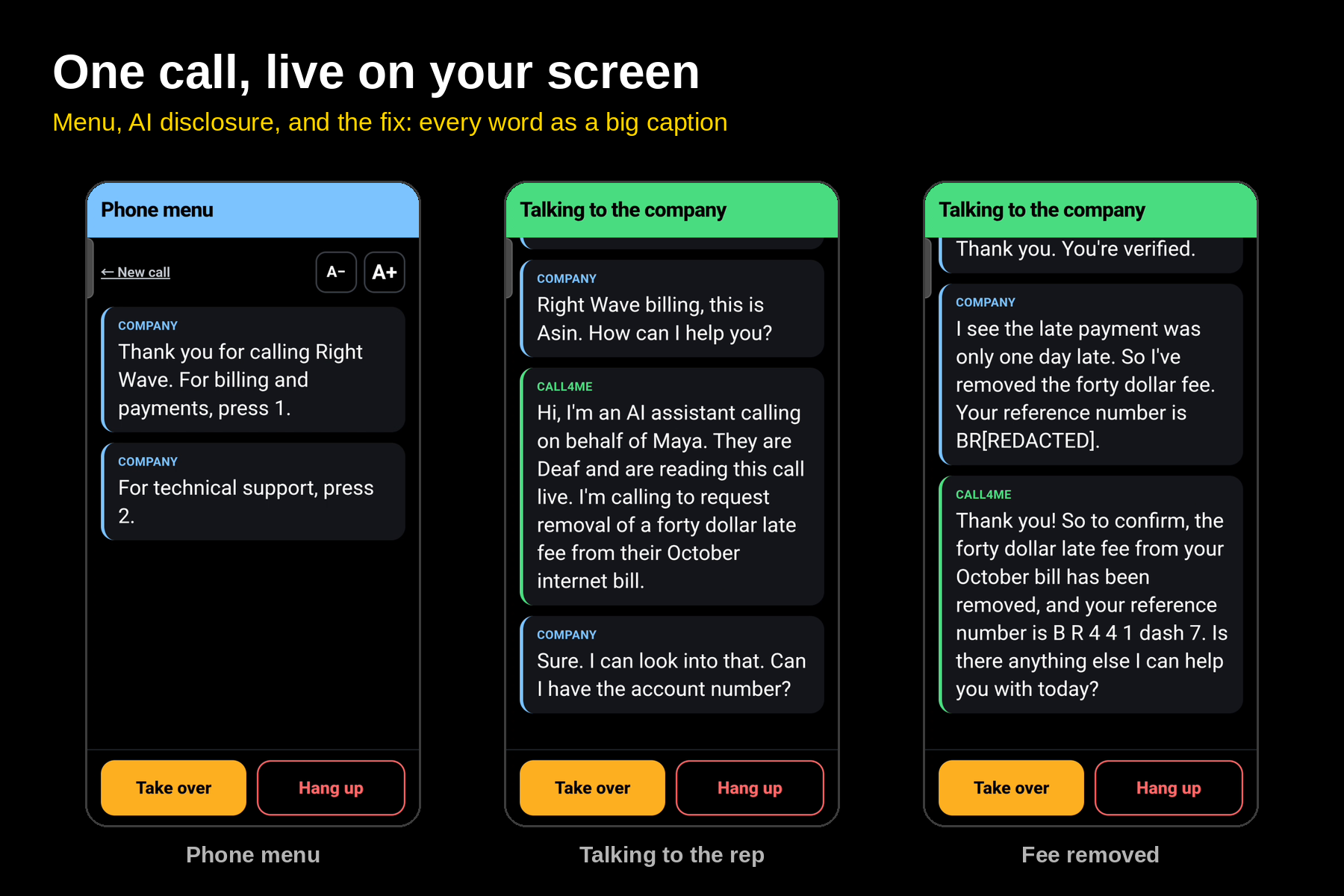
call4me is a mobile web app plus a voice agent that makes a customer service call for you, start to finish. You type what you want and what it's not allowed to agree to. The agent dials, gets through the phone menu, waits on hold, and talks to the person who answers. You follow the whole call as large live captions.
- It presses the keypad for you. Phone menus are the first wall: "Press 1 for billing, press 2 for appointments." call4me listens to the whole menu, picks the option that matches your goal, and presses the key with real touch-tone beeps, the same sound your phone's keypad makes. It works through menus inside menus until it reaches a person, and your screen shows each choice as it happens, like "Jev: Press 2 (billing), 83% sure." It protects private numbers the same way: when the phone system asks for a PIN, your answer goes out as keypad tones and is never spoken aloud.
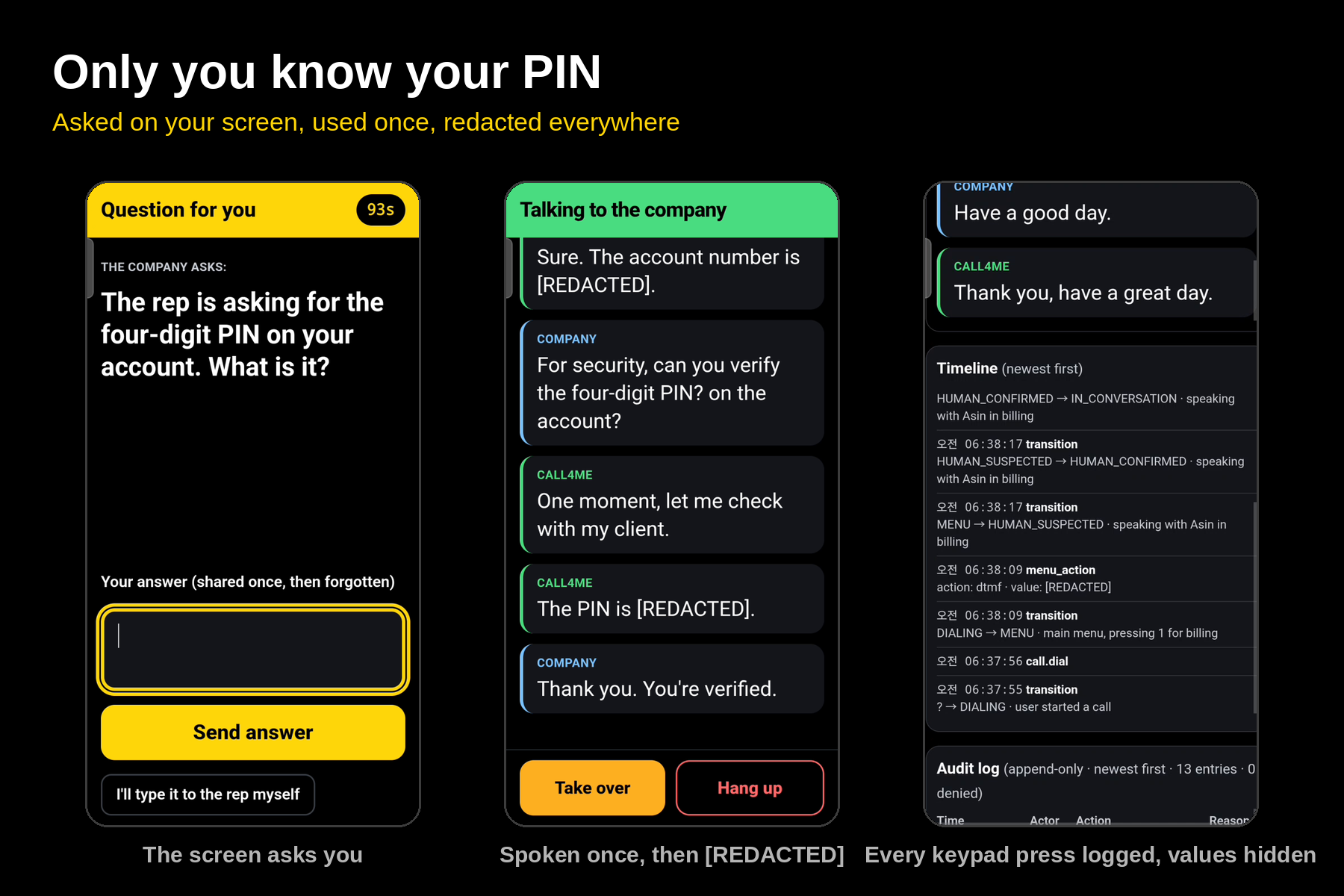
- It asks only for what only you know. When the rep needs your PIN or a choice between two appointment times, your whole screen flashes. You type the answer, it's encrypted, used once, and deleted. It never lands in the call log.
- It stays inside your limits. If the rep offers something you didn't ask for, like a faster plan for 10 dollars more a month, the agent checks it against your limits and politely declines.
- It's honest. It always says it's an AI assistant calling on your behalf, in your own wording. It never makes up facts about you. It won't relay a full SSN, card number, or password.
- You're in control. Type a message anytime and the agent says it to the rep word for word.
- Nothing relies on sound. Every alert is a full-screen flash, plus a vibration on Android. The screen stays awake, and the app reconnects on its own if your signal drops.
Our demo call: getting a late fee removed at a (fictional) internet provider.
- The user types: "Get the 40-dollar late fee removed. Don't change my plan or agree to anything that costs money."
- The agent presses through the billing menu and waits on hold while the banner counts the minutes.
- A person answers. The agent says it's an AI assistant calling for the customer.
- The rep asks for the account PIN. The screen flashes, the user types it, and it's used once and then deleted.
- The rep offers to waive the fee if the user upgrades their plan. The agent checks it against the limits and declines.
- The rep waives the fee as a one-time courtesy. The agent reads back the details and gets a reference number.
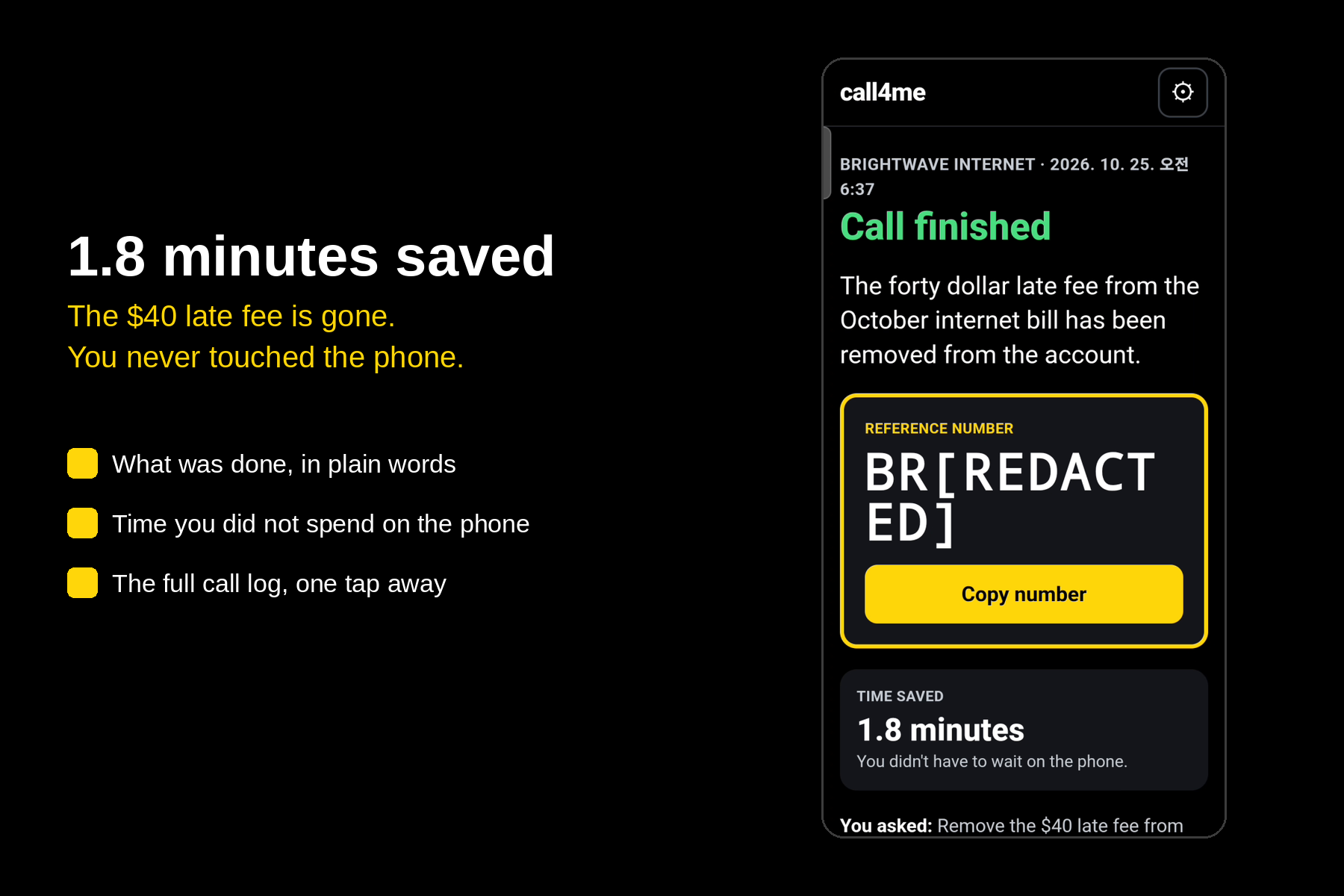
- The user sees a summary: fee removed, plan unchanged, reference number, minutes saved.
How we built it
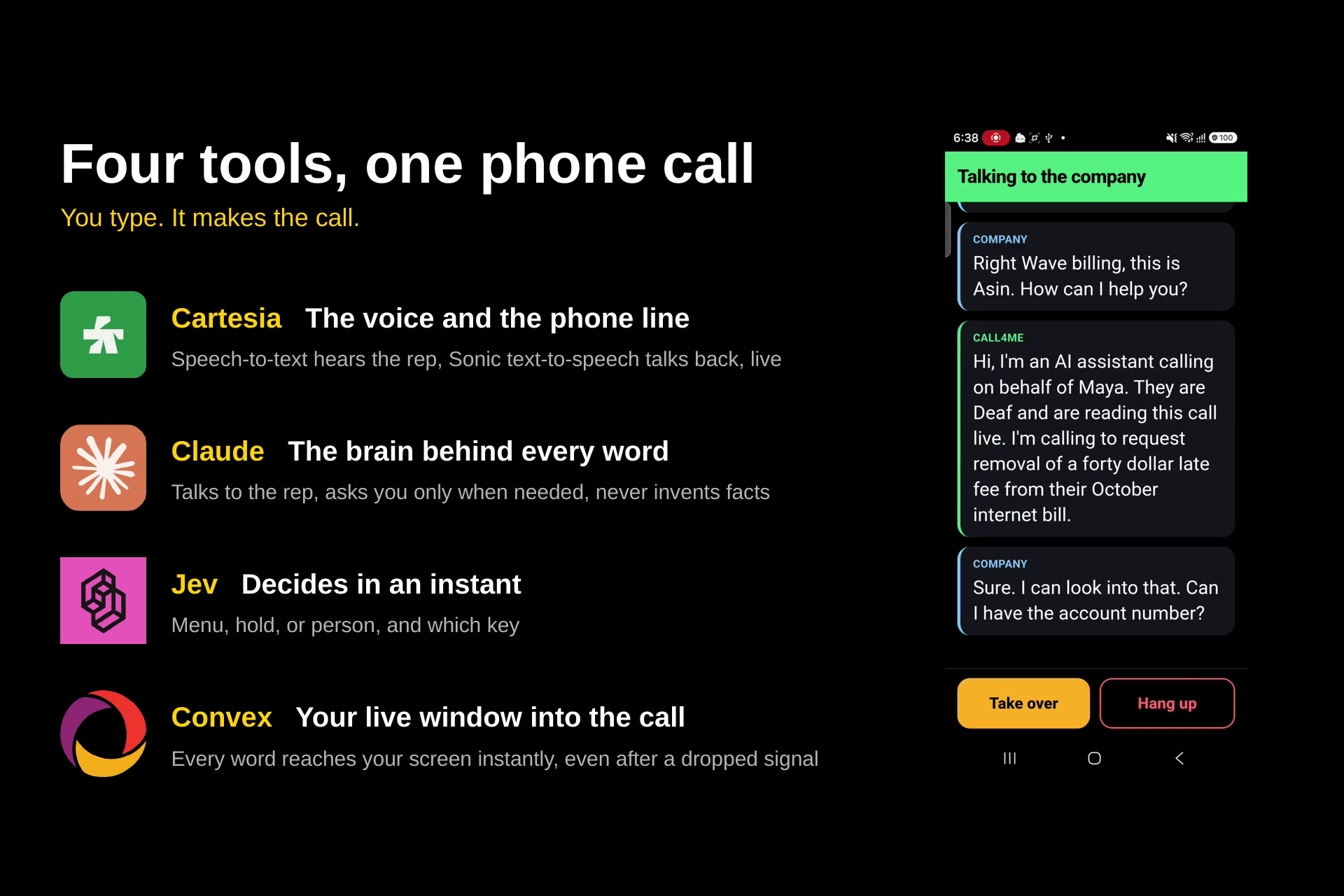
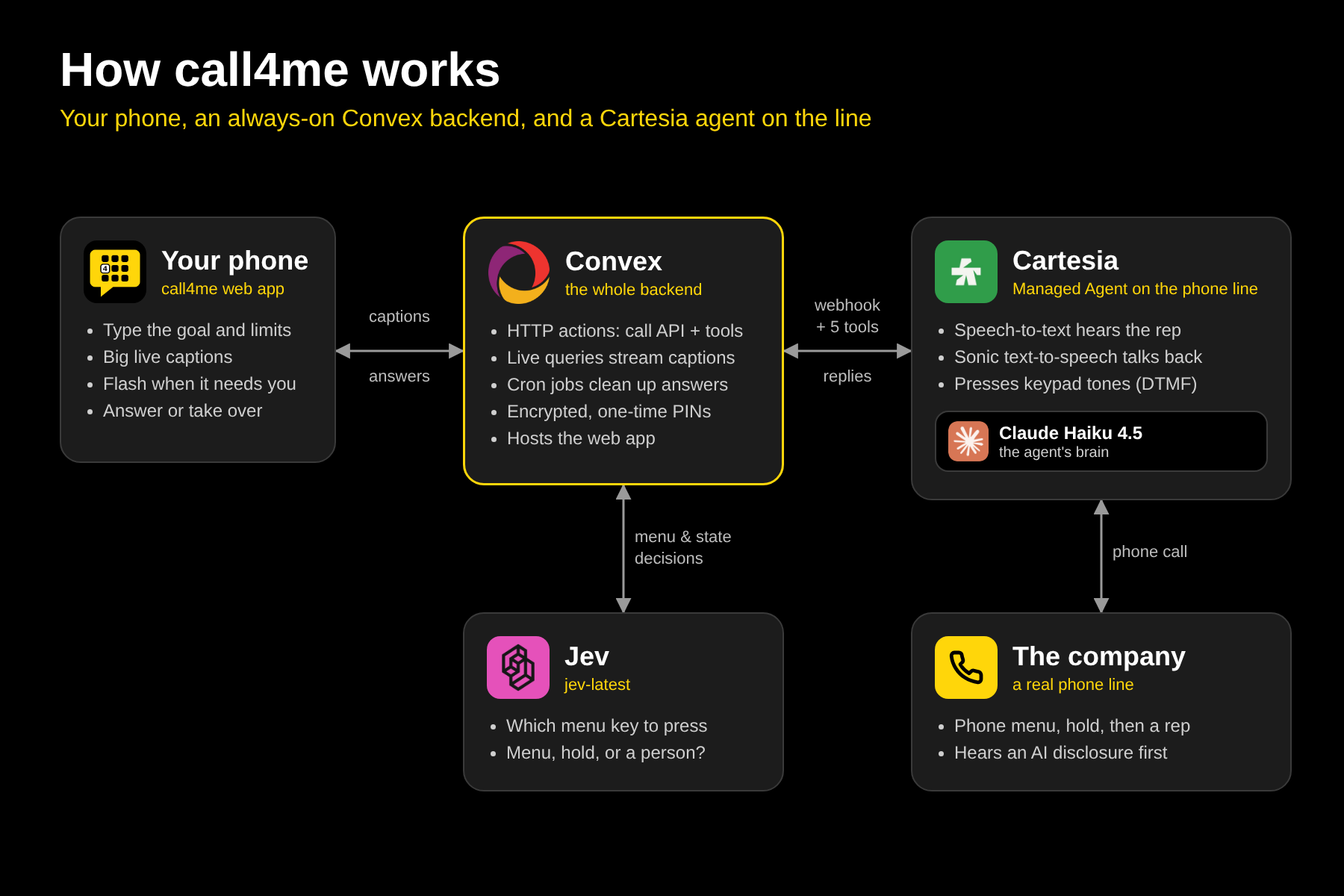
call4me is three pieces working as one phone call: the web app on your phone, our backend on Convex, and a Cartesia voice agent that talks on the line. Convex is the referee in the middle: every caption, question, and offer passes through it, and it's always on, with no server of our own to keep running.
One real call, step by step
- You set up the call in the web app: company, number, goal, limits, what the agent may share, and the opening line it should say.
- Convex starts a Cartesia agent with all of that filled into its instructions.
- The agent dials the company from a Cartesia phone number. At each phone menu, Jev picks the key and the agent presses it. It waits on hold and talks to the rep, starting with its AI disclosure.
- Every utterance streams back to a Convex webhook. Convex redacts numbers and emails, saves the caption, and a live query pushes it to your phone instantly.
- When the agent needs a decision or needs you, it calls a tool on Convex:
menu_choiceasks Jev which menu option fits your goal and returns the key to pressask_userputs a question on your screen and waits for your typed answercheck_offertests any fee, offer, or plan change against your limitsreport_statetells the app whether the call is in a menu, on hold, or with a personfinishrecords the outcome and reference number
- The call ends. You get a summary, and Convex deletes the call data at Cartesia, retrying on a schedule if the first attempt fails.
Two ways to place a call
- Cartesia mode (real calls): a Cartesia Managed Agent, running Claude Haiku 4.5, dials a real number and holds the conversation. Before a person answers, Jev reads what the company says and labels it (menu, recording, hold music, or a person) so your screen always shows where the call is. At each phone menu, Jev picks the key to press, and the agent presses it with touch tones. Whenever it needs you or has to check something against your limits, it calls our tools on Convex.
- Our own pipeline (backup demo): Cartesia speech-to-text hears the line, Jev reads what's on it and picks menu keys, Claude decides what to say, our guard checks every sentence, and Cartesia's voice speaks it. The "company" is a fake phone line we built, with a scripted menu, hold music, and a bot rep.
The stack
- Cartesia: the voice and the phone line. The Managed Agent places real calls, listens, speaks, and presses keypad tones for menus and PINs. Our pipeline uses Cartesia streaming speech-to-text (
ink-whisper) and Sonic 2 for the agent's voice. - Claude: the conversation. Claude Haiku 4.5 runs inside the Cartesia agent, chosen for speed on a live call. In our pipeline, Claude Sonnet 5.5 runs a tool-use loop (
say,ask_user,press_digits,end_call,request_takeover) and writes the opening disclosure and the post-call summary. - Jev (TypeSafe): fast decisions on every call. On real calls, Convex asks Jev (
jev-latest) which menu option fits your goal and what's on the line before a person answers: menu, recording, hold, or a person. Each answer is a single typed choice with a confidence score, logged to the call timeline. If Jev doesn't answer within 2 seconds, keyword rules decide, so the call never stalls. - Convex: the whole backend. Convex HTTP actions serve the call API and answer Cartesia's webhook and tools. Live queries stream captions to your phone the moment they're written. Scheduled jobs run Jev checks in the background, delete expired answers, and retry cleanup at Cartesia. Convex file storage even hosts the web app itself, so the entire product runs from one always-on address. Private answers are encrypted with AES-GCM, read once by the agent, then deleted.
- Our guard layer: limits in code. On real calls,
check_offercompares every offer against your plan-change, cancellation, and spending limits, andask_userrefuses to relay a full SSN, card number, or password. In our own pipeline, every sentence passes the guard before it's spoken. - The web app. Next.js and Tailwind, served straight from Convex as a site you can add to your home screen, plus a judges' dashboard showing the live call, the timeline, and the audit log.
Testing. We tested 11 scenarios on our fake line: cancellation, fee waiver, order status, callback offer, transfer back to hold, a menu that loops, a rep asking for a PIN, a rep pushing a paid upgrade, a rep who refuses to talk to an AI, user takeover, and a rep asking for an SSN. Our own pipeline, with real Claude, Jev, and the guard, passed 11/11 with zero safety violations.
Challenges we ran into
- Safety when someone else's agent is speaking. In our own pipeline, the guard checks every sentence before it's said. With Cartesia's hosted agent, we can't block a sentence before it goes out. So we put the rules in the agent's instructions, routed every offer through
check_offer, and delete call data at Cartesia once the call ends. Making those hard blocks on real calls is our top next step. - Takeover with a hosted agent. We planned to bridge the user into the call directly, but a hosted agent can't be muted from outside. Instead, typed messages are queued and the agent says them word for word on its next turn. In our own pipeline, Take over stops the agent immediately.
- Phone menus that sound like voicemail. Automatic voicemail detection kept hanging up on long recorded menus. We turned it off and let the agent report what it actually hears.
- Native app vs. web app. We started with a SwiftUI app with lock-screen Live Activities, but those alerts needed a paid Apple developer account. We rebuilt the client as a mobile web app with full-screen flashes.
- Moving to an always-on backend. We first ran the backend in Python, which meant a laptop and a tunnel had to stay up for every call. We rebuilt the real-call path on Convex, including Jev, so calls run from one permanent address.
Known limitations
- On real calls, the guard can't stop a sentence before it's spoken. Cartesia's hosted agent speaks for itself, so the safety rules live in its instructions and every offer goes through
check_offer. Hard pre-speech blocking only exists in our own pipeline. - Caption redaction is pattern-based. Emails and numbers of four or more digits are removed; shorter codes or numbers spoken as words may not be.
- Takeover isn't instant on real calls. A hosted agent can't be muted from outside, so typed messages are spoken word for word on the agent's next turn.
- Keep the app open during a call. There are no push notifications yet. iPhone browsers can't vibrate, so on iPhone alerts are full-screen flashes only.
Accomplishments that we're proud of
- The user is in the call, not just reading about it afterward. They actively answer questions and steer the call while it's live.
- Private answers never touch the call log. They're encrypted, read once by the agent, and deleted. The audit log records that a question was asked, never the answer.
- The safety rules are tested, not just promised. 11/11 scenarios passed with zero violations, including a rep demanding an SSN and a rep pushing a paid upgrade.
- It's live and always on. The whole product, from app to API to Cartesia webhooks to Jev, runs on Convex at one permanent address, with live captions that replay right where you left off after a dropped connection.
What we learned
- Latency is a design problem. A rep hangs up if the line goes quiet. Every reply costs
$$t_{\text{reply}} = t_{\text{speech-to-text}} + t_{\text{LLM}} + t_{\text{guard}} + t_{\text{voice}}$$
so we attacked each term. We run Claude Haiku 4.5, the fastest Claude model, as the agent's voice, which keeps $$t_{\text{LLM}}$$ small on every turn. We moved the frequent, simple decisions off that path entirely and gave them to Jev. Instead of asking a language model to reason in free text about "is this a menu, hold music, or a person?" or "which key should I press?", Jev answers each one as a single typed choice with a confidence score. It runs alongside the conversation, so it never delays a reply.
- Accessibility changes every default. Alerts can't be sounds, captions have to be big, and the interface text has to be plain, since English is a second language for many ASL users.
- Safety rules belong in code. A prompt can ask the agent not to agree to a fee, but only a check in code and a test can prove it won't.
What's next for call4me
- Test with Deaf and hard-of-hearing users and redesign the screens around what they tell us.
- Bring hard safety blocks to real calls, so live calls get the same pre-speech guard as our own pipeline.
- Saved menu routes, so the second call to the same company skips straight to the right department.
- Push notifications, so the user can put their phone down during a long hold.
- Sign language input, so users can answer in ASL instead of typing.
Built With
- cartesia
- claude
- convex
- html
- javascript
- jev
- openai
- python
- swift
- typescript


Log in or sign up for Devpost to join the conversation.