
Inspiration
Copy-pasting event details from emails, docs, and chats into Calendar was slow and error‑prone. We wanted a fluid “highlight → event” flow that feels as lightweight as selecting text, with AI to parse messy natural language.
What it does
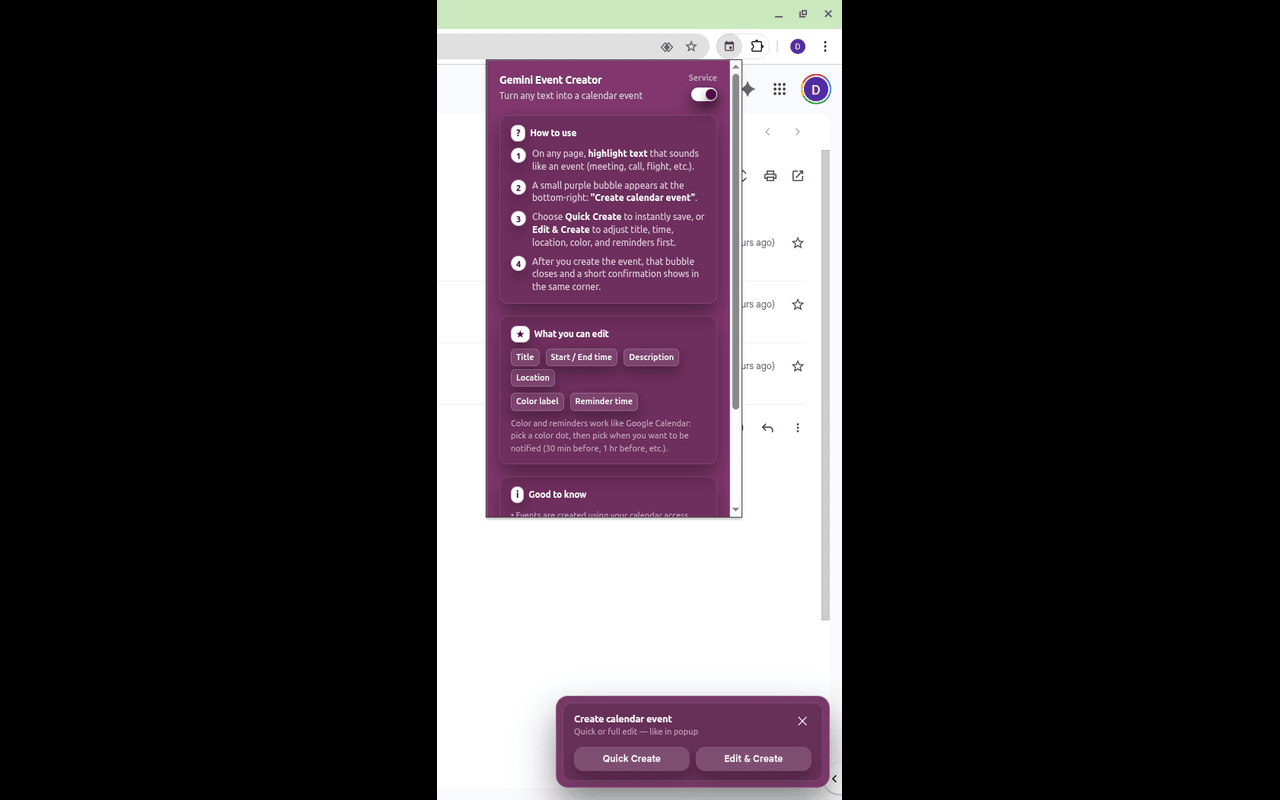
When you highlight text on any webpage, a small overlay appears with:
- Quick Create: one click to create a Google Calendar event
- Edit & Create: opens a compact form prefilled from the text so you can tweak title, time, location, color, and reminders
It parses dates/times/locations from natural language using Gemini and falls back to robust on-device parsing when needed. Events are saved directly to your Google Calendar via OAuth.
How we built it
- Chrome Extension (Manifest V3):
background.jsas service worker,content.jsinjects the overlay UI - AI parsing: Google Prompt API (Gemini) via
public/services/promptAPIService.js, with JSON-cleanup and normalization - Fallback parsing:
any-date-parserto cover edge cases and offline-ish flows - Calendar integration:
chrome.identityto obtain OAuth tokens, then POST to Calendar API (/calendar/v3/calendars/primary/events) - UX: fully self-contained, framework-free UI rendered by the content script; snackbars, color and reminder pickers, click-outside handling
Challenges we ran into
- Managing MV3 service worker lifecycle and reliable messaging between content and background
- JSON irregularities from LLM output; added cleanup/normalization and strict guards
- Handling the breadth of human date/time expressions and missing fields (year, end time, etc.)
- OAuth in a Chrome extension, plus scope/verification and token reliability
Accomplishments that we're proud of
- A Grammarly‑style, low-friction overlay that appears exactly when you select text
- One‑click Quick Create that goes end‑to‑end (parse → validate → save to Calendar)
- A resilient Edit flow with sensible defaults, color/reminder controls, and graceful fallbacks
- Privacy-aware design: minimal data handling; uses on-device capabilities where possible
What we learned
- Practical MV3 patterns (service worker startup, messaging, CSP constraints)
- Prompt engineering for structured outputs and how to harden LLM JSON parsing
- Chrome OAuth flows specific to extensions and Calendar API nuances (reminders, color IDs)
- Designing unobtrusive UI that adapts to arbitrary webpages
What's next for Calendar Event Creator
- Recurring events and multi-day support
- Smarter attendee extraction and invite suggestions
- More providers (Outlook, Apple Calendar)
- Template snippets and quick actions (standup, 1:1, travel)
- Better offline behavior and model fallback strategies
Built With
- css
- gemini
- html
- javascript
- nano
- oauth
- vite


Log in or sign up for Devpost to join the conversation.