A CakePHP Bootstrap Table Helper
An easy to use Helper that produce well formed tables using Twitter Bootstrap 3 (http://getbootstrap.com).
INSTALLATION
- Add Bootstrap files to CakePHP
- Copy TableHelper.php in app/View/Helper
- Add to the controller: public $helpers = array( 'Table' );
- Use $this->Table functions in your views
TABLE CREATE OPTIONS
- 'bordered' - add borders to table [TRUE or FALSE]
- 'class' - add class/classes to table class attribute [string]
- 'cols_width' - set column widths (string: same value for each column, array of strings: set columns individually)
- 'condensed' - compact table style [TRUE or FALSE]
- 'hover' - set mouse hover background [TRUE or FALSE or color string, ex. 'red', '#FB1']
- 'id' - set table id attribute [string]
- 'panel_heading' - add a panel before the table with the specified title [string]
- 'panel_class' - set panel class (ex. 'panel-primary', 'panel-success', etc.) [string]
- 'panel_body' - set a panel body with the specified content [string]
- 'panel_footer' - set a panel footer with the specified content [string]
- 'responsive' - add a responsive around the table [TRUE or FALSE]
- 'striped' - striped table [TRUE or FALSE]
- 'style' - set table style attribute [string]
USAGE EXAMPLE 1
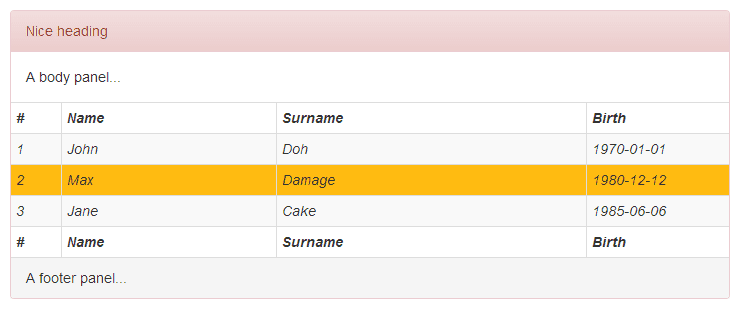
echo $this->Table->create( array( 'bordered' => TRUE, 'condensed' => TRUE, 'hover' => '#FB1', 'responsive' => TRUE, 'striped' => TRUE, 'cols_width' => array( '50px', '30%', NULL, '20%' ), 'panel_class' => 'panel-danger', 'panel_heading' => 'Nice heading', 'panel_body' => 'A body panel...', 'panel_footer' => 'A footer panel...', 'style' => 'font-style: italic' ) );
echo $this->Table->tableHeaders( array( '#', 'Name', 'Surname', 'Birth' ) );
echo $this->Table->tableCells( array(
    array( '1', 'John', 'Doh', '1970-01-01'),
    array( '2', 'Max', 'Damage', '1980-12-12'),
    array( '3', 'Jane', 'Cake', '1985-06-06'),
) );
echo $this->Table->tableFooters( array( '#', 'Name', 'Surname', 'Birth' ) );
echo $this->Table->end();
USAGE EXAMPLE 2
Execute a query in the controller like: $this->MyTable->find( 'all' );
echo $this->Table->create();
echo $this->Table->tableFromData( $data, array( 'header' => TRUE ) );
echo $this->Table->end();
NOTES
tableFromData() adds automatically the row id to the tr elements of the table body. Here is a way to access to the content of specific cells of the table using jQuery:
<script>
$(document).ready( function() {
    $('#tbl tr td').click( function() {
        var rid = $(this).parent().attr( 'id' );
        if( typeof rid != 'undefined' )
        {
            var id = rid.substring( 3 );    // length of 'rid'
            alert( 'ID ' + id + ': row=' + $(this).parent().attr( 'class' ).substring( 1 ) + ' col=' + $(this).attr( 'class' ).substring( 1 ) );
        }
    });
});
</script>
My website: http://blocknot.es/

Log in or sign up for Devpost to join the conversation.