Coding in Colour
The nonprofit's problem
Coding in Color's donor information is scattered across a spreadsheet and exports from Zeffy, Benevity and AZ Gives. The same donor can appear in several places with slightly different details, and nobody has one up-to-date view of who gave what. Follow-ups depend on someone remembering to reach out. Board members can't easily see which donors are theirs. Answering basic questions, like who stopped giving this year or what a funder's money paid for, means hours of copying between files.
What we built
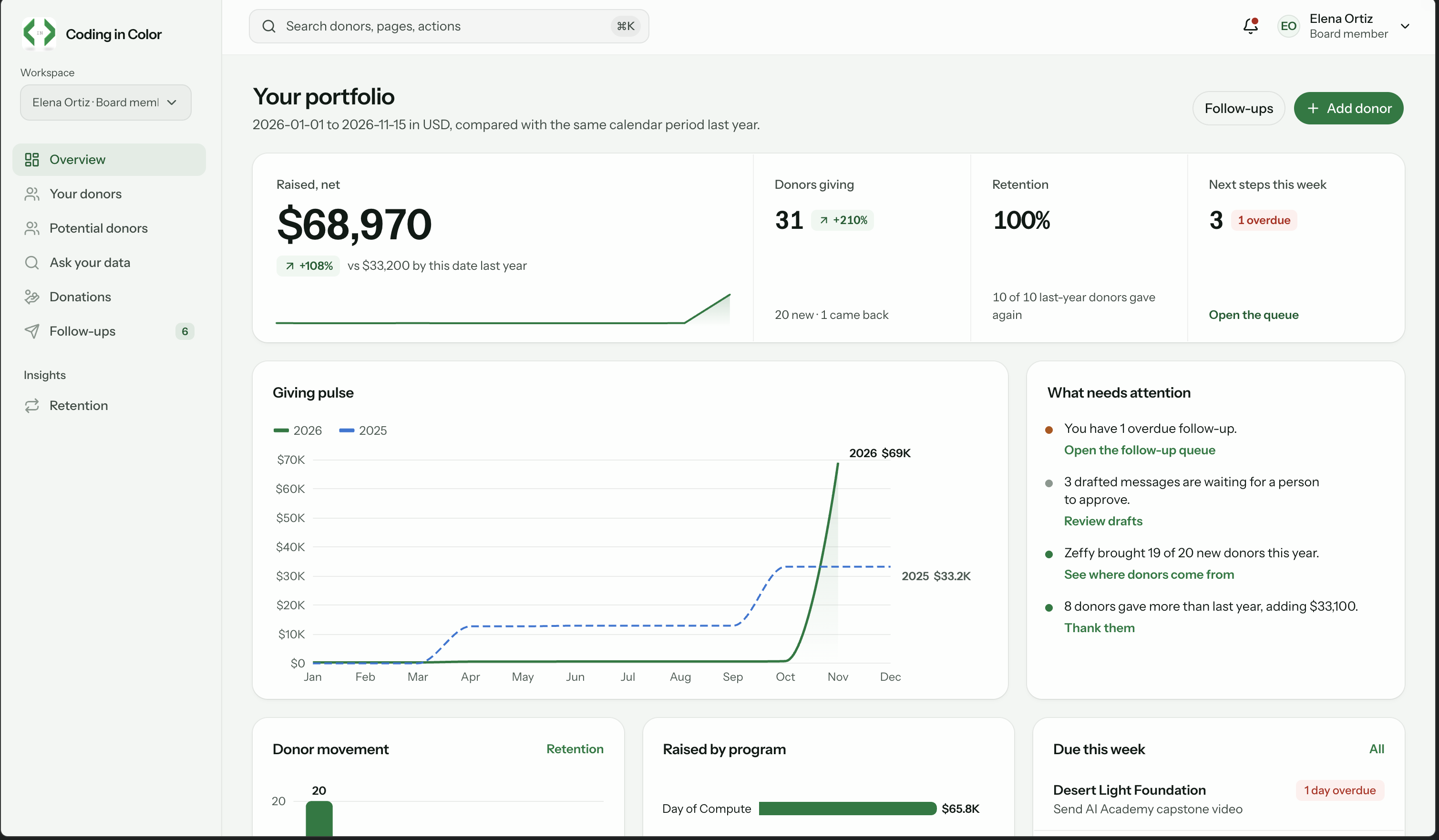
Cadence gives Coding in Color's CEO and board one place to manage every donor, gift and follow-up, and to report on them.
- Import from every source. Upload spreadsheet, Zeffy, Benevity or AZ Gives files (CSV or Excel). Columns map automatically. Unclear dates must be confirmed, never guessed, and amounts are stored to the exact cent. Possible duplicate donors go to a person for review instead of being merged automatically. Nothing is saved until an admin approves, and importing the same file twice adds no duplicate gifts.
- One record per donor. Each donor has an owner, contact details, a full gift history, past messages and upcoming next steps. Staff can also add donors and past gifts by hand.
- Fair ownership. New donors go to the board member with the fewest donors. When an admin reassigns a donor, their open follow-ups move too.
- Follow-ups that don't slip. A queue of overdue, this-week and upcoming tasks, plus a quarterly check-in for every donor. Thank-you notes, quarterly updates and "we miss you" notes are drafted from editable templates. A person approves the exact wording, then sends it from their own email or phone. Cadence never sends anything on its own, and every send is logged.
- Meeting notes to action. Paste notes from a donor conversation and review a proposed contact note, next step and draft before saving.
- Retention at a glance. Year over year, donors are grouped as new, reactivated, increased, flat, decreased or lapsed. Lapsed donors can get a reviewed nudge draft in one click.
- Funder reports. Pick a funder and a period to see their gift history alongside the program outcomes it funded. Admins can export it as CSV, and every export is logged.
- Ask your data. Ask a plain-English question, like "which donors lapsed this year?" Cadence turns it into search filters it explains, and answers only from donors you're allowed to see.
- A dashboard connection for CIC. A read-only API key gives CIC's own dashboard summary totals by period, program and board member. It never returns donor names, and hides any group smaller than three donors.
- Secure by default. Sign-in is by invitation only, and admins must use two-step verification. Board members see only their own donors.
- Try Now. Anyone can explore Cadence with made-up sample data, no account needed.
How it works
The main flow follows a donor's journey:
- Import. An admin uploads a file. Cadence reads it, matches columns, checks every row and flags anything uncertain.
- Review. The admin decides on possible duplicates and confirms missing facts. Approved changes are saved together, or not at all.
- Assign. New donors get an owner automatically, balanced across the board.
- Follow up. Cadence schedules next steps and drafts messages. A person approves and sends each one, and the send is recorded on the donor's timeline.
- Report. Retention, funder packets and the read API all draw on the same records, so the numbers always match.
Under the hood:
- Web app: built with Angular. It works on phones and with a keyboard alone.
- API: Node.js with Express. It checks every request against the person signed in.
- Database: PostgreSQL, hosted on Neon. Its built-in row-level security (each row checked against who's asking) means a board member can't reach another member's donors, even with a direct link.
- Sign-in: Clerk handles invitations and two-step verification.
- Hosting: the app and API run as a single Vercel service.
- AI: optional and kept small. It helps interpret questions and choose which facts go into a donor update. It never sees donor names or raw notes, and the wording comes from CIC's own data. Everything works without an AI key.
What we'd do next
- Find new donors: suggest prospects who resemble CIC's best supporters.
- Likelihood to give: a machine learning model that predicts which donors are most likely to give next, so the board can prioritize outreach.
- Calendar-aware next steps: read CIC's Google Calendar and turn "invite them to the next event" into a dated task.
- Grant deadline tracker: assemble the funder packet automatically as a deadline approaches.
- Voice and meeting notes: voice-recorded debriefs, and Google Meet notes pulled in automatically.
- Production polish: tune imports with CIC's real export formats, move to a CIC-owned domain, schedule and rehearse backups, run a full accessibility audit of signed-in screens, and add roles for program and fundraising staff.
What we learned
Build the core features first, before any of the nice-to-haves or moonshots. Importing, a single donor record, follow-ups and funder reports are what Coding in Color needs every day. Extras only matter once those work end to end. We set a rule: nothing optional until the core passed a live check. That kept our time on what a user would value most.
Built With
- angular.js
- express.js
- gemini
- node.js
- postgresql
- python
- tailwind
- typesafe
- typescript
- vercel

