-
-
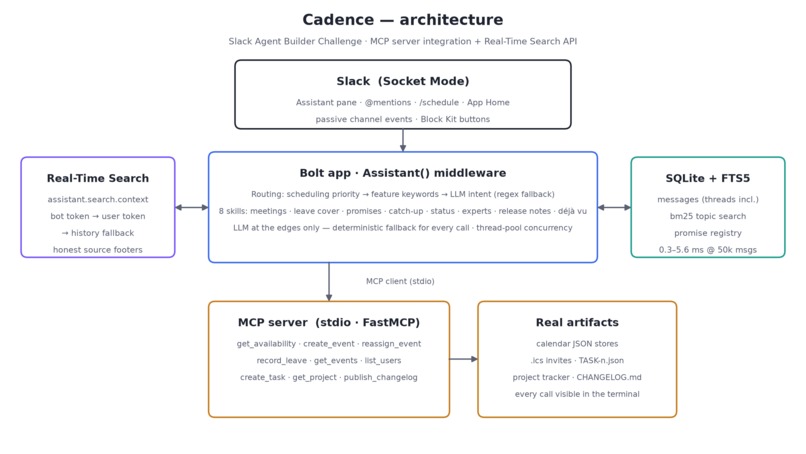
architecture
-
logo
Inspiration
Every team’s work lives in Slack, but managing that work often happens somewhere else: calendars, task trackers, status docs, release notes, and handoff notes. We built Cadence to bring that coordination layer back into Slack. The inspiration was a simple question: what if a Slack agent could not only answer questions, but actually keep a team’s rhythm moving?
What it does
Cadence is a Slack-native productivity agent that helps teams coordinate work in real time. It can find meeting slots, book calendar events, arrange leave coverage, track promises people make in channels, catch users up after time away, summarize project status, find topic experts, compile release notes, and detect whether a topic was already discussed before.
Cadence uses an MCP server for real side effects like calendar updates, task creation, project lookups, and changelog publishing. It also uses Slack workspace context and Real-Time Search to ground responses in actual team conversations.
How we built it
We built Cadence with Python, Slack Bolt, Socket Mode, Block Kit, SQLite FTS5, and a local MCP server. The Slack app handles assistant messages, slash commands, app mentions, passive channel events, and interactive buttons.
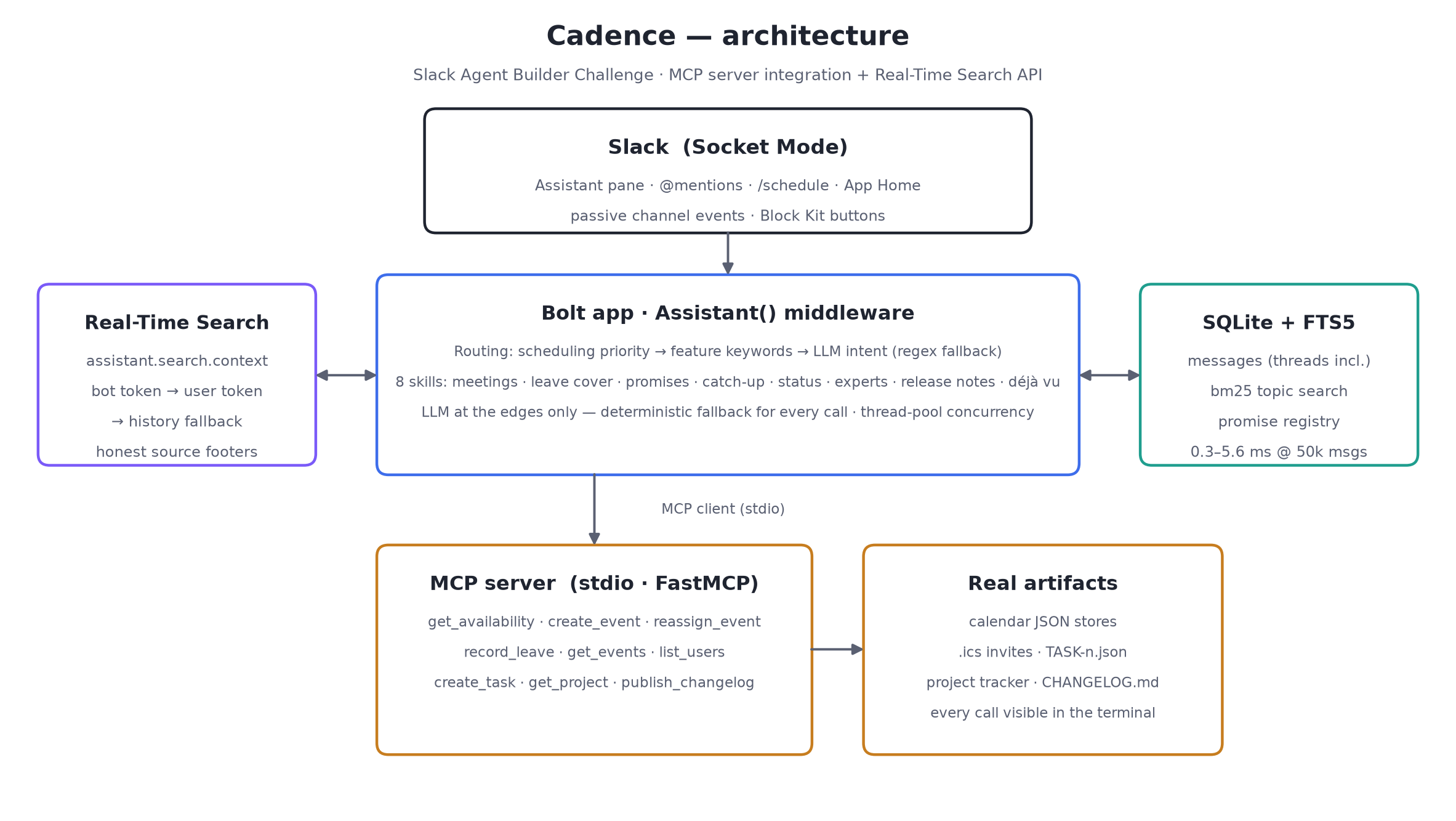
The architecture has three main layers:
- Slack interface: Assistant pane,
@Cadence,/schedule, App Home, and Block Kit actions. - MCP tools: calendar availability, event creation, leave recording, reassignment, task filing, project lookup, and changelog publishing.
- Intelligence layer: deterministic scheduling, promise detection, full-text search, expert ranking, catch-up summaries, release-note extraction, and optional LLM polishing.
We intentionally kept core actions deterministic and auditable, while using an LLM only at the edges for parsing and drafting.
Challenges we ran into
The hardest part was making the agent feel useful without becoming a black box. Scheduling, promise tracking, and handoffs need trust, so Cadence had to show evidence, source links, and clear side effects.
Slack event handling also required care. Some information comes from live message events, some from channel history, and some from Real-Time Search. We had to make sure Cadence could gracefully fall back when a retrieval path returned no results.
Another challenge was demo realism. We created seeded channels, personas, calendars, project data, and Slack chatter so the agent could be tested like a real workspace, not a toy chatbot.
Accomplishments that we're proud of
We are proud that Cadence is more than a conversational demo. It performs real actions through MCP: booking meetings, writing .ics files, reassigning events, filing tasks, and publishing changelogs.
We are also proud of the breadth of the agent. In one Slack app, Cadence supports scheduling, leave coverage, promises, catch-up, project status, expert discovery, release notes, and prior-discussion search.
Most importantly, Cadence is transparent. Its responses include links, source notes, and terminal-visible MCP logs so users can understand what happened.
What we learned
We learned that a useful workplace agent needs both reasoning and reliable tools. LLMs are helpful for interpreting intent and drafting language, but workflow automation needs deterministic systems, structured data, permissions, and auditability.
We also learned that Slack is a strong place for agents because the work context is already there. The challenge is not just answering questions, but turning conversations into action.
What's next for Cadence
Next, we would connect Cadence to real calendar providers, task systems, and project trackers like Google Calendar, Jira, Linear, and Notion. We would also add organization-level permissions, richer admin controls, and more robust memory across workspaces.
We also want to make Cadence more proactive: detecting stalled promises, warning about repeated discussions, preparing meeting briefs before calls, and generating weekly team operating reviews automatically.

Log in or sign up for Devpost to join the conversation.