-
-
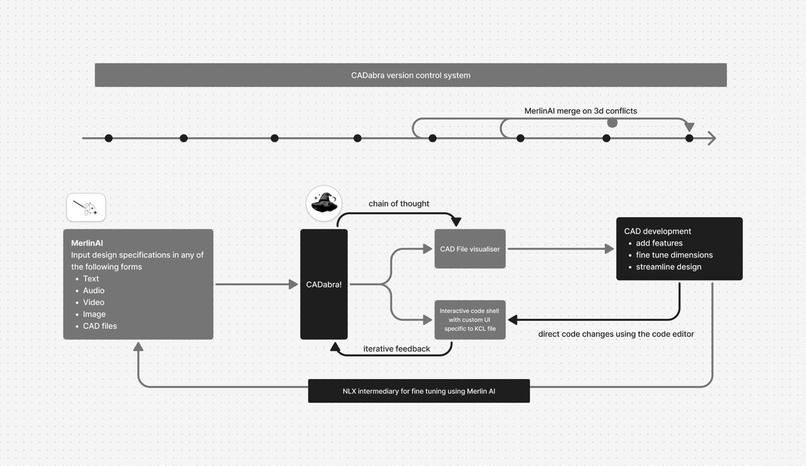
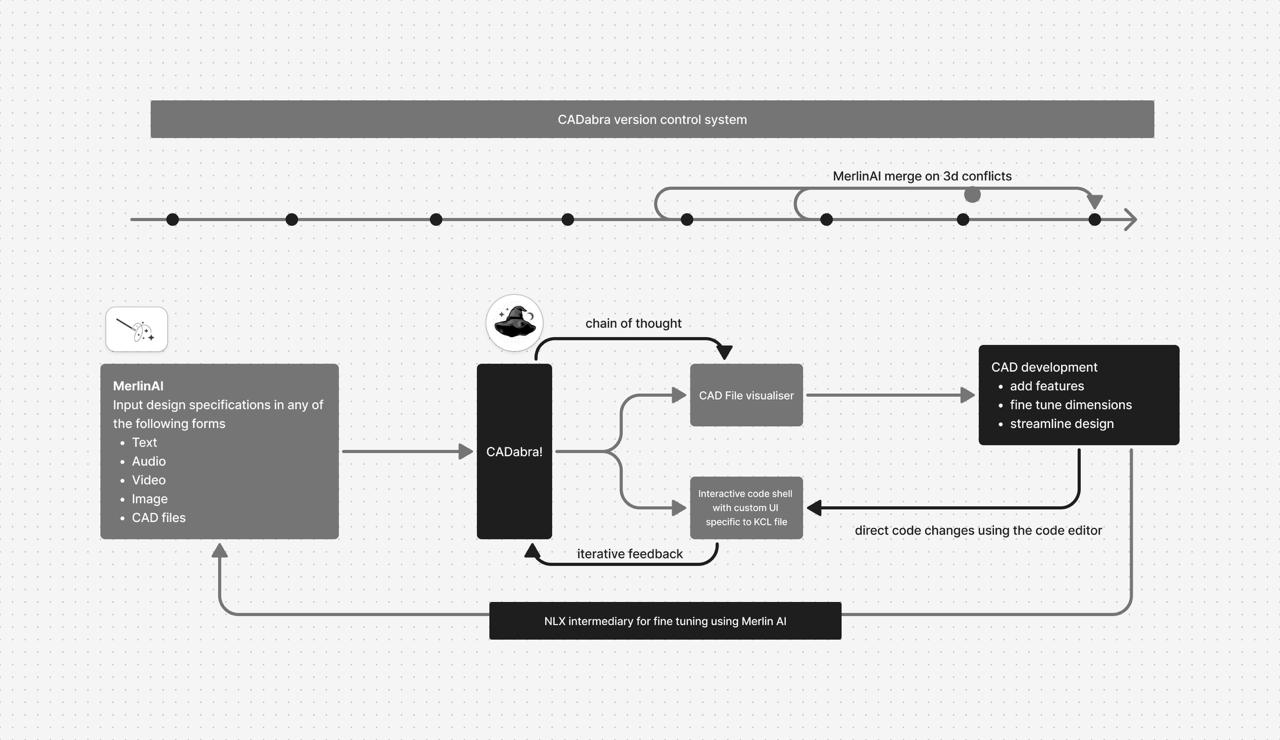
Overall Workflow
-
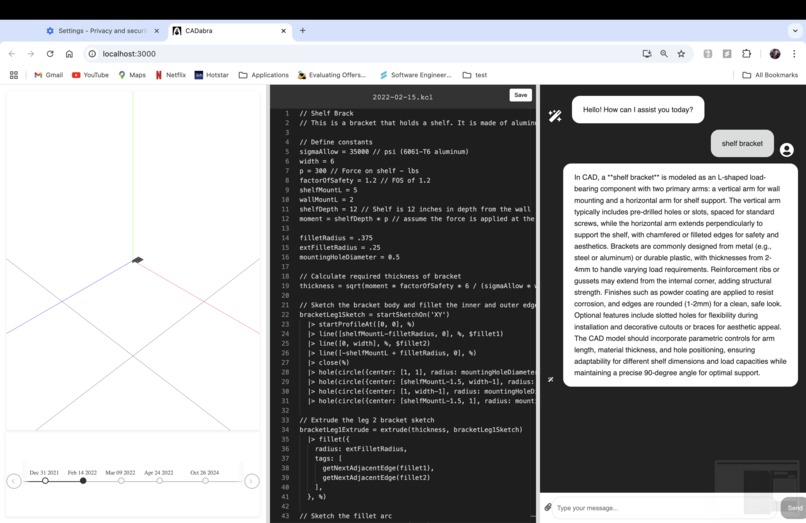
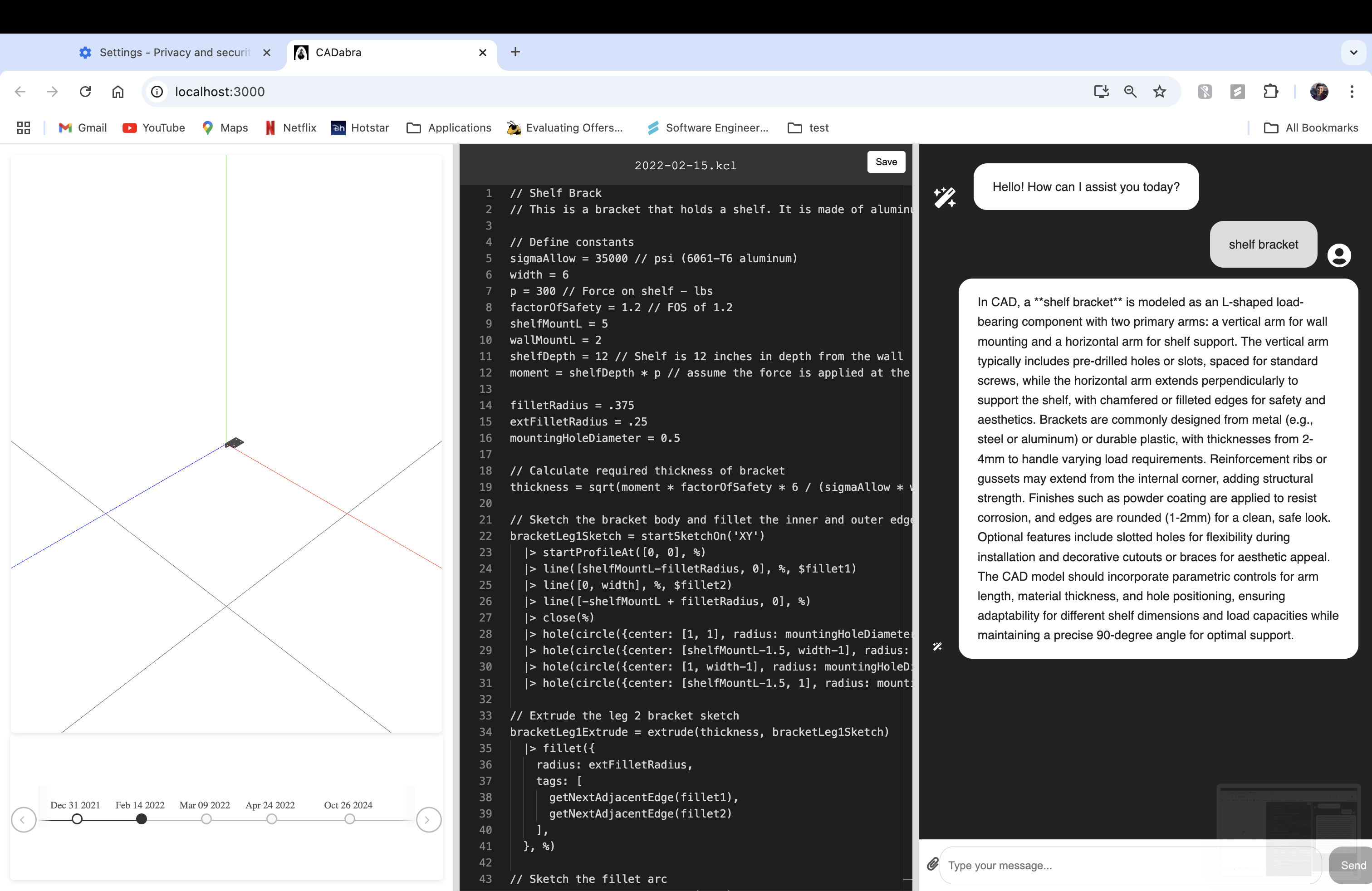
Example Usage
-
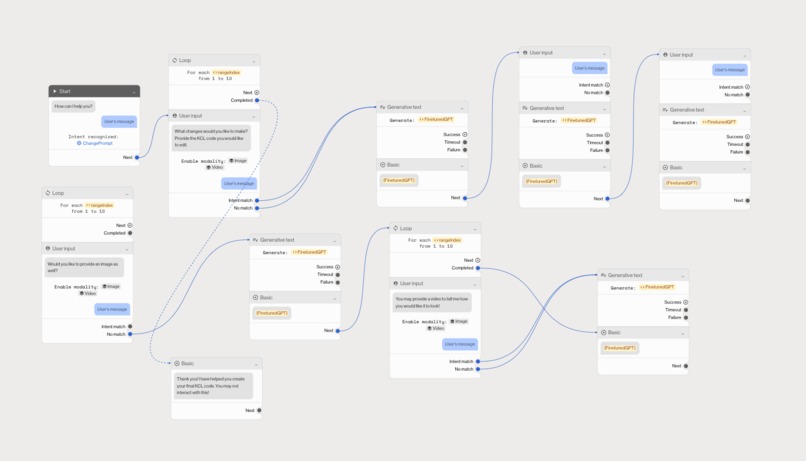
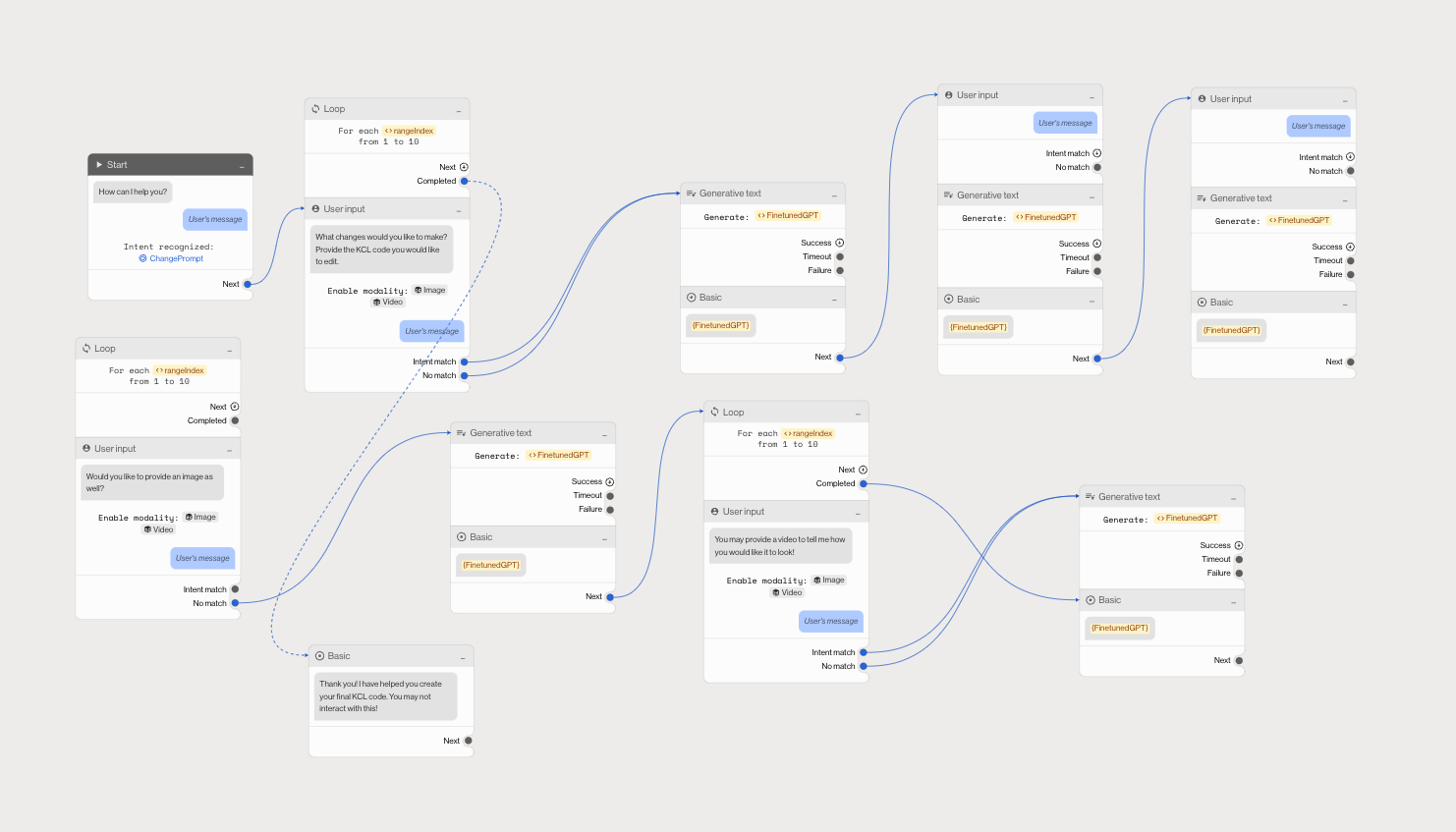
NLX Intent Workflow
-
Logo
Inspiration
Computer Aided Design (CAD) is a technology that is used widely across manufacturing industries, no more so than the healthcare and biomedical industry. As of 2021, nearly 30% of prostheses incorporate CAD technology. However, there are several issues with how CAD projects are developed today:
- 27.9% of respondents in a survey (341) indicated that collaborating in CAD is extremely difficult
- 18.2% of respondents in a survey (341) indicated serious issues with file version control
- 7.1 hours of work a week are lost on average due to CAD Software issues
Given the growth of CAD technology in healthcare and its general use in manufacturing industries, we decided to develop an AI-powered collaborative CAD Development tool.
What it does
CADabra is the first AI-powered CAD Development tool that enables collaboration on 3D files. We boast 5 key features that significantly increase the efficiency of CAD project development.
- Multimodal 3D model generation: Automatic generation of CAD files based on multimodal user prompt. The user can describe an object they wish to build a CAD file for in 5 different ways:
- Text
- Audio
- Video
- Image(s)
- Existing CAD files (.stl format)
- Automated Conflict Resolution in 3D: Developers can automatically merge files with conflict errors in 3D. This is a direct translation of Github's merge conflict abilities but in 3D! Multiple developers working on the same CAD part can now automatically combine their files with our application.
- Online CAD File Code Editor: Developers can edit CAD files directly on our app using our 3D code editor, and visualize their rendered 3D models in real time.
- Real-Time Feedback Loop: Developers can use natural language to iteratively improve the quality of the generated CAD file through a MerlinAI, which is GPT 4o fine-tuned on KCL (CAD Programming Framework).
- Version Control Tracking: Developers can view a detailed history of previously "committed" CAD files on the same project. Each commit is tracked and can be opened with a simple click of a button!
How we built it
We used several cutting edge technologies to develop each of the 5 features above.
- KittyCad: This is a library that defines a standard on how to develop CAD files using KCL code. KCL defines several functions to develop CAD files in .kcl format, which is then easily exported to standard CAD file formats. The KCL framework is an improvement on the popular OpenSCAD software.
- Zoo TextToCAD API: This is an API that takes in a text prompt as input as produces a 3D Model. This is built on top of the KCL framework.
- Multimodal Prompt Input: We convert each of the 5 input formats in our application into actionable text prompts for the TextToCAD API. We use AWS Transcribe and OpenCV to convert STL, video and audio files into informative images and text. The text and images are then fed into Claude 3.5 Sonnet to generate the TextToCAD API prompt.
- Fine-tuned GPT-4o on KCL Framework: We fine-tuned GPT 4o on the documentation files of KCL in order for GPT-4o to produce high quality KCL code. This allows us to merge two KCL files with "merge conflicts", as our fine-tuned GPT-4o has an incredibly high understanding of KCL code.
- NLX for Multimodal Feedback Loop: We used NLX to create a multimodal chatbot that allows the user to enhance their generated CAD files. By integrating the NLX Dialog Studio with our fine-tuned GPT-4o model, developers can use natural language to change aspects of their CAD File.
Challenges we ran into
We ran into several challenges during this hackathon. Some of these are:
- Attempting to fine-tune Claude: We initially aimed to fine-tune Claude AI's models on the KCL documentation, but were ultimately not able to get permission to do this task. We instead fine-tuned GPT-4o.
- Working with KCL: KittyCad Language (KCL) is a framework with less documentation available, which made it difficult to interpret and work with. A workaround for this was to thoroughly understand KittyCAD's github repository and source code.
- Chaining multimodal inputs together: Working with 5 different input types and 4 modes made it difficult to parse the inputs and transform it to the correct format.
- Generating enough Q&A pairs for GPT-4o finetuning: We had to generate enough Q&A pairs (~1000 pairs) for our GPT-4o fine-tuning to be effective. With limited KCL documentation available, we used Claude 3.5 Sonnet to parse the documentation and generate enough data points.
Accomplishments that we're proud of
- Ideation and development: Throughout the course of this hackathon, our project went from trying to make CAD development more efficient through AI to making an entire ecosystem revolutionising the computer aided design. In our past experience of hackathons, this has been unique in the sense that ideation was never a limiting factor and we found ourselves competing with time to implement it all.
- Seamless flow: Made by four tech students, CADabra's highlight is how the UI components flow making the designing experience very intuitive. A designer can not only visualise and edit the code using the KCL specific editor but can also choose to make edits through chatting MerlinAI giving the designer complete freedom over their 3D model.
- Version Control: We realise the importance of version control and tracking model changes which is why we spent a lot of time brainstorming that. CADabra not only tracks files through timestamps but is also supercharged with AI to be able to merge 3D model files from different stamps and render them in the visualiser in real time.
- User Friendly: Be it someone who works professionally with 3D models or someone who is looking for a efficient solution the CADabra UI is accessible to all.
What we learned
- Developing an application that can take in 4 modes and 5 input formats
- Fine-tuning GPT-4o given a limited set of data available
- Developing an online code editor with real-time 3D renderings
- Working with CAD file formats and automatically generating CAD file code
What's next for CADabra
- Collaboration on CADabra We aim to make the platform one which allows intensive collaboration through addition of comments attached to specific lines of KCL code or even through visual pinpointing in the renderer. We also aim integrate this with the version control trackers of multiple developers mimic a git like software for CAD designers.
- VR integration To help designers visualize and edit the 3D models better. This greater interaction will allow better development of 3D models, and more importantly, better testing of the generated CAD files.


Log in or sign up for Devpost to join the conversation.