🔍 Problem
At physical events, people are surrounded by potential connections, but:
- They can’t see who is looking for what (teammates, talent, investors, collaborators).
- They don’t know where relevant people or booths actually are in the space.
- They have no intent-aware way to discover others or plan who to meet next.
Result: good connections mostly depend on chance, not design.
💡 What C-ABLE Does
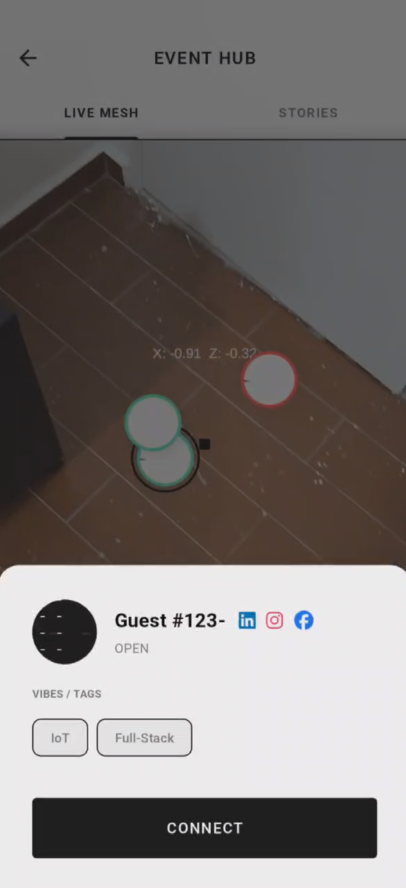
C-ABLE turns an event space into an interactive, AR-enabled social layer.
- Attendees check in with AR by scanning a marker/QR at the venue.
- They answer a short intent form (“what I want” / “what I offer”).
- The app builds a spatial, real-time view of people and booths, and uses AI to:
- Suggest people to meet
- Suggest booths to visit
- Suggest activities to join (e.g. badminton/games)
All with low-friction ways to say:
“I’m open to chat.”
“I’m looking for a dev/designer/VC.”
“Feel free to fight with me.” 😄
🎯 Key Use Cases
For Developers / Hackers
- Find teams that need your skills.
- Discover other builders with similar interests or stacks.
- Surface hidden/stealth projects looking for collaborators.
For Founders / Project Leads
- Broadcast what you’re building and who you need.
- Quietly signal for help on side or stealth projects.
- Get a shortlist of best-fit people to reach out to.
For VCs / Judges / Mentors
- Filter teams by domain, stage, or theme.
- See who is actually relevant in the event right now.
- Spend time with the highest-signal teams, not just the closest tables.
For Organizers
- Help people connect faster & better.
- Highlight sponsors and booths to the right audience.
- Gain engagement insights (where people go, who they meet).
For Sponsors / Exhibitors
- Attract high-intent visitors, not just swag hunters.
- Surface your booth to users whose interests match your offering.
- Measure interest & engagement more clearly.
🧩 Core Features
1. AR Check-in & Spatial Awareness
- Scan a QR / image marker at the entrance or key points.
- Use marker-based AR to anchor the event space.
- Keep tracking in the background while the UI shows a clean 2D/interactive view.
2. Fast Intent Onboarding
A short, event-specific flow that captures:
- What you want from this event
(e.g. “Find a backend dev”, “Meet AI founders”, “Look for internships”) - What you offer
(skills, experience, role) - Whether you have hidden/stealth projects and what you need there.
- Your social openness
(coffee chats, casual talks, serious recruiting, “open to play”)
3. Intelligent Connection Suggestions
- AI (or rules in early MVP) ranks:
- People who match your goals
- People whose skills complement yours
- Booths & zones aligned with your interests
- Displays highly relevant connections with clear visual emphasis.
4. Smart Booth & Route Recommendations
- Each booth is a known location with tags (e.g. “AI tools”, “devtools”, “Fintech”).
- C-ABLE:
- Filters booths based on user interest.
- Suggests an optimized order to visit them (shorter walking, higher relevance).
5. Play & Social Zones (“Feel free to fight with me”)
- Courts / game zones are treated as interactive spots.
- Users can set statuses like:
- “Feel free to fight with me”
- “Looking for teammates”
- Others can see who’s open and join games or activities instantly.
🏗️ High-Level Architecture
Client
- Flutter
- App shell, navigation
- Onboarding & intent forms
- 2D / spatial views of people, booths, zones
- Messaging & invitations
- Unity (embedded as a widget)
- AR marker detection and tracking
- Spatial anchoring & local positioning
- Optional AR overlays (tags, arrows, highlights)
Communication (Flutter ↔ Unity)
- JSON messages for:
- User profile/intent
- Position updates
- AR events (marker detected, anchor set)
- Commands (e.g. “start AR”, “update mode”)
Backend (example design)
- Realtime database (e.g. Firebase / Supabase)
UsersEventProfiles(per-event intents & roles)Positions(userId → x, y, lastSeen)Booths&Zones
- Matching & Routing Service
- Rule-based or ML-based matching engine
- Path suggestion for booth/zone visits

Log in or sign up for Devpost to join the conversation.