Inspiration
We've all been there, you see an incredible dish at a restaurant, on social media, or in a friend's kitchen, and you think "I want to make that." But going from what you see to what you cook is surprisingly hard. You'd have to reverse-engineer the dish, search for a recipe that looks close enough, cross-reference your pantry, and figure out a shopping list, all in separate apps or browser tabs. I wanted to collapse that entire journey into a single action: point your camera at food and start cooking. Beyond that, I noticed that food waste is a real problem: people buy groceries, forget what they have, and let ingredients expire. I wanted an app that connects what's in your kitchen to what you can make, and makes meal planning and shopping feel effortless rather than like a chore.
What it does
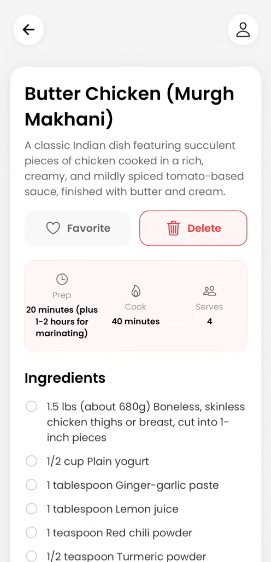
Bytes turns any food photo, video, or text description into a full, actionable recipe. Complete with ingredients, step-by-step instructions, and nutrition info powered by AI. But it doesn't stop at recipe generation:
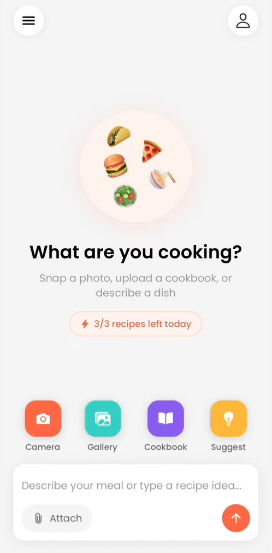
- Camera/Gallery recipe extraction: Snap a photo of food or upload from your gallery, and Gemini AI identifies the dish and generates a complete recipe.
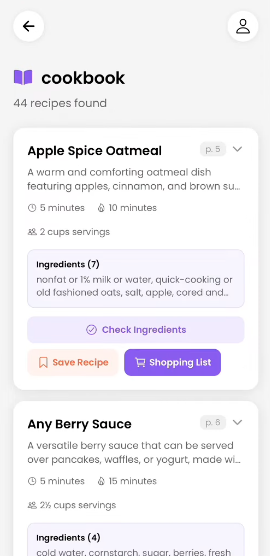
- Cookbook PDF upload: Upload an entire PDF cookbook and the app parses every recipe out of it, building a searchable personal cookbook library.
- Smart inventory management: Scan receipts or pantry shelves with your camera to automatically populate your ingredient inventory. The app then suggests recipes you can make with what you already have, reducing food waste.
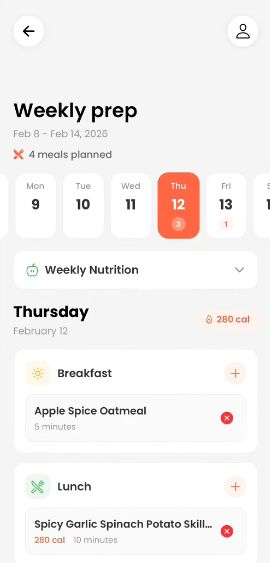
- Meal planning: Plan your meals for the week on a calendar, assign recipes to breakfast, lunch, dinner, or snacks, and get a nutrition summary.
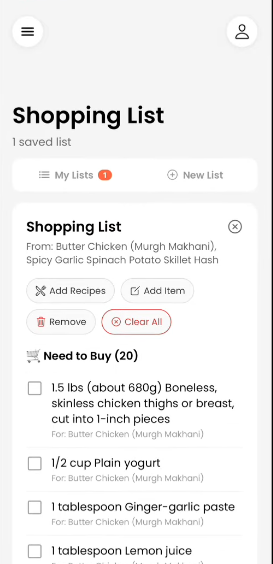
- Shopping list generation: Select recipes and the app generates a smart grocery list, cross-referencing your inventory to split items into "need to buy" vs. "already have." Check items off as you shop and add them straight to your inventory.
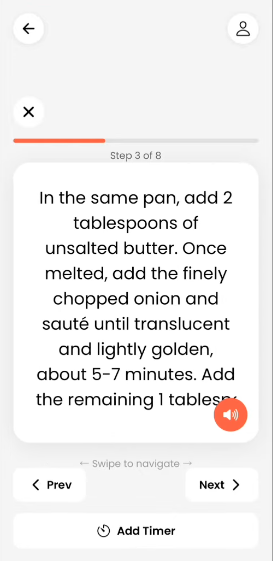
- Cooking mode: A hands-free, step-by-step cooking experience with voice narration (text-to-speech), built-in timers, and swipe-able steps -- so you never have to touch your phone with messy hands.
- Cook history and favorites: Log what you've cooked, rate recipes, and build a favorites collection.
- Free and Pro tiers with RevenueCat: A generous free tier with clear daily and total usage limits, and a Pro subscription (monthly/yearly) via RevenueCat for unlimited access. Upgrade prompts appear contextually when limits are reached, and subscription state syncs server-side via webhooks.
How I built it
- Frontend: React Native with Expo (SDK 54), TypeScript, and Expo Router for file-based navigation. I used React Context for auth and subscription state,
expo-image-pickerfor camera/gallery,expo-document-pickerfor PDF uploads, andexpo-speechfor voice-guided cooking mode. - Backend: Node.js with Express, Prisma ORM connected to a PostgreSQL database on Supabase. JWT authentication with optional passkey (WebAuthn) support. Custom middleware enforces daily and total usage limits based on subscription tier.
- AI: Google Gemini 2.5 Flash for image/video recipe analysis, cookbook PDF parsing, and text-to-speech. Perplexity Sonar Pro for inventory image scanning (receipts/pantry) and recipe suggestions from ingredients.
- Monetization: RevenueCat handles subscriptions end-to-end -- the native paywall UI, entitlement checks via the SDK, and server-side webhook sync so the backend always has the correct tier. The entitlement "Byte to Bite Pro" gates unlimited usage, and free-tier limits are enforced server-side with clear 429 responses that the frontend translates into upgrade prompts.
- Database schema: 14 interconnected models (User, Recipe, Ingredient, Instruction, Cookbook, CookbookRecipe, InventoryItem, MealPlan, MealPlanEntry, SavedShoppingList, CookLog, UsageLog, Passkey, MediaUpload) to support the full cooking workflow.
System Components:
Challenges I ran into
- AI output unpredictability: Gemini and Perplexity return varying structures and string lengths. I hit database column overflow errors (
P2000) because AI-generated values exceeded ourVarCharlimits, requiring us to add truncation and sanitization layers between AI output and database storage. - Image-to-recipe pipeline: Getting the base64 image encoding, MIME type detection, and structured JSON response schema working reliably across both camera captures and gallery picks (including HEIC format on iOS) took significant iteration.
- Subscription state consistency: Keeping subscription state in sync across three sources -- RevenueCat SDK (client), backend database, and the app stores -- was complex. I had to handle edge cases like expired trials, webhook race conditions, and ensuring the app reflects the correct tier even when opened offline.
- Usage limit UX: Making limits feel fair rather than frustrating required careful design -- showing remaining usage proactively, contextual upgrade prompts (not nag screens), and ensuring the paywall doesn't break the user's flow.
- Cooking mode: Building a hands-free cooking experience with reliable TTS, swipeable steps, and timers that work when the screen is locked (using
expo-keep-awake) required balancing multiple async processes. - YouTube/Social Media Video Analyzer: Believe me, I spent DAYS trying to get this feature work. It was working extremely well locally by the complex logic which I integrated, but not in production. Why? I realized that it's against YouTube's terms. Legally, there wasn't any other way to implement this feature while respecting youtube, instagram and other social medias' compliances, so I had to bring down this feature.
Accomplishments that I'm proud of
- End-to-end AI cooking workflow: From pointing your camera at food to standing in your kitchen with voice-guided instructions -- all in one app. There's no other step where you need to leave.
- Deep RevenueCat integration: Not just a paywall bolted on, but a full subscription system with server-side enforcement, webhook sync, usage tracking, contextual upgrade prompts, and a Customer Center for subscription management. Free users get a genuinely useful experience with clear, fair limits.
- PDF cookbook parsing: Being able to upload a family cookbook PDF and have every recipe extracted, searchable, and integrated with the shopping list and inventory system is a feature I haven't seen elsewhere.
- Inventory-aware recipe suggestions: The app doesn't just generate recipes -- it knows what's in your kitchen and suggests what you can actually make right now, reducing food waste.
- 14-model database schema: A fully relational data model that connects users, recipes, cookbooks, inventory, meal plans, shopping lists, cook history, and usage tracking into a cohesive system.
What I learned
- RevenueCat makes monetization approachable: The SDK, paywall templates, and webhook system let us add a production-quality subscription flow without building payment infrastructure from scratch. Managing paywalls from the dashboard (no app update needed) is a game-changer.
- AI needs guardrails: Structured JSON schemas for Gemini responses were essential -- without them, output was inconsistent. Even with schemas, you need validation and truncation before persisting to a database.
- Server-side limit enforcement is non-negotiable: Client-side gating is for UX; server-side middleware is for trust. I learned to always enforce limits in the backend and use the client only for displaying remaining usage.
- The gap between "demo" and "usable" is mostly error handling: Most of our debugging time was spent on edge cases -- network timeouts, malformed AI responses, expired tokens, paused databases -- not on the core features themselves.
- Expo ecosystem maturity: Expo SDK 54 with file-based routing, image picker, document picker, speech, haptics, and keep-awake made it possible to build a feature-rich native app without ejecting or writing platform-specific code.
What's next for Bytes (Byte to Bite)
- Offline support: Cache recipes, cooking steps, and shopping lists for offline use, with background sync when connectivity returns.
- Social and sharing: Share recipes with friends, create collaborative meal plans, and build a community cookbook.
- Dietary customization: Allergen filtering, dietary preference tags (vegan, keto, gluten-free), and automatic serving-size adjustments.
- A/B testing paywalls: Use RevenueCat's offering experiments to test pricing, trial lengths, and paywall layouts to optimize free-to-Pro conversion.
- Smart notifications: Reminders for meal plans, expiring pantry items, and gentle re-engagement nudges for inactive users.
- Analytics dashboard: RevenueCat and product analytics to measure conversion funnels, feature usage, and retention to prioritize what to build next.
Built With
- expo.io
- gcp
- node.js
- react-native
- revenuecat

Log in or sign up for Devpost to join the conversation.