-
-
logo
-
architecture
Inspiration
Every expert has a way of doing things that is difficult to write down. They often skip the small decisions and visual cues that feel obvious because they have practiced them so many times. A learner, however, may get stuck on exactly those missing details. Most training tools record what happened, but not what the learner needed to notice. We built ByFeel to find those gaps in a structured way. The system helps preserve practical knowledge while keeping the teacher involved in deciding what is actually correct.
What it does
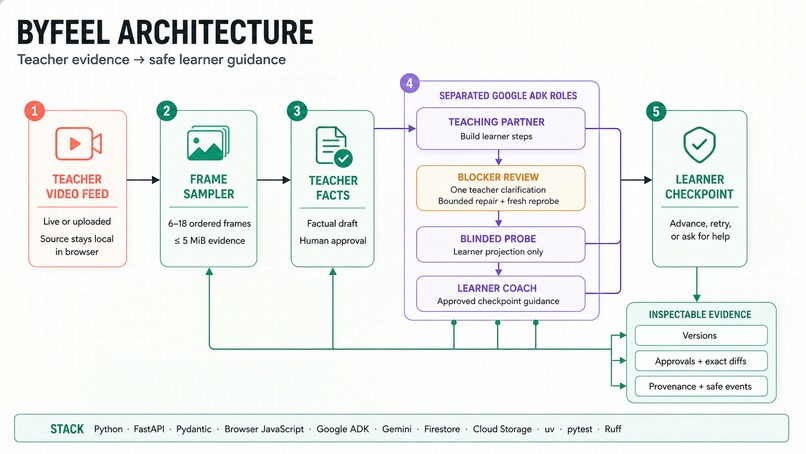
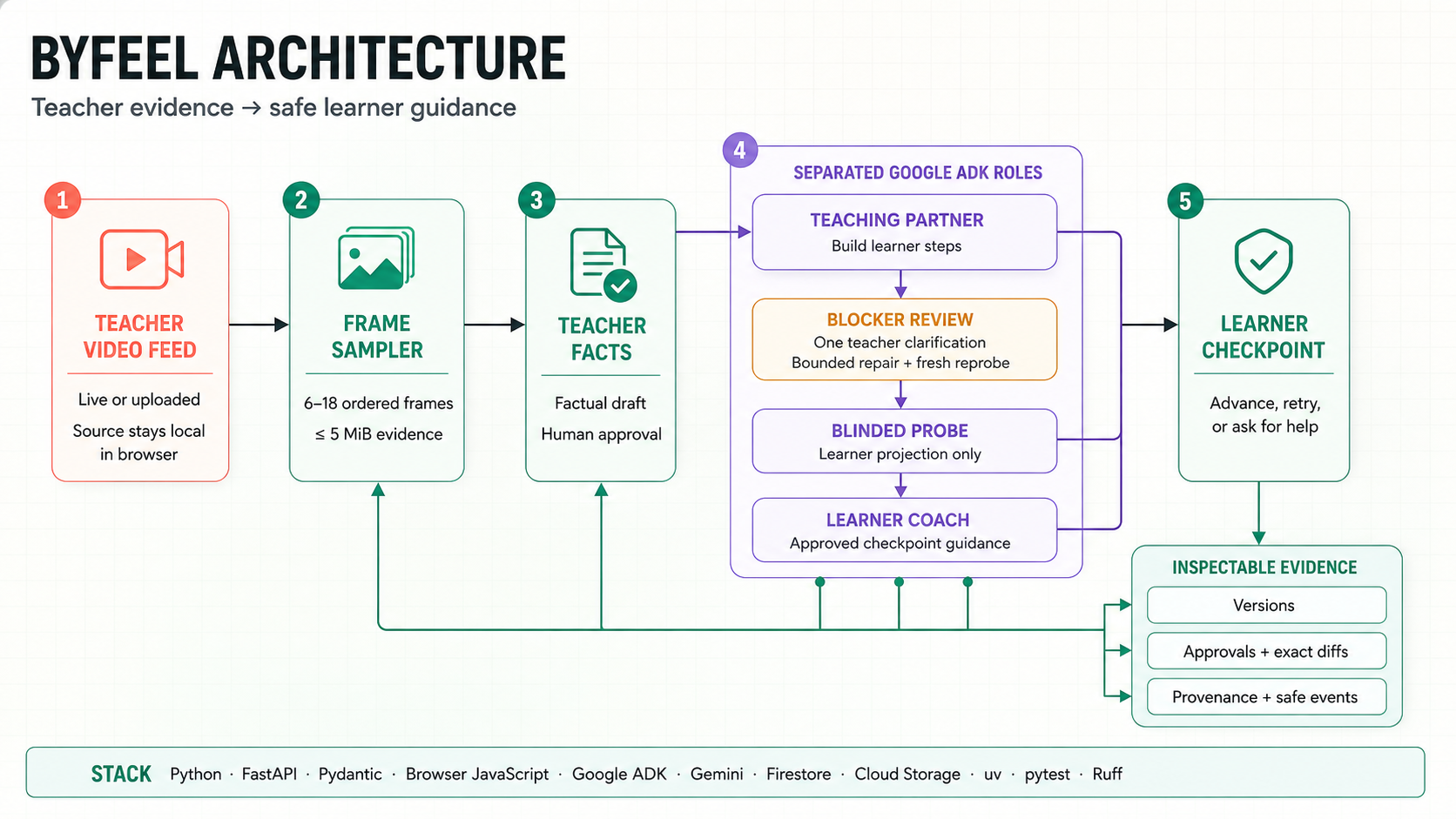
ByFeel starts with a short teacher video feed, either uploaded or captured through the browser. The original video stays on the user’s device, while the system sends only a limited set of frames for review. The teacher checks the factual observations before they become learner-facing instructions. ByFeel then creates a learner procedure and sends it to a fresh blind probe that sees only the learner’s view, not the teacher’s video or private context. If the probe finds a genuine blocker, the teacher reviews it and provides one clarification. ByFeel uses that clarification to create a limited, traceable repair, runs the probe again, and then guides the learner through an observable checkpoint.
How we built it
ByFeel is built as a Python application using FastAPI and Pydantic for the API, rules, and data validation. The browser interface handles local video processing, frame sampling, and separate views for the teacher, blind probe, learner, and evidence review. Google ADK and Gemini power three distinct roles: the Teaching Partner creates learner steps, the Blinded Probe checks them without teacher context, and the Learner Coach helps evaluate the learner’s current state. Each role receives only the information it needs, which keeps the workflow easier to inspect and safer to trust. Firestore and Cloud Storage adapters support structured evidence when cloud mode is enabled, while local in-memory mode makes development and testing quick. We also use fake-model tests and a seeded rehearsal so the core flow can be demonstrated without making live model calls.
Challenges we ran into
The hardest challenge was enforcing the blind boundary. The learner check must not see the teacher video, hidden notes, or earlier probe reasoning. We also had to make every correction traceable to one approved teacher answer. Video adds another constraint, because the system needs a small, useful frame package instead of the whole recording. Finally, we had to make all of that understandable in a browser demo.
Accomplishments that we’re proud of
We built the full loop from teacher capture to learner recovery. The app shows the handoff clearly across Teacher, Blind Probe, Learner, and Evidence views. It records approvals, versions, blocker decisions, interventions, and exact changes. It can safely report that no blocker was found instead of creating drama. We also built a seeded rehearsal that demonstrates the flow without making model calls.
What we learned
We learned that reliable AI is mostly about boundaries and timing. A model should propose within a narrow job, while people approve the facts and the correction. A blind test is only meaningful when the hidden context is truly hidden. Observable learner checkpoints are more useful than vague confidence scores. We also learned that a clear evidence trail makes the whole system easier to trust.
What’s next for ByFeel
Next, we want to run fresh studies with real teachers and learners. We’ll strengthen restart-safe storage, authentication, and the live video experience. We’ll improve how the system handles faster demonstrations and richer visual evidence. We also plan a careful cloud deployment with clear cost and privacy controls. The long-term goal is to support more kinds of hands-on learning without losing human review or traceability.
Built With
- agentic-ai
- browser-apis
- computer-vision
- css
- evidence
- fastapi
- firestore
- gemini
- generative-ai
- google-adk
- google-cloud
- html
- human-in-the-loop
- javascript
- privacy-by-design
- pydantic
- pytest
- python
- ruff
- uv
- video-processing

Log in or sign up for Devpost to join the conversation.