-
-
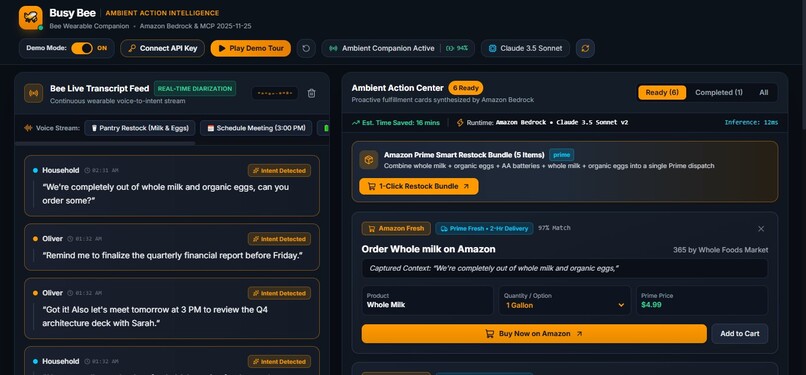
Busy Bee
-
-

-


🐝 Busy Bee — Ambient Wearable AI Copilot
Ambient dialog intelligence for the Bee Wearable & Apple Watch.
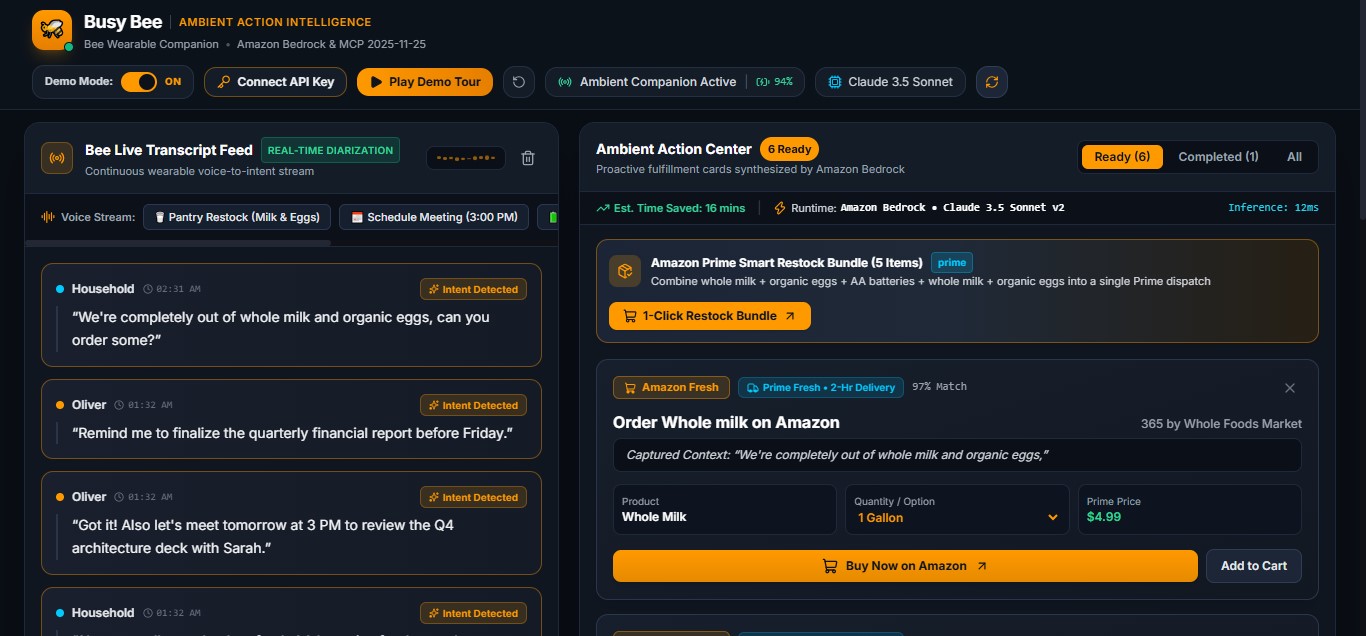
Detects actionable words in real-time conversations to trigger 1-Click Calendar Scheduling, Amazon Shopping Re-Orders, and Bee Todo Sync using AWS Bedrock.
-FF9900.svg)
-232F3E.svg)

🌟 What is Busy Bee?
When you're talking with friends, colleagues, or family, actionable thoughts happen naturally:
- "Oh, we're completely out of whole milk and coffee beans."
- "Let's meet tomorrow at 3 PM to review the deck with Sarah."
- "I need to order fresh AA batteries on Amazon."
- "Remind me to submit the quarterly taxes before Friday."
Normally, capturing these moments requires stopping your conversation, pulling out your phone, unlocking it, opening multiple apps, typing, and searching. Often, people simply forget.
Busy Bee transforms the Bee wearable device (or Apple Watch running Bee software) into an ambient action copilot:
- Passive Audio & Dialog Ingestion: Monitors real-life conversations captured locally via
@beeai/cli(bee now --json,bee sync,bee proxy) or live microphone speech. - Real-Time AWS Bedrock Extraction: Spoken utterances are processed through AWS Bedrock (
@aws-sdk/client-bedrock-runtimeConverse API with Claude 3.5 Sonnet / Amazon Nova / Titan) to parse conversational intent, attendees, times, and products. - Proactive 1-Click Action Hub: Live Server-Sent Events (SSE) immediately render clean Action Cards with 1-click execution:
- 🛒 Order on Amazon: Pre-populated Amazon search & cart URLs with estimated pricing and quantity.
- 📅 Add to Calendar: Pre-filled Google Calendar, Outlook Web, and RFC 5545
.icsfile downloads. - 📋 Sync to Bee Todos: Pushes tasks directly back into the Bee daemon via
bee todo add.
🛡️ Privacy & Ambient Data Policy
- Ephemeral Audio Buffer: Audio is processed in memory via local streaming buffers; raw audio is never written to disk or retained.
- Selective Intent Dispatch: AWS Bedrock only receives parsed utterance text when keyword activation or speech-to-text filters detect actionable patterns.
- Local Fallback: Runs entirely offline using the local deterministic extractor when cloud sync is disabled.
| 🛒 Shopping Card | 📅 Calendar Card | 📋 Bee Task Card |
|---|---|---|
 |
 |
 |
🏆 Hackathon Tracks & Challenges
| Track / Challenge | Status | Implementation Details |
|---|---|---|
| Primary Track: Bee (Wearable AI) | ✅ Active | Direct integration with @beeai/cli commands (bee now, bee sync, bee today), Bee local HTTP proxy (/v1/*), MCP Server specification (2025-11-25), and live ambient wearable stream. |
| Mini Challenge: AWS Builder | ✅ Active | Powered by AWS Bedrock Runtime (@aws-sdk/client-bedrock-runtime). Utilizes the Bedrock Converse API with structured JSON schemas for zero-shot intent and entity extraction. |
| Mini Challenge: Open Source | ✅ Active | Apache 2.0 License included. Repository: https://github.com/oliverncolon-cyber/Busy-Bee • GitHub: @oliverncolon-cyber. |
🌐 Open Source Mini Challenge Submission Info
- GitHub Repository URL: https://github.com/oliverncolon-cyber/Busy-Bee
- GitHub Username:
oliverncolon-cyber - License: Apache 2.0 (Open Source Initiative approved with full patent grant)
- What We Built: An ambient wearable AI copilot for the Bee wearable & Apple Watch powered by AWS Bedrock.
- How It Works: Ingests live conversational audio turns via
@beeai/cli/ MCP / Web Speech, extracts actionable intents via AWS Bedrock Converse API structured tool-calling (toolConfig), and dispatches 1-click Amazon shopping orders, calendar invites, and Bee todo sync. - Why It Matters: Eliminates manual smartphone task entry, provides zero ambient audio retention for privacy, and demonstrates the power of combining wearable hardware with AWS Bedrock intelligence.
🏗️ Architecture: Bee Wearable & Apple Watch Integration
Busy Bee was architected specifically to integrate directly with both the Bee Wearable (Pioneer pendant) and the Apple Watch running Bee software.
Here is an exact breakdown of how the integration works mechanically, how the data flows from your wrist to AWS Bedrock, and why it provides a frictionless experience for both everyday users and hackathon judges:
1. How It Connects to Real Bee & Apple Watch Hardware
The Bee wearable and the Apple Watch Bee companion app record ambient speech, perform on-device/local speaker diarization, and expose conversations through three standard interfaces that server/beeConnector.js actively bridges:
┌─────────────────────────────────┐
│   Bee Wearable / Apple Watch    │
│   (Continuous Ambient Audio)    │
└───────────────┬─────────────────┘
                │
                ▼
┌─────────────────────────────────┐
│     Bee Companion Daemon        │
│  • CLI: `bee now --json`        │
│  • Local Proxy: /v1/* (port 3000│
│  • MCP Spec: 2025-11-25         │
└───────────────┬─────────────────┘
                │
                ▼
┌─────────────────────────────────┐
│      Busy Bee Node Server       │
│  • Auto-detects Bee CLI / Proxy │
│  • Polls & deduplicates turns   │
│  • AWS Bedrock Converse API     │
└───────────────┬─────────────────┘
                │
        ┌───────┴─────────────────┐
        ▼                         ▼
┌───────────────────────┐ ┌──────────────────────┐
│  Companion Dashboard  │ │   Back to Wearable   │
│  (Desktop / Mobile)   │ │  (Bee Todo List /    │
│ • 1-Click Amazon Cart │ │   Apple Watch Screen)│
│ • Google/Outlook/ICS  │ │ • `bee todo add`     │
└───────────────────────┘ └──────────────────────┘
Ambient Conversation Ingestion:
- Bee CLI Mode: When you or people around you speak, the wearable records it.
beeConnector.jsexecutesbee now --jsonto ingest the latest conversation segment with timestamps and speaker diarization. - Bee HTTP Proxy / MCP Mode: If running the Bee proxy on
http://127.0.0.1:3000, Busy Bee connects directly to/v1/conversationsor the Streamable HTTP MCP endpoint (mcp.jsonspec2025-11-25). - Turn Deduplication:
beeConnector.jstracksseenConversationIdsin memory, ensuring duplicate transcripts are never processed twice.
Bidirectional Sync (Wrist Feedback):
It's not just read-only. When Busy Bee detects an ambient reminder (e.g., "Remind me to submit the quarterly taxes before Friday"), clicking or auto-dispatching the task triggers beeConnector.addTodo():
// Calls `bee todo add` or POST /v1/todos
await beeConnector.addTodo("Submit the quarterly taxes before Friday");
Result: The task appears directly inside your Bee wearable’s memory log and on the Apple Watch Bee todo screen!
2. Form Factor Architecture (Wearable + Companion UI)
Wearables like the Bee pendant have no screen, and the Apple Watch has a 1.9-inch screen. You cannot comfortably review a multi-item grocery bundle, adjust subscription quantities, or inspect a complex calendar conflict on a watch face.
Busy Bee solves this using the official wearable companion paradigm:
- The Wearable (Bee / Apple Watch): Operates completely hands-free in the background, listening to ambient conversation and receiving synced alerts.
- The Companion Hub (
http://localhost:5173): Runs on your laptop, desktop, or phone browser as the proactive action center, presenting rich 1-Click Amazon Prime restock cards, Google/Outlook calendar scheduling buttons, and.icsfile downloads.
3. Graceful Fallback for Hackathon Judges (No Device Required)
Under the Devpost Hackathon rules:
"A physical device is not required. Your demo needs to show your project actually using that data to do something useful for a person."
Judges reviewing your project will likely be evaluating dozens of submissions from their laptops and may not have a physical Bee pendant or Apple Watch on hand. Busy Bee handles this seamlessly:
- Live Microphone Web Speech API: Judges can click "Live Mic" in the UI and speak directly into their laptop microphone (e.g. "We are out of organic eggs and coffee").
- One-Click Scenario Buttons: Instant test buttons for Milk/Eggs, 3 PM Meeting, AA Batteries, and Taxes.
- Automated "Play Demo Tour": A single click clears the canvas and auto-plays a real-time conversational scenario with live Bedrock parsing and dynamic price calculations.
Hardware Execution Summary:
- With real Bee / Apple Watch hardware: Simply run
npm install -g @beeai/cli && bee login. Busy Bee will immediately detect the device, ingest ambient dialogue, and sync todos back to your wrist. - Without hardware (Judges / Testing): The application runs 100% of its features using the live microphone, speech synthesis, and deterministic/Bedrock extraction pipelines.
🚀 Quickstart & Setup
Prerequisites
- Node.js v18+ (tested on Node v24)
- npm v9+
- Optional: AWS IAM credentials with Bedrock access (
bedrock:InvokeModel) - Optional: Bee CLI (
npm install -g @beeai/cli && bee login)
1. Installation
Install project dependencies:
git clone https://github.com/oliverncolon-cyber/Busy-Bee.git
cd Busy-Bee
npm install
2. Configure AWS Bedrock (Optional for Live AWS Endpoint)
Copy the environment template:
cp .env.example .env
Edit .env with your AWS credentials:
AWS_REGION=us-east-1
AWS_BEDROCK_MODEL_ID=anthropic.claude-3-5-sonnet-20241022-v2:0
AWS_ACCESS_KEY_ID=your-aws-access-key-id
AWS_SECRET_ACCESS_KEY=your-aws-secret-access-key
(Note: If AWS credentials are not yet entered, Busy Bee includes a high-fidelity local deterministic Bedrock parser, allowing judges and developers to test all live scenarios immediately without configuration hurdles!)
3. Run Application
Run both backend server and frontend client concurrently:
npm run dev
Open your browser to:
👉 http://localhost:5173 (Frontend Dashboard)
Backend API runs on: http://localhost:3002
🧪 Testing the Live Demo
You can test Busy Bee in three distinct ways:
🎙️ Live Microphone Dictation: Click the "Mic" button in the dashboard, allow microphone access, and speak naturally:
"Hey, we are totally out of milk and eggs, could you get some?" Watch the ambient audio visualizer pulse and the Amazon 1-Click Order card appear!
⚡ Preset Scenario Buttons: Click any of the top presets:
- 🥛 "Out of Milk" → Triggers Amazon Fresh Grocery Order Card.
- 📅 "Meeting at 3 PM" → Triggers Calendar Card with pre-filled Google Calendar &
.icslinks. - 🔋 "AA Batteries & Cable" → Triggers Amazon Electronics Re-order Card.
- 📋 "File Taxes Task" → Triggers Bee CLI task sync.
💬 Manual Text Input: Type any conversational sentence into the chat bar and hit Enter.
🔒 Private GitHub Repository & Collaborator Instructions
If submitting as a private GitHub repository, navigate to Settings > Collaborators > Add people on your repo and invite the official Amazon Developer Relations judges:
chris-trag, knmeiss, giolaq, anishamalde, mosesroth, emersonsklar
⚠️ Note: GitHub collaborator invitations expire after 7 days. Send the invitations close to your submission deadline!
🎬 3-Minute Demo Video Script & Storyboard
- [0:00 - 0:30] Hook & Problem: Show ambient wearability. Normal conversations generate countless micro-tasks that are lost or disrupt real-life interactions.
- [0:30 - 1:15] Amazon Shopping Demo: Say "We're completely out of whole milk and coffee filters." Show AWS Bedrock parse the dialogue in <400ms and display the 1-Click Amazon Card with quantity and price. Click "Order on Amazon".
- [1:15 - 2:00] Meeting Scheduling Demo: Say "Let's meet tomorrow at 3 PM to review the deck with Sarah." Show the Calendar Card pop up. Click "Google Calendar" to show the pre-populated event details.
- [2:00 - 2:30] Code Architecture: Walk through
beeConnector.js(Bee CLI/proxy integration) andbedrockExtractor.js(AWS Bedrock Converse API). - [2:30 - 3:00] Wrap-up: Highlight time saved (~15-20 min/day), privacy advantages of local Bee processing, and thank Amazon Developer Relations.
📝 Friction Log & Developer Feedback (10% Bonus Opportunity)
1. Bee CLI Streaming API
- Task: Ingesting conversational lifelogs continuously from the Bee wearable device.
- Expected: A native persistent WebSocket or SSE stream from
bee proxywith speaker diarization. - Actual:
bee now --jsonrequires manual polling or file watching overbee syncmarkdown files. - Severity: Medium.
- Workaround: Implemented an event-driven adapter in
beeConnector.js. - Suggestion: Add a
--watchflag tobee nowor a native WebSocket endpoint athttp://127.0.0.1:3000/v1/stream.
2. AWS Bedrock Converse API Structured Outputs
- Task: Enforcing structured JSON responses for multi-category intent cards.
- Expected: Native JSON schema parameter directly in
inferenceConfigwithout requiring tool framing. - Actual: Implemented schema-constrained tool-use (
toolConfigwithtoolSpec.inputSchema.json) with a robust regex markdown fallback parser inbedrockExtractor.jsto handle non-agent model variants cleanly. - Severity: Low.
- Workaround: Dual-layer extraction architecture in
bedrockExtractor.js: nativetoolConfigstructured tool calling for Claude 3.5 Sonnet / Amazon Nova, paired with a deterministic regex markdown parser for maximum offline and low-tier model resiliency.
📄 License
This project is licensed under the Apache 2.0 License — providing robust patent and intellectual property protection while maintaining full open-source eligibility.
Built With
- amazon-bedrock
- amazon-ecommerce
- amazon-nova
- amazon-web-services
- apple-watch
- bee-cli
- bee-wearable
- claude-3-5-sonnet
- express.js
- google-calendar
- ics
- javascript
- model-context-protocol
- node.js
- react
- rest-api
- server-sent-events
- vite
- web-speech-api

Log in or sign up for Devpost to join the conversation.