-
-
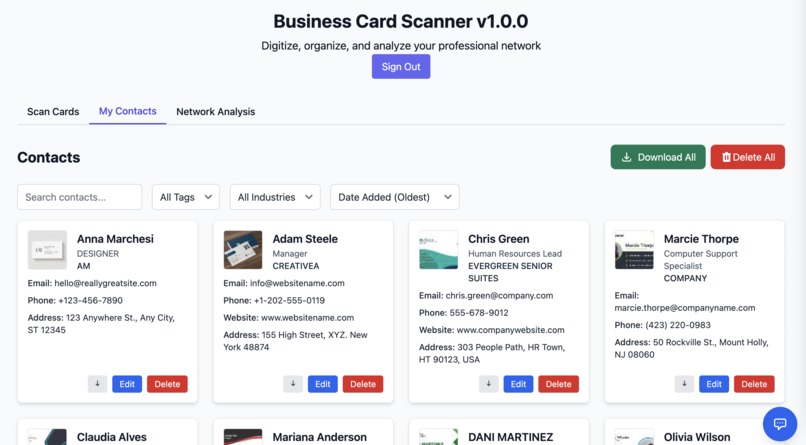
Digitalizing Business Cards
-
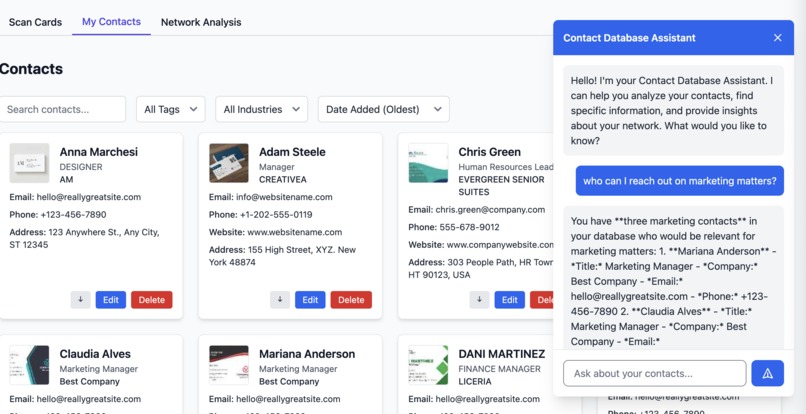
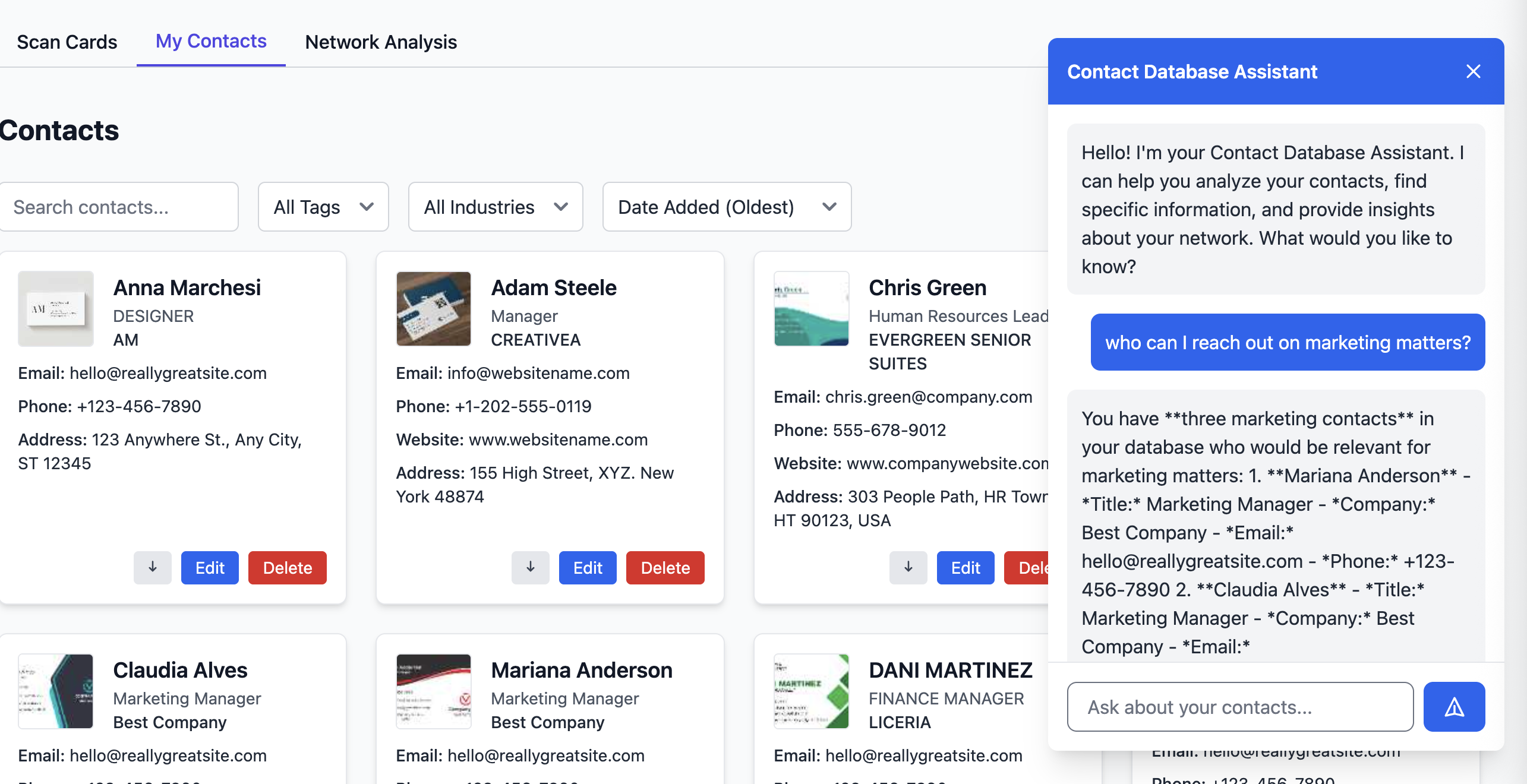
Gain actionable insights with AI-powered chatbot
-
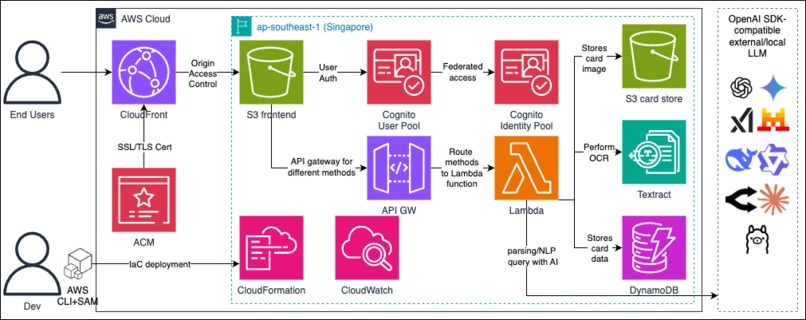
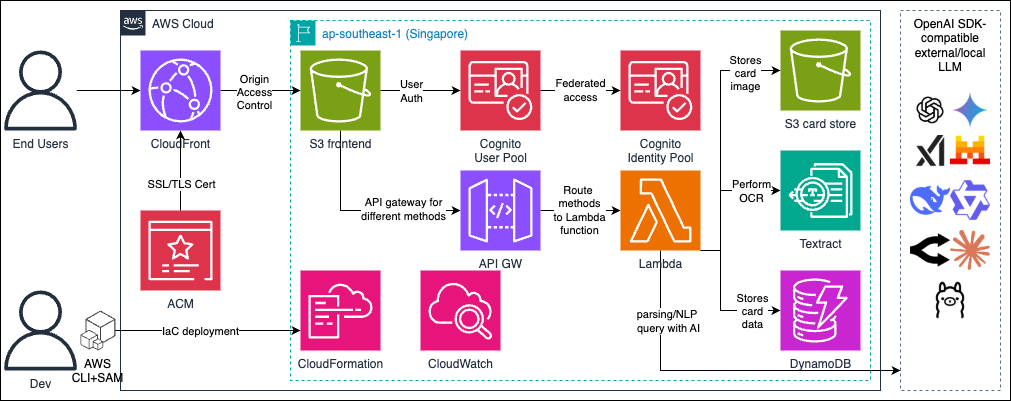
aws infra diagram
-
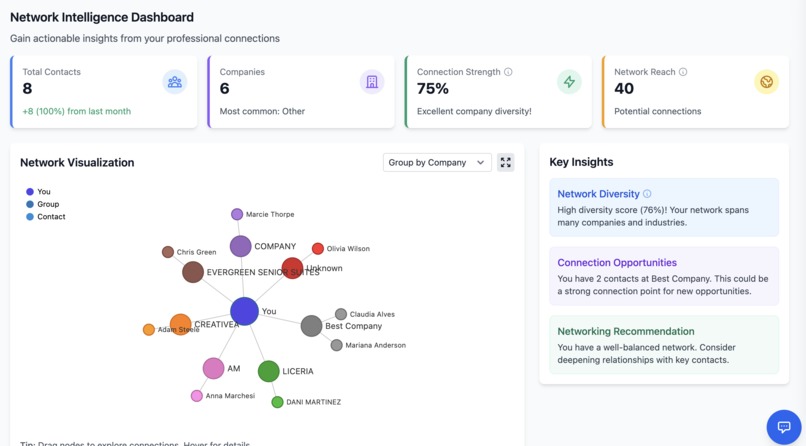
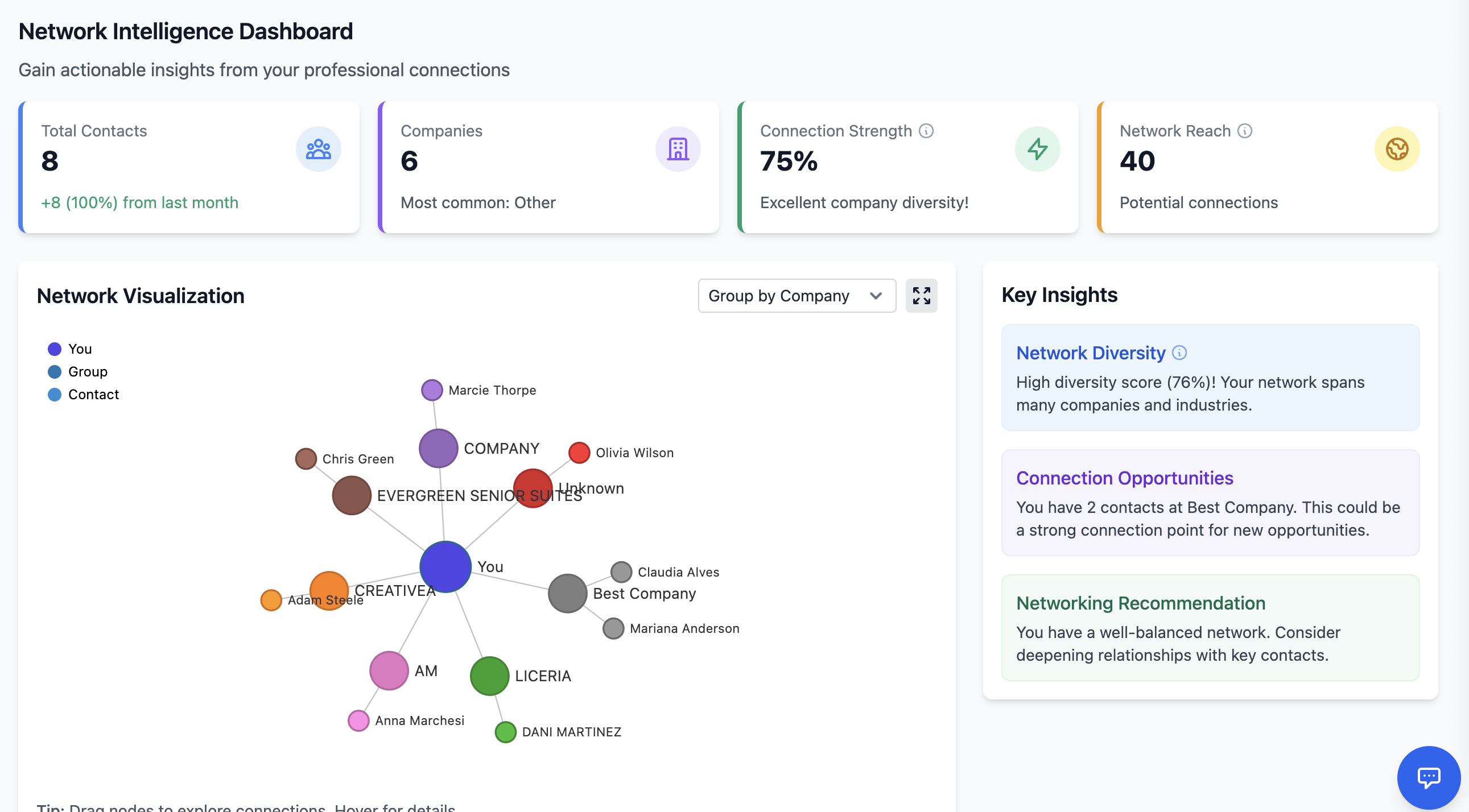
Anaylze your network with visualization
-
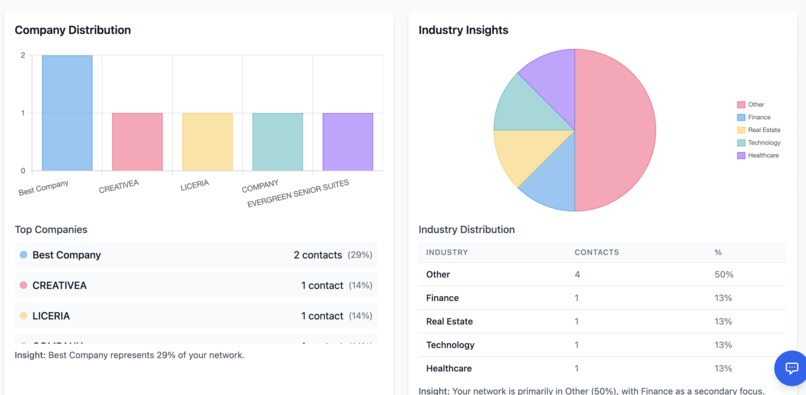
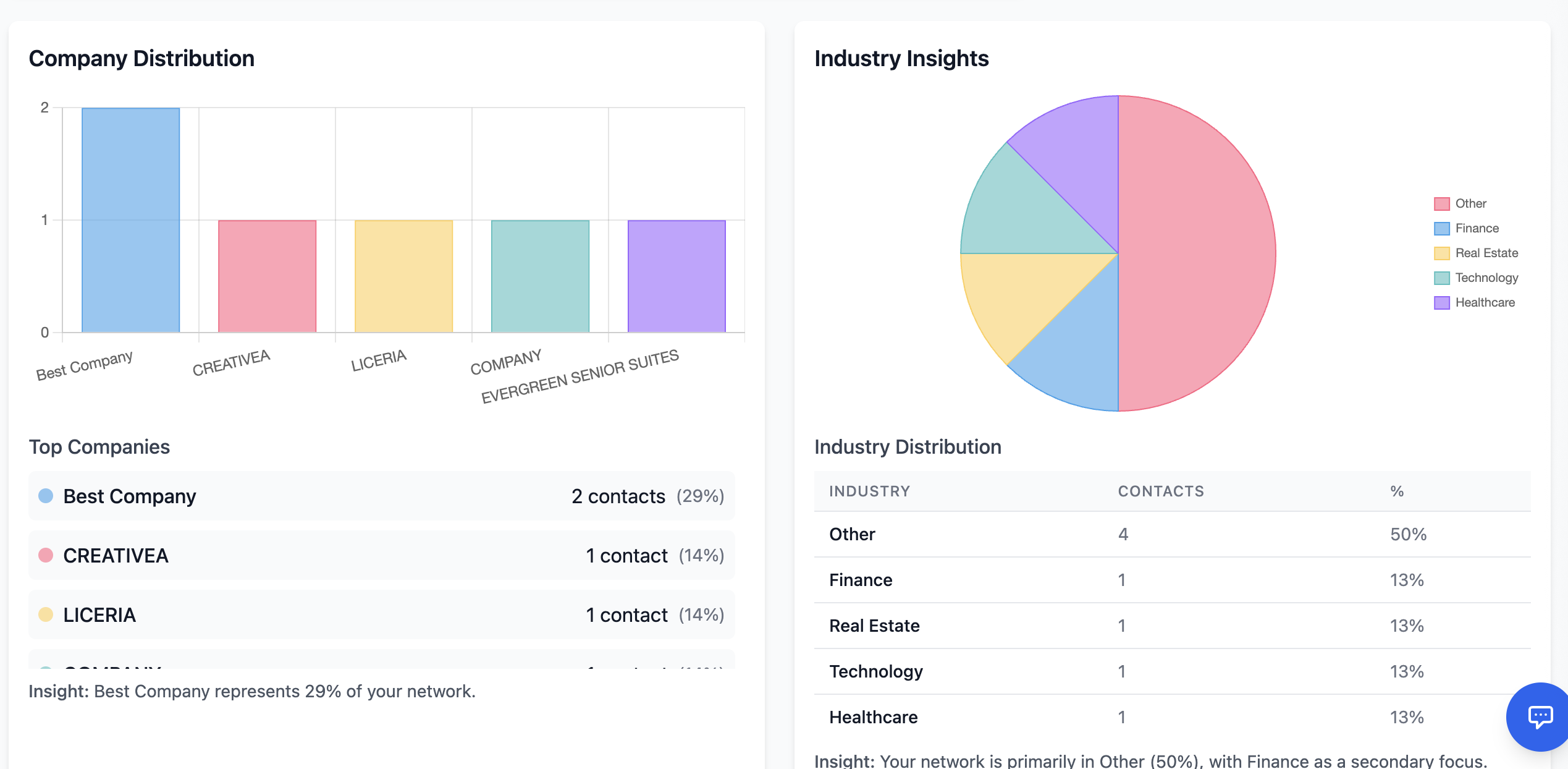
Anaylze your network with charts
🎯 Inspiration
In today's digital age, we still exchange physical business cards, but managing them efficiently is a challenge:
- Cards get lost or damaged
- Manual data entry is time-consuming and error-prone
- It's hard to analyze your professional network effectively
- Finding specific contacts or seeing connections between companies is difficult
There are existing digital business card scanning solution in the market, but they are often:
- expensive
- not user friendly
- only supports internal address book, no integration with device contacts
- data stored in the providers' database, you don't own the data
So, after exchanging many cards from events like AWS Summits, I decided to digitalize all these cards and allow integration with my phone contact book, and with AI implemented to handle my questions on my network.
💡 The Solution
I built an open-source web application that solves these problems by:
- Using AI to extract information from business card images
- Organizing contacts with rich metadata
- Allows importing the contacts to your phone contacts in batch/individually!
- open-source solution, meaning you can self-deploy and control your data!
- Providing network analysis and visualization
- Offering an AI-powered chat interface for querying your contact database
Some quick peek on the product:
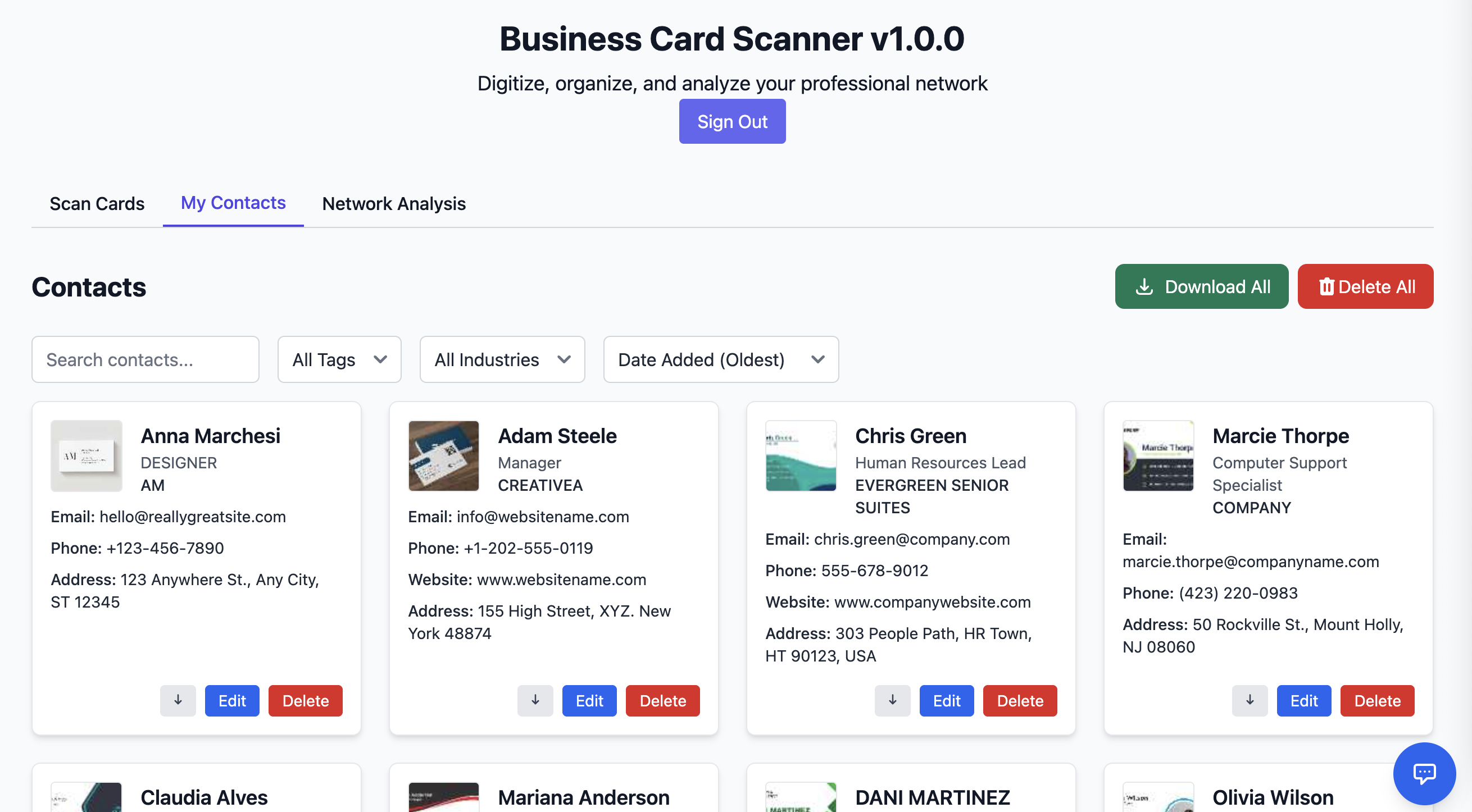
View your contacts and save to phone contact

Gain actionable insights with AI

Visualize your professional network


🚀 Quick Start
Want to try it yourself?
- Click this demo url
- Sign in using the test credentials:
- Username: testUser
- Password: 12345678!
- Navigate to the "Scan Cards" tab
- Upload one or more business card images
- View processed contacts in the "My Contacts" tab
- Explore network insights in the "Network Analysis" tab
🏗️ How I built it
Architecture and Data Flow
Let's start with the overall architecture design

The application processes business card data through a multi-stage pipeline managed by AWS Lambda that extracts, analyzes, and stores contact information.
The below shows how Lambda handles the pipeline when a new business card image comes in
[Lambda receives card image] -> [Amazon Textract] -> [DeepSeek API] -> [DynamoDB]
           |                    |                   |               |
           v                    v                   v               v
    Image Storage     Text Extraction    Contact Info Parse    Data Storage
    (S3 Backend)                         & Classification
Key Component Interactions:
- Frontend (CloudFront + S3) uploads business card images to S3 backend bucket
- Lambda function triggers Textract for OCR processing
- Extracted text is sent to DeepSeek API for structured data extraction
- Parsed contact information is stored in DynamoDB
- Frontend retrieves and displays contact data through API Gateway
- Network analysis is performed on the stored contacts
- Real-time chat interface queries the contact database
Infrastructure components
Networking
- CloudFrontDistribution (CloudFront): Content Delivery Network (CDN) for caching, reduce latency and better website performance
Storage
- BackendBucket (S3): Stores business card images
- FrontendBucket (S3): Hosts the web application
- MainDynamoDBTable: Stores contact information with userId and cardId as keys
Compute
- MainFunction (Lambda): Handles API endpoints for scanning, contact management, and network analysis
API & Authentication
- MainAPIGateway: REST API interface
- MainUserpool (Cognito): User authentication
- MainIdentityPool (Cognito): Federated identity management
Security
- MainIdentityPoolIAMAuthRole: IAM role for authenticated users
- Bucket policies for secure access to S3 resources
- AWS Certificate Manager (ACM): Manage SSL/TLS certificates for use with CloudFront CDN
Deployment
- CloudFormation: deploying infra with IaC approach
- AWS SAM: ease serverless deployment
😮 Challenges I ran into
There are quite challenges in developing this web app, let me include the most major one here. You cannot scan by camera without HTTPs (or a TLS/SSL certificate)
As I was trying to quickly ship this web app, I didn't know that having this certificate is a REQUIREMENT to enable upload by camera, apparently it would be a security vulnerability without it. Since the ability to upload by camera is crucial to UX, I quickly google the solution. I then figured out that I can use CloudFront to solve this as CloudFront by default has a certificate.
However, the default domain name of CloudFront is hardly user friendly, as the name is too long to remember, so then I proceed to buy a cheap domain elsewhere and handled the DNS config as well.
All is good until I find out that CloudFront could still be bypassed, so I implemented Origin Access Control with S3 as origin, which this took me some time as quite a lot of documentation is still showing the legacy method (using OAI).
So basically it's a chain of problems starting with simple upload by camera issue. But by overcoming this challenge (and other challenges as well), I learned more on the best practices related to web app development.
🔮 Accomplishments that I am proud of
Well this web app is truly a very useful tool that I always use it whenever there are some networking events, and I am also very proud of the fact that all my core features on the wishlist have been accomplished:
- Upload business card images (single or batch)
- AI automatically extracts and categorizes information
- View my contacts in a modern, filterable interface
- Explore network connections through interactive visualizations
- Chat with AI to analyze my professional network
- Easily export contacts as vcard files to my phone contacts
And the fact that now all business cards are digitalized, I can finally gain actionable insights easily with my database.
🤔 What I learned
- Serverless architectures need really thoughtful timeout configurations (I had to increaset the integration timeout to 60000ms via service quota request this time...)
- User experience is crucial for AI-powered application, I spent more than expected dev time on the frontend part.
What's next for Business Card Scanner: Digitize Professional Network with AI
- Better UI/UX and improve latency with AI chatbot.
- The current serverless architecture is a "Lambdalith", which is great for quick development for PoC but does not scale well with more features coming in. So may need to decouple this part in the future.
Built With
- ai
- amazon-web-services
- apigateway
- cdn
- cloudformation
- cloudfront
- cognito
- css
- deepseek
- dynamodb
- html5
- iac
- javascript
- lambda
- llm
- nosql
- python
- s3
- serverless
- shell
- ssl
- tailwindcss
- textract

Log in or sign up for Devpost to join the conversation.