Inspiration
Anyone who has built a robot knows the feeling: you connect one wire to the wrong pin, power it on, and smell smoke. Electronics parts cost money, take days to replace, and datasheets are long and confusing for beginners. Existing simulators help, but you're limited to the parts already in their library. We wanted a safe place where students could add any real part they're thinking of buying, wire it up, and learn from mistakes before they damage real hardware.
What it does
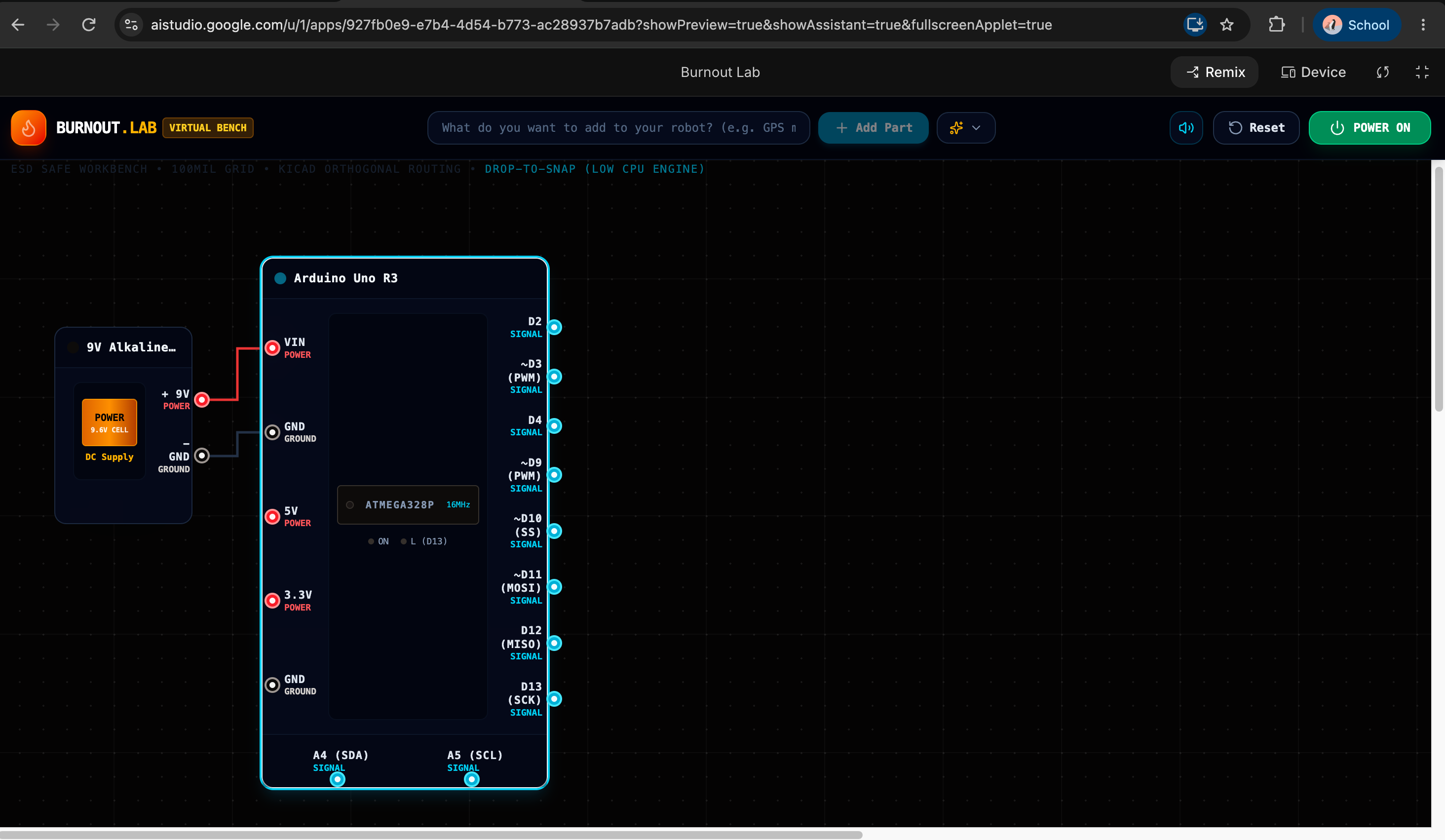
Burnout Lab is a virtual workbench for robot electronics. You type a part in plain English, like "add a GPS module," and Gemini searches the web for its real datasheet. It reads the pin names and voltage limits, shows the sources so you can check them, and automatically wires the part to an Arduino Uno with an explanation for each connection.
Then you can delete wires, create new ones, and hit Power On. If the wiring is correct, the part lights up and shows "Working!" If it's wrong, you see what would happen in real life:
- Short circuit: sparks fly and the battery smokes.
- Overvoltage: the part smokes, catches fire, and turns black.
- Reversed power: the part glows orange and fills with smoke.
- Missing power or ground: the part stays dead.
After each test, a results card explains what went wrong, why it's dangerous, and how to fix it in simple words.
How we built it
We built the app with Google AI Studio. Gemini, using Google Search grounding, finds datasheet information and returns each part's pins, voltage ranges, recommended connections, and sources as JSON. The workbench draws parts and wires on a canvas, with color coded pins for power, ground, and signal.
The safety checks run in our own code, not in the AI. For example, a part is flagged as overvoltage when
$$V_{\text{in}} > V_{\text{max}}$$
where $V_{\text{max}}$ comes from the datasheet. We used this design so the results are consistent and predictable every time. The sparks, smoke, and fire use a custom particle system.
Challenges we ran into
- Trusting AI with safety. Early on, we realized an AI deciding what explodes could give different answers each time. We split the work: Gemini finds the facts, and fixed rules decide the outcome.
- Getting clean data from web search. Search results don't always come back in a neat format, so we had to extract and validate the JSON, and added preloaded backup parts in case a search fails.
- Time. We changed ideas several times and built the final version in about an hour.
Accomplishments that we're proud of
- Turning any part described in plain English into a wired, interactive component.
- Showing real datasheet sources so students learn to verify information.
- Making failure fun and educational instead of expensive.
- Shipping a working project at our first hackathon.
What we learned
- AI is great at finding and summarizing information, but important decisions should be checked by reliable rules.
- Showing sources builds trust in AI answers.
- A focused idea that works beats a big idea that doesn't.
What's next for Burnout Lab
- Simulating current, so missing resistors can burn out LEDs and motors.
- More boards, like the ESP32 and Raspberry Pi.
- Running real Arduino code on the virtual workbench.
- A classroom mode where teachers create wiring challenges.
- Exporting a correct wiring diagram to use when building the real robot.

Log in or sign up for Devpost to join the conversation.