-
-
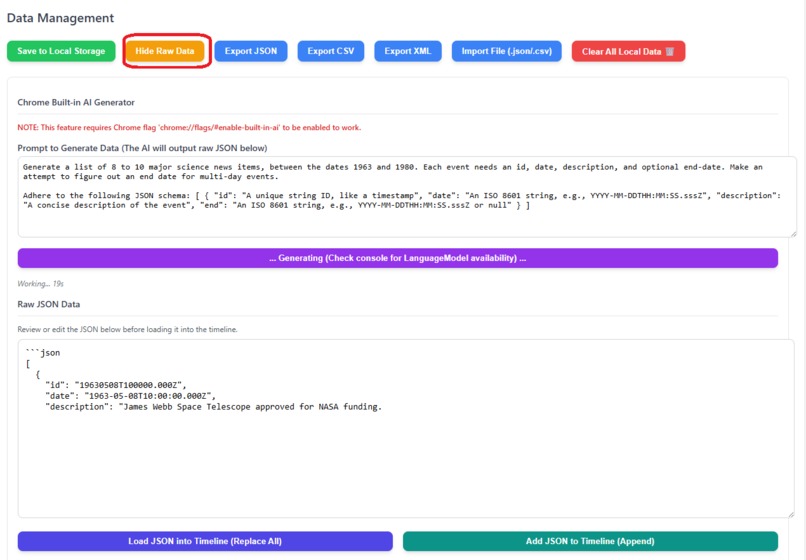
Generate the information fully on or offline using Chrome Built in AI
-
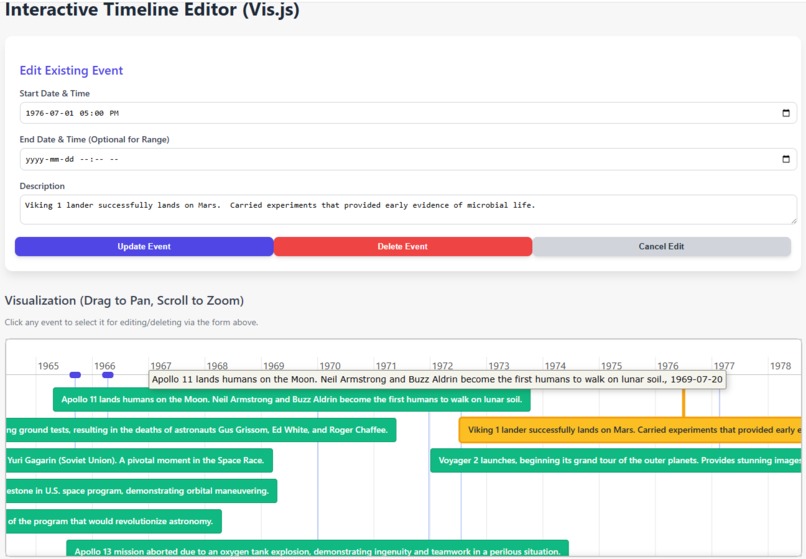
View on a timeline all the major dates, edit them, mouse over view the description
Inspiration
The inspiration for the "AI timeline" project came from the rapid and often overwhelming pace of advancements in Artificial Intelligence. It's difficult for anyone to keep track of key milestones. The core goal was to prove the advanced capabilities of the Chrome Built-in AI Prompt API by using its offline-capable Large Language Model (LLM) to generate the historical data itself. We wanted to create an accessible, visually engaging resource for students, built with the simplest HTML/CSS/JavaScript possible, where the content is dynamically sourced from a powerful, client-side, on-device AI.
What it does
The "AI timeline" is a unique web application where the historical data is sourced from an offline LLM and then displayed using simple web technologies.
Specifically, it offers:
- Offline LLM-Generated Content: The entire set of events, dates, and descriptions is generated by the Chrome Built-in AI's LLM running locally on the user's device (after its initial required download). This is a critical demonstration of on-device data generation.
- Chronological Display: Presents the LLM-generated events in order, from early conceptualizations to recent developments.
- Simple Rendering: Events are displayed using purely vanilla JavaScript and basic DOM manipulation, reinforcing its use as a teaching tool.
- Proof of Concept: The project serves as a clear proof-of-concept that LLMs can be used client-side to dynamically generate and structure complex datasets (like historical timelines) for immediate use in a web application.
How we built it
The project was constructed using standard web development practices combined with advanced local AI integration:
- HTML, simple JavaScript, minimal inline CSS: Formed the core structure and presentation, adhering to the preference for simple code for teaching.
- Chrome Built-in AI Prompt API: This is the core component. A prompt is sent to the offline LLM requesting it to output a structured format (likely a stringified JSON array or a similar easy-to-parse structure) containing the AI history data.
- Client-Side Parsing: Simple JavaScript is used to take the string output from the LLM and parse it into a manageable JavaScript array of objects.
- Vanilla JavaScript Rendering: The JavaScript iterates over the parsed, LLM-generated data array to dynamically create and display the timeline elements, with no external visualization libraries.
myPrefixed Variables: The JavaScript code adheres to the preference for descriptive, camelCase variables and function names starting with the "my" prefix to maximize clarity.
Challenges we ran into
- Reliable LLM Output: The biggest challenge was crafting a specific prompt that consistently forces the Chrome Built-in AI LLM to output the historical data in a perfectly structured, machine-readable format (e.g., valid JSON) that the simple JavaScript parser could rely on.
- Parsing the LLM Response: Writing a simple, robust JavaScript function to parse the LLM's raw text response, while still maintaining the simplicity required for a teaching project, was a key hurdle.
- Chrome API Availability: Relying on the Built-in AI Prompt API meant dealing with potential inconsistencies or limited availability across different Chrome versions or user configurations.
Accomplishments that we're proud of
- Offline Data Generation: Successfully demonstrating the use of an offline, client-side LLM to generate a complex dataset that forms the entire content of the web page.
- LLM-to-DOM Pipeline: Creating a functional, end-to-end pipeline: Local LLM Generation --> Simple JS Parsing --> Vanilla JS Rendering in the browser.
- Educational Value: Created a resource that not only simplifies AI history but also serves as a fundamental example of how to integrate and use the output of an LLM in a web application with minimal external dependencies.
What we learned
- Advanced LLM Prompt Engineering: Gained deep experience in engineering specific prompts to coerce an LLM into producing clean, structured data for programmatic use.
- The Power of On-Device AI: Reinforced the idea that local LLMs can be used for content generation tasks, not just simple text processing, opening up new possibilities for offline web applications.
- Simplicity and Adaptability: Confirmed that complex data generation flows can be achieved using basic JavaScript for parsing and rendering.
What's next for built-in-ai-timeline
- User-Driven Content: Implementing a feature that allows the user to adjust the initial prompt (e.g., "Generate a timeline of AI focusing on deep learning") and have the LLM dynamically regenerate a new timeline.
- Simple Search Functionality: Adding client-side search functionality to demonstrate string matching within the LLM-generated data array.
- Code Auditing for Simplicity: Continuously auditing the JavaScript to ensure variables remain descriptive (starting with "my") and the use of functions is as straightforward as possible, maintaining the teaching focus.

Log in or sign up for Devpost to join the conversation.