-
-
Main Page
-
AR Legos
-
AR GPU
-
AR RAM
Inspiration
Across our team we've worked jobs alongside electricians, plumbers and installers. On every job we saw the same thing: skilled people stopping work to dig through manuals and PDFs. Instructions are almost always pictures, and the hard part isn't reading them. It's knowing whether what's in front of you actually matches, and catching a mistake before it gets buried under the next five steps.
We wanted a copilot for anyone following picture-based instructions with their hands full: frontline workers, new hires, installers, technicians. It watches you work, tells you what's next, shows you where the next piece goes, and catches mistakes as they happen. For the hackathon we use LEGO and IKEA as stand-ins judges can watch live, but nothing in BuildSight is specific to either.
What it does
BuildSight is a hands-free build copilot. Give it any instruction manual, point a camera at your work, and it guides you step by step.
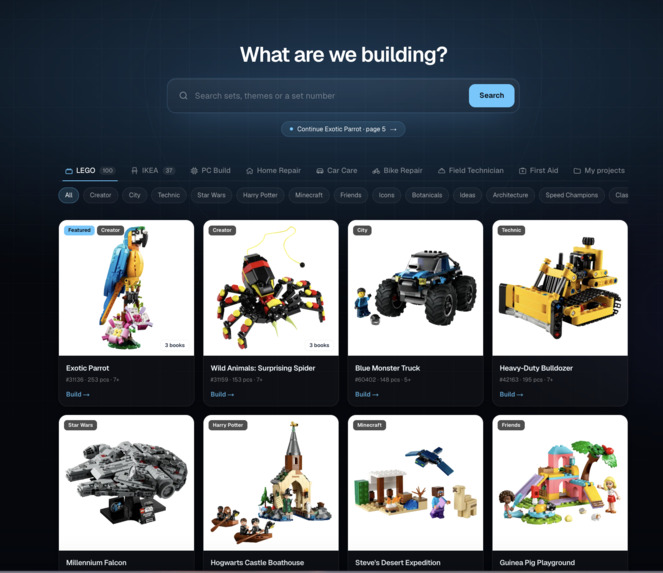
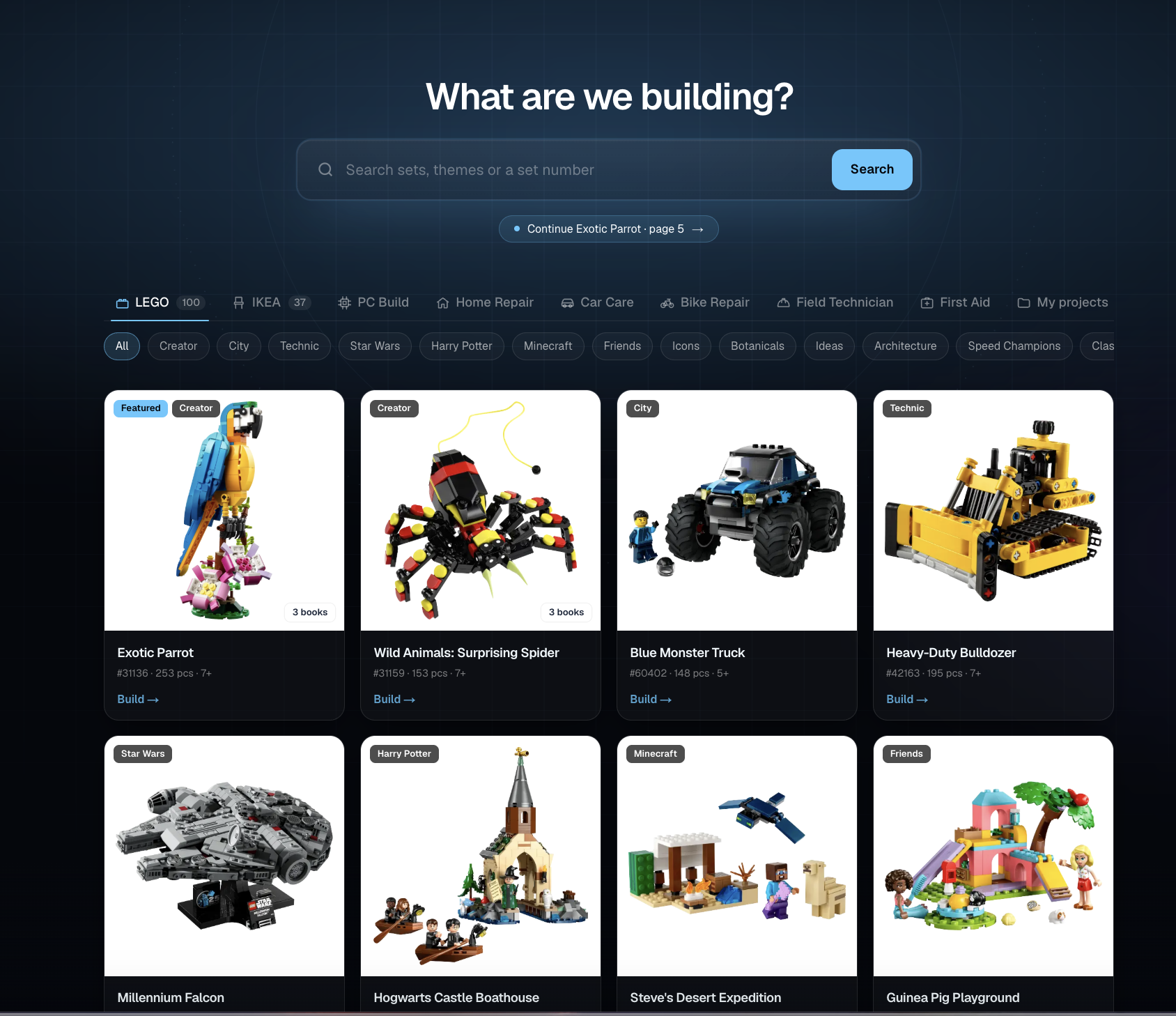
- Any manual. Search ~100 LEGO sets or ~37 IKEA products, or upload any PDF. Claude reads it into steps, parts and warnings.
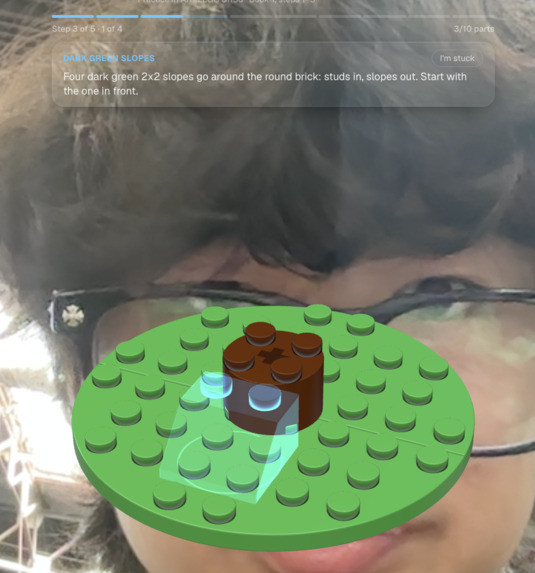
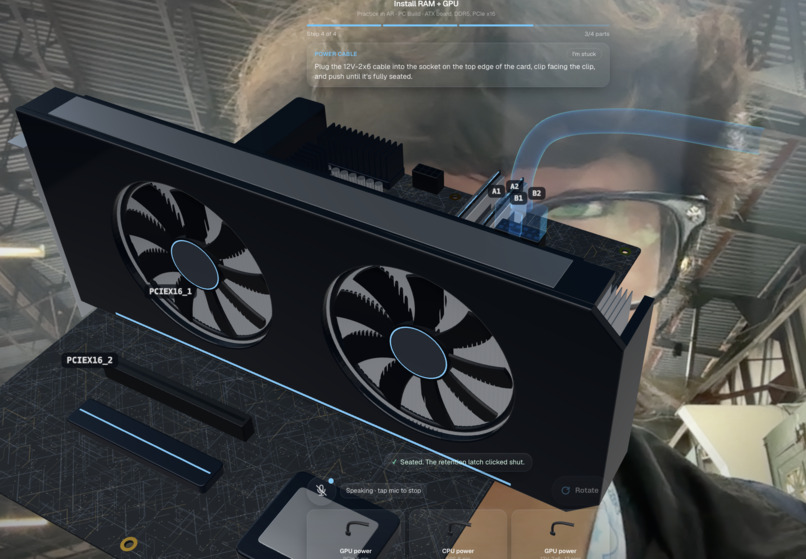
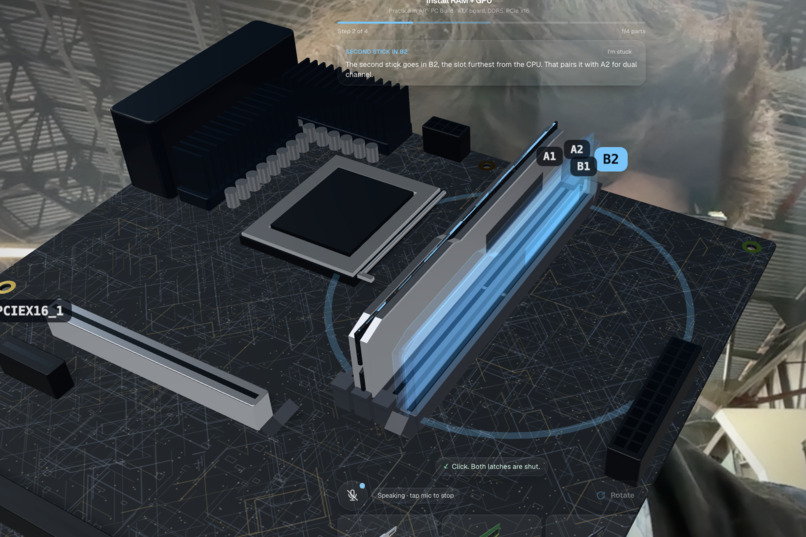
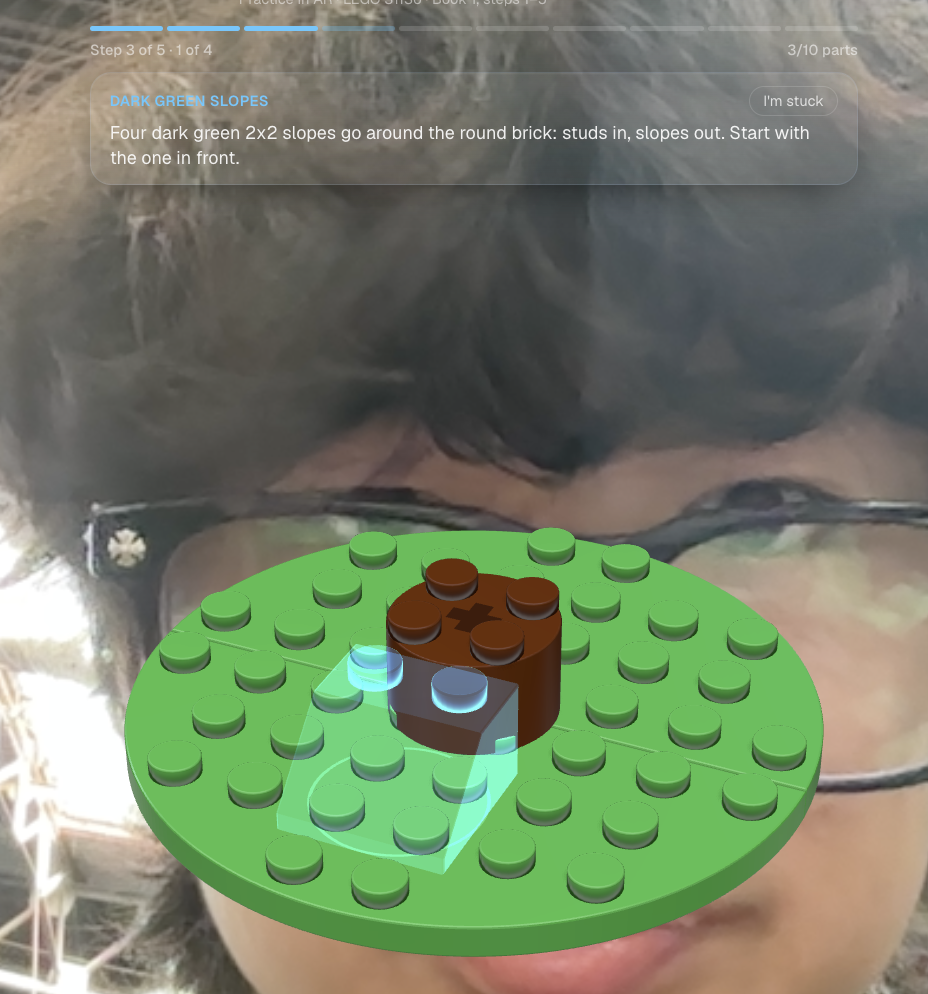
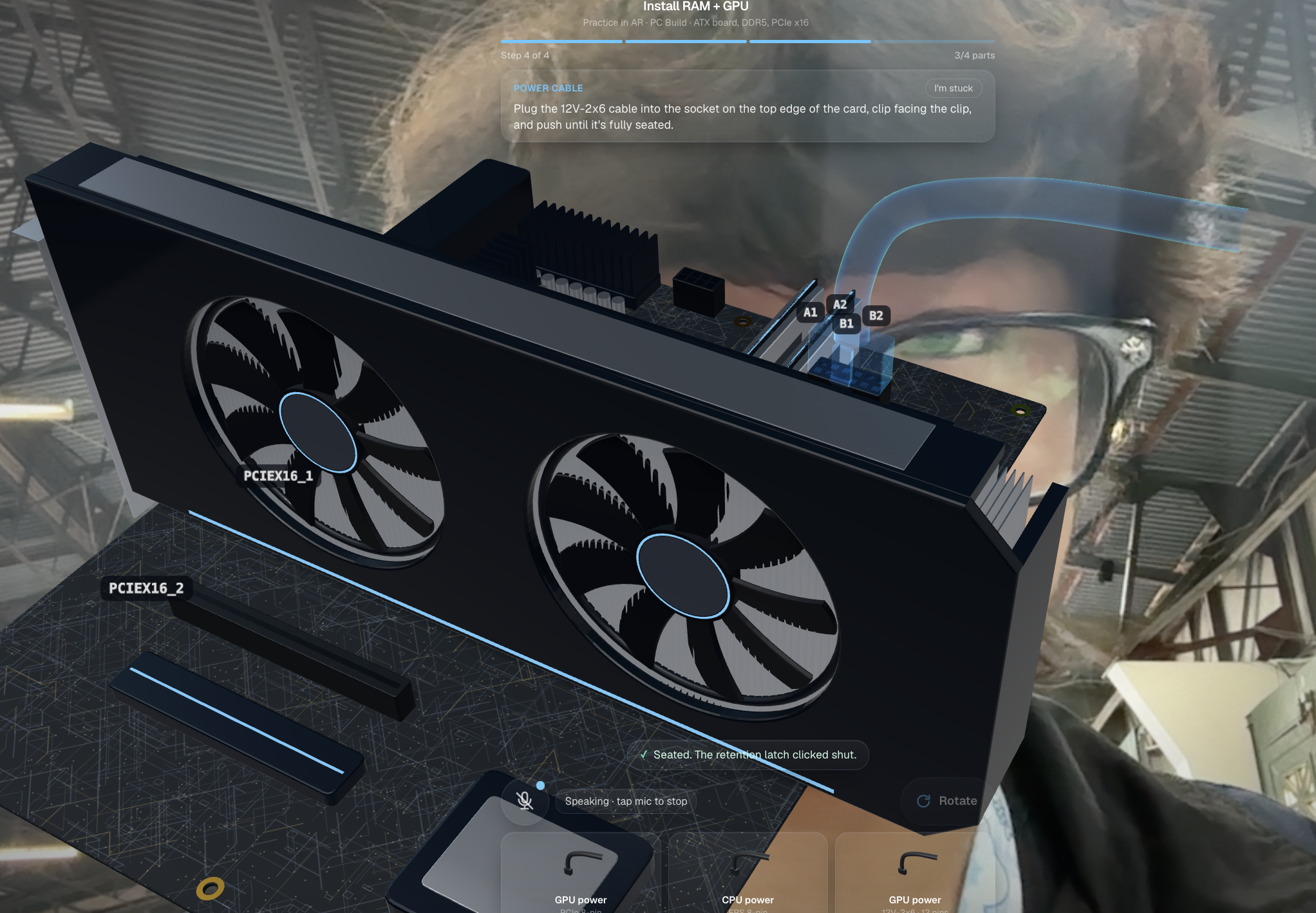
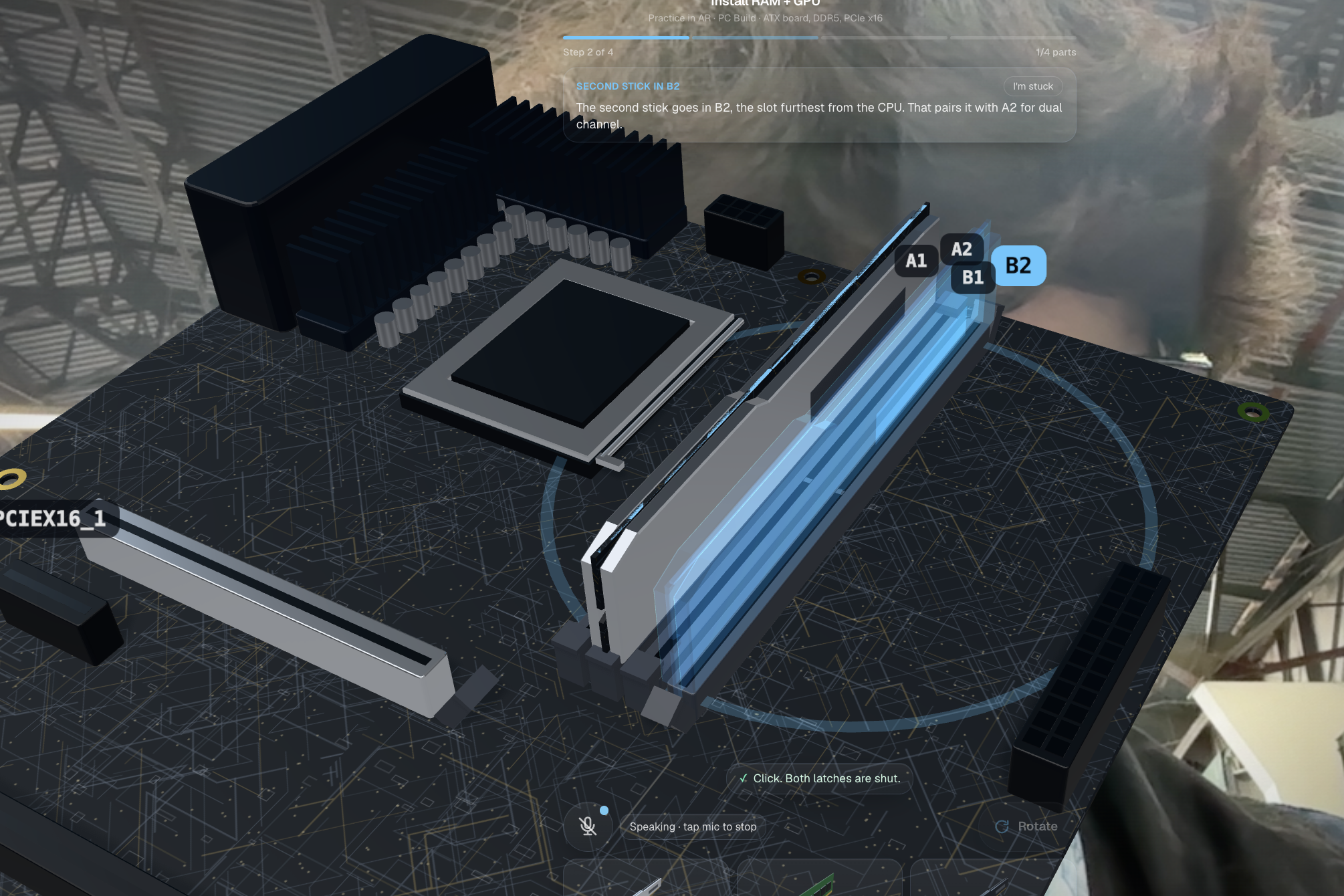
- AR placement guide. It boxes the piece you need on your table and draws an arrow to where it goes on your real build. When it's unsure, it turns amber and lets you tap to correct it.
- Check build. Say "is this right?" and it compares your build to the manual's picture for that step, says what's wrong, and marks the mistake on the live camera. It tells lookalike parts apart using visual descriptions of each piece.
- Auto Mode. It notices when your build changes and then holds still, checks it automatically, and moves on. You can set it to Careful, Normal or Fast.
- Knows where you are. It works out which step you're on and jumps there.
- Fully voice-driven. "Next", "go to step 8" and "I finished step 7" act instantly. Questions get a spoken answer in about a second, and "I'm stuck" breaks the step into smaller actions.
How we built it
Frontend (one website for phone and laptop, no app store)
- Next.js 16, React 19, TypeScript, Tailwind
- three.js via react-three-fiber for holograms, cut from the manual's parts box at true relative scale; Motion for animation
- pdf.js renders manual pages in the browser, loading only the byte ranges it needs; library and progress live in IndexedDB
AI (Claude Sonnet 5.5)
/api/extractreads a manual page into steps, parts, warnings and picture boxes/api/checkcompares the camera frame to the expected and previous step pictures and returns step_complete, confidence and issues with boxes; a check passes only at confidence >= 0.7/api/locate,/api/ar-guideand/api/where-am-iground parts, placement and current step in the live frame/api/assiststreams spoken answers plus an action (next, back, go to step, break into substeps)- Anthropic SDK, with OpenRouter as a fallback
Voice (Cartesia + Azure AI Speech)
- Azure AI Speech does speech-to-text in the browser using short-lived tokens, so the key never reaches the client
- Cartesia Sonic (sonic-3.6) is the voice, streamed sentence by sentence while Claude is still writing, with the next sentence's audio fetched one ahead so voices never overlap
- An in-code command matcher handles navigation instantly with no model call
Runs on Azure
- Production runs on Azure Container Apps (always-on replica) with keys stored as Azure secrets
- Every merge to main builds a container on GitHub Actions, pushes it to Azure Container Registry, and deploys in about 3 minutes. GitHub signs into Azure with OIDC as a managed identity scoped to one resource group, so no stored passwords. Vercel is a backup.
- Azure Application Insights measures every request in production. Median timings: speech token 19 ms, Cartesia first audio 0.22 s, Claude first word 1.4 s, a full spoken answer from our server about 1.1 s
Speed
- The demo manual (LEGO 31136 Exotic Parrot, 68 pages, 122 steps) is read ahead of time, so it opens in ~0.4 s with no PDF download and no AI calls
Challenges we ran into
- AR on the real world. The manual, the camera photo and the on-screen video each use different coordinates, and a confident wrong box is worse than none. We mapped between all three and made the guide stay quiet, or turn amber, when unsure.
- Two voices at once. Too many simultaneous voice requests made a second voice cut in mid-answer. We now fetch audio one sentence ahead and never switch voices.
- Slow manuals. LEGO PDFs are around 20 MB. Routing them through our server and loading only the pages needed cut opening time from up to 130 s to about 15 s.
- Phones freezing. Background work dropped phones to 13 fps. Moving image processing off the main thread brought it back to 53–60 fps.
- Repeating step numbers. Sub-builds restart at step 1, so we track steps by their order in the book, not their printed number.
- Deploying under a student account. Our Azure for Students subscription couldn't build images in the registry or create service principals, so we build on GitHub Actions and sign in with a managed identity over OIDC.
Accomplishments that we're proud of
- It works with any picture-based manual: any LEGO set, any IKEA product, any PDF.
- AR guidance and mistake boxes land on the real build, not just on a picture.
- Checks are grounded in the manual's own picture, so it can point at the exact wrong piece and tell lookalikes apart.
- You can run a whole build by voice, or let Auto Mode run it, without touching the screen.
- It's in production on Azure with auto-deploy and live performance monitoring, not just a laptop demo.
What we learned
- Comparing against the manual's own picture works far better than asking a model to work out the build from scratch. Grounding beats reasoning.
- An AI that says "I'm not sure" is more useful than one that's confidently wrong, especially when it's drawing on the real world.
- Speed is a design problem. Streaming speech sentence by sentence, skipping the model for simple commands, and sensing motion on the phone made it feel responsive.
What's next for BuildSight
- Real work instructions: assembly-line work instructions, kitting sheets, equipment installs and maintenance procedures are mostly pictures too. BuildSight's loop applies to all of them: read the instructions, watch the work, catch the mistake at the step it happens.
- A record of the work: a photo saved at each check becomes a step-by-step record of how the job was done, which quality teams collect by hand today.
Built With
- anthropic
- augmented-reality
- azure
- azure-ai-speech
- azure-application-insights
- azure-container-apps
- cartesia
- claude
- claude-sonnet
- computer-vision
- getusermedia
- indexeddb
- motion
- next.js
- node.js
- openrouter
- pdf.js
- react
- react-three-fiber
- tailwindcss
- three.js
- typescript
- vercel
- vitest
- web-audio-api


Log in or sign up for Devpost to join the conversation.