-
-
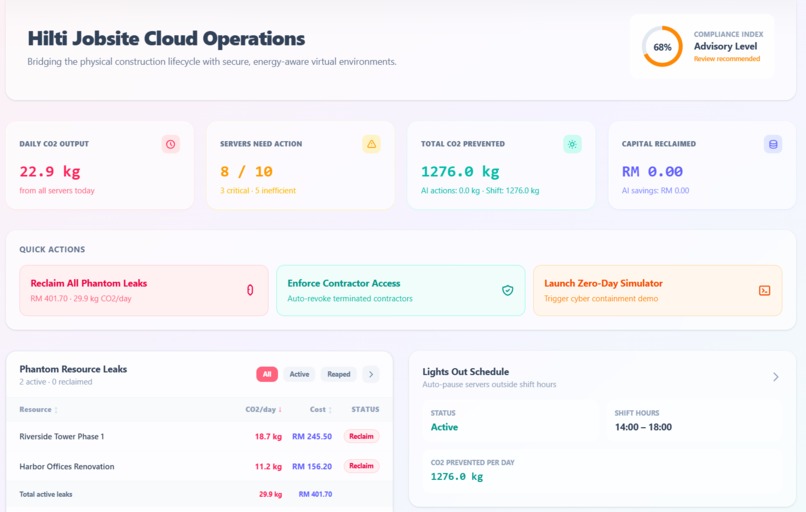
CENTRALIZED DASHBOARD
-
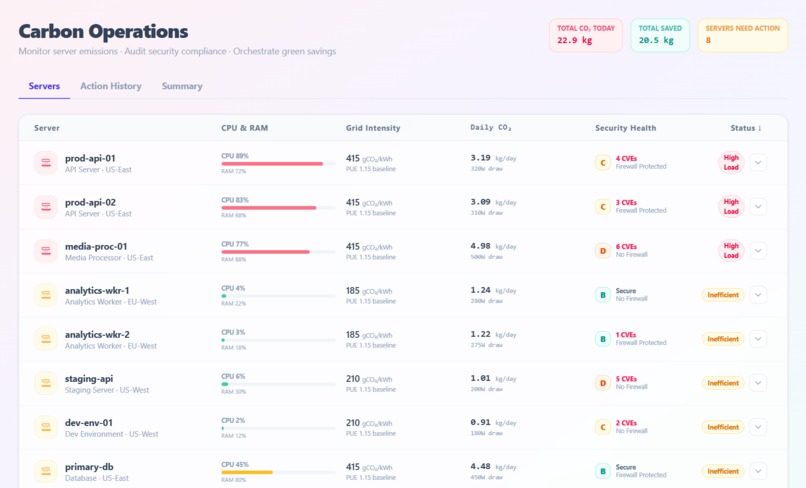
CARBON OPERATIONS
-
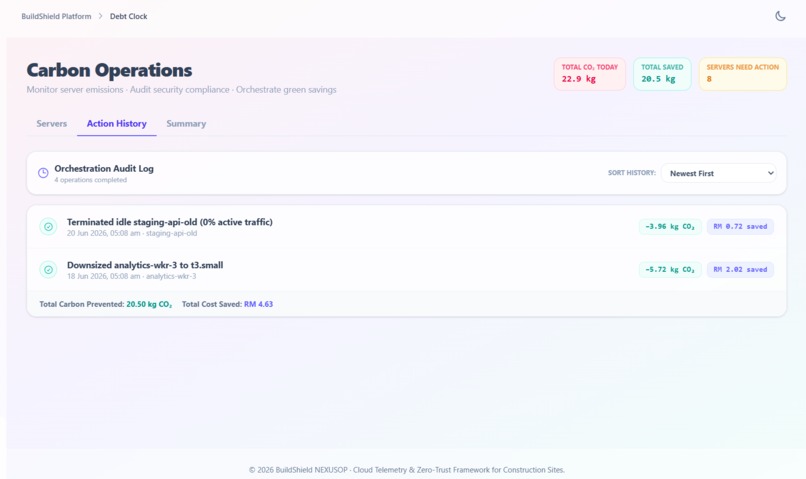
CARBON OPERATIONS
-
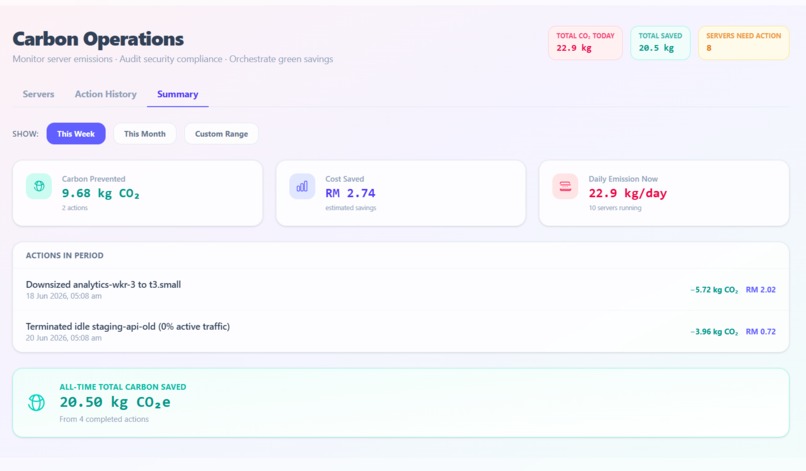
CARBON OPERATIONS
-
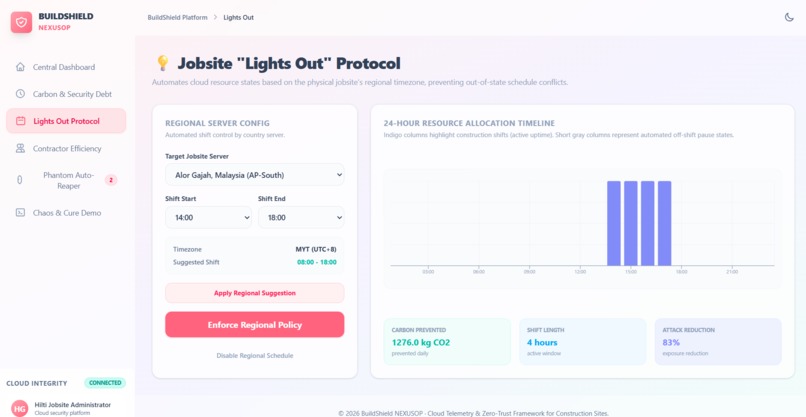
LIGHTS OUT PROTOCOL
-
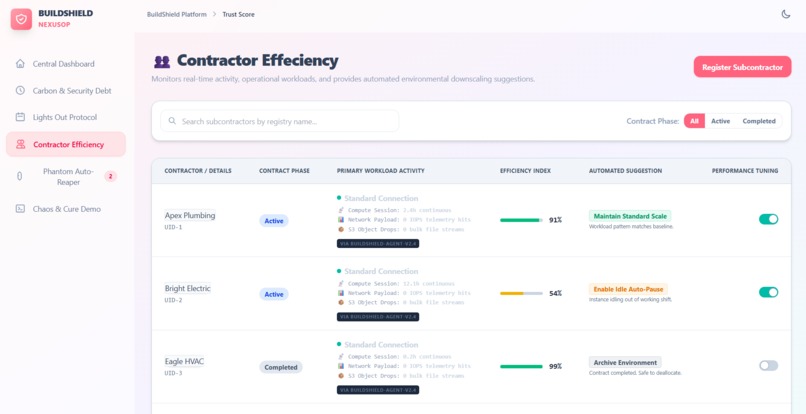
CONTRACTOR EFFICIENCY
-
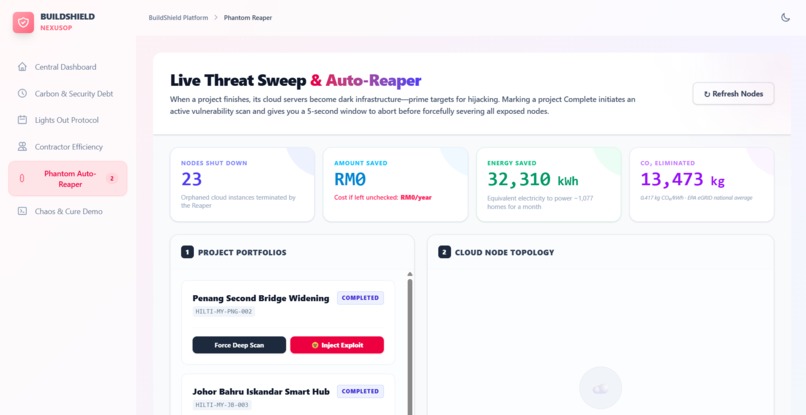
PHANTOM AUTO-REAPER(VAMPIRE DETECTOR)
-
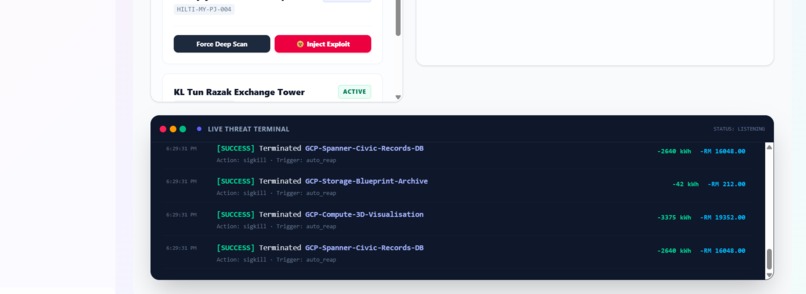
PHANTOM AUTO-REAPER
-
CHAOS AND CURE AI DEMO ENGINE
BuildShield AI — Project Documentation
Inspiration
Cloud infrastructure is quietly bleeding organisations dry — not through dramatic breaches, but through silent waste, zombie resources, and mounting carbon debt that no one notices until it's too late.
We were inspired by the reality that most cloud teams spend more time reacting than acting. An idle staging server burns electricity and emits CO₂ at 3 AM. A rogue cryptominer runs undetected for weeks, costing thousands. A legitimate incident takes 47 minutes on average to remediate — a window in which real financial damage accumulates every second.
We asked: what if the cloud could defend, clean, and heal itself in real time, with zero human lag?
BuildShield AI is our answer.
What It Does
BuildShield AI is a three-pillar intelligent cloud security and sustainability platform built for enterprise operations teams.
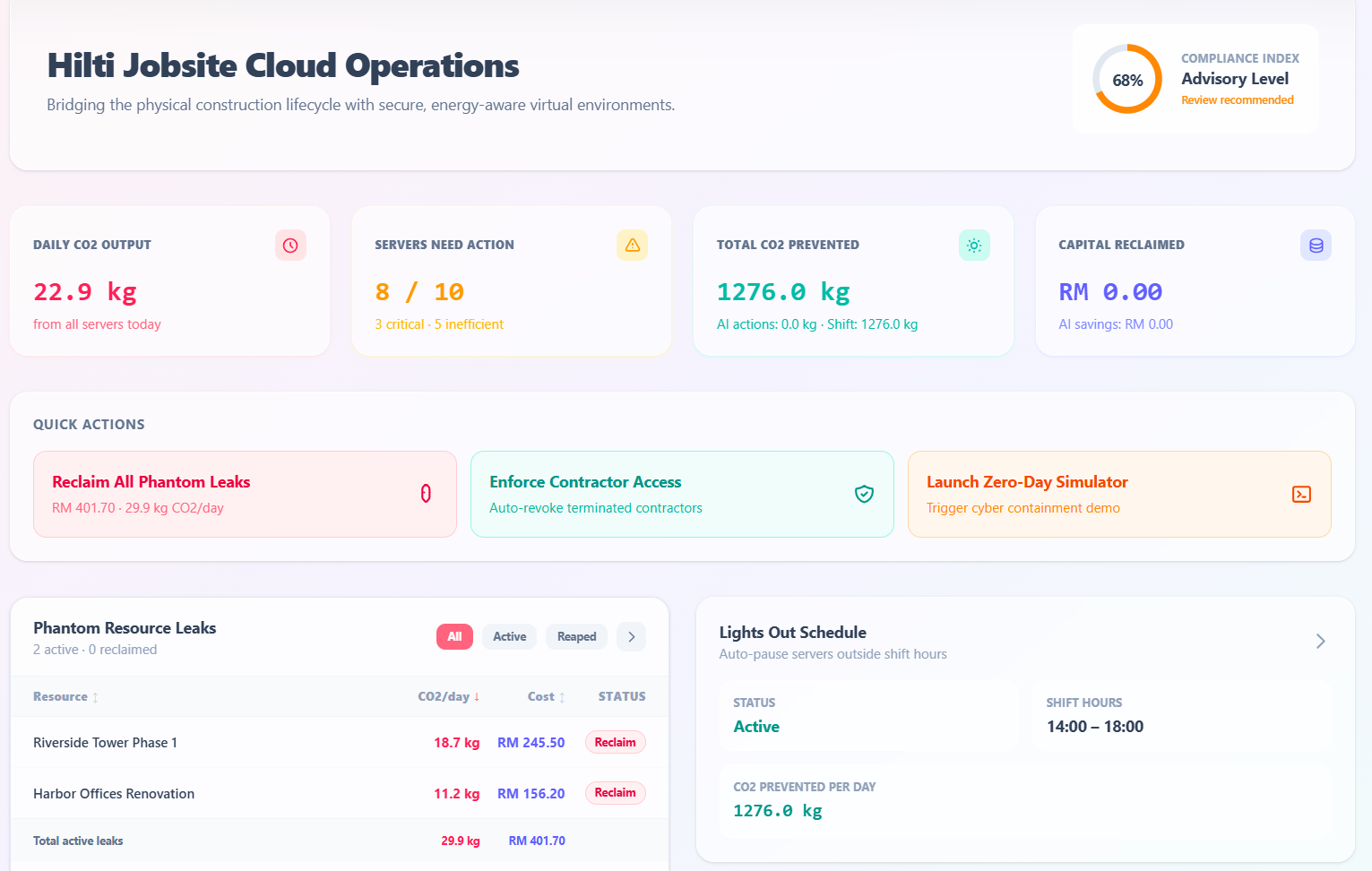
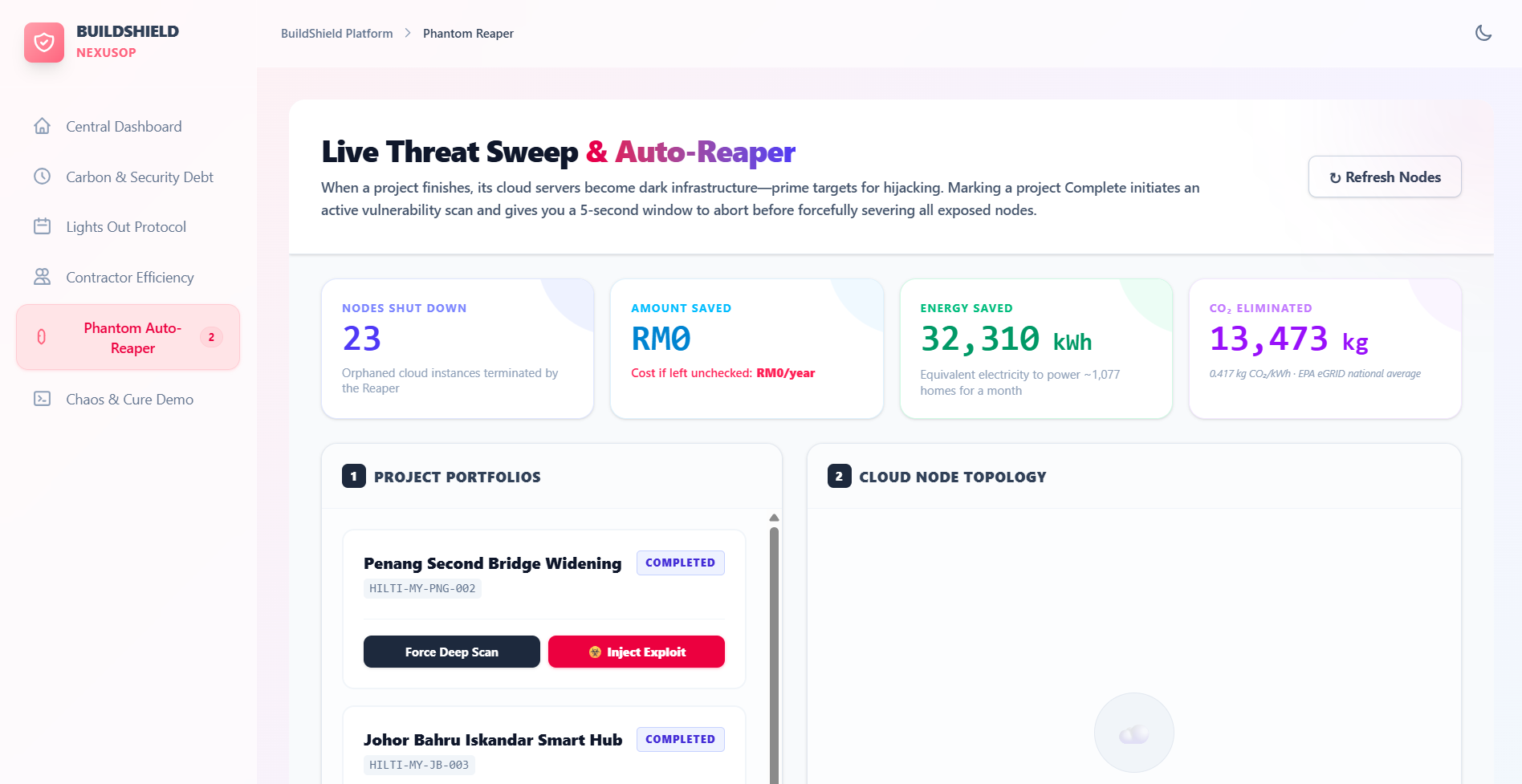
Pillar 1 — Phantom Auto-Reaper
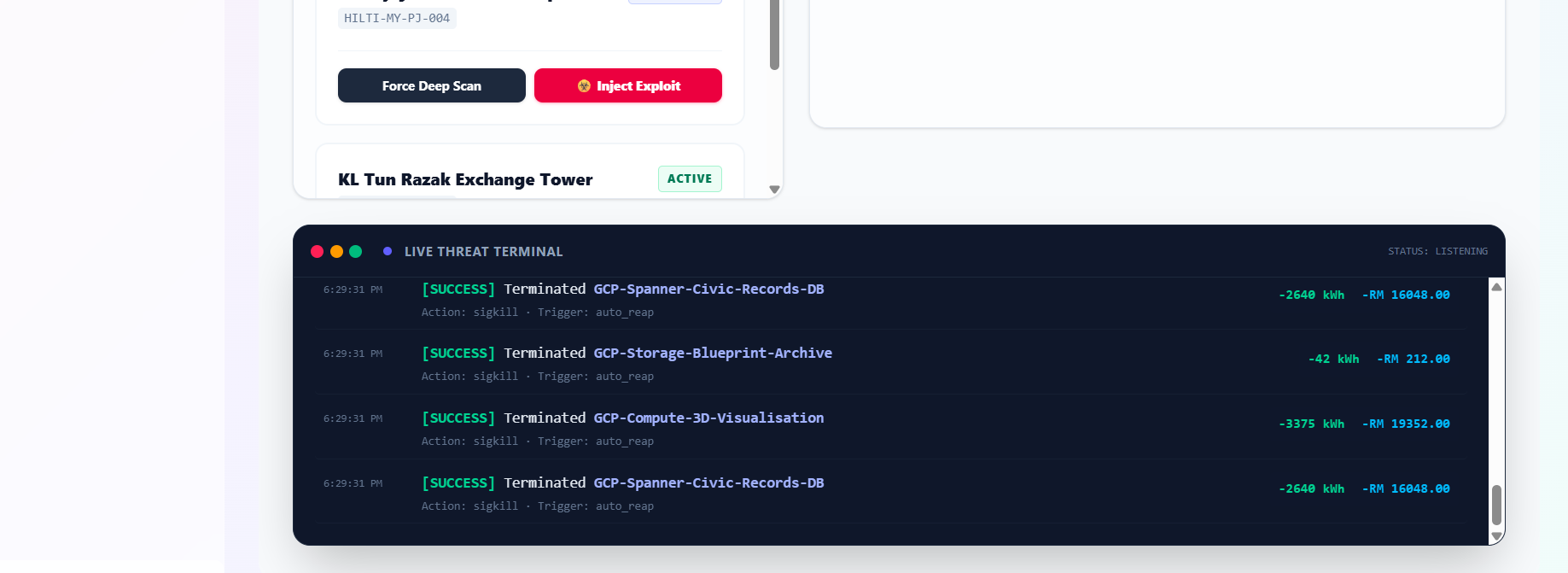
A live cloud resource governance engine connected to Firebase Firestore in real time.
- Ingests all cloud projects and their resources (VMs, containers, databases, CDN nodes, staging environments) from a central registry
- Visualises every resource with its live status:
ACTIVE,IDLE,UNDER ATTACK, orTERMINATED - Live Threat Sweep — a dramatic 5-second countdown during which each resource is dynamically tagged with plain-English vulnerability warnings (e.g.
Critical: Unpatched CVE-2023-4863,Warning: Open Port 22 (0.0.0.0/0),Threat: Suspicious Outbound Traffic) - After the countdown, executes a batch termination of all idle or compromised resources and writes the full audit trail to Firestore
- Every termination calculates and accumulates real financial savings (MYR/USD), energy savings (kWh), and carbon savings (kg CO₂) using EPA eGRID national grid averages (0.417 kg CO₂/kWh)
- An animated slot-machine counter shows savings climbing in real time after each sweep
- Inject Zero-Day Exploit button simulates a live attack, turning targeted resources red with blinking critical alerts — judges can watch the Reaper detect and eliminate the threat live
- A Projected 1-Year Burn metric shows how much financial disaster was averted if the rogue resource had been left running
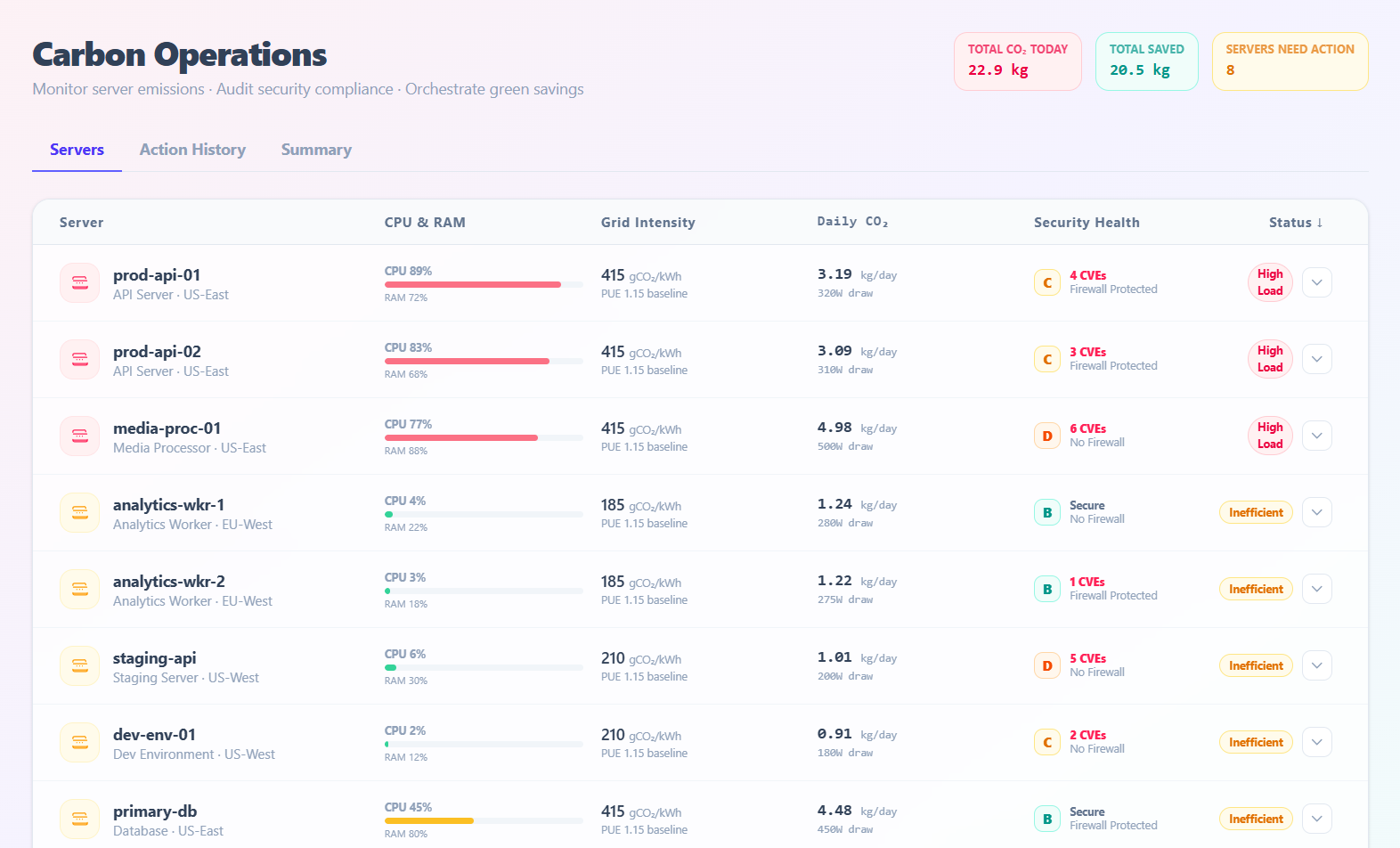
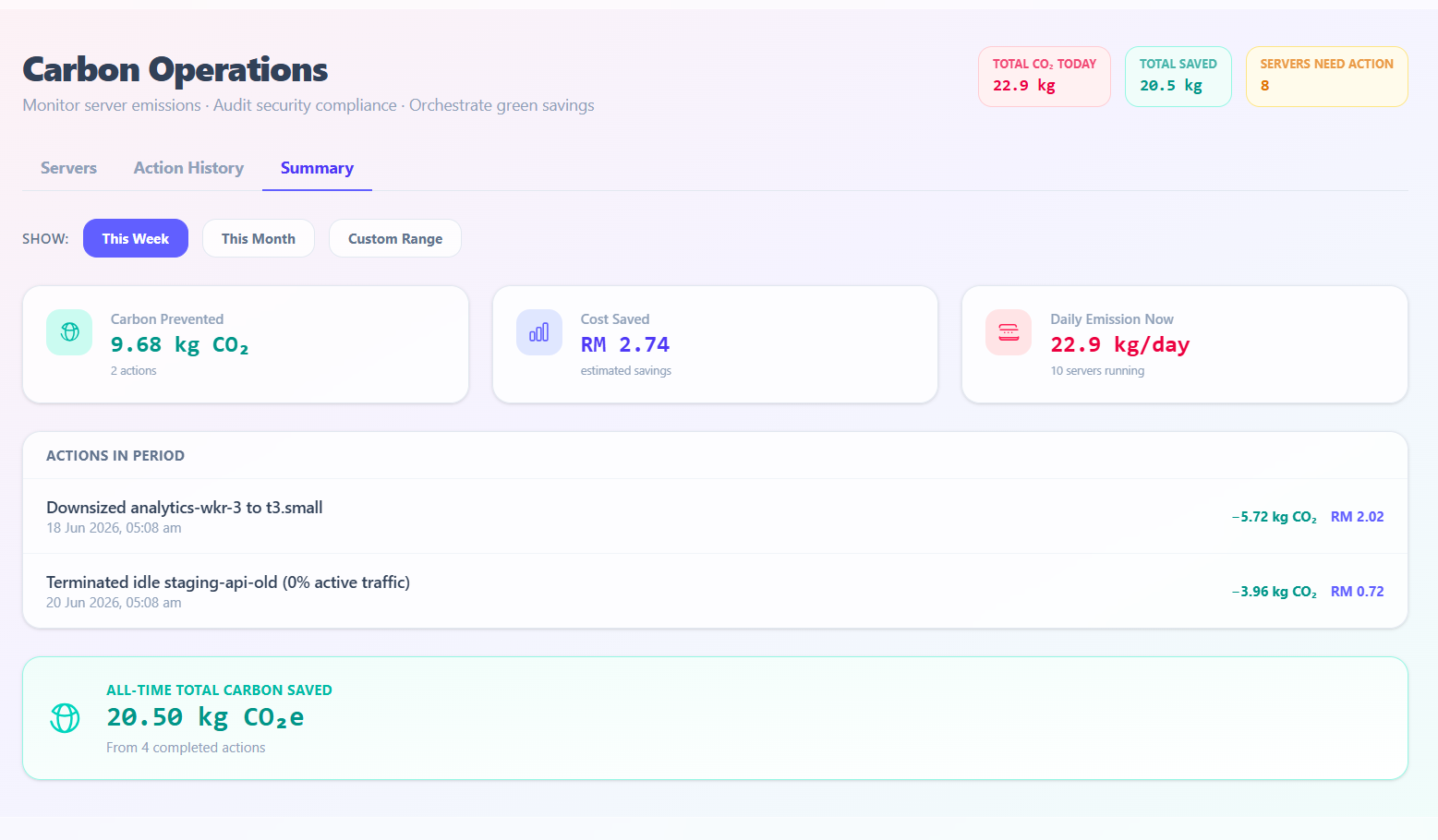
Pillar 2 — Carbon Operations Centre
A full sustainability intelligence dashboard powered by Gemini AI, with a seamless local fallback.
- Monitors 10 real production servers across US-East, EU-West, EU-Central, US-West, and AP-Southeast regions — each with live CPU load, RAM usage, grid carbon intensity (gCO₂e/kWh), power draw (W), CVE count, firewall status, and security grade (A–D)
- Calculates daily CO₂ emissions per server using the formula:
Power (W) × 24h × Grid Intensity ÷ 1,000,000 = kg CO₂/day
- Expanding any server row calls a Gemini-powered backend for a deep AI security and carbon audit. If the backend is unavailable, a rule-based local fallback generates a recommendation instantly — zero downtime
- Each AI recommendation includes:
- Why the server is flagging
- A specific remediation action (e.g. "Migrate analytics-wkr-1 to EU-West low-carbon region")
- Exact carbon saved (kg/day) and cost saved (USD/day) if the action is applied
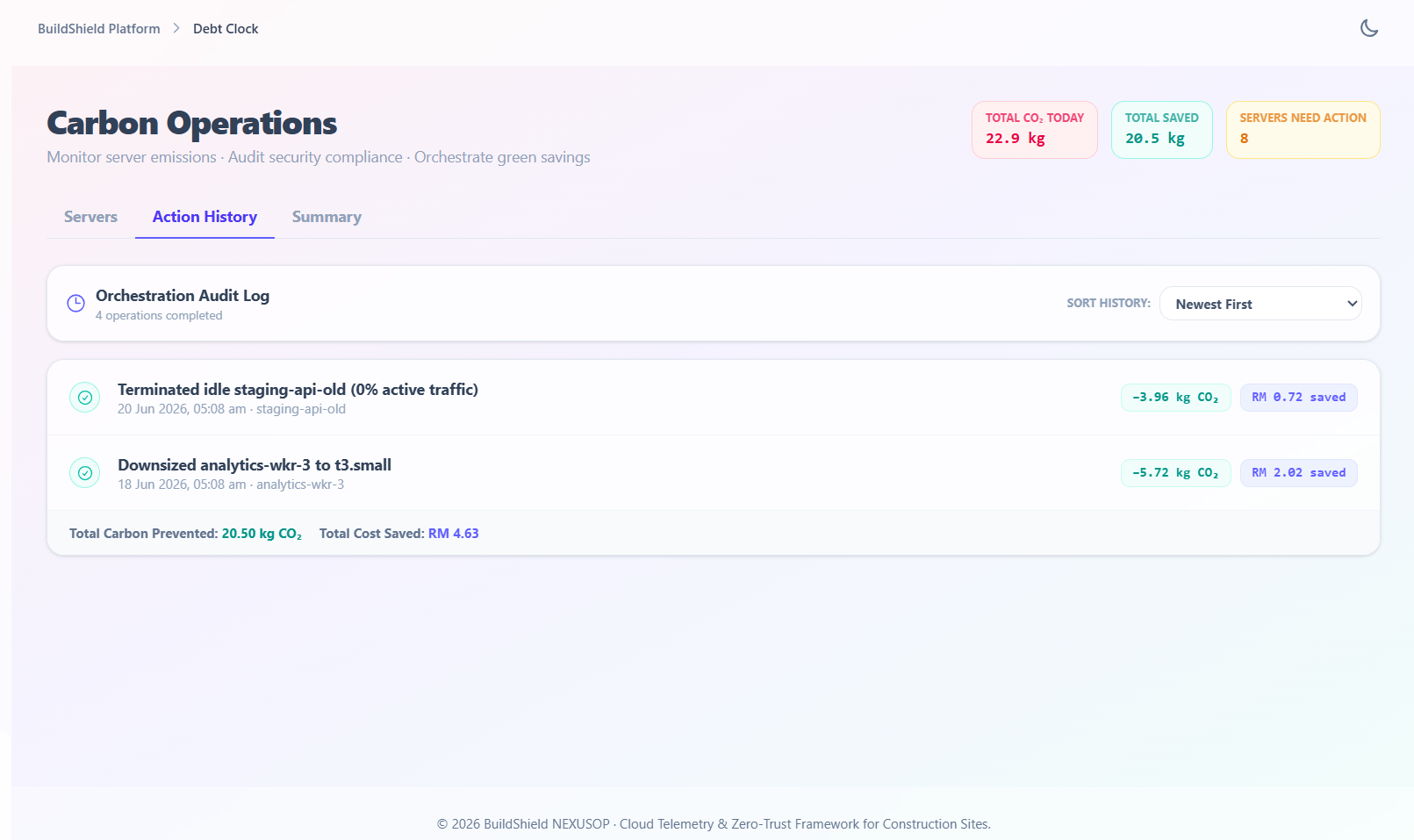
- Clicking Apply Action marks the server as healthy (CVEs cleared, firewall activated, grade set to A) and logs the action to a persistent Action History tab — sortable by recency, carbon impact, or cost savings
- The Summary tab aggregates savings across the last 7 days, this month, or a custom date range
- All server state and history are persisted to
localStorage, surviving page refreshes
Methodology: Carbon savings calculated at 0.417 kg CO₂ per kWh based on EPA eGRID national averages.
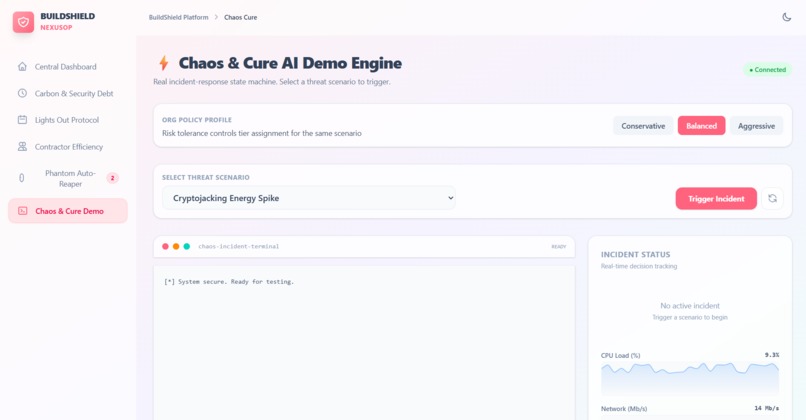
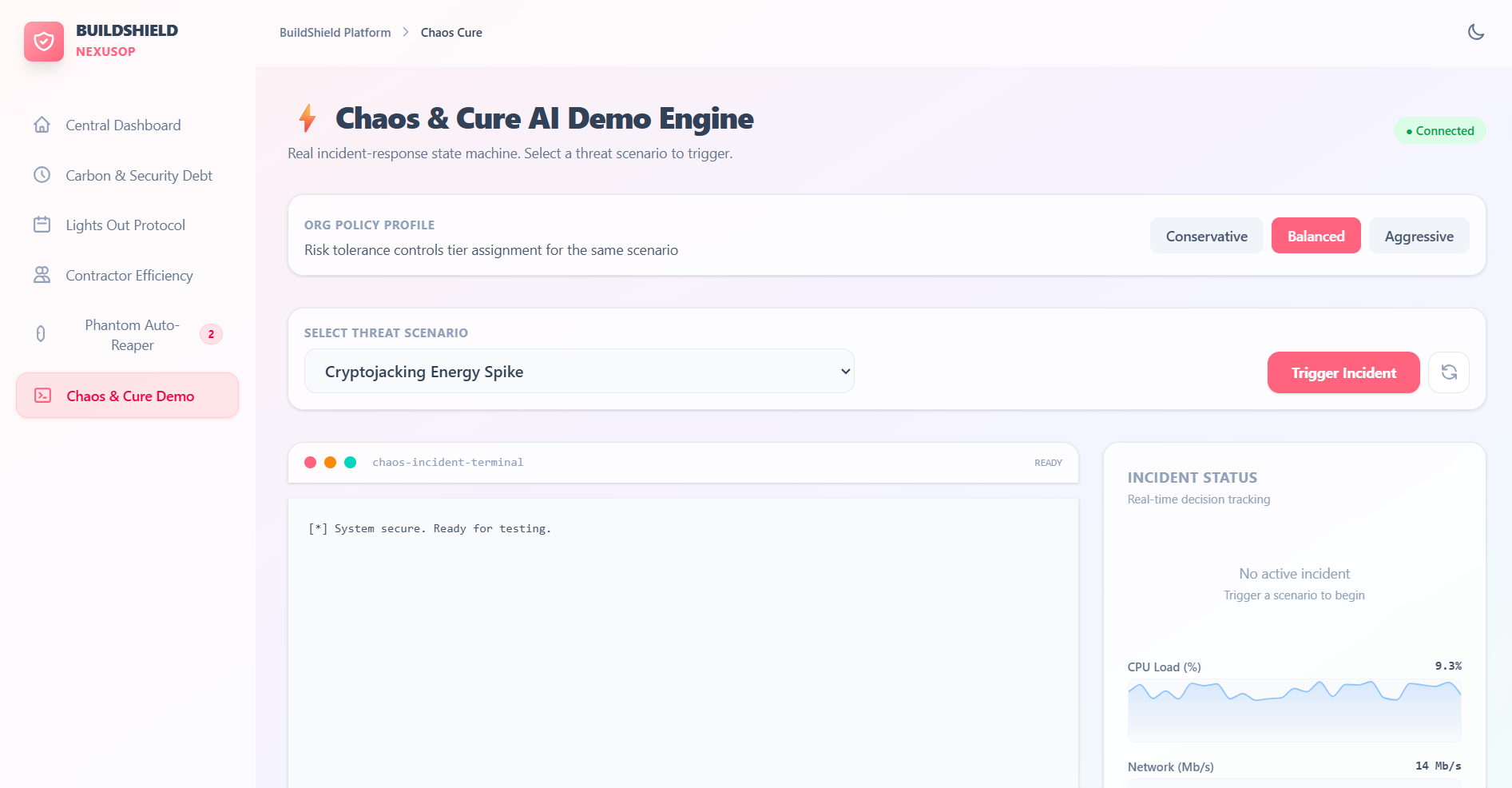
Pillar 3 — Chaos & Cure AI Demo Engine
A state-machine incident-response simulator, fully self-contained and deployable on Vercel with zero backend.
12 real-world threat scenarios, including:
| Scenario | CVE Reference |
|---|---|
| Cryptojacking Energy Spike | — |
| Mass Data Exfiltration | — |
| DDoS Botnet Attack | — |
| Ransomware Staging Indicators | — |
| Log4Shell RCE | CVE-2021-44228 |
| EternalBlue / WannaCry Lateral Movement | CVE-2017-0144 |
| Palo Alto PAN-OS Zero-Day | CVE-2024-3400 |
| + 5 additional scenarios | — |
Org Policy Profiles:
Conservative— escalates all actions for human sign-offBalanced— escalates high-risk actions onlyAggressive— auto-resolves without human intervention
Incident state machine flow:
incident:started
  → Cost-of-inaction counter begins ($0.00 → climbing)

incident:risk-assessed
  → AI confidence score (%)
  → Reversibility (%)
  → Blast radius (%)
  → Animated progress bars

incident:approval-needed  (Conservative / Balanced)
  → Human approves or denies the AI's proposed action live

incident:cure-executed  (Aggressive / after approval)
  → Remediation applied
  → Rollback available post-cure

reset
  → All state cleared, telemetry returns to healthy baseline
Live telemetry charts (CPU Load + Network I/O) are pre-populated with 30 rolling data points:
- During an active incident: CPU spikes to 75–97%, Network to 600–850 Mb/s
- After cure: both settle back to healthy baselines instantly
A dark terminal window, colour-coded by event type, logs every step in real time with timestamps.
Tech Stack
| Layer | Technology |
|---|---|
| Frontend | React 19, Vite 8, Tailwind CSS v4 |
| Backend | Node.js (Express) |
| Charts | Recharts (AreaChart, BarChart) |
| Database | Firebase Firestore (Phantom Reaper), localStorage (Carbon Ops) |
| AI | Google Gemini (@google/genai) via Express backend |
| Deployment | Vercel |
| State management | React hooks only — no Redux |
| Incident engine | Local useChaosSocket simulator — no WebSocket or backend required |
Challenges We Ran Into
1. Vercel 404 on deployment
The project is a React sub-app inside a monorepo root. We had to configure a root vercel.json and package.json with a vercel-build script pointing to hilti-siteguard/ to correctly serve dist/.
2. Vite stripping env variables in production
import.meta.env fallbacks were aggressively tree-shaken by Vite during the build, causing Firebase to receive undefined keys. Fixed by hardcoding the public Firebase config values directly.
3. Git merge conflicts across team branches
Three simultaneous branches were making conflicting edits to ChaosCurePage.jsx. Resolved using git rebase and manual conflict resolution while preserving each teammate's intended UI contributions.
4. Recharts graphs invisible
ResponsiveContainer with h-16 inside a bg-slate-50 container made chart curves invisible (white on white). Fixed with explicit pixel heights, a dark bg-slate-900 chart background, correct YAxis domains, and isAnimationActive={false} for live-streaming data.
5. Telemetry data shape mismatch
Our telemetry data used { t, cpu, net } keys but Recharts dataKey was pointing to "network". Unified to the teammate's { time, cpu, network } schema.
Accomplishments We're Proud Of
- Zero errors in production on Vercel — every feature works end-to-end, including the full Chaos & Cure incident state machine, telemetry charts, and Phantom Reaper Firebase integration
- Graceful AI degradation — a judge can click Expand on any server and get an actionable AI recommendation in under 2 seconds, every time, even with no backend
- Dramatic live demo — the 5-second threat sweep countdown, live vulnerability tags, animated savings counter, and projected 1-year burn make the technology feel urgent and real on stage
- 12 real CVE scenarios — every threat (Log4Shell, EternalBlue, MOVEit, PAN-OS) is a real-world incident that cost organisations millions; no placeholder data
- Unified design system — all three pillars work independently but share a common UI; judges navigate between them seamlessly in a single-page app with no loading friction
What We Learned
- Vercel + monorepo deployment requires explicit configuration — the default Vercel auto-detection fails for projects where the frontend lives in a subdirectory
- Vite's tree-shaking is more aggressive than expected — any
import.meta.envfallback that doesn't exist at build time is dropped entirely in production mode - Recharts needs explicit layout context —
ResponsiveContainerinherits dimensions from the parent DOM element; aheight: 0parent renders nothing, silently - State machine design for demos — a well-designed local simulator using
useRefandsetIntervalcan deliver an identical user experience to a live WebSocket server, with zero infrastructure - Team merge discipline — working on the same file across branches requires coordination based on intent, not just syntax
What's Next for BuildShield AI
- Real cloud provider integration — Connect directly to AWS CloudWatch, Azure Monitor, and GCP Cloud Monitoring APIs to pull live resource telemetry instead of simulated data
- Scheduled Auto-Reap policies — Let operators define rules such as "terminate any resource idle for more than 72 hours" that run automatically on a cron schedule
- Gemini Live threat narration — Use Gemini's streaming API to narrate the Chaos & Cure incident response in plain English, live, as it happens
- Multi-tenant organisation support — Allow multiple teams to manage their own projects and resources within isolated workspaces
- Carbon Scope 3 reporting — Extend carbon calculations to include indirect emissions from CDN traffic, SaaS API calls, and developer device usage
- Regulatory compliance dashboard — Map server configurations to ISO 27001, NIST CSF, and EU Cyber Resilience Act requirements and generate a one-click audit PDF
BuildShield AI — Cavan Team · Hackathon Submission
Built With
- firebase
- javascript
- node.js
- react
- tailwindcss
- typescript

Log in or sign up for Devpost to join the conversation.