-
-
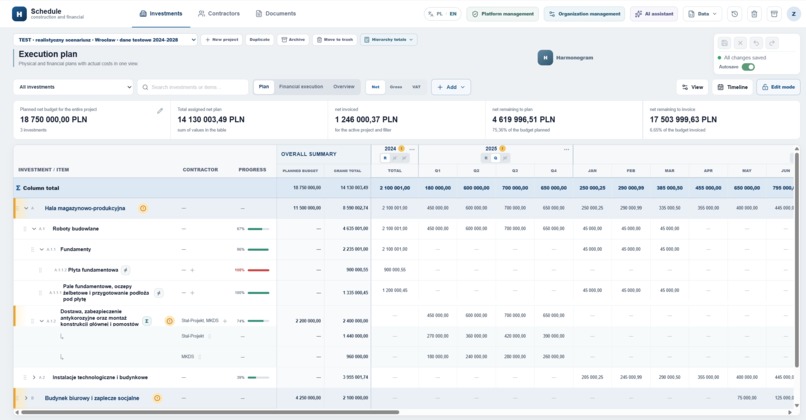
Schedule view
Inspiration
From no coding experience to a deployed construction-planning application
The project started because my husband had a real problem at work, and because both of us badly underestimated what solving it would involve.
He works with complex construction investments. Their material and financial schedules lived in large Excel files containing projects, investments, work items, contractors, annual and monthly plans, contracts, invoices and actual costs.
Excel could hold all of it. Keeping it coherent was another matter.
The same information had to answer different questions. A manager needed to understand how an investment was progressing. Someone else needed to see which contractor was responsible for which scope. Annual plans did not always match the sum of monthly plans, and that difference could be meaningful. Contracts, invoices and payments described different stages of the same financial obligation, so adding them together would count the same money several times.
The schedule also needed to stop living as a file on one computer. People involved in a project may need to check the current state from the office, another device or a construction site. Authorized users should see the same live data without waiting for somebody to send the latest spreadsheet—and without first deciding which attachment called “final” is actually final.
The available software did not reflect the way my husband worked. Some tools were too generic, some assumed a different financial model, and others expected the workflow to adapt to the software.
A few days earlier, I had started experimenting with Codex. I had been interested in AI for a long time and wanted to see what an AI coding agent could actually do. My experiments were small and largely harmless: simple tasks, minor tools and attempts to understand its capabilities. I was poking at a new and unusually powerful machine to see what happened.
My husband knew about those experiments. From his perspective, I had access to something that could write code, while he needed what sounded like a relatively simple improvement over Excel.
So he asked a deceptively reasonable question:
Could you build something better?
He was under the rather optimistic impression that “a better Excel” would be straightforward.
The slight flaw in this plan was that I had no coding experience.
This is the first web application I have ever built and the first software project I have ever undertaken. When I started, I could not read code, did not understand how web applications were structured, and had no idea how many things could go wrong underneath a feature that looked perfectly fine on the screen.
I had only just discovered that Codex could build things. Neither of us yet understood how much “a better Excel” would eventually contain.
Under normal circumstances, my lack of technical skills would have ended the idea at that point. I understood the problem and could imagine how the product should work, but I had no practical way to turn either of those things into software.
Codex changed that equation. It provided the implementation ability I did not have, which meant I could begin with the problem itself instead of spending years acquiring the technical skills required to build a first version.
What it does
The application is a multi-organization workspace for planning and monitoring the material and financial progress of construction investments.
Its central principle is simple: there should be one underlying set of data, but more than one useful way to look at it.
Two perspectives on the same project
The investment view presents the project as a hierarchy:
project → investment → group → work item
The contractor view reorganizes the same records around the companies carrying out the work:
contractor → investment → work item
A project can contain multiple investments and a multi-level hierarchy of work items. Users can create, edit, reorder, move, archive and restore elements. Entire branches can be moved while the system preserves or deliberately relocates the related data.
The contractor view also works as a practical directory. A company can remain available before it is assigned to a construction scope, which is useful when several contractors are being considered or kept for future work. Clicking a contractor reveals legal and tax information, address, contact details and notes.
Planning and financial control
The schedule supports independent annual, quarterly and monthly planning.
A yearly plan is not silently overwritten when monthly values change. The discrepancy remains visible because it may reflect different revisions, meetings or stages of planning rather than an error.
Projects can use hierarchical aggregation, where parent rows are calculated from their descendants, or a manual working mode in which every level retains its own values. The manual mode is especially useful while migrating irregular spreadsheets, and switching modes does not destroy the inactive data.
The financial model distinguishes:
planned, committed, contracted, invoiced and paid.
Contracts, invoices and payments describe successive stages of an obligation. If a contract for 100,000 is followed by a related invoice for 70,000 and a payment for 50,000, the automatic committed-funds calculation does not report 220,000. It follows the relationships and counts the covered obligation once. A manual mode remains available when the business needs independently entered values.
Contracts can be distributed across scopes, work items and periods. Invoices may contain line items and allocations. Payments can be linked and distributed as well. Contractor plan shares remain reference allocations rather than a second total that inflates the work-item plan.
The application also supports project, investment, work-item and yearly budgets; net, gross and VAT views; progress and variance indicators; search; configurable columns; filters; and adjustable timeline detail.
Flexible ways of working
I wanted the application to accommodate different working styles instead of imposing one supposedly perfect method.
A user who prefers direct control can type values into the schedule, use manual calculations, enter financial records without AI and save deliberately. Someone who wants to reduce repetitive work can use autosave, hierarchical aggregation, automatic committed-funds logic, OCR, document parsing and AI-assisted extraction.
Structured contracts, invoices and payments are available when useful, but the application does not require somebody to recreate an entire office bureaucracy before entering a number.
Users can personalize visible columns, filters, financial views, timeline detail, calculation mode and save behaviour. The interface is available in Polish and English.
Documents and records
The application is also a document workspace.
Contracts, invoices, payments and manual financial records can exist as structured entries without an attachment. When the original evidence should be retained, the related file can be stored in private, organization-scoped storage. Contracts, invoices, payment confirmations and other attachments remain connected to the records they explain.
PDFs are parsed for embedded text. Scanned PDFs and images can be processed with Polish and English OCR after safety validation. GPT-5.6 may help interpret the extracted content and prepare structured data, but the user reviews the result before it enters the project.
Excel import and export
Excel remained part of the real workflow, so import and export could not be decorative extras.
The application exports structured workbooks containing selected project, financial, contractor and document data. Native exports preserve technical identifiers and hierarchy metadata so they can be imported again without reconstructing the structure from appearance alone.
Unfamiliar workbooks are much harder.
The first importer used simple column mapping. It worked only when a spreadsheet already behaved like a clean database table. Real construction schedules used merged cells, indentation, numbering, formatting, repeated headers, totals and values placed in rows without obvious names.
The importer therefore evolved into a two-stage system. GPT-5.6 analyses the workbook and prepares an explicit mapping plan, including row types and precise source cells or ranges. A deterministic XLSX parser then reads the values from those cells.
The division of labour is deliberate: GPT-5.6 works out what the sheet appears to mean; the parser reads the numbers.
The user can review and correct the proposed mapping through conversation, resume the session later and roll the import back. The system retains source coordinates, decisions and per-record results. Uploaded workbooks are also checked for dangerous dimensions, decompression ratios and other resource-exhaustion patterns.
In one real-world validation, the importer saved 1,219 records with zero failed records and no duplicated source keys. This is evidence of one demanding successful import, not a promise that every spreadsheet ever created will reconstruct itself without questions.
Saving, history and collaboration
The application uses one shared source of project data rather than files exchanged between users.
Ordinary edits enter a visible change buffer. Users can save manually or enable autosave. Related operations are ordered, and a save is divided into individually tracked steps. Successful independent operations remain saved; failed ones stay visible with their errors instead of disappearing behind a false success message.
Completed saves create reversible batches. Users can undo or redo them when later changes have not made reversal unsafe. Records are versioned, so simultaneous edits to the same financial cell produce a conflict instead of silently overwriting one user’s work.
Supabase Realtime synchronizes project changes and presence information. A cell being edited by another person can show their name. Incoming updates do not replace local unsaved work.
The application records who changed what, when it happened and whether the source was the interface, an import, AI or a system process. Archive, trash, restoration and retention mechanisms keep everyday views usable without immediately destroying recoverable data.
Organization isolation and access control
The application supports multiple organizations whose data must remain separated.
The organization selected in the interface is not the security boundary. Membership and roles are checked by server-side operations. PostgreSQL Row Level Security controls access to business tables. Private Storage policies use organization-scoped paths, and composite foreign-key constraints prevent records from being connected across organizations or projects.
The system supports administrators, editors and read-only users, with additional permissions for import, export and AI features.
CI reconstructs the database from every migration and verifies schema functions, RLS, RPC permissions, Storage policies and maintenance jobs. The architecture provides strong organization-level isolation, although broader deployed end-to-end and adversarial testing remains part of future hardening.
The AI assistant
The organization-configured assistant can inspect authorized project data, prepare summaries and charts, identify unassigned contractors, search records and help interpret inconsistencies.
It can also prepare one or several proposed changes. These appear inside the conversation for review and are not written directly to the database. Approved proposals enter the same buffered save, validation, conflict and history workflow as manual changes.
With the OpenAI integration, GPT-5.6 can use the full controlled tool set. Other configured providers may support ordinary chat and analysis. API keys are encrypted server-side, official endpoints are fixed, and custom endpoints require an explicit allowlist.
And, because serious construction software should acknowledge the emotional consequences of construction software, the assistant can offer the user a virtual match after a sufficiently convincing request to burn everything down.
The effect is purely visual.
The accounting records survive.
How we built it
There was no single magic prompt behind the application.
It was built through continuous collaboration between me, ChatGPT and Codex, with GPT-5.6 used throughout the project. No other model was used.
Codex wrote exactly 100% of the application code.
The vast majority of the work took place in one long-running primary Codex session. A separate supporting Codex session, also using GPT-5.6, was deliberately kept fresh for independent audits, selected investigations and bug fixes.
I used ChatGPT, also running GPT-5.6, as a product and reasoning partner. We discussed how observations from the real workflow should translate into software, developed and evaluated features, compared alternatives, argued over edge cases and turned decisions into requirements precise enough for Codex to implement.
Codex translated those decisions into technical designs and suggested an architecture suited to the project. It compared possible approaches and recommended Next.js for the application layer, Supabase for PostgreSQL, authentication, storage and realtime collaboration, and Railway for hosting. I made the final choices, while individual trade-offs were also discussed with ChatGPT.
Codex then implemented the selected approach, created migrations and interfaces, wrote tests, analysed real workbooks, configured Supabase, GitHub and Railway, investigated production data and performed its own repository, database, security and workflow audits.
ChatGPT also performed independent code reviews. Findings were investigated, reproduced and, where appropriate, repaired with Codex.
I defined the product model and priorities, brought in feedback from the person who needed the application, tested real workflows and spreadsheets, and decided whether the result matched the intended behaviour. A successful build or plausible explanation was not enough if the interface produced the wrong result.
Sometimes Codex stopped me from pursuing an impractical idea. Sometimes I stopped Codex from confidently implementing something technically plausible but completely wrong for the product. Then, inevitably, we swapped roles again.
And yes, ChatGPT also helped me edit this submission. The story itself needed no embellishment; my sleep schedule can confirm that.
Technical architecture
The application uses Next.js 16, React 19 and TypeScript. The main schedule is a large interactive, virtualized workspace rather than a sequence of isolated forms. next-intl provides Polish and English interfaces.
Supabase provides PostgreSQL, authentication, private object storage and realtime events. PostgreSQL also enforces important business rules through constraints, Row Level Security and server-side functions. More complex operations—such as saving an invoice with allocations or moving hierarchy data—are performed atomically where possible.
The browser keeps a local change buffer. Edits appear immediately but remain distinguishable from server-confirmed data. Save batches order dependencies, check record versions, preserve successful independent operations and support reversal when later conflicts do not make it unsafe.
ExcelJS handles XLSX processing. Native exports include hidden metadata for reliable re-import, while unfamiliar workbooks use the explicit AI-assisted mapping plan described above. Workbook values are always read from source cells by deterministic code.
PDF text is processed with pdf-parse. Tesseract handles OCR after image validation with Sharp. Extracted content may be interpreted by GPT-5.6 to prepare structured fields for human review.
The AI layer uses organization-specific configuration and permissions. Project and organization identifiers are resolved and verified by the server rather than trusted from the model. API keys are encrypted server-side.
The application is deployed on Railway and connected to Supabase. GitHub Actions runs linting, application tests and a production build, reconstructs a fresh Supabase database from the complete migration history, verifies database permissions and policies, runs database tests and type-checks Edge Functions.
The resulting architecture is somewhat more complicated than the “slightly better Excel” my husband originally imagined.
He has since been informed.
What changed during the eligible period
The idea itself was born on July 11, 2026.
By the time the eligible period began on July 13, two very intensive days had produced an early prototype: enough to prove the central concept, but nowhere near the submitted application.
That first version contained the initial schedule grid, a basic hierarchy and database schema, preliminary contractor and invoice concepts, early AI endpoints and a simple importer.
During the eligible period, the prototype became a deployed multi-organization application.
The financial model was expanded to distinguish planned, committed, contracted, invoiced and paid values. Contractor allocations and both main views were substantially redesigned. Organization isolation was enforced across server operations, PostgreSQL policies and private storage.
The shared save buffer, manual save and autosave, partial-operation handling, conflicts, undo and redo, realtime collaboration, document lifecycle, OCR, archives, trash, operational limits, bilingual interface and organization administration were introduced, rebuilt or repeatedly hardened.
The importer changed from a small header-mapping dialog into a resumable AI-assisted workflow with deterministic cell-level execution, source tracking, validation and rollback. Export became a structured round-trip format. The assistant gained organization-scoped tools, charts and reviewable multi-record proposals.
The project also gained application and database tests, security checks, complete schema reconstruction in CI and production deployment. Almost every major part of the early prototype was later extended, redesigned or replaced. The original direction survived; very little else escaped untouched.
A separate evidence package documents the progression through a pre-period source archive, Git history, migrations, pull requests, CI runs and dated audit materials.
Challenges we ran into
The importer was the most stubborn part of the project.
Its first version assumed that an unfamiliar spreadsheet was essentially a table with recognizable headers. Real construction workbooks treated that assumption with the contempt it deserved.
Hierarchy could be expressed through codes, indentation, merged cells, colours or text spread across several columns. A row could represent an investment, an element, a contractor or several of those at once. Repeated headers and totals interrupted meaningful sections. Similar visual patterns could mean different things in different files.
The importer was rebuilt several times because each version solved the previous failure without yet handling the real variety of workbooks. It eventually became the reviewable, resumable combination of AI interpretation and deterministic execution described above.
The second major challenge was keeping the data internally consistent and understandable.
A displayed value may depend on hierarchy, year granularity, contractor allocation, VAT mode, financial stage, calculation mode, archive state and relationships between contracts, invoices and payments. The same records must remain coherent in the investment view, contractor view, summaries, exports, AI tools and history. A correction that made one screen look right could quietly make another one wrong.
Important relationships therefore moved into database constraints and atomic server-side operations. Records were versioned, saves became tracked batches, imports gained stable source identities and rollback data, and regression tests were added whenever a failure revealed another route to inconsistency.
The interface also had to expose this complexity without becoming an accounting cockpit designed by somebody paid per visible control. The schedule stays at the centre; deeper contractor, financial, document and administrative details appear when needed.
My complete lack of coding experience did not help.
Especially at the beginning, I sometimes had to investigate a failure before I knew the name of the layer that was failing. Debugging occasionally resembled arriving at a crime scene before learning what several objects in the room were called.
I compensated by describing symptoms precisely, reproducing failures, asking for evidence and refusing to treat “the build passed” as a divine declaration that the feature worked.
Accomplishments that we're proud of
The first thing I am proud of is very simple: it works.
The application is deployed and connected to a live database. It supports multiple organizations and authorized users, synchronizes project data, stores documents privately, imports and exports real workbooks, records reversible changes and protects important operations through database constraints and server-side validation.
I am particularly proud of the importer. It repeatedly failed when confronted with actual construction spreadsheets, but after several redesigns it became a resumable workflow that separates AI interpretation from deterministic values. In one real-world validation, it saved 1,219 records with no failed records or duplicated source keys.
I am also proud that I did not give up after the failures, regressions and minor nervous breakdowns that accompanied the project. More than once, something that had finally started working broke after an apparently unrelated change. The spreadsheet appeared to be pursuing victory by attrition.
It did not get it.
I am proud that the finished system can suit people with different preferences. One person can enter values manually and save deliberately. Another can use hierarchical calculations, autosave, document extraction and AI-assisted proposals. Both can work in the same application without being forced into identical habits.
Most of all, I am proud of how much I learned. I began without coding experience or even the vocabulary needed to describe many of the failures. By the end, I was making product and architectural decisions, testing complex data relationships, recognizing regressions and managing separate Codex contexts according to the work they needed to perform.
My first software project solves a real problem for the person who asked for it.
It is considerably larger than the “slightly better Excel” either of us imagined.
We have both updated our estimates.
What we learned
I learned how to test a system rather than merely check whether a screen looked correct. A small interface change can affect database constraints, imports, exports, undo operations and concurrent users.
I learned to describe expected behaviour precisely enough for another intelligence to implement it, inspect evidence, distinguish symptoms from causes and recognize when a proposed repair merely moved a problem somewhere less visible.
I also learned how to manage an AI coding partner: when to let it lead, when to ask for an explanation, when to demand a fresh audit and when accumulated context had become a liability.
The project changed how I understand software development. The interface is only one layer; reliability often depends on less glamorous decisions underneath it—constraints, policies, transaction boundaries, version checks, rollback data, validation and tests.
Two weeks did not make me an experienced developer. They did leave me able to make product and technical decisions inside a complex application, supervise implementation, identify failures and refuse to accept an answer merely because it arrived in valid TypeScript.
I already considered programmers practitioners of a rather obscure form of black magic.
I now have considerably more evidence.
What's next
The application is accessible from smaller devices and can already be used to check project data and perform some updates away from the office. Very narrow screens are not yet the intended primary workspace.
A dedicated mobile-first interface remains planned. It will provide navigation and editing designed specifically for phones, tablets and on-site use rather than simply compressing the desktop schedule.
The next product work includes broader deployed end-to-end testing, especially around simultaneous users, organization boundaries, Storage operations and very large files. I also plan to reduce the size of the remaining central components, improve processing of long scanned documents, refine import diagnostics and expand named revisions and comparisons of project plans.
A dedicated demonstration environment with synthetic data is already in place.
The application is still unfinished, and several hundred passing tests are not a magical certificate of perfection. It is already a functioning, deployed system built around a real operational workflow.
Building it changed my sense of what AI makes possible for somebody who understands a problem but has no technical route into software development. GPT-5.6 gave me that route. It did not make the product decisions for me, and it certainly did not spare me the testing, criticism or responsibility.
Ten days earlier, I could not read the code. I still can't say I do. What changed was that I learned how to understand the system well enough to question it, test it and decide whether what Codex produced was actually correct.
Built With
- chatgpt
- codex
- exceljs
- github
- gpt-5.6
- next.js
- openai
- playwright
- postgresql
- railway
- react
- typescript
- vitest

Log in or sign up for Devpost to join the conversation.