Inspiration
Most virtual try-on tools only work one item at a time or only on one retailer. Build-A-Fit was created to make online shopping more personal and decisive by letting shoppers upload a photo, collect items as they browse, and instantly see how complete outfits would look on them instead of guessing from static product pages.
What it does
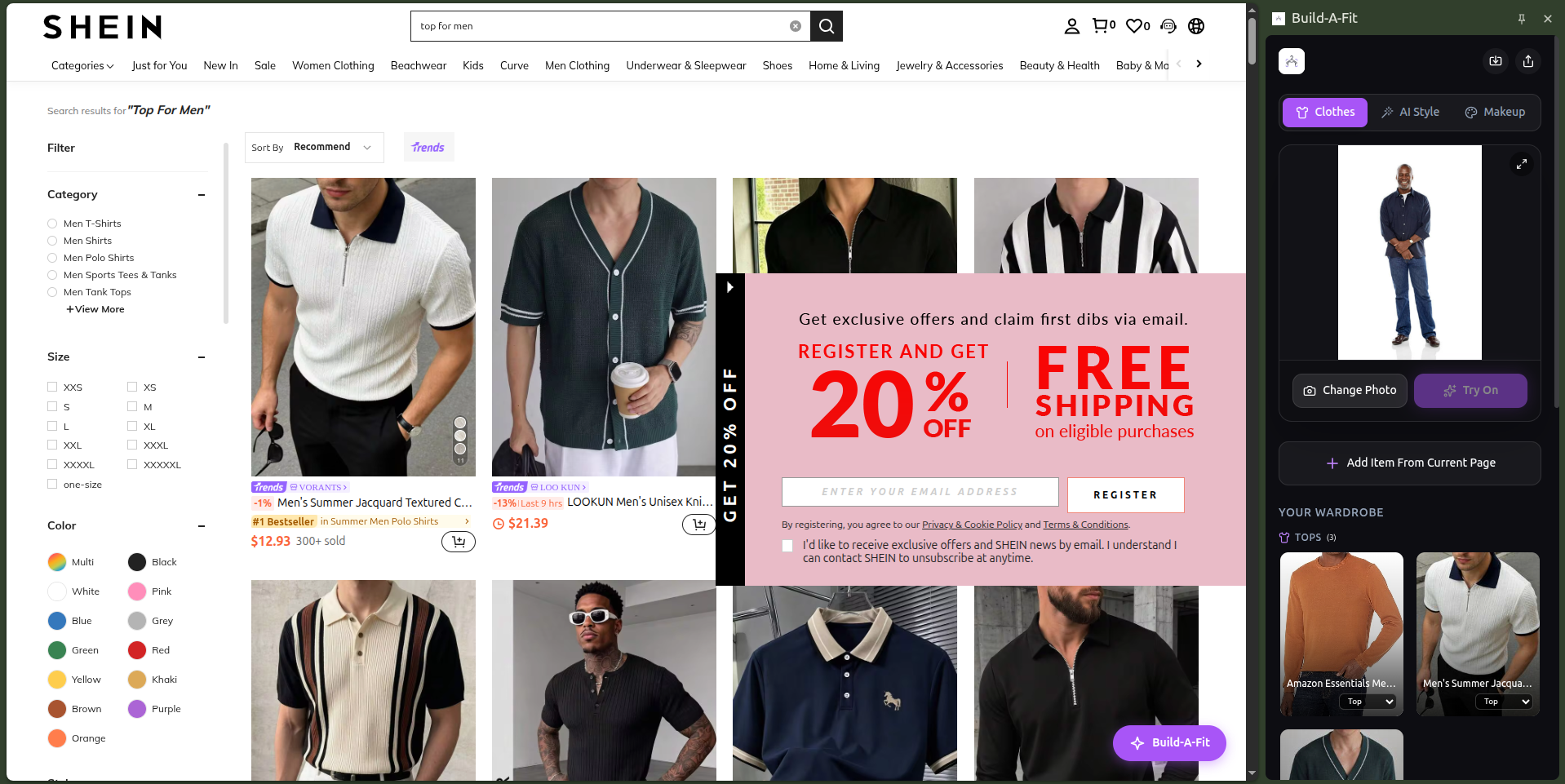
Build-A-Fit is a Chrome side-panel extension that turns everyday shopping pages into a try-on workspace.
Core experiences:
- Save items from any shopping page as a visual wardrobe inside the extension
- Try on individual items using AI-powered virtual try-on
- Use AI Style mode to let the stylist pick the best outfit from selected items
- Automatically generate a layered full-outfit try-on in the correct order
In practice, a user can upload a photo, browse Amazon, Shein, Jumia, or other stores, save looks they like, and then let the product guide them toward a complete outfit instead of only seeing isolated garment previews.
How we built it
Build-A-Fit was built as a Chrome MV3 extension with a side-panel UI and multiple AI services behind it.
Stack and workflow:
- Browser layer: Chrome extension with content scripts, side panel, and product extraction for known shopping sites plus a universal fallback using Open Graph metadata
- Try-on layer: PerfectCorp YouCam API for cloth, necklace, and hat virtual try-on
- Styling layer: Kimi K2.6 via OpenCode Zen for outfit selection and reasoning
- Image workflow: user photos and product images are resized and converted before being sent to the AI stylist, then the selected results are rendered through the try-on API
The main product loop is:
- Capture candidate items from the page
- Send images plus a stylist prompt to the LLM
- Parse a structured outfit recommendation
- Execute the virtual try-on sequence from base garments to accessories
- Show the final layered result in the side panel
Challenges we ran into
- Making product extraction work reliably across different retailers and page structures
- Handling cross-origin image fetching and extension permissions cleanly in MV3
- Keeping the AI Stylist output parseable when the model sometimes included extra formatting or whitespace
- Ordering layered try-on correctly so bottoms, tops, outerwear, and accessories rendered in a believable sequence
- Balancing accuracy and speed when sending multiple images to an LLM while keeping the UI responsive
Accomplishments that we're proud of
- Built a working AI Style flow that chooses an outfit and then automatically runs the layered try-on sequence
- Shipped a universal fallback extractor so the extension can still capture product details on sites beyond the main supported retailers
- Turned multiple AI services into one coherent user experience instead of disconnected demos
- Kept the extension lightweight enough to feel like a natural part of normal shopping
What we learned
- Structured prompting plus strict JSON output rules make LLM integrations far more reliable
- Layered virtual try-on is as much about product sequencing and UX as it is about model quality
- A strong demo workflow matters: the difference between “cool prototype” and “compelling product” often comes down to flow and storytelling
- Browser extensions require careful permission design, especially when mixing multiple external APIs and image sources
- Product extraction is never truly universal; a smart fallback strategy is more practical than perfect site-by-site coverage
What's next for Build-a-fit
- Improve outfit reasoning with stronger color, occasion, and fit awareness
- Add smarter wardrobe memory so users can reuse saved items across sessions
- Expand store coverage and make product extraction more resilient across more fashion retailers
- Add save, share, and comparison features for final try-on looks
- Refine the AI Style UI with better previews, faster retries, and clearer progression during layered try-on
Built With
- kimi
- opencode
- vite
- youcam


Log in or sign up for Devpost to join the conversation.