Inspiration
Budget Lab was inspired by a common student problem: money disappears in small, frequent purchases before students clearly understand where it went. Meals, drinks, transportation, printing, entertainment, and daily supplies are often logged mentally or not at all.
We wanted to build a lightweight budgeting tool that feels easy enough to use between classes, during a commute, or right after a purchase. Instead of creating a complex finance platform, we focused on quick daily expense capture and clear spending feedback.
What it does
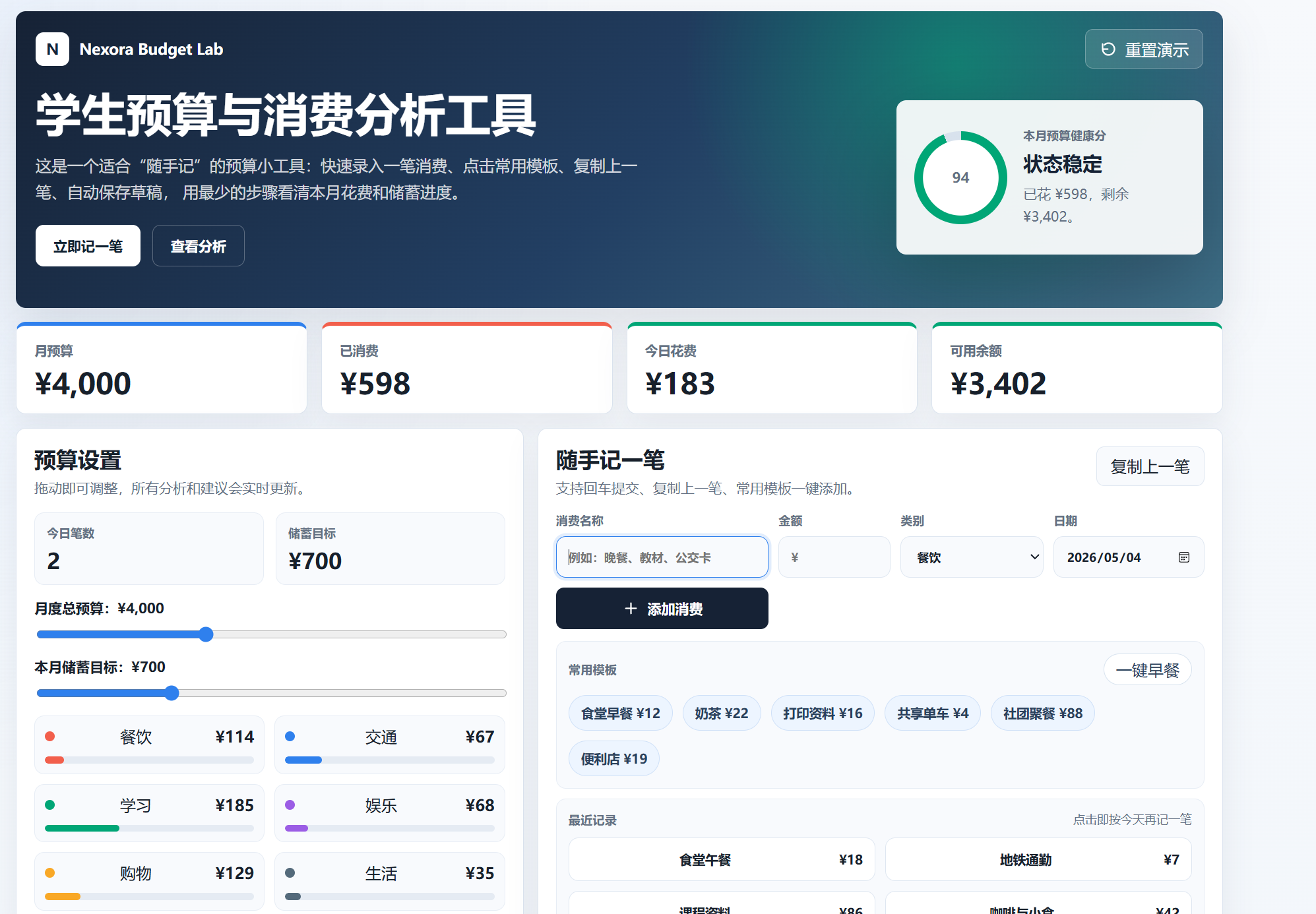
Budget Lab helps students record and analyze everyday spending.
Users can:
- Set a monthly budget and saving goal.
- Add expenses with name, amount, category, and date.
- Use quick templates for common student purchases.
- Reuse recent records to log repeated expenses faster.
- Copy the previous entry for quick editing.
- View spending by category.
- See today's spending total and record count.
- Check a budget health score.
- Read simple suggestions based on current spending.
- Keep data saved locally in the browser.
The goal is not to replace a bank app, but to make student budgeting easier, faster, and more understandable.
How we built it
We built Budget Lab as a responsive React web application using Vite.
The app uses React state to manage expenses, budget settings, filters, and form input. Browser LocalStorage is used to persist user data, so expenses and unfinished form entries remain available after refreshing the page.
The interface was designed around a compact dashboard layout. The main screen combines quick logging, budget controls, category analysis, smart suggestions, and a spending history list. CSS was written manually to keep the layout responsive and usable on both desktop and mobile devices.
Challenges we ran into
One challenge was balancing speed and clarity. A budgeting app needs enough detail to be useful, but too many fields can make users stop logging expenses. We solved this by adding quick templates, recent record reuse, and copy-previous-entry behavior.
Another challenge was making the layout compact without making it feel crowded. We adjusted card spacing, reduced empty areas, and reorganized category data so the dashboard feels more efficient.
We also had to make sure the app stayed useful without requiring accounts, bank connections, or sensitive financial data. LocalStorage gave us a simple privacy-friendly way to preserve demo data.
Accomplishments that we're proud of
We are proud that Budget Lab is a complete working prototype rather than just a static mockup. The main workflows are interactive, including expense entry, quick templates, category filtering, live budget recalculation, and local persistence.
We are also proud of the “quick capture” experience. Students can record common expenses with very few clicks, which makes the product feel practical for everyday use.
What we learned
We learned that financial tools for students should focus less on complexity and more on habit formation. A simple product that users actually open every day can be more valuable than a feature-heavy system that feels intimidating.
We also learned how important information hierarchy is in dashboard design. Budget, spending, savings, categories, and suggestions all matter, but they need to be presented in a way that supports fast decisions.
What's next for Budget Lab
Future improvements could include:
- Custom categories and custom category budgets.
- Weekly and monthly spending trends.
- Exporting data as CSV.
- Optional cloud sync.
- Better visual charts.
- Spending reminders.
- Shared budgeting for roommates or student groups.
- AI-generated weekly spending summaries.
Budget Lab could eventually become a campus-focused financial wellness tool for students, student banks, or university life platforms.
Built With
- css
- html
- javascript
- localstorage
- react
- vite

Log in or sign up for Devpost to join the conversation.