Inspiration
Late one night, staring at a complex diagram of the human nervous system, we realized that the hardest part of learning isn't the difficulty of the material—it's the friction of being stuck alone. Textbooks are static, and searching for answers requires you to break your "flow" to type into a search bar. We were inspired to build a companion that doesn't just "chat," but actually sees what you're looking at, providing the same kind of over-the-shoulder guidance a human tutor would. We wanted to transform the lonely 2 AM study session into a collaborative experience.
What it does
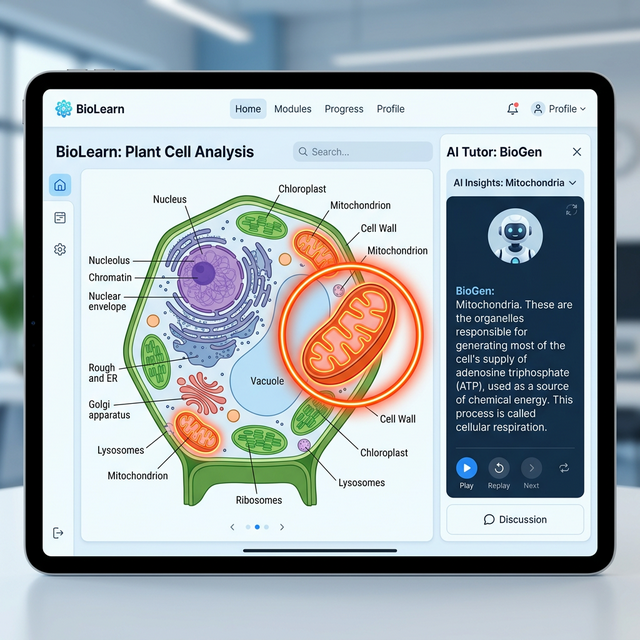
Buddy AI is a true Live Agent. It uses your camera to analyze study materials—from handwritten calculus problems to intricate biology diagrams—and explains them using a natural, conversational voice.
Key features include:
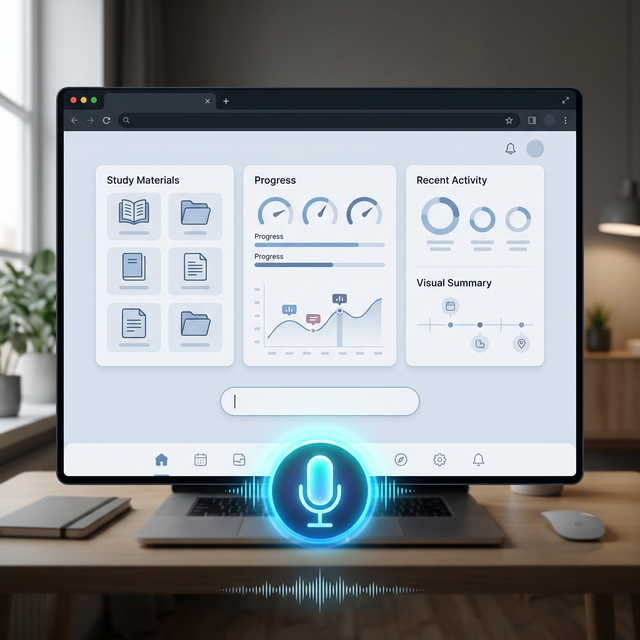
- Continuous Listening: A seamless, hands-free conversation loop that automatically restarts after every Buddy response, allowing for natural follow-up questions.
- Visual Intelligence: Real-time analysis of diagrams, text, or textbook pages using multimodal AI.
- Dynamic Annotations: Buddy doesn't just talk; it can "draw" on your material, overlaying highlights and pointers to guide your eyes to the most important parts of a diagram.
- Intelligent Summaries: At the end of every session, Buddy generates a structured study guide based on the specific topics you covered.
Technical Architecture
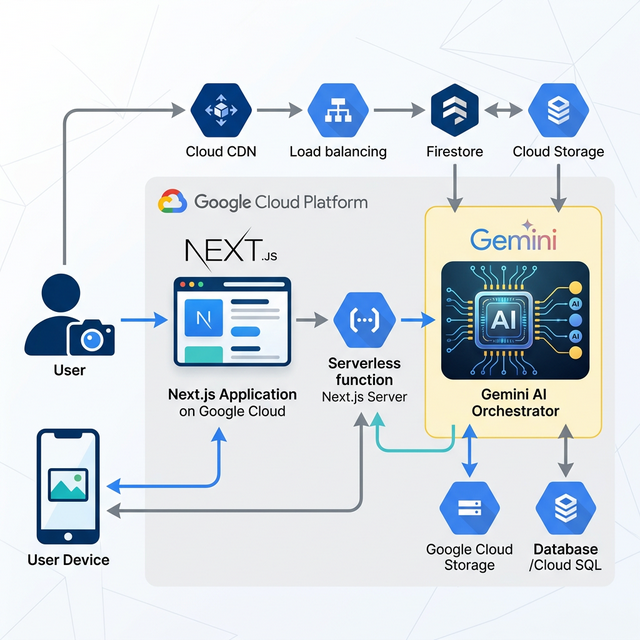
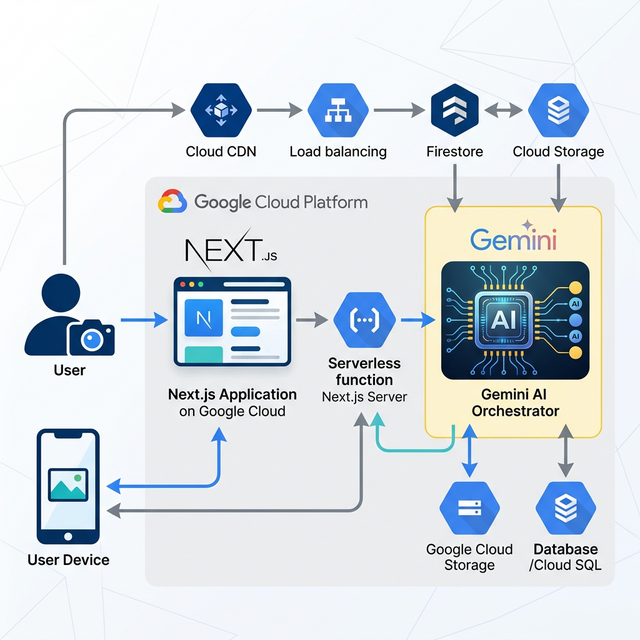
Buddy AI uses a modern, serverless architecture optimized for high-performance AI interactions.
graph TD
    User((User))
    Webcam[User Camera/Mic]
    Browser[Next.js Frontend / React 19]
    Server[Next.js Server Actions]
    Genkit[Genkit AI Orchestration]
    GeminiVision[Gemini 1.5 Flash - Vision]
    GeminiTTS[Gemini 1.5 Flash - TTS]
    GeminiImage[Gemini 1.5 Flash - Annotations]

    User --> Browser
    Webcam -.-> Browser
    Browser --> Server
    Server --> Genkit
    Genkit --> GeminiVision
    Genkit --> GeminiTTS
    Genkit --> GeminiImage
    GeminiVision --> Genkit
    GeminiTTS --> Genkit
    GeminiImage --> Genkit
    Genkit --> Server
    Server --> Browser
    Browser --> User
- Architecture Diagram:
How we built it
We built Buddy AI using Next.js 15 and React 19 to ensure a high-performance, responsive interface. The AI orchestration is powered by Genkit, managing several specialized flows:
- Gemini 1.5 Flash handles the core conversational reasoning and vision.
- Gemini 1.5 Flash also powers the visual analysis and image-to-image annotation.
- Gemini 1.5 Flash provides the spoken voice responses via its multimodal capabilities.
Google Cloud Integration (Proof of Usage)
This project is a deep integration of Google Cloud's Generative AI ecosystem:
- AI Services: Orchestrated via Genkit, we consume direct Vertex AI models (Gemini 1.5 family) for vision, text, and speech synthesis.
- Deployment: Hosted on Firebase App Hosting, leveraging Google Cloud's serverless infrastructure (Cloud Run) for optimized performance.
- Automated Cloud Deployment (Bonus Points): We use Infrastructure-as-Code (IaC) to automatically provision and deploy our Next.js backend and frontend instances in response to cloud triggers. See the apphosting.yaml file for the automated deployment configuration for Firebase App Hosting.
- Published Content (Bonus Points): Check out our Demo Video / Blog Post covering how Buddy AI was built with Google AI models and Google Cloud. This piece of content was created for the purposes of entering this hackathon. #GeminiLiveAgentChallenge
- Proof File: See
src/ai/flows/voice-tutor-flow.tsfor direct implementation of Google Cloud AI models.
Challenges we ran into
The biggest hurdle was the "Hands-Free Loop." We had to solve the "Self-Hearing" problem—preventing the microphone from listening to the AI's own voice while ensuring it was ready the instant the student wanted to speak. We also faced tight token quotas, which forced us to implement aggressive context truncation.
Accomplishments that we're proud of
We are particularly proud of the "Continuous Listening" feature. It transforms the app from a simple "push-to-talk" tool into a living presence that feels like it's actually studying with you.
What we learned
We learned that multimodal AI is most powerful when it disappears into the background. Building a low-latency experience where vision, text, and voice work in harmony taught us deep lessons about state management in React 19.
What's next for Buddy AI
- Collaborative Study Rooms: Multiple students sharing a single Buddy session.
- Interactive Quizzing: The Buddy proactively testing the student based on visual materials.
Reproducible Testing
- Prerequisites: Node.js installed and a Google Cloud Project with Vertex AI API enabled.
- Environment Setup: Run
gcloud auth application-default loginto authenticate with your Google Cloud account. - Installation & Launch: Run
npm install && npm run dev. - Testing the Live Agent:
- Click "Start Session".
- Allow Camera/Mic permissions.
- Hold up a diagram or handwritten note.
- Ask naturally: "Buddy, can you see this? What's going on here?"
- The mic will automatically restart once Buddy finishes speaking.

Log in or sign up for Devpost to join the conversation.