-
-
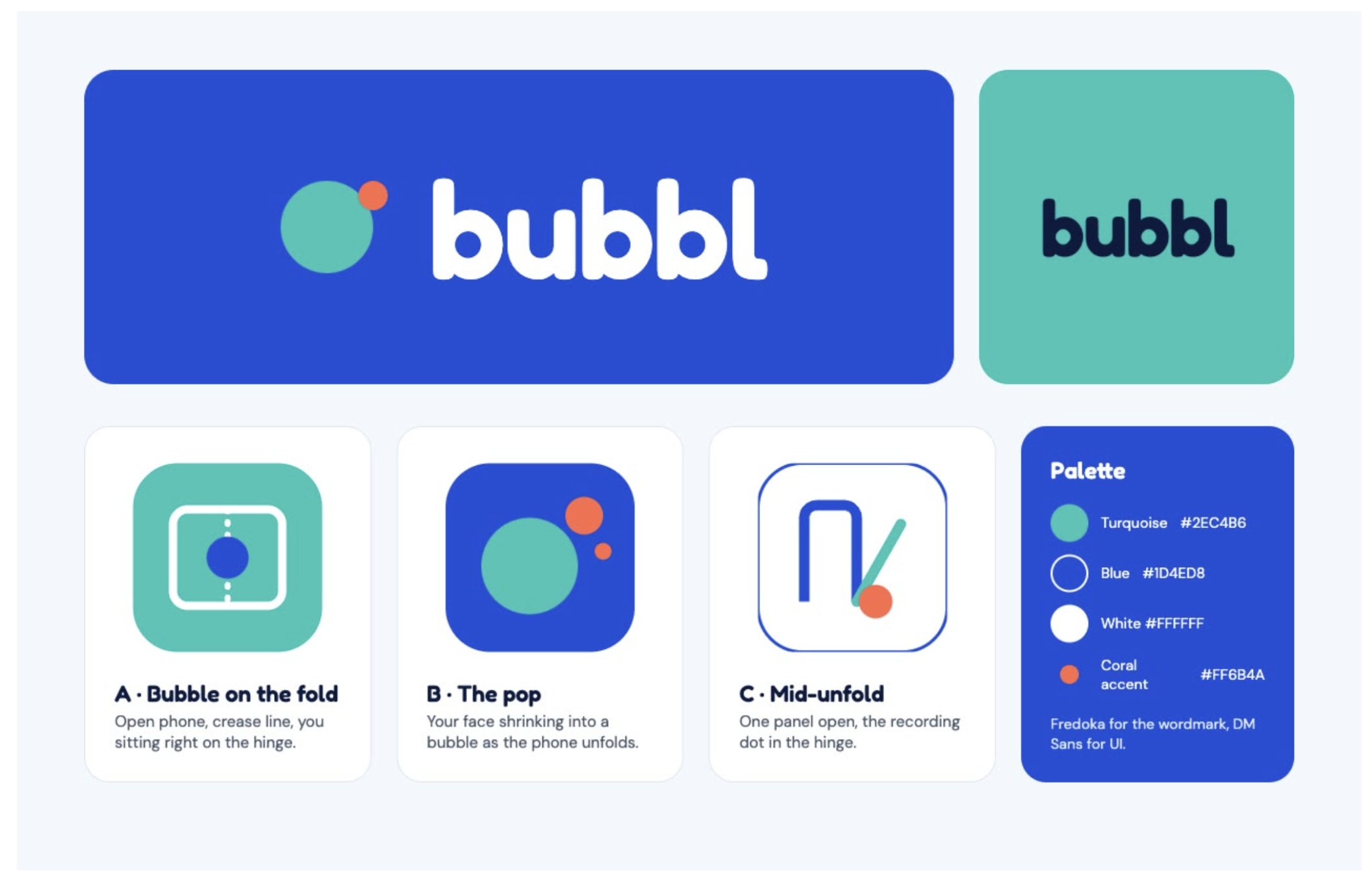
Bubbl Logo
-
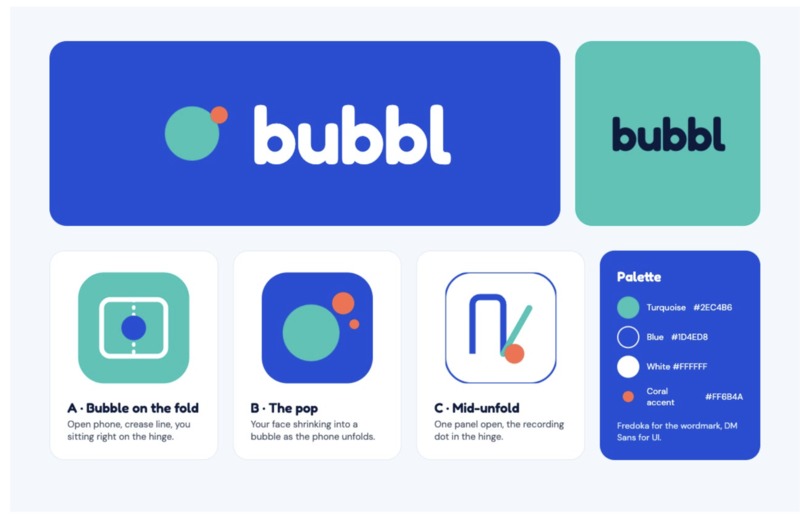
Brand Identity
-
-
Bubbl
Hello from inside the bubbl.
Bubbl turns the iPhone Duo's fold into the controls for a camera and screen recorder. Instead of recording yourself, stopping, switching apps, recording your screen, and editing everything together later, Bubbl lets you create one continuous explanation directly from your phone.
Say it in a bubbl.
Inspiration
Every day, founders send updates to investors, designers walk teams through mockups, teachers explain assignments, and coworkers give feedback by recording short videos of themselves explaining something on a screen.
Tools like Loom proved how useful this format can be.
But there is still a problem: the experience is fundamentally designed around a laptop.
On a phone, you can easily record yourself with the camera, or record what is happening on your screen, but combining the two into one natural workflow is much harder.
When we saw the iPhone Duo, we realized the fold could remove that limitation.
Instead of treating the second screen and different folding positions as extra display space, we asked:
What if the physical shape of the phone became the interface for recording?
That became Bubbl.
What it does
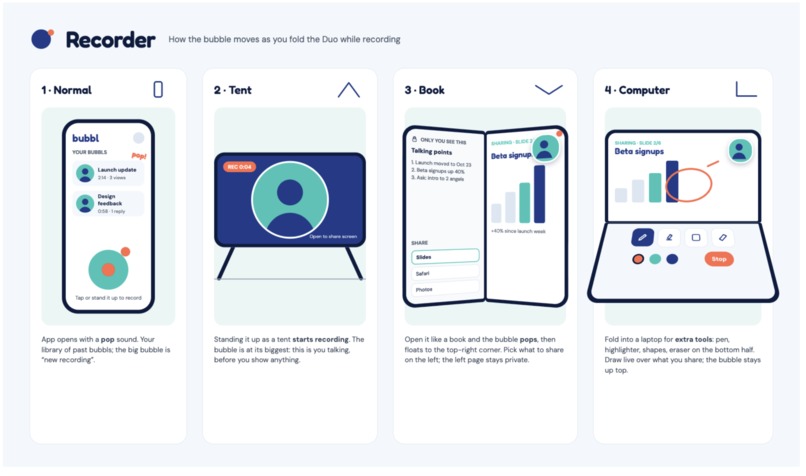
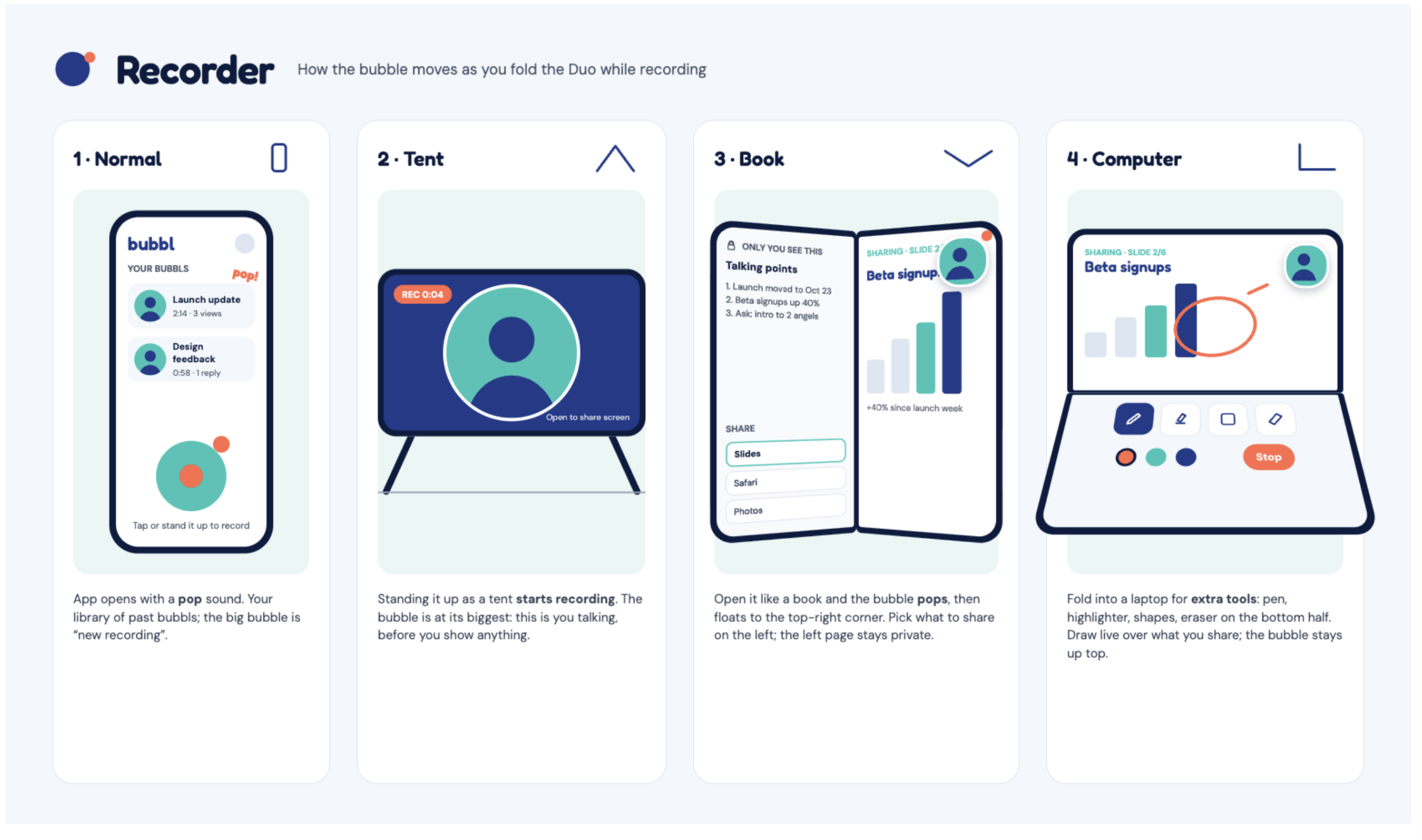
Bubbl changes its behavior depending on how the iPhone Duo is positioned.
🫧 Stand to talk
Place the phone in tent mode and Bubbl becomes a simple camera recorder.
Your face appears inside the main bubble and you can speak naturally to the camera.
💥 Open to show
Unfold the device and your bubble "pops" into the corner while your content appears behind it.
You can walk through:
- a presentation
- a website
- a prototype
- a document
- a design
- or anything else you want to explain, for a meeting, to a friend, about travel/ hang out plans…
The recording continues while the device changes shape, so the transition feels like part of the conversation rather than a new recording.
📖 Open flat for presenter mode
When the Duo is fully open, Bubbl takes advantage of the extra screen space.
One side contains what you are sharing.
The other side becomes your private workspace, where you can keep speaker notes, another document, your inbox, or reference material that does not appear in the final recording.
add notes and drawing designs
If you wish to add highlights, specify designs and drawings
⏸ Control the recording through the bubble
The bubble itself is also part of the interface.
Long-press it to pause.
While paused, the bubble gently "breathes" so you immediately understand the recording state.
Tap again to continue.
When you move to another section of your presentation, Bubbl can also place small bubbles on the timeline, turning those moments into visual chapters.
🫧 Close to send
When you are finished, simply fold the phone closed.
The bubble pops, the recording ends, and Bubbl produces one clean video that is ready to share.
No laptop.
No timeline editor.
No stitching clips together.
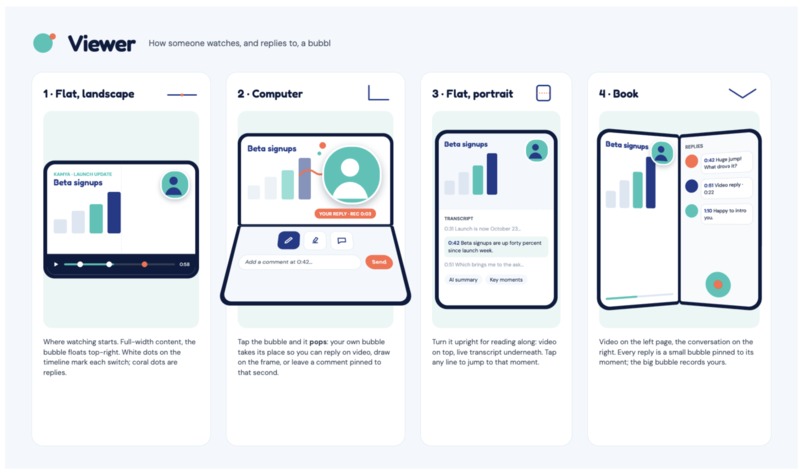
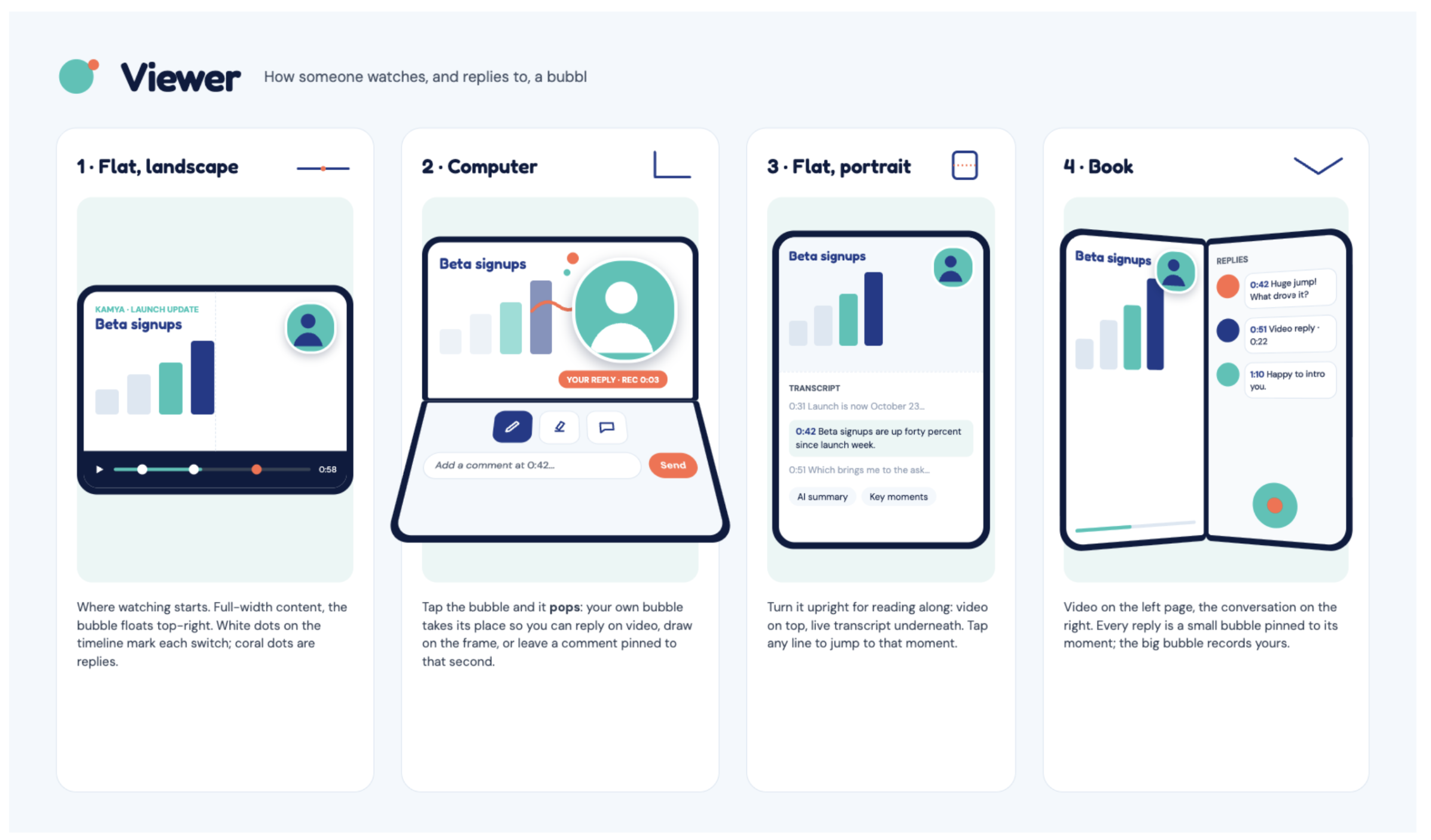
The viewer experience
We also wanted Bubbl to feel conversational after the video is sent.
The viewer sees the creator's bubble floating above the content while watching the recording.
Replies are attached to specific moments in the video. A viewer can tap the bubble and respond with their own video, drawing, or comment pinned to that exact second.
That turns a recording from something you simply watch into something you can respond to.
How we built it
We designed Bubbl specifically around the new interaction possibilities created by the iPhone Duo.
The core of the prototype is a state-based recording experience that reacts to the physical configuration of the device.
Instead of adding traditional buttons for every action, we mapped the most important recording states to physical movements:
| Device state | Bubbl action |
|---|---|
| Tent mode | Camera-first recording |
| Unfold | Camera bubble + shared content |
| Flat / book mode | Shared content + private presenter workspace |
| Fold closed | Finish recording |
We then designed the bubble as a persistent interface element that follows the user across those states.
The visual system is intentionally simple: bubbles appear, move, breathe, drop onto the timeline, and pop. These animations communicate what is happening without requiring a complex interface.
For the hackathon prototype, our priority was not building a complete video platform. It was demonstrating the interaction that becomes possible when software understands and responds to the physical form of the Duo.
Challenges
The biggest challenge was deciding how much control to remove.
It would have been easy to build a traditional recording app with more buttons, menus, settings, and editing tools.
But that would miss the point of the Duo.
We wanted the fold itself to do meaningful work.
That forced us to constantly ask whether an interaction really needed a button or whether the physical movement of the device could communicate the user's intention instead.
Another challenge was keeping the recording experience continuous while the phone changes configuration. The product only feels magical if moving from talking to presenting feels like one uninterrupted action.
We also had to think carefully about what should be visible to the audience versus what should stay private to the presenter, especially when using both screens.
Finally, we had limited hackathon time, so we had to focus on proving the core interaction rather than attempting to recreate every feature of a mature video platform.
Accomplishments that we're proud of
We're proud that Bubbl never feels like a settings menu wearing a fun skin — every state of the recording, from talking to pausing to sending, is expressed through the bubble itself, with no extra buttons layered on top.
We're proud that the recording genuinely never stops as the device changes shape. Standing, unfolding, and laying the phone flat all feed into one continuous take, which was the single hardest technical and design problem to get right, and the one that makes the product feel physical rather than like a UI skin.
We're proud of turning a phone posture into an interface primitive. Tent, book, and flat aren't just screen layouts here, they're commands, and getting that mapping to feel obvious on first try (rather than needing an explanation) was a real design win.
We're proud of closing the loop with the viewer. A reply pinned to the exact second of a video, rather than a comment thread bolted on afterward, made the whole thing feel less like "sending a file" and more like a conversation.
And we're proud that in a short hackathon window, we shipped a prototype that made almost everyone who tried it say the same thing without prompting: "wait, do it again."
What we learned
The biggest thing we learned is that designing for a foldable device should not simply mean putting more content on a bigger screen.
The interesting opportunity is posture.
A device that can stand, unfold, lie flat, and close gives software a new form of input.
Instead of:
tap a button → select a mode → confirm an action
the interaction can become:
stand → talk
open → show
close → finish
That feels much closer to manipulating a physical object than navigating software.
We also learned that removing interface elements can sometimes make a product more expressive. Bubbl has fewer traditional controls precisely because the device itself becomes one of those controls.
What's next
There is much more we would like to explore.
Bubbl could automatically generate transcripts and chapters, summarize recordings, extract action items, translate conversations, and let viewers jump directly to the most relevant moments.
Collaborative replies could also evolve into full asynchronous conversations, where each response remains attached to the exact part of the video that triggered it.
The next big step is taking Bubbl beyond a single hackathon prototype on a single device and implementing it across platforms, so the same fold-driven recording experience works wherever people already create and share these videos.
Part of that is drag-and-drop send: once you close the phone and your bubble pops into a finished recording, you'd be able to drag that bubble straight into WhatsApp, email, Slack, or any split-screen app, and send it, instead of routing through a separate share sheet.
A few other details from our feature roadmap we're especially excited to build out:
- Save pop — double-tapping the bubble to stop recording, with the bubble bursting into droplets that re-form into the video's thumbnail, so even finishing a recording feels like part of the same physical language.
- Onboarding pop — a first-run moment where the logo bubble floats up, pops, and its droplets settle into the app's four core controls: pause/resume, delete, restart, and save.
- Low-light glow — in dark mode, the bubble softly lights the presenter's face, working like a built-in ring light.
- Reaction bubbles — on the viewer's side, emoji reactions float up from the bottom of the screen and pop at the exact second the viewer reacted, mirroring the creator's own bubble language back at them.
- Iridescent sheen — a subtle rainbow shimmer that moves across the bubble as you tilt the phone, like a real soap bubble, so the interface itself keeps feeling tactile rather than flat.
But the core idea would stay the same:
the fold should not be a gimmick. It should be the interface.
Stand to talk.
Open to show.
Close to send.
We're Bubbl. Say it in a bubbl.
Built With
- language


Log in or sign up for Devpost to join the conversation.