Inspiration
I own an Intel Mac, which prevents me from directly connecting to the built-in browser within VS Code to debug webpage content. As a workaround, I have to compile debugging logic into commands and send them to the Codex APP instead. During debugging, I found the feedback provided by Codex far from intuitive. This inspired me to build a custom plugin to take full control over the debugging workflow.
What it does
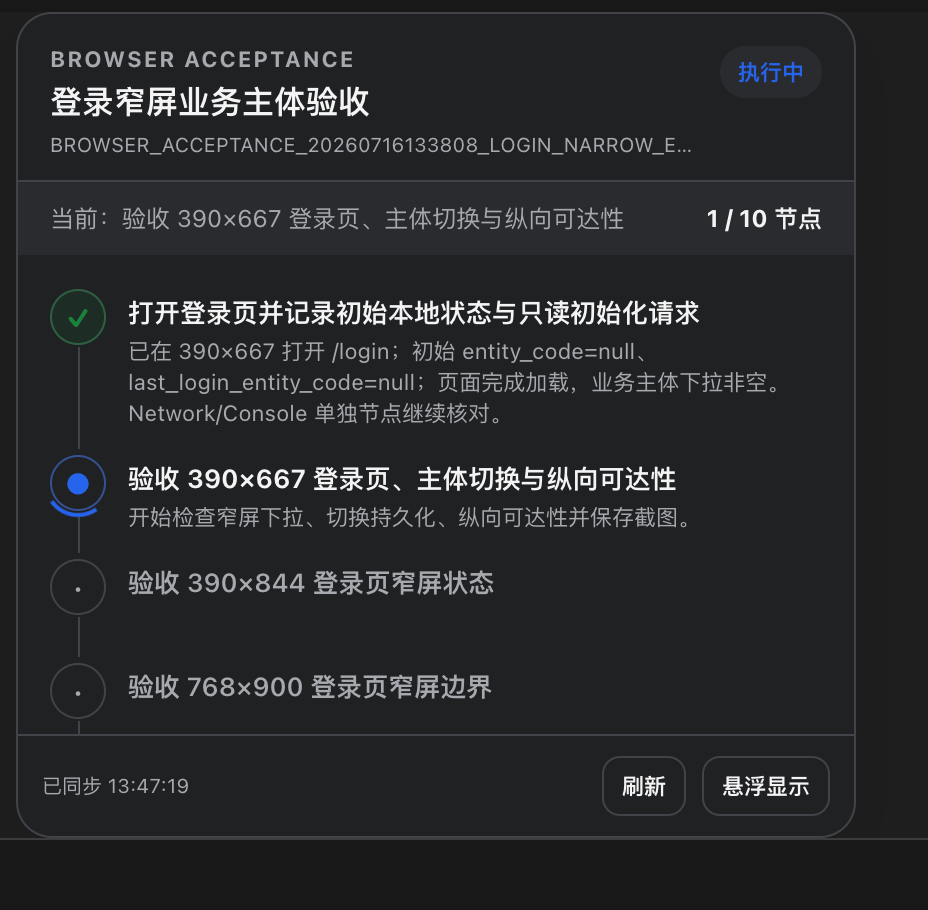
This is a plugin for ChatGPT/Codex that uses navigation nodes to display the execution status and results of built-in browser crawling tasks. It does not navigate the internal items within the nodes.
How we built it
We implemented the project as a repository-scoped Codex marketplace containing a plugin package, an MCP server, an MCP Apps component, a browser-acceptance skill, and a prebuilt distribution bundle.
The Node.js MCP server uses the Model Context Protocol SDK, MCP Apps extensions, and Zod schemas. It exposes six focused tools for starting a task, updating a node, attaching a report, acknowledging result delivery, reading current state, and reopening the panel.
A dedicated state store enforces the workflow rules. It validates task and node identifiers, reserves the report and handoff node IDs, keeps at most one node running, recalculates the overall result, and protects completion actions that require stronger evidence. State is written as JSON with atomic temporary-file replacement, restrictive file permissions, and a pointer to the most recent task.
The frontend is a self-contained HTML, CSS, and JavaScript MCP Apps resource. It supports light and dark themes, reduced-motion preferences, accessible state labels, automatic scrolling to the active node, manual refresh, PiP requests, and polling for persisted updates. Revision numbers and timestamps prevent an older response from overwriting newer visible state.
We use esbuild to produce a standalone dist/server.mjs because Codex installs the plugin from the marketplace package without running a build step. Automated tests exercise the state machine and run MCP smoke tests against both the source server and the built distribution.
Challenges we ran into
The first challenge was the display boundary. A native, permanently docked right sidebar would be ideal for long-running progress, but the public Apps SDK does not guarantee that placement. It supports host-controlled display modes such as inline, fullscreen, and Picture-in-Picture. We therefore designed the interface around PiP while keeping inline rendering as a reliable fallback.
The second challenge was making status trustworthy. A conventional progress bar would imply precision that browser acceptance work does not have. We needed a state model that could distinguish a confirmed failure from missing evidence, and an interrupted task from a completed one. We also had to prevent report generation and result delivery from being marked as passed through ordinary status updates.
The third challenge was keeping the panel synchronized across processes and reopenings. An in-memory store was not enough because the component, plugin process, and acceptance session do not necessarily share the same lifetime. File-backed persistence, atomic writes, task revisions, and stale-response protection were all needed to keep the visible state consistent.
Packaging introduced another constraint: the installed marketplace plugin cannot assume that dependencies will be downloaded or that a build will run. The checked-in standalone server bundle became part of the release contract, so our validation flow tests both development source and the exact artifact users install.
Accomplishments that we're proud of
As an enthusiast with zero prior programming experience, I find it incredibly amazing and deeply fulfilling to build a custom tool tailored exactly to my own needs. This plugin allows me to keep track of the AI’s command execution progress at all times. It makes lengthy browser test workflows far easier to interpret, without overstating the certainty of task judgments. Every terminal state has a clear definition, and the system treats "unconfirmed" as a first-class standalone outcome, instead of lumping it generically under success or failure and concealing underlying details.
What we learned
I’ve learned how to effectively leverage ChatGPT to build tools that boost work efficiency and fit real usage scenarios perfectly. Another key takeaway is that persistence and sequence validation are indispensable parts of the user interface. A progress panel can only be considered reliable if it retains accurate data after server restarts and blocks delayed responses from overwriting the latest state. Most importantly, I’ve learned to explicitly model the final-stage workflow. Generating a report and verifying that other workflows have received the report are two separate events, so they require distinct nodes, dedicated supporting artifacts, and independent validation rules for completion.
What's next for browser-test-progress
Next, I want to make evidence easier to inspect directly from the progress experience by adding richer report and screenshot references while preserving the plugin's read-only boundary.
I also plan to improve cross-session handoff so a receiving workflow can return a verifiable receipt through a more direct integration, reducing the amount of coordination needed around the final node.
Built With
- acceptance-test
- accessibility
- browser-testing
- codex-plugin
- javascript
- marketplace-plugin
- mcp-server
- node.js
- pip
- progress
- smoke-test
- state-persistence
- task-state-machine
- web-automation


Log in or sign up for Devpost to join the conversation.