-

logo
-
printscreen


Inspiration
I saw a great opportunity to learn how to create an extension for Chrome, the knowledge acquired will be used for future projects.
What it does
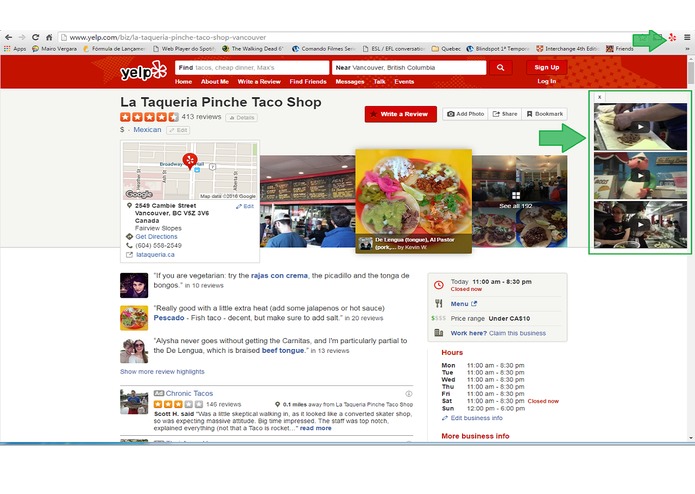
The Yelptube extension aims to add a feature to the site http://www.yelp.com/ able to list three videos related to the selected restaurant.
As the extension works? After the research the site visitor has the option to view the details of the establishment.
When the detail page is loaded wheel extension in the background performing a search on Youtube referring to the establishment concerned. This search returns only three videos to not pollute the page, maintaining close to the original layout.
The extension uses three version of the YouTube API, prioritizing the most relevant videos for sentence search (property name). If the return is empty the extension does not display anything.
Upon receiving the list of the extension video shows the three videos in the top right corner of the page, right next to the photo gallery. If the visitor no longer wish to view the videos, just click the "X" button that the videos will be removed from the page, only returning in a new detail page or if the page is reloaded
How I built it
Development strategy As there was created an extension for Chrome previously I had to set the following steps: 1) Understanding how an extension and what resources are available. 2) Develop an extension able to manipulate the page DOM. In this case you get the content of an element and print the log brownser. 3) Change the extension to create an element in the page DOM (div at the top right). 4) Observe the page source code searching for elements that could be used as a means of establishing identification. 5) Understand the YouTube API, create API key and the like. 6) Develop a simple HTML to consume the API and list in the body using the embed player. 7) Join the parts to create the final design. 8) Test the project on different computers, different establishments and locations.
Challenges I ran into
During step development 7 got some errors as the loading of the client library, Google Javascript. Charging the library via extension did not work and ended up causing error loading the page map element. Then I discovered that the site has performed the loading of this library which caused conflict with my load. To address this issue safely abondonei I use Google library and used an Ajax request to consume the Youtube API. The project decreased in size and became more simple to understand (so I hope).
During the test in step 8 I noticed that could improve the accuracy of search is used to class as part of the research. Then I changed the design to get the element that renders the category and concatenei in the search sentence. This greatly improved the outcome of the videos.
Accomplishments that I'm proud of
The change in the way I was using the Youtube API was very important in this project because the result was a more cohesive design with fewer unwanted errors chances for incompatibility.
What I learned
Overall it was a very interesting challenge and fun, learning is always good even when you have a set goal. Chrome extensions are very powerful features that can greatly facilitate the growth of usability and features to the user. I hope this project can help your business meet a possible need. I appreciate the opportunity to participate in this challenge.
What's next for BroadbandTV Yelp Video Augmenter
Develop options page for qu and the user can set the limit of videos that will be returned. Make an array of compliance survey of videos with users and can improve the presentation.

Log in or sign up for Devpost to join the conversation.