Why This Use Case Is a Strong Fit for WebMCP
Assistive form-filling is one of the few agentic use cases where "just scrape the DOM and click around" is actively dangerous:
- The cost of a wrong guess is serious. A shopping-assistant agent that misclicks can be retried. An agent that misreads an unlabeled housing-benefits field and submits a wrong income figure or the wrong document can cost someone real benefits, or force them to redo a multi-step application alone. WebMCP's structured, explicit tool schemas (
fill_field(field_id, value), not "click the third gray box") remove the guessing entirely — the page tells the agent exactly what's fillable, what it's called, and what values are valid (e.g. thehousing_statusenum), instead of the agent inferring it from pixels and placeholder text. - Screen scraping and vision models are exactly what disabled users can't rely on. A blind user's agent can't "look" at a tiny unlabeled button any better than a screen reader can — both need the page to declare its own semantics. WebMCP's
document.modelContext.registerToolis that declaration, machine-readable and unambiguous, which is precisely the gap screen readers have never been able to close on their own. - Retrofit, not redesign, is the only realistic path for legacy government/benefits sites. These are exactly the sites least likely to ever get an accessibility redesign. WebMCP lets a site owner bolt on a config object and one
<script>tag and get agent-legible tools immediately — no rebuild, no waiting on a procurement cycle. - The same tool surface serves both a real browser-native agent and our own bundled LLM loop, so the use case naturally showcases WebMCP as a genuine web platform primitive (via
document.modelContext) rather than something that only works inside one vendor's chat widget.
How It Creates a Better User Experience
- From "hand over your laptop" to "stay in control." Before WebMCP-style structured tools, the only real options for someone who can't operate a confusing form were to struggle through it alone or hand full control to a caregiver/bot. BridgeAble's tool-gated actions mean the person can direct an agent conversationally while remaining the one who approves every change — no full hand-off of control required.
- Every action is visible, not a black box. Because each tool call acts on the real DOM element (via the
BridgeableConfigselector), the actual page visibly highlights and updates as the agent works — the person watching (whether low-vision, using a screen reader, or a family member helping) sees the same ground truth the agent is acting on, in real time. - Plain language replaces jargon.
explain_fieldandread_field_aloudturn a confusing government-form label into a spoken, plain-language explanation on demand — something a static form or a generic screen reader narration cannot do, because the form itself doesn't know what its own fields mean. - Mistakes are cheap to fix.
undo_last_changeand simply re-callingfill_fieldmean a correction is a single spoken sentence ("actually my income is $2,600"), not a re-navigation of a multi-step wizard with tiny, hard-to-hit controls. - Consent is structural, not just polite.
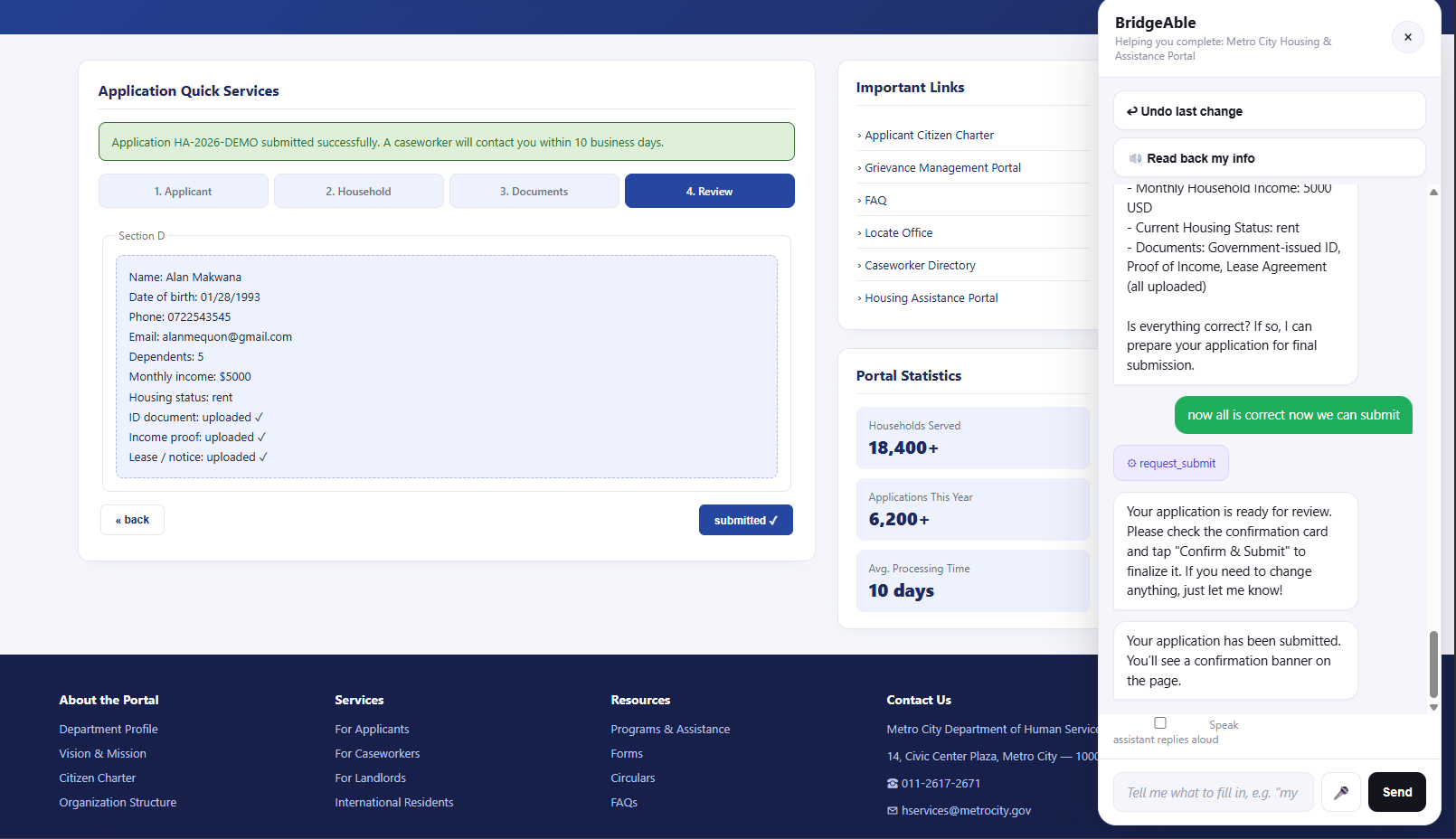
request_submitcan only ever open a large-text, high-contrast confirmation card — it can never submit. The person (or their caregiver) always makes the final, deliberate tap. That single design choice is what turns "an agent that could act for me" into "an agent I can actually trust to act for me."
What People and Agents Can Now Do Together That Was Difficult or Impossible Before
- Reliable multi-step form completion by voice or plain chat, with zero blind trust. Before, a person with a motor or visual disability could either painstakingly tab/zoom/scroll through a 4-step, unlabeled form themselves, or dictate instructions to a human/bot that had no structured way to confirm it acted correctly. With WebMCP tools exposed, a person can say one natural sentence and watch, in real time, exactly which fields were set to what — then correct or undo any single one without redoing the rest.
- Mid-conversation correction without losing progress. Because each field is an addressable tool call (not a scripted macro), a person can course-correct ("actually, two dependents, not one") at any point, and the agent calls
fill_fieldagain on just that field — something a recorded macro, a scripted RPA bot, or a caregiver relaying instructions secondhand can't do cleanly. - A meaningful, plain-language "explain this to me" conversation embedded in the task itself.
explain_fieldlets someone ask "what does housing status mean?" in the middle of filling out the form and get an answer that maps to that exact field, then keep going in the same flow — rather than leaving the page to search a FAQ or call a helpline. - Human-gated agentic submission that's provably safe, not just prompted to be careful. Previously, "the agent will ask for confirmation" was a matter of trusting a prompt. Here, the agent literally has no callable tool that finalizes anything —
request_submitonly opens a UI, and the real submit path is wired exclusively to a human click handler. That means a person can delegate the tedious, error-prone filling work to an agent while keeping the consequential, irreversible submitting action entirely their own — a split of labor between human and agent that wasn't safely possible when agents only had "click here" style access to a page. - The exact same tool surface working for a real WebMCP-aware browser/extension and our own accessible chat panel. A person isn't locked into one vendor's assistant; any WebMCP-compliant agent (verified here with the Model Context Tool Inspector extension) can discover and drive the same accessible form-filling flow.
How We Implemented WebMCP (Briefly)
- Each host page (e.g.
portal.php) declares a smallwindow.BridgeableConfigobject mapping semantic field/document/step keys to real CSS selectors, human-readable labels, and types — the only integration work a site owner does. assets/bridgeable-widget.jsdefines one canonicalTOOLSarray (name, description, JSON Schema, handler) forget_application_state,fill_field,go_to_step,upload_document,explain_field,read_field_aloud,review_summary,request_submit, andundo_last_change.- Every tool in that array is registered with the browser via
document.modelContext.registerTool({ name, description, inputSchema, execute }), per the WebMCP Imperative API, so any WebMCP-aware agent or extension can discover and call it directly against the live page. - The same
TOOLSarray is mirrored into a local registry that powers BridgeAble's own bundled chat/voice panel and agent loop (agent_api.php/llm.php), so the identical tool implementations run whether they're invoked by a real WebMCP client or by our fallback LLM loop — no duplicated logic, and the demo works even wheredocument.modelContextisn't available yet. - The one deliberately un-registered function,
finalizeSubmission(), is wired only to a human click event on the confirmation card — enforcing human-in-the-loop consent at the architecture level rather than via a system prompt.
See How We Built It below for the full architecture breakdown.
Inspiration
Every day, millions of people with disabilities hit a wall online — not because they can't use a computer, but because the web was never built for them. A 12-step government benefits form with no screen-reader labels. A healthcare portal with tiny, unlabeled buttons scattered across five tabs. A visually impaired parent trying to book a school appointment through a form that assumes perfect vision and fine motor control.
Existing "solutions" force a bad trade-off: either the person struggles through alone, or they hand over their laptop entirely to a caregiver or an autonomous bot that clicks blindly and makes mistakes on their behalf — with zero visibility or consent along the way.
We kept coming back to one moment in the WebMCP spec: the idea that a website can expose structured, trustworthy tools that an agent calls directly — no guessing, no fragile scraping, no misclicks. That's not just a technical convenience. For someone with a disability, it's the difference between an agent that might get it right and one that reliably does, with every action visible and confirmable in real time.
We built BridgeAble because accessibility software has been stuck in the same paradigm for 20 years — screen readers narrating a UI never designed to be narrated. WebMCP lets us skip that entirely: the agent doesn't interpret the page, it understands it, because the page tells it exactly what it can do.
What It Does
BridgeAble is a retrofit accessibility layer that can be dropped onto any complex web app — starting with our demo: the Metro City Housing & Assistance Portal, a deliberately messy, realistic government-style benefits application form (four-step wizard, placeholder-only unlabeled fields, tiny inconsistent buttons, no progress indicator).
The whole "integration" a site owner needs is two things added to their existing page: a small window.BridgeableConfig object mapping semantic field names to the page's real CSS selectors/labels, and a single <script src="assets/bridgeable-widget.js"> tag. No redesign, no rewrite.
Once loaded, that script registers a set of WebMCP tools on the page via document.modelContext.registerTool(...), describing every action a user could take: get_application_state, fill_field, go_to_step, upload_document, explain_field, read_field_aloud, review_summary, request_submit, and undo_last_change.
A person with a disability can then interact with the same portal in a radically different way, through a floating BridgeAble panel:
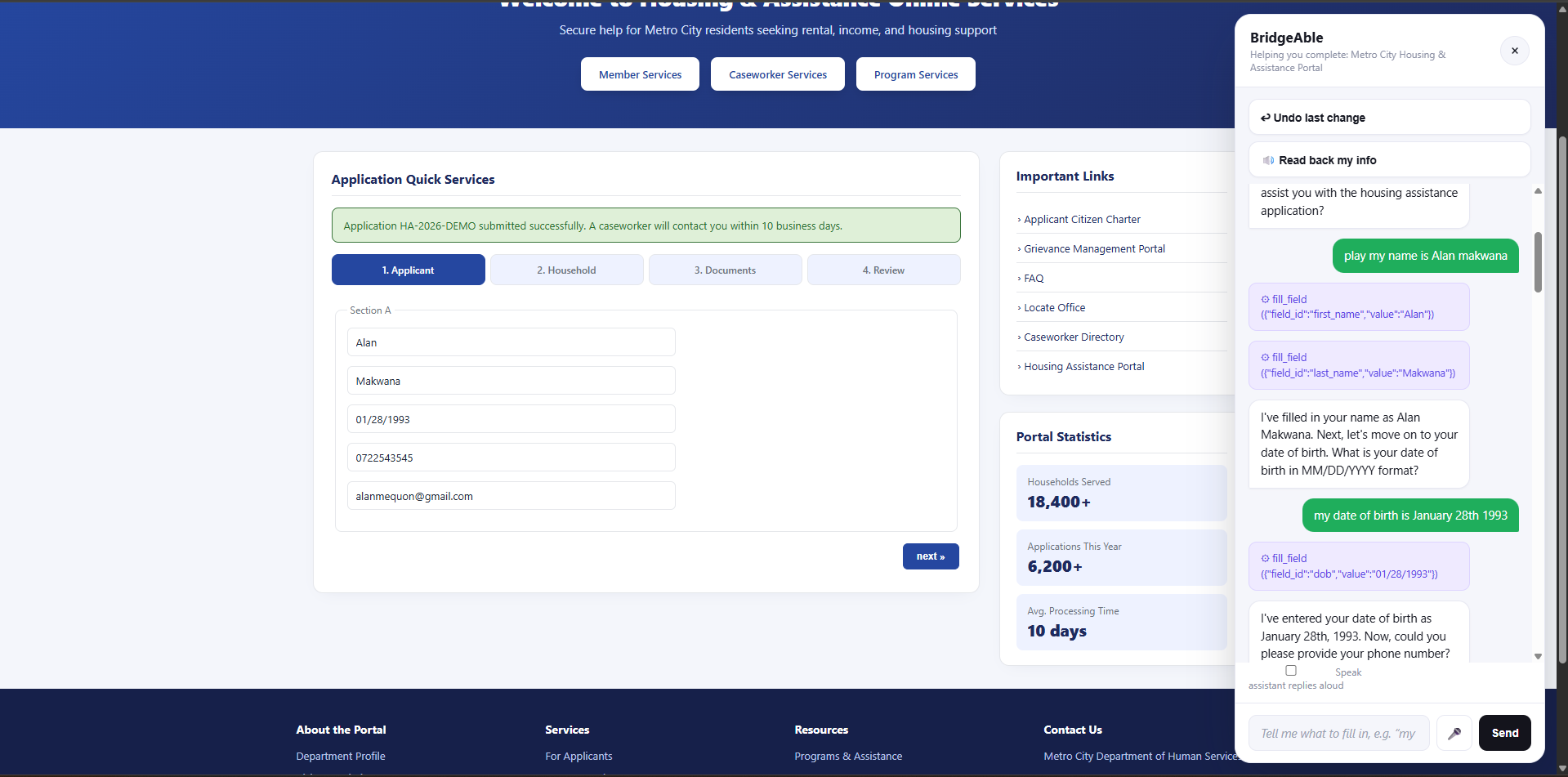
- Voice or simple chat interface: "I want to apply for housing assistance. My name is Maria Gomez, I have two dependents, and my income is $2,400/month." An LLM (with the tools above as function-calling schema) parses this and calls the right tools to populate the correct fields across steps — instantly.
- Human-in-the-loop confirmation: The
request_submittool never submits anything by itself — it only opens a plain-language, large-text, high-contrast confirmation card listing every field and document status. The application is only actually finalized by a direct human tap on "✅ Confirm & Submit" inside the panel (a code path the LLM cannot reach), or "✏ Let me fix something" to keep editing. - Live visual sync: As the agent fills fields, the actual underlying form visibly highlights and updates in real time on the real page (not a black box) — so a caregiver, family member, or the user themselves (if partially sighted) can watch it happen and trust it.
- Undo at every step: Every
fill_fieldcall and document upload is pushed onto an undo stack; a dedicated "↩ Undo last change" button (or saying "undo that") reverts the most recent change — no re-doing the entire form. - Explain & read aloud:
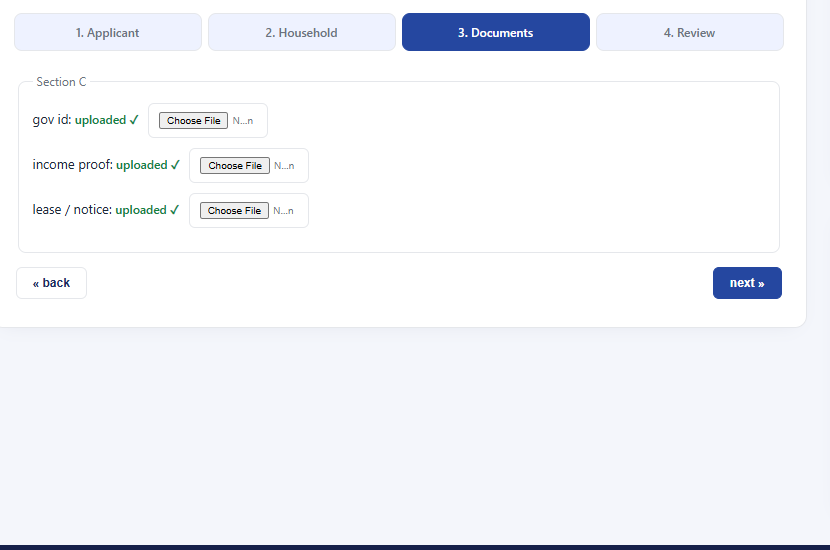
explain_fieldgives a plain-language description of a confusing field ("What does housing status mean?");read_field_aloudand a "🔊 Speak assistant replies" toggle use the Web Speech API to speak field values and replies aloud. - Manual fallback for uploads: Step 3 also has real (deliberately tiny/unlabeled, matching the messy demo theme)
<input type="file">pickers per document, wired to the same status the assistant tools read/write — so uploading works whether it's done by voice, chat, or a direct manual click. - Multi-modal, keyboard/switch-operable input: Voice input via
SpeechRecognition, typed chat, or two always-visible large (44px+) quick-action buttons reachable by Tab alone, for users with motor impairments who can't rely on precise mouse control.
How We Built It
Architecture (flat, vanilla PHP + JS — no build step, no framework, consistent with the rest of this repo's projects):
- Demo host site (
portal.php+assets/portal.css) — An intentionally "bad" benefits-portal form: multi-step, placeholder-only inputs with no visible<label>s, tiny gray buttons, dated table-era styling. This is the "before" state that most accessibility tools fail on, and stands in for any real, unmodified host site. - Adapter config — A small inline
window.BridgeableConfigobject on the host page mapping semantic field/document/step keys to real DOM selectors, labels, and types. This is the one piece of "integration work" a site owner does; BridgeAble never needs to know anything about the page's markup beyond this map. - WebMCP tool layer + local mirror (
assets/bridgeable-widget.js) — For every tool, the same JS handler is:- registered with the browser via
document.modelContext.registerTool({ name, description, inputSchema, execute })per the WebMCP Imperative API, so any WebMCP-aware agent/extension can discover and call it directly, and - kept in a local registry that powers BridgeAble's own bundled chat/voice panel, so the demo works today in any browser without requiring WebMCP browser support to be enabled.
- registered with the browser via
- Accessible panel — A floating launcher opens a high-contrast (dark navy/white), large-text (≥15px), keyboard- and voice-operable side panel: chat log (
role="log" aria-live="polite"), quick-action buttons, a mic button (SpeechRecognition), and the confirmation card. - Human-in-the-loop enforcement by construction, not by prompt —
request_submitis exposed to the LLM and only opens the confirmation card. The actualfinalizeSubmission()function that clicks the host page's real submit button is wired only to the confirmation card's "Confirm & Submit" button click handler — it is never registered as a callable tool, so no prompt-injection or model mistake can trigger a real submission. - PHP backend (
agent_api.php+llm.php) — A JSON endpoint that takes the running conversation, the tool schema (mirrored from the sameTOOLSarray as the WebMCP registration), and a fresh snapshot of the live form state, and forwards all of it to any OpenAI-compatible Chat Completions API withtools/function-calling enabled. The browser, not the server, executes any returned tool calls (since tools act on the live DOM), then reports results back for the next round — a standard OpenAI tool-calling loop split across the network because execution has to happen client-side. - Landing page (
index.php) + docs (README.md,DEPLOYMENT.md) — Explain the product and walk through local setup, LLM configuration, the built-in agent test flow, real WebMCP testing via Chrome, and an accessibility testing checklist.
Challenges We Ran Into
- Enforcing human-in-the-loop by architecture, not by asking nicely: It's easy to prompt an LLM "always confirm before submitting" — it's much harder to guarantee it. We solved this by never exposing the actual submit action as a callable tool at all;
request_submitcan only open a confirmation UI, and the real submit function is wired exclusively to a human DOM click event the model has no path to trigger. - PHP's
{}vs[]JSON ambiguity broke tool schemas: Several of our tools (e.g.get_application_state,review_summary) take no arguments, so their JSON Schema has an emptyproperties: {}. Because PHP'sjson_decode(..., true)turns an empty JSON object into an empty array — indistinguishable from[]— re-encoding it for the OpenAI API silently produced"properties": [], which OpenAI's schema validator rejected with"[] is not of type 'object'". We fixed this with a small recursivenormalize_json_schema()helper that forces emptyproperties/itemsback into objects before the request goes out. - Making the "retrofit" story real, not just a slogan: It would have been easy to build a demo where the accessibility layer and the form are co-designed. Instead we deliberately built the host portal first, with its own independent JS (
gotoStep,renderReview,submitApplication) and no knowledge of BridgeAble, then retrofitted it with only a config object and one script tag — proving the pattern would work on an unmodified page. - Accessible feedback for non-visual users: Visually highlighting "here's what changed" doesn't help a blind user. Every state-changing tool call surfaces through at least two channels — a live DOM highlight and a plain-language chat message (optionally spoken via
speechSynthesis) — not just one. - WebMCP is still experimental:
document.modelContextisn't available by default in any shipping browser yet; it requires Chrome'schrome://flags/#enable-webmcp-testingflag (or an origin trial token for a real deployed domain). We built the widget to register real WebMCP tools when available and gracefully fall back to our own LLM-driven agent loop otherwise, so the demo works everywhere while still being spec-compliant where WebMCP is enabled.
Accomplishments That We're Proud Of
- Registered a full, spec-compliant set of WebMCP tools (
get_application_state,fill_field,go_to_step,upload_document,explain_field,read_field_aloud,review_summary,request_submit,undo_last_change) viadocument.modelContext.registerTool, independently discoverable and callable by the Model Context Tool Inspector extension — not just from our own chat panel. - Built a genuinely structural human-in-the-loop consent pattern for agentic form-filling: the model can propose a submission but has no reachable code path to finalize one — a reusable pattern for any WebMCP-enabled accessibility tool.
- Proved the retrofit pitch concretely: the demo host site's own form logic was written first, independently, and BridgeAble was layered on with zero changes beyond a config object and one script tag.
- Delivered real, working multi-modal input — typed chat,
SpeechRecognitionvoice input,speechSynthesisvoice output, and large always-visible keyboard/switch-reachable quick-action buttons — not just a text box. - Got the full loop working end-to-end and deployed: voice/text input → LLM tool-calling → local + WebMCP tool execution → visible DOM update on the real form → plain-language confirmation card → human-gated submission.
What We Learned
- WebMCP is an accessibility technology first, and an "agent convenience" technology second. The structured, unambiguous nature of exposed tools solves the exact problem screen readers have struggled with for decades: web pages that don't clearly communicate their own structure and intent.
- Building for people with disabilities forces better WebMCP tool design overall — the discipline of "every tool call must be explainable in plain language and reversible" is good practice for any agent-native app, not just accessible ones.
- Trust is the hardest UX problem in agentic interfaces — more than accuracy, more than speed. A slightly slower agent that clearly shows its work will always beat a fast one that operates like a black box, especially for vulnerable users.
- Consent and confirmation shouldn't be an afterthought bolted onto an agent's prompt — it needs to be enforced in the tool architecture itself, by simply never exposing the destructive action as something the model can call.
- Cross-language JSON edge cases (like PHP's
{}/[]ambiguity) are a real, recurring failure mode when bridging a browser-side tool schema to a server-side LLM API — worth defensively normalizing schemas rather than assuming a round trip is lossless.
What's Next for BridgeAble
- Real-world pilot integrations: Partner with actual civic-tech or nonprofit portals (benefits applications, housing assistance, healthcare enrollment) to retrofit real forms, not just our demo.
- Browser extension mode: Ship a lightweight extension that can auto-generate a best-effort WebMCP tool layer for any site lacking a
BridgeableConfig, using DOM heuristics + LLM inference, falling back to native tools where a site does provide one. - Expanded input modalities: Add support for switch-access devices, eye-tracking input, and sign-language video input for Deaf users interacting with the confirmation layer.
- Multi-language + literacy support: Extend plain-language summaries and
explain_fieldto support low-literacy users and non-native speakers, not just disability accommodations — the same pattern helps a much broader audience. - Open-source tool schema library: Publish a reusable set of pre-built, accessibility-audited WebMCP tool patterns (confirmation gating, plain-language summarization, ARIA live-region bridging, the
normalize_json_schemafix) that any developer can drop into their own WebMCP-enabled app. - Caregiver/family shared sessions: Allow a trusted family member's agent to co-pilot alongside the user's own agent with scoped, consent-based permissions — useful for elder care and cognitive disabilities.
Testing Instructions for the Application
- Open the live demo: https://hackathons.thinktank.support/bridgeable/ — lands on a page explaining the project, linking to the demo portal. Or run it locally per
DEPLOYMENT.md(cp .env.example .env,cp config.example.php config.php, setLLM_API_KEY,php -S localhost:8080). - Open the demo portal (
portal.phpfrom the landing page) — the "Metro City Housing & Assistance Portal," a deliberately messy, multi-step benefits application form representing the "before" state. - Click the round 🤝 button in the bottom-right corner to open the BridgeAble assistant panel.
- Try the chat/voice prompt (type, or tap 🎤 and speak): > "I want to apply for housing assistance. My name is Maria Gomez, I have two kids, and I make $2,400 a month."
- Watch the live sync: the underlying (still-messy) form fields highlight and populate in real time as BridgeAble calls
fill_field/go_to_step, while the panel shows each action in plain language. - Test the confirmation gate: say/type "I'm done, submit it" — this calls
request_submit, which opens a confirmation card. Notice it will not submit until you explicitly tap "✅ Confirm & Submit" yourself. - Test correction flow: say "actually my income is $2,600" — verify BridgeAble calls
fill_fieldagain on just that field, without restarting the form. - Test document upload: say "I've attached my ID" (calls
upload_document), or manually pick a file in Step 3's file inputs directly — both update the same status. - Test undo, explain, and read-aloud: tap "↩ Undo last change" after an edit; ask "what does housing status mean?" (
explain_field); ask it to "read my income back to me" (read_field_aloud), and enable "🔊 Speak assistant replies" to hear every reply spoken via the Web Speech API. - Inspect the WebMCP tools (for judges): enable
chrome://flags/#enable-webmcp-testingin Chrome and reload, then check'modelContext' in documentin DevTools, or install the Model Context Tool Inspector extension to see and independently call all nine registered tools with their JSON Schemas. Full steps inDEPLOYMENT.md.
Built With
- webmcp
Log in or sign up for Devpost to join the conversation.