-
-
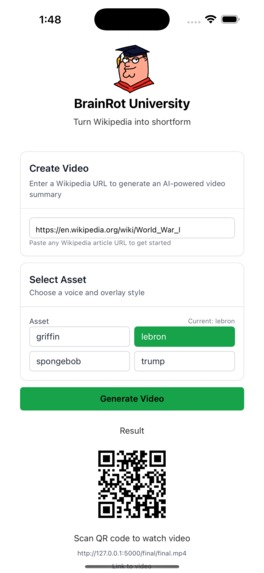
Landing page with results
-
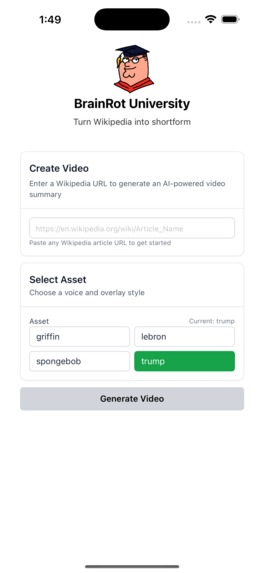
Landing Page
Inspiration
TikTok Brainrot Videos
Link to video demonstration
Brainrot University Demo Video
What it does
Paste a Wikipedia article link, and a typical brainrot video featuring the chosen character will be generated summarising the contents of the article.
How we built it
We set up a monolithic repo, with Lynx JS as the frontend framework, while using Flask for the backend. For the web scraping, we used Wikipedia's API endpoints to extract the texts, followed by summarization using Groq's API to call our chosen LLM model, llama 3.3 70b.
After this, we use Coqui's xTTSv2 to turn the extracted text into the speech of the chosen character
To create the subtitles, we needed to perfectly time the text with the generated audio, a process known as forced alignment. Using the wav2vec2 model as outlined in Motu Hira's tutorial, we analyzed the audio to predict the probability of each speech sound at every moment. This data was then processed to find the single most likely path, which gave us the precise start and end times for each word.
After this, we align and overlay the character's image over the video and save it locally as an mp4 file.
Lastly, we generate a QR code using the qrcode python library, and pass it back to the frontend to display to the user to scan. This brings the user to the endpoint which displays the final mp4 video output.
Development Tools Used
- VSCode
- Postman
- Lynx Explorer
- XCode
- Cursor
APIs, assets and libraries used
Techstack
- Lynx JS
- Flask
APIs and Libraries
- Groq
- Coqui
- wav2vec2
- Wikipedia
- qrcode
- Tailwind CSS
- ffmpeg
Challenges we ran into
Given that Lynx JS is a relatively new framework, its eco system is lacking in certain aspects, such as its lack of a UI library, which we were accustomed to depending on. As such we had to manually create components on our own, and had to really understand the documentation to implement our UI well.
On top of that, the lack of an inbuilt video element made it difficult to display the finished video locally within the Lynx Explorer app, and hence we had to think outside the box to solve the issue, eventauly deciding on using a QR code to show the final video
Accomplishments that we're proud of
We are proud that we managed to create a monolithic repo, using a new framework we've been wanting to try for a while, as while as getting some hands on experience making UI elements from scratch instead of relying on ready made ones
What we learned
We learnt that reading documentation is really important, and that when making AI programmes, there is alot to consider that you don't usually think about, like how to align certain text segments to an audio and etc.
Personally, we learnt more about mobile development that we weren't very familiar with at the start. Given that we are all usually web developers, its refreshing to see the similarities and differences between web development and mobile app development.
Future implementations / improvements
Given the time constraint, we couldn't set up a deployment for people to test out, especially since its out first time coding an IOS app. The best we could do is provide the github repo link, and have the community set up the environment themselves to test out our app. On top of that, the finished video couldn't really be stored properly in a database, and if given more time, we'd definitely want to ensure that the videos have a proper place to reside.
While we have go-tos for our usual web deployments, app deployments are much different, and we don't know enough to try them out yet, but I am sure we can take this into account the next time!


Log in or sign up for Devpost to join the conversation.