-
-
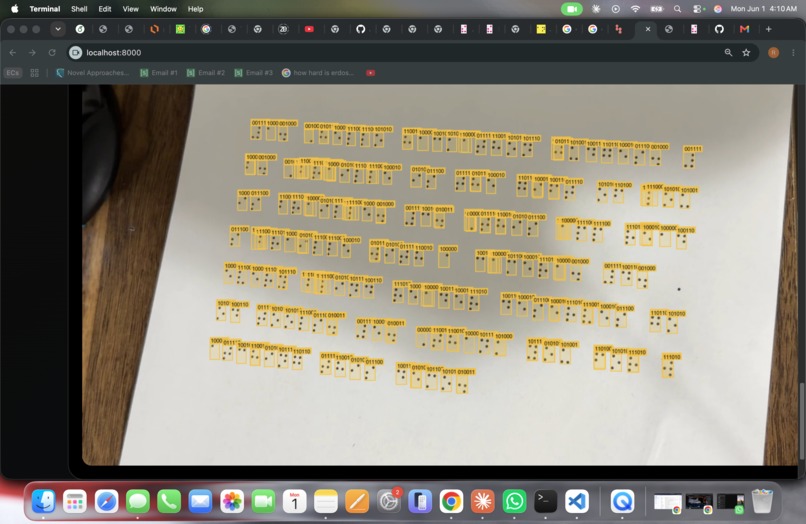
Detection overlay: every Braille cell on the page detected and labeled with its 6-bit dot pattern.
Inspiration
My friend's mom teaches at a school with blind kids. She told me she can't actually read the Braille they bring home. Most sighted people can't. There are Braille translator apps everywhere, but they only work on text you type in. Nothing real for an actual page of dots.
That bugged me enough to spend the night building this.
What it does
Point a phone camera at Braille. It reads it. Shows you the English. Speaks it out loud. Done in about a second.
Works on:
- Embossed paper (the real kind)
- Printed Braille
- Braille shown on a screen
- Even if someone just drew the dots with a Sharpie
There's a live mode for continuous reading, and a "Deep Read" button that uses GPT-4o vision when the image is too rough for the local model.
How we built it
Six steps:
- Browser grabs a camera frame, sends it to a Python backend (FastAPI).
- OpenCV runs contrast normalization so shadows look the same everywhere in the frame.
- A pre-trained YOLOv8 model (from the DotNeuralNet open source project) finds each Braille cell and figures out which of the 6 dots are raised.
- My code groups the cells into lines, sorts each line left to right, and figures out where words break based on the gaps.
- liblouis turns the Braille into English. It handles Grade 2 contractions (so a single Braille cell can mean a whole word like "the").
- A spell checker fixes obvious mistakes. If you give it an OpenAI key, GPT-4o-mini does a smarter cleanup at the end.
Frontend is just HTML, CSS, and JavaScript. No React, no framework. The browser speaks the result using the built-in voice.
Challenges we ran into
liblouis wouldn't install properly on my Mac. The Python version of it kept breaking. I ended up writing it so the app tries three different ways to talk to liblouis and uses whichever one works. Annoying, but now it runs anywhere.
The YOLO model was trained on photos of bumpy embossed paper. Flat dots on a screen look different enough that accuracy drops. That's why I added the "Deep Read" mode, which sends the image to GPT-4o vision when the local model struggles.
Also, one wrong dot in Grade 2 Braille can turn a word into total garbage. The spell checker fixes the easy ones. The AI polish step catches the harder ones.
Accomplishments that we're proud of
Nothing in the app fully breaks. If liblouis is missing, it falls back to letter-by-letter. If OpenAI is down, it uses the offline spell checker. If OpenCV isn't installed, it skips preprocessing. It just keeps working, less accurately maybe, but it works.
Also, the design was made for blind users from the start. Atkinson Hyperlegible font (designed by the Braille Institute), big high-contrast text, full keyboard navigation, screen reader support, voice feedback on everything. Someone who can't see the screen can still use it.
What we learned
The hard part of OCR isn't the model. The model works fine. The hard part is what you do after, when one dot is wrong and the whole word breaks. Cleaning up after the model matters as much as the model.
Also, never trust that a library will install the same way twice.
What's next for BrailleVision WebApp
- Run detection on the GPU instead of CPU, should be about 6x faster.
- Add other languages. liblouis already supports 60+, just need the UI for it.
- Math Braille support.
- A native iPhone app so it works offline on the phone itself.
- Camera hints like "move closer" or "hold steadier".
- Train the model on screen-displayed Braille so flat dots work as well as embossed.


Log in or sign up for Devpost to join the conversation.