Brillie.ai
Scan any Braille with any old phone. No special hardware, no internet needed. Just point, snap, and hear it speak — anywhere, for anyone.
Inspiration
Braille is the primary written language for millions of visually impaired people worldwide. Yet the gap between Braille readers and the rest of the world remains enormous — caregivers, teachers, volunteers, and family members often cannot read a single word of it.
We wanted to close that gap without requiring expensive hardware, cloud connectivity, or technical expertise. The insight was simple: almost everyone already carries a capable camera in their pocket. If we could make that camera understand Braille, we could put an interpreter in the hands of anyone who needs one — whether they are in a classroom in rural Tamil Nadu or a hospital ward anywhere in the world.
The name Brillie comes from Braille + brilliant — because the people who use it are.
What it does
Brillie.ai is a fully offline mobile application that uses a phone camera to scan physical, embossed or handwritten Braille and converts it into English text and spoken audio in near real time. No internet connection is required. No special lighting rig. No dedicated scanner. Just a phone.
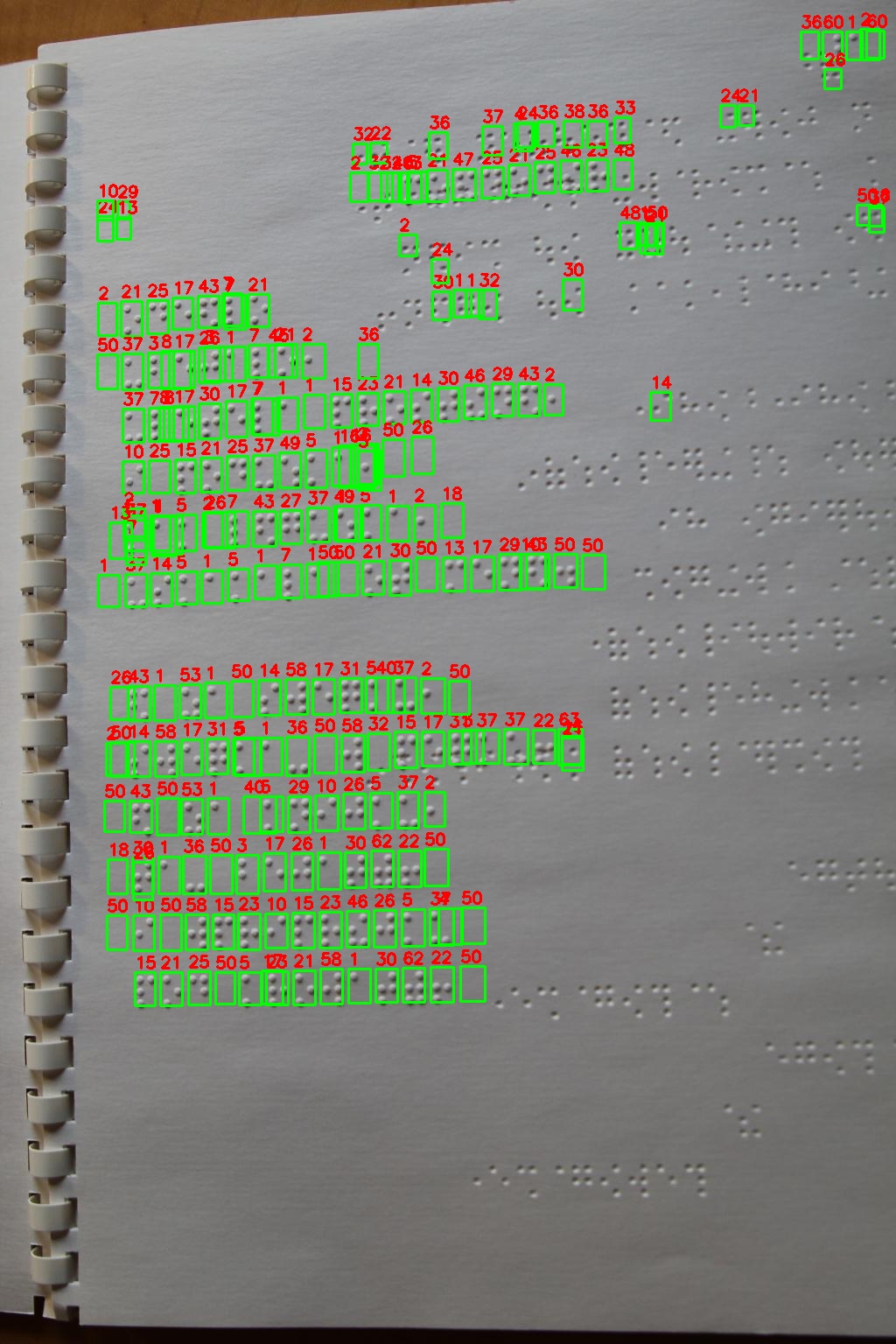
The app captures a camera frame, detects every Braille cell using an on-device YOLO26 model, classifies each dot pattern, and reconstructs English text — including capital and number indicators — before reading it aloud through the device's native text-to-speech engine. The entire pipeline runs on the mobile GPU through ONNX Runtime, making inference fast enough for practical use on older Android devices.
| Metric | Value |
|---|---|
| Cell detection accuracy | 96.5% |
| Dot-pattern classes | 63 |
| Annotated training samples | 203,000+ |
| Total training images | 21,595 |
How we built it
The single-stage detection pipeline
The core of Brillie is a single-stage pipeline built on YOLO26, an end-to-end, NMS-free, edge-optimised detector. YOLO26 directly detects and classifies every Braille cell in a single forward pass — no separate CNN refinement stage is needed. The model is trained on 63 dot-pattern classes, one for each possible 6-dot combination in the Braille cell grid, encoded as a bitmask where dot positions 1–6 carry values 1, 2, 4, 8, 16, 32 respectively. The class value is simply the sum of the raised dot values.
$$\text{class} = \sum_{i \in \text{raised dots}} 2^{i-1}$$
For example, dots 1, 4, and 5 raised gives 1 + 8 + 16 = 25, which maps to the English letter d.
We chose YOLO26 over the earlier two-stage YOLOv8 + CNN architecture because its NMS-free end-to-end head removes a bottleneck at inference time, and its edge-first design fits the hardware-friendly parameterisation we need for real-time performance on older Android phones.
Pipeline:
Camera frame → YOLO26 cell detection + classification → Pattern → English text → TTS output
Post-processing maps the ordered sequence of detected dot-pattern classes to English characters, handling capital and number prefix indicators correctly:
- Pattern
56(capital indicator) → next letter is uppercase - Pattern
60(number indicator) → next a–j patterns are digits 1–0 - All other patterns → lowercase letter or punctuation
|
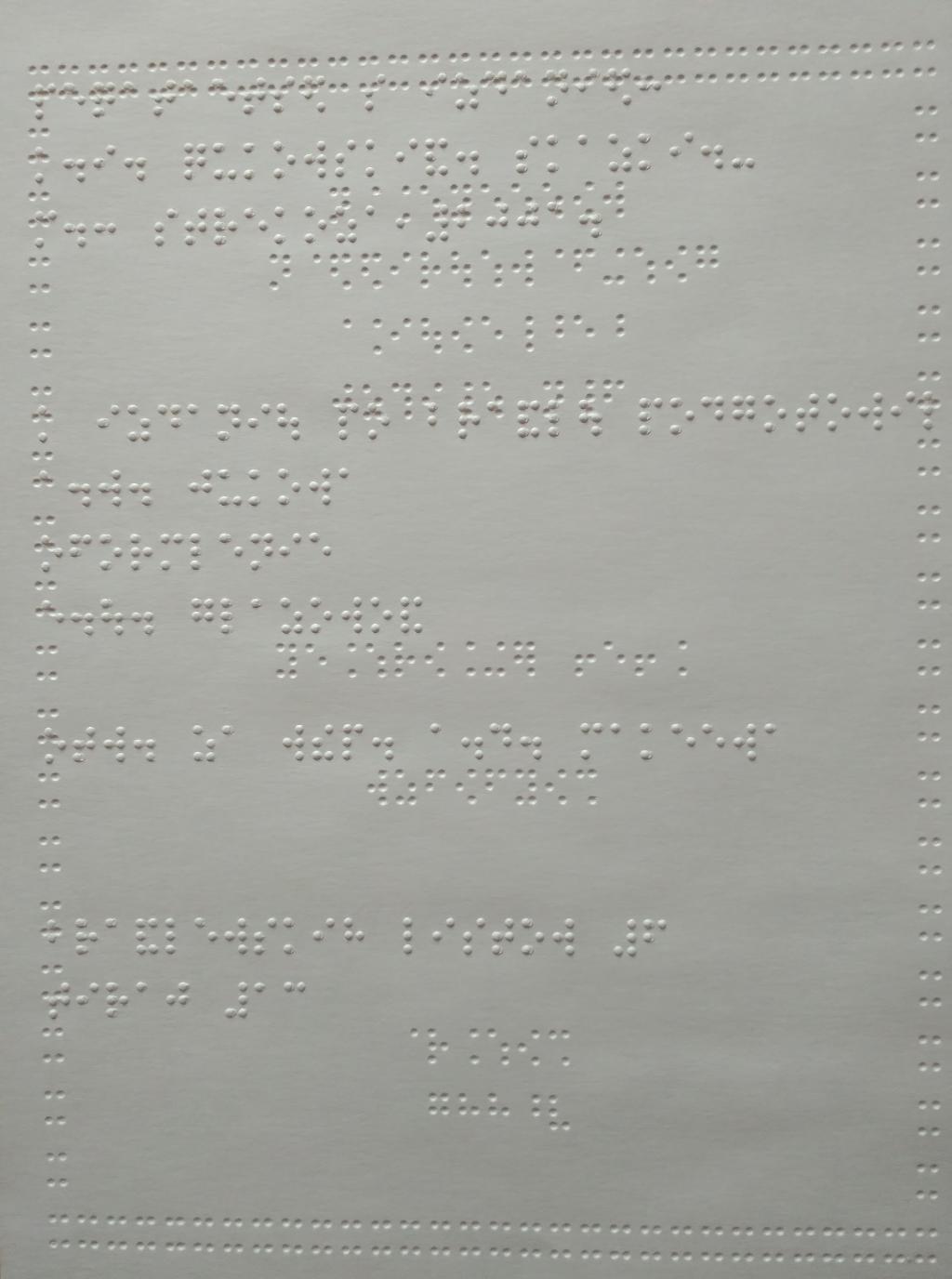
Sample of physical Braille script — annotated cells used in training |
|
YOLO26 live detection on a physical Braille sheet |
Building the unified dataset
No single public dataset covered the full 63-class dot-pattern space with enough diversity. We merged four open datasets — spanning Filipino, Portuguese, and standard English Braille, as well as natural scene Braille photographs — into a single unified YOLO-format dataset totalling over 21,000 images and 203,000 annotations.
| Dataset | Images | Annotations | Conversion |
|---|---|---|---|
| Filipino Grade 1 (Roboflow) | 10,807 | 93,497 | 67 → 63 classes |
| Angelina Dataset (ICCV 2021) | 290 | 72,250 | CSV → YOLO |
| Braille Dataset (Roboflow) | 8,031 | 26,817 | 48 → 63 classes |
| char_label / segment_natural | 1,157 | 10,853 | JSON/XML/TXT → YOLO |
| Total | 21,595 | 203,417 |
Each source required a different conversion strategy. The Angelina Dataset (ICCV 2021) already used 63-class dot patterns in CSV format and was converted directly. The Filipino Grade 1 dataset used 67 character-level labels which we mapped back to their underlying dot patterns. The Portuguese Roboflow dataset used 48 character classes including accented letters, each mapped to the corresponding Ibero-American Braille dot pattern. The natural scene dataset used three annotation formats — LabelMe JSON, VOC XML, and ICDAR TXT — all parsed and normalised into YOLO's relative bounding box format.
On-device inference with ONNX Runtime
The trained YOLO26 model was exported to ONNX format and bundled directly into the Flutter application. ONNX Runtime's mobile GPU delegate handles inference, making real-time detection feasible on mid-range and older Android hardware without any server round-trip. The Flutter app handles camera capture, frame preprocessing, model invocation, text reconstruction, and TTS playback in a single integrated pipeline — entirely on device.
Mathematical formulation of the inference pipeline
1. Dot-pattern class encoding
Each Braille cell is encoded as a bitmask over 6 dot positions. The class ID c ∈ {1 … 63} is:
$$c = \sum_{i=1}^{6} d_i \cdot 2^{i-1}, \quad d_i \in {0, 1}$$
where d_i = 1 if dot i is raised. The YOLO training label is c − 1 (zero-indexed). After inference the class index is recovered as:
$$\text{predicted_class} = \arg\max_k\, \mathbf{o}_k + 1$$
where o ∈ ℝ⁶³ is the YOLO26 classification output logit vector.
2. Image normalisation before inference
Each detected Braille cell region is normalised during preprocessing with μ = 0.5, σ = 0.5:
$$\hat{x} = \frac{x / 255.0 - \mu}{\sigma} = \frac{x / 255.0 - 0.5}{0.5}$$
The resulting tensor is passed to YOLO26 as a normalised float32 input — batch, channel, height, width.
3. YOLO26 bounding box clipping
Detected cell coordinates are clipped to the image boundary before cropping to prevent out-of-bounds indexing:
$$x_1' = \max(0,\, x_1), \quad y_1' = \max(0,\, y_1)$$
$$x_2' = \min(W,\, x_2), \quad y_2' = \min(H,\, y_2)$$
where W and H are the image width and height respectively. A cell is skipped if the resulting crop area is zero:
$$\text{crop_area} = (x_2' - x_1')(y_2' - y_1') = 0$$
4. Confidence filtering
YOLO detections are filtered at inference time using a confidence threshold τ = 0.01:
$$\mathcal{B} = { b_i \mid \text{conf}(b_i) \geq \tau }$$
Only cells in B are passed to the post-processor. A low threshold is used deliberately to maximise recall across varying Braille embossing depths and lighting conditions.
5. Full pipeline as a function composition
The complete inference pipeline for an input image I can be written as:
$$\text{English}(I) = \phi\Bigl(\, f_{\text{YOLO26}}(I) \,\Bigr)$$
where:
- f_YOLO26(I) — YOLO26 returns the set of bounding boxes B each with a predicted dot-pattern class c ∈ {1 … 63}
- φ(·) — post-processor maps the ordered sequence of classes to English text using capital and number prefix rules
Challenges we ran into
Class imbalance. While common English letters had between 4,000 and 15,000 training samples each, the rarest dot patterns appeared fewer than 100 times across the entire unified dataset. We applied targeted augmentation and weighted sampling to prevent the model from ignoring these thin classes.
Annotation format diversity. The four source datasets used six different annotation formats, and normalising them all to YOLO's relative bounding box format required careful handling of coordinate systems, class label mappings, and image resolution differences. A single build script — build_unified_dataset.py — handles all conversions reproducibly.
Mobile inference constraints. Achieving reliable inference on lower-end devices required careful model size and quantisation trade-offs. We evaluated several YOLO architectures before settling on YOLO26, whose NMS-free edge-optimised design delivers the best balance of accuracy and latency on phones as old as three to four years.
Physical Braille optics. Physical Braille presents optical challenges that synthetic or scanned datasets do not capture well — variable embossing depth, ambient lighting, paper texture, and slight cell misalignment. The inclusion of the Angelina natural scene dataset, which contains real photographs of Braille books, was critical to bridging this sim-to-real gap.
Accomplishments that we're proud of
- Achieved 96.5% Braille cell detection accuracy on the held-out test split of the unified dataset.
- Built a fully local, offline pipeline — no user data ever leaves the device. This matters deeply for accessibility users who may have limited or no data connectivity.
- Bridged Flutter with ONNX Runtime to run YOLO26 inference on the mobile GPU, enabling near-real-time performance on hardware that most users in our target communities actually own.
- Unified four heterogeneous open-source datasets spanning three languages and six annotation formats into a single clean 63-class training corpus of over 200,000 annotated Braille cells.
- Designed the application with accessibility as a first principle — voice guidance, high-contrast UI, large tap targets, and camera alignment feedback are built into the core experience, not added as an afterthought.
What we learned
We learned that real-world Braille recognition is a substantially harder problem than digital Braille translation. Physical dots vary in height, spacing, and clarity in ways that no clean Unicode input can simulate. Building a robust model requires diverse, real-photograph training data, not just scanned or synthetic samples.
We also learned that dataset unification is as important as model architecture. Bringing together data from Filipino, Portuguese, and English Braille sources — each with different class schemes and annotation formats — forced us to reason carefully about what a "class" actually means at the dot-pattern level versus the character level, and why the dot-pattern representation is the right canonical form for a language-agnostic detector.
On the engineering side, deploying a YOLO26 model entirely on-device in a Flutter application taught us a great deal about mobile ML constraints — memory budgets, GPU delegate compatibility, and the gap between desktop inference benchmarks and real device performance.
What's next for Brillie.ai
- Grade 2 Braille — Full Grade 2 contraction support to handle the compressed shorthand used in most real-world Braille publications.
- Live video mode — Continuous frame-by-frame recognition so users can sweep the camera across a page and hear text read in real time without tapping.
- iOS support — Extend the Flutter application to iOS using the CoreML delegate for ONNX Runtime.
- Multi-language output — Leverage the multi-lingual training data to support Tamil, Filipino, and Portuguese Braille output alongside English.
- Edge device deployment — Package the model for Raspberry Pi and similar embedded hardware to enable fixed-mount Braille readers for schools and libraries.
- Larger model training — Train YOLO26 on the full unified dataset with additional data collection targeting the 17 critically thin dot-pattern classes.
Credits
1. Angelina Braille Images Dataset
- Author: Ilya G. Ovodov
- URL: https://github.com/IlyaOvodov/AngelinaDataset
- Description: 212 pages of two-sided printed Braille books, 28 handwritten student works, and 44 non-Braille negative examples. Published at ICCV 2021.
2. Filipino Grade 1 Braille Dataset
- Author: aemiio
- URL: https://www.kaggle.com/datasets/aemiio/filipino-grade-1-braille-dataset
- Platform: Kaggle
- Description: YOLOv8-ready dataset for detecting Filipino Grade 1 Braille characters.
3. Braille-Iberoamericano Dataset
- Author: Edwin Hurtado
- URL: https://universe.roboflow.com/edwin-hurtado/braille-iberoamericano-dataset
- Platform: Roboflow Universe
- Description: Spanish Braille Alphabet dataset with over 10,000 images covering lowercase, uppercase, numbers, and punctuation.
4. YOLO26 — Ultralytics
- Maintained by: Ultralytics
- URL: https://docs.ultralytics.com/models/yolo26
- Description: End-to-end, NMS-free object detection model engineered for edge and low-power devices. Used as the primary detection and classification backbone in Brillie's single-stage inference pipeline.
5. Braille Dataset (ScienceDB)
- Maintained by: Computer Network Information Center (CNIC), Chinese Academy of Sciences (CAS)
- URL: https://www.scidb.cn/en/detail?dataSetId=b1df1a601acc47a6984aafa8f3ab8e92
- Description: Natural Braille character images with LabelMe JSON, VOC XML, and ICDAR TXT annotations.

Log in or sign up for Devpost to join the conversation.