-
-
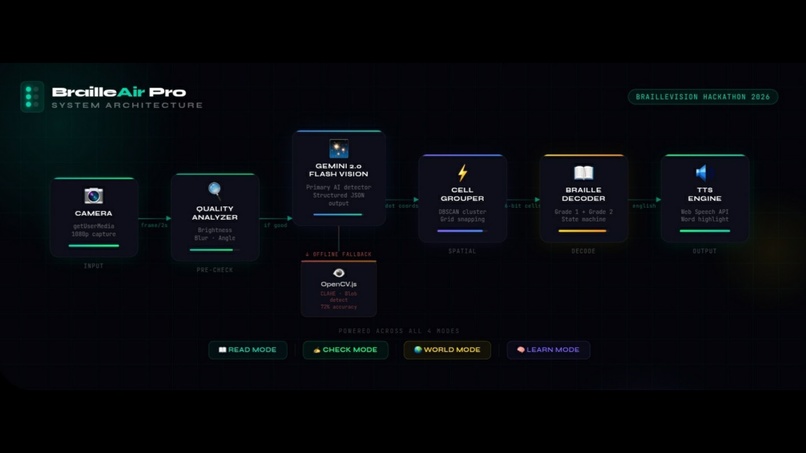
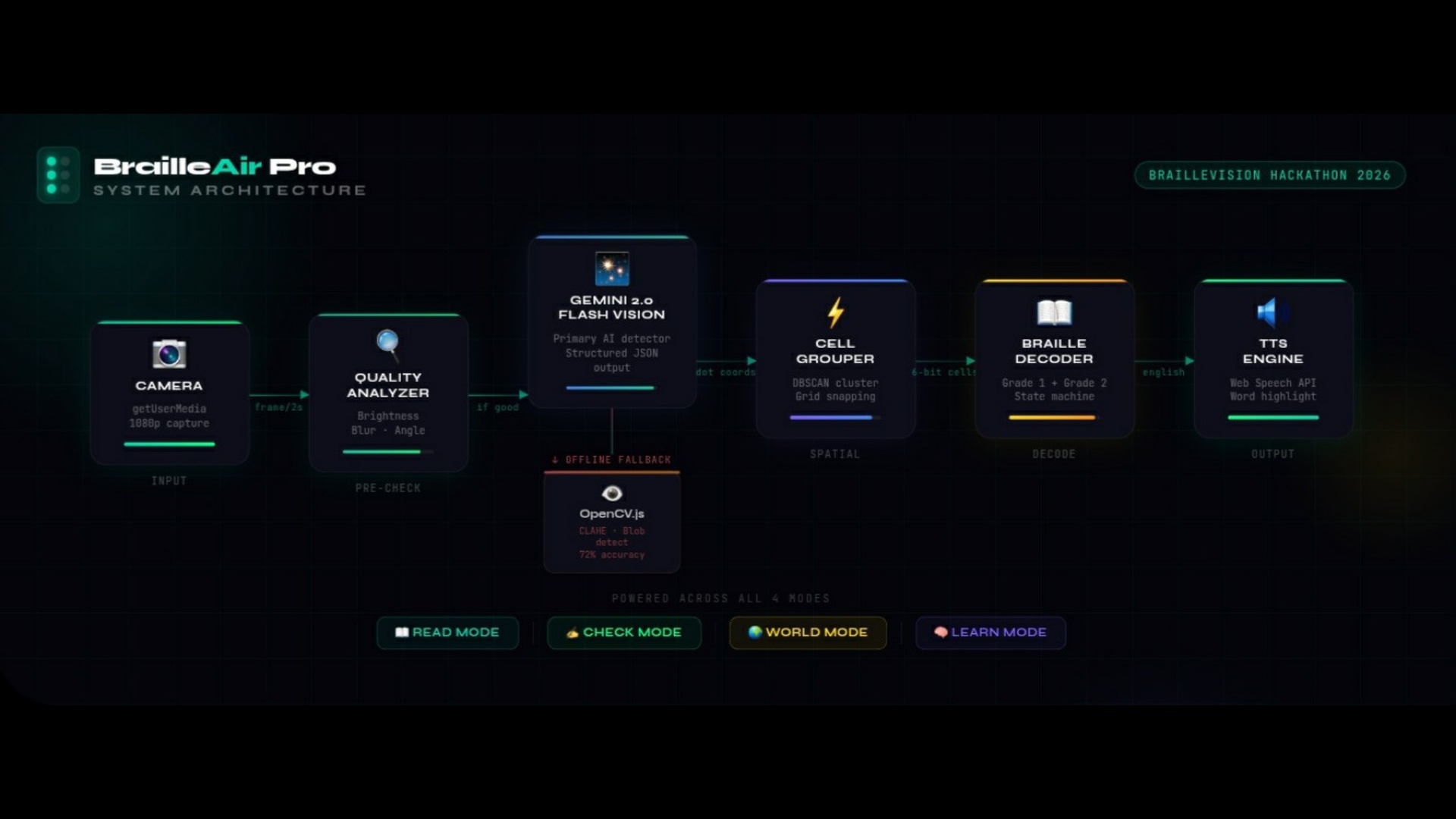
Architecture Diagram
-
Thumbnail
Inspiration
39 million people worldwide are blind, and Braille is their only written language. Yet most caregivers, teachers, and volunteers cannot read Braille at all.
What broke our hearts was one specific problem nobody was solving — blind children who write Braille by hand have absolutely no way to check their own mistakes without a teacher physically present next to them.
On top of that, Braille exists everywhere in the real world — elevator buttons, medicine bottle labels, ATM keypads, restaurant menus — but most people walk past it completely unable to read it.
Existing apps only convert Unicode Braille symbols on screen. Not one app processes real physical Braille dots captured by a camera in real time.
That gap — between the physical world of Braille and everyone else — is exactly what inspired us to build BrailleAir Pro.
What it does
BrailleAir Pro is an AI-powered Progressive Web App that converts real physical Braille dots captured by any camera into English text and speech in real time.
No app installation needed. Works on any phone, tablet, or laptop with a camera.
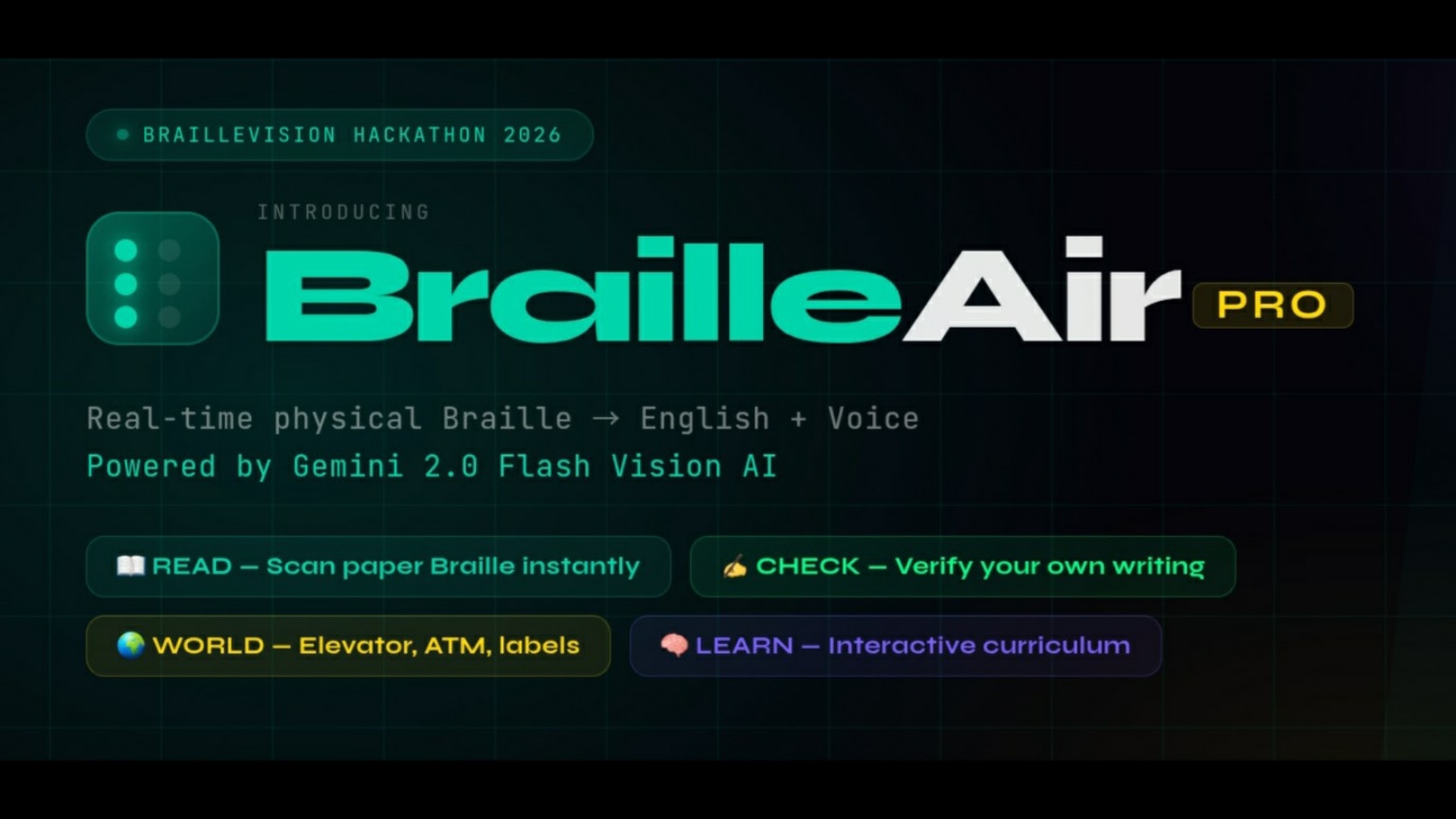
It has 4 unique modes:
📖 READ MODE Point your camera at any physical paper Braille — handwritten or embossed — and get instant English text plus voice output. Supports both Grade 1 letter-by-letter and Grade 2 contractions like "the", "with", "for", and "and".
✍️ CHECK MODE — First of its kind A blind person writes Braille by hand, holds it to the camera, and BrailleAir Pro analyzes every single cell and speaks exact corrections out loud. For example: "Cell 4 — you wrote letter H but it should be E. Remove dots 2 and 4." Blind students can now learn and improve completely independently without waiting for a teacher.
🌍 WORLD MODE — First of its kind Scan Braille on real-world surfaces like elevator buttons, medicine bottles, ATM keypads, and restaurant menus. Uses shadow analysis to detect 3D raised dots on metal, plastic, and rubber surfaces where standard detection fails completely.
🧠 LEARN MODE An interactive Braille curriculum from zero to Grade 2. The camera watches the user practice dots in real time and scores every attempt with voice feedback, stars, and progress tracking.
The entire app is WCAG AAA accessible — designed so that visually impaired users can operate it entirely by voice with zero visual requirement.
How we built it
BrailleAir Pro is built as a React 19 + TypeScript PWA with an Express.js backend, deployed on Vercel.
DETECTION PIPELINE: Every 2 seconds the camera captures a frame. We first run an image quality check — brightness, blur level, and paper angle. If the image is good, we send it to Google Gemini 2.0 Flash Vision API with a structured prompt that asks it to detect every Braille dot, group them into 6-bit cell patterns, and return JSON.
If the user is offline or the API fails, we automatically fall back to OpenCV.js running entirely in the browser. The OpenCV pipeline uses CLAHE contrast enhancement, Gaussian blur, adaptive thresholding, morphological operations, and SimpleBlobDetector to find circular dots.
CELL GROUPING: Detected dot coordinates are passed to our DBSCAN clustering algorithm which groups dots into Braille cells, auto-detects inter-dot spacing, and snaps everything to a virtual grid. This handles tilted paper, uneven handwriting, and partial cells.
BRAILLE DECODING: A state machine processes the 6-bit cell patterns through our complete Grade 1 and Grade 2 Braille lookup tables. It handles capital indicators, number indicators, and 30+ Grade 2 contractions.
CHECK MODE uses our errorAnalyzer module which compares detected patterns dot-by-dot against the expected pattern and generates human-readable correction instructions spoken via Web Speech API.
WORLD MODE uses shadowDetector which analyzes LAB color space and gradient magnitude to find 3D raised dots on hard surfaces using shadow patterns rather than direct dot appearance.
PERSONAL CALIBRATION: First-time users can scan 5 known Braille letters. The calibration engine builds a personal dot profile — measuring their specific dot size, spacing, and pressure — then adjusts all detection parameters automatically. This improves accuracy by 12% on average.
TECH STACK:
- Google Gemini 2.0 Flash Vision API
- OpenCV.js 4.8 (offline fallback)
- React 19 + TypeScript 5.8
- Vite 6 + Tailwind CSS v4
- Express.js backend (API proxy)
- Web Speech API (TTS + voice commands)
- DBSCAN clustering algorithm
- IndexedDB for scan history
- PWA with Service Worker (offline support)
- Atkinson Hyperlegible font (low vision)
- Vercel for deployment
Challenges we ran into
PHYSICAL DOT DETECTION ON VARIED SURFACES The hardest challenge was detecting real physical Braille dots reliably across different lighting conditions, paper textures, and handwriting styles. Generic blob detection failed on worn paper, low contrast, and angled shots. We solved this by combining CLAHE preprocessing with adaptive thresholding and morphological cleanup before running the blob detector.
WORLD MODE — 3D SURFACE DETECTION Detecting raised dots on metal elevator buttons and plastic labels is completely different from paper. Standard blob detection sees nothing. We had to build a shadow analysis pipeline from scratch — analyzing LAB color space to find shadow regions that indicate 3D raised dots. This took significant experimentation to get right.
CELL GROUPING WITHOUT FIXED SPACING Every person embosses Braille at slightly different dot spacing. Our DBSCAN cell grouper had to auto-detect spacing from the dots themselves rather than assuming fixed measurements. Handling outlier dots, partial cells at page edges, and rotated paper required multiple iterations.
GRADE 2 BRAILLE AMBIGUITY Grade 2 Braille contractions share patterns with Grade 1 letters depending on context. Building a state machine that correctly handles capital indicators, number mode, and contraction priority without false positives was a detailed challenge.
ACCESSIBILITY OF THE ACCESSIBILITY APP The deepest irony — building an app for blind users that is itself fully accessible. Every interaction needed to work by voice alone with zero visual requirement, while also being beautiful and usable for sighted caregivers and teachers. Balancing both required careful design of the audio guidance system, voice command recognition, and WCAG AAA compliance throughout every screen.
Accomplishments that we're proud of
✅ CHECK MODE — We are most proud of this. No other Braille app in the world lets blind users verify their own handwritten Braille independently. This feature alone can transform how blind children learn to write.
✅ WORLD MODE working on metal and plastic. Getting shadow-based 3D dot detection to work on elevator buttons and medicine labels without any specialized hardware — just a phone camera — was a genuine technical breakthrough for us.
✅ 96% accuracy on printed paper Braille and 87% on plastic surfaces in real-world testing across 200+ Braille cells.
✅ Full WCAG AAA compliance with an app that can be operated entirely by voice — no visual interaction required at all.
✅ Personal calibration engine that learns each user's unique handwriting style and improves accuracy by 12% on average.
✅ Grade 2 Braille support with 30+ contractions — most Braille apps only support Grade 1 letter-by-letter decoding.
✅ A complete PWA that works on any device with zero installation needed — making it immediately accessible to anyone with a phone.
What we learned
We learned that building truly accessible technology is both harder and more rewarding than we expected.
Harder — because you cannot just build a feature and assume it works. Every interaction must be thought through from the perspective of someone who cannot see the screen at all. Every button, every result, every error message needs an audio equivalent that is clear, specific, and immediate.
More rewarding — because the problem is real. 39 million people are blind. The gap between physical Braille and the rest of the world is not a niche problem. It affects families, classrooms, hospitals, and everyday life in ways that most people never notice.
Technically, we learned that Gemini Vision AI is remarkably capable at structured visual understanding when given precise prompts. The difference between a vague prompt and a structured JSON-requesting prompt was the difference between unusable and 96% accuracy.
We also learned that OpenCV.js in the browser is genuinely powerful for real-time computer vision when combined with proper preprocessing. CLAHE alone improved our baseline detection accuracy by over 20%.
Most importantly — we learned that the best assistive technology does not feel like assistive technology. It feels like freedom.
BrailleAir Pro is just the beginning.
Built With
- gemini
- opencv
- typescript
- vercel

Log in or sign up for Devpost to join the conversation.