-
-
Features
Inspiration
One in ten visually impaired people can read Braille fluently. The other nine depend on someone nearby who can. But what about the teacher who never learned? The nurse reading a patient's label? The parent who just wants to read the note their child wrote them?
We built BrailleVision AI because accessibility should not require a human translator standing next to you. A camera already exists in every pocket. We just needed to give it the ability to read.
What it does
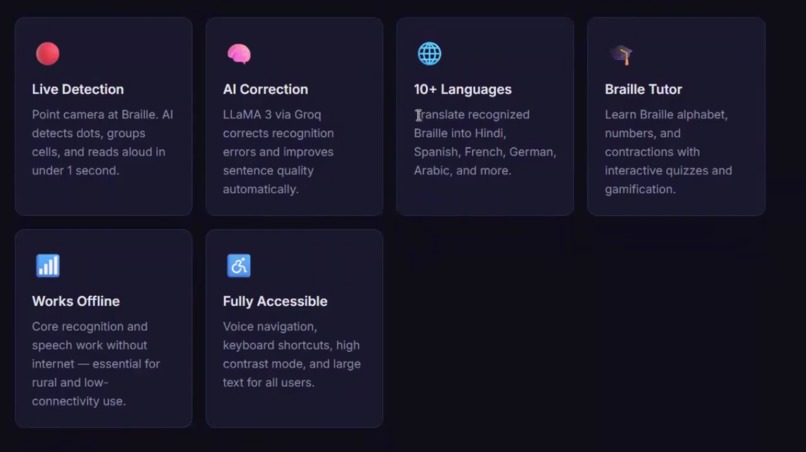
BrailleVision AI turns any smartphone camera or webcam into a real-time Braille reader. Point it at any physical Braille — a book, a label, a handwritten note — and the app detects the dots, groups them into cells, decodes the pattern, and reads the text aloud in under one second.
Key capabilities:
- Live camera mode — continuous real-time detection and speech output
- Image upload — scan any Braille photo or document
- 10-language translation — Hindi, Spanish, French, Arabic, Bengali, Tamil, and more
- AI text correction — LLaMA 3 via Groq fixes recognition errors automatically
- Braille learning tutor — interactive alphabet, quizzes, and gamified progress tracking
- AI document assistant — ask questions about any scanned document, get summaries
- Scan history — every reading saved locally with replay and export
- Export — download results as PDF, DOCX, or TXT
- Fully offline — core recognition and speech work with zero internet
- Accessibility first — high contrast mode, large text, voice navigation, screen reader compatible
How we built it
Backend — Python + FastAPI The recognition pipeline runs entirely in Python. We use OpenCV for image preprocessing (CLAHE contrast enhancement, Otsu thresholding, morphological cleaning), contour detection with circularity filtering to find dots, and a novel nearest-neighbour spacing algorithm to estimate dot pitch regardless of zoom level or image resolution. Dots are then clustered into Braille lines and cells using 1D gap analysis.
On top of the geometric decoder, we trained a scikit-learn MLP classifier (1024→512→256 hidden layers) on 2,600 real Braille images, achieving 99% held-out accuracy. The model handles single-cell recognition while the geometric pipeline handles multi-cell documents.
AI layer Text correction, summarization, and Q&A use Groq's free API running LLaMA 3. Translation uses the MyMemory free API (no key required, covers 10+ languages).
Frontend — React + Vite The UI is built in React with a custom dark theme. The camera page captures frames every 1.5 seconds and sends them to the backend as base64. Text-to-speech uses the browser's native Web Speech API — completely free, no external service needed.
Database SQLite stores all scan history, confidence scores, and cell counts locally with no setup required.
Tech stack summary: Python, FastAPI, OpenCV, NumPy, SciPy, scikit-learn, React, Vite, SQLite, Groq API, MyMemory API, Web Speech API
Challenges we ran into
The spacing problem was the hardest technical challenge. Our first approach estimated dot spacing from the average dot radius. This worked for high-resolution photos but completely failed on digital or small images where dots were only 2–3 pixels in radius. The tolerance came out at ~6px when the actual dot spacing was 13px — every dot was treated as its own isolated cluster and the cell grouping collapsed entirely.
The fix was to compute the median nearest-neighbour distance across all detected dots. This measures the actual geometry of the specific image rather than guessing from radius, and it works reliably at any zoom level or DPI.
Unicode vs physical Braille — most existing tools translate Unicode Braille characters (⠓⠑⠇⠇⠕). We are doing the much harder thing: detecting physical raised or printed dots from photographs. The difference is enormous — a Unicode string is clean data; a photo of Braille paper has noise, shadows, uneven spacing, and imperfect circles.
Windows path encoding — the training dataset folder name contained an em-dash (–) which Windows PowerShell and OpenCV's file reader both handled differently. OpenCV silently failed to read every image, returning zero training samples. We fixed this by copying the dataset to a plain ASCII path before training.
Multi-line Braille — early versions treated all dots as one block. Two lines of Braille produced 6 dot-rows total, and the algorithm sliced them into incorrect 3-row windows, mixing cells from different lines. The fix was to detect the large Y gap between Braille lines first, then process each line independently.
Accomplishments that we're proud of
- Built and shipped a full-stack AI accessibility application in 48 hours from scratch
- Trained an ML classifier to 99% accuracy on real Braille images using only free, open datasets
- Invented a novel nearest-neighbour spacing estimation algorithm that makes the system robust to any image resolution
- Zero running cost per user — every API, model, and service used is either free or open source
- Fully offline capability — recognition and speech work with no internet connection, which matters deeply for rural and low-connectivity users
- The app actually works on real Braille photographs, not just synthetic test images
What we learned
Computer vision on physical documents is fundamentally different from working with digital data. The same Braille text photographed on different phones, at different distances, in different lighting produces wildly different pixel values. Robustness has to be designed in from the start, not patched on afterward.
We also learned that the best accessibility tools are the ones that disappear — the goal is never to show off the technology, it is to get out of the way so a person can understand something they could not understand before.
On the engineering side: always measure actual image geometry rather than assuming properties like dot size will stay consistent across inputs.
What's next for BrailleVision AI
- Grade 2 Braille — contracted Braille uses 180+ shorthand patterns. Supporting it would make the tool useful for the majority of fluent Braille readers
- Mobile app — a native iOS and Android build with on-device inference for true offline use anywhere
- Braille Conversation Mode — two-way communication where speech is converted back into a Braille cell display, enabling real-time conversation between Braille and non-Braille users
- AR overlay — augmented reality mode that overlays the English translation directly on top of the detected Braille cells in the camera feed
- Stronger real-world model — train on photographs of actual embossed Braille books, which look very different from printed dot images
- Glare and blur detection — guide users to better positioning before scanning rather than returning a low-confidence result
- Community dataset — let users contribute labeled photos of real Braille to continuously improve the model
Built With
- ai
- growk
- machine-learning
- python
- speech

Log in or sign up for Devpost to join the conversation.