-
-
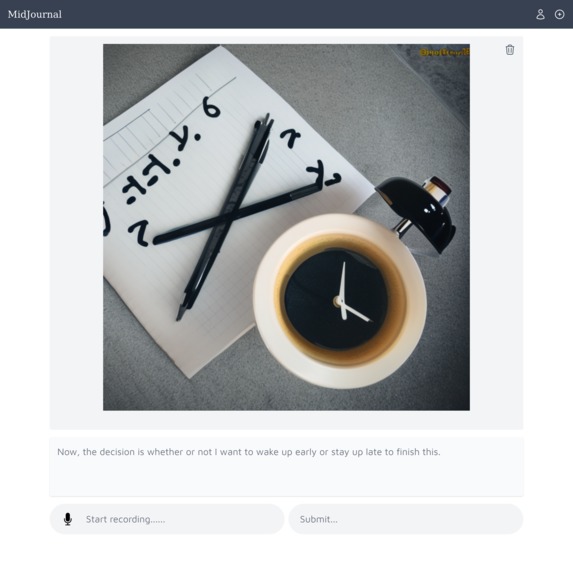
Entry capture page
-
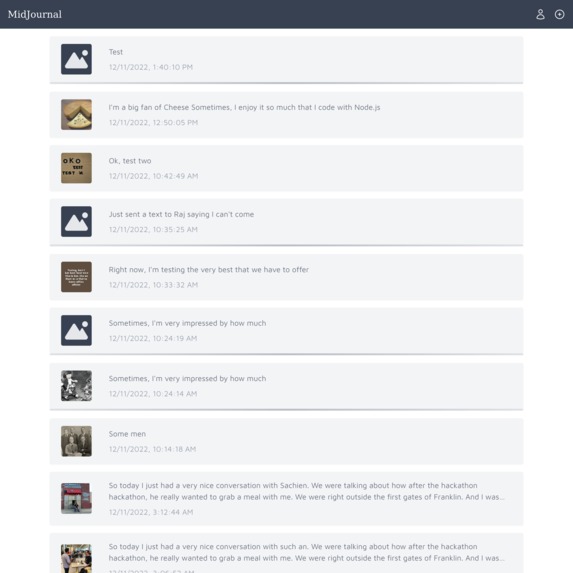
List of entries. Notice how entries generate images in the background, as indicated by the loading indicator and image placeholder
Introduction
Journaling has been used for centuries for self-expression and personal growth. We write to understand ourselves and others, but the process of typing up your thoughts can be time-consuming and difficult to make into a habit. Additionally, it's hard for people who journal to read all their old entries and quickly understand large amounts of text. MidJournal uses AI to transcribe your spoken thoughts into a journal entry and generate a complementary image that captures its essence. Simply log in to access your journal, create a new entry by talking out your reflections, and watch as your audio is transcribed in real-time. Edit your text entry as desired, then submit it to your journal. Your new text entry will appear, and soon after, you'll see a cool image corresponding to the text. You can also edit and regenerate images for any of your old entries. We built MidJournal using AssemblyAI’s API for real-time transcription, Replicate’s API for text-to-image generation, Sveltkit, TailwindCSS, Cloudflare, Supabase, and Google OAuth. Our goal is to make the process of journaling and revisiting your thoughts effortless and enjoyable.
What it does
MidJournal uses AI models to transcribe your spoken thoughts into a journal entry and generate a complementary image that captures its essence. Simply log in to access your journal, create a new entry by talking out your reflections, and watch as your audio is transcribed in real-time. Edit your text entry as desired, then submit it to your journal. Your new text entry will appear, and soon after, you'll see a cool image corresponding to the text. Quickly learn about your train of thoughts by looking at these visual representations. You can also edit and regenerate images for any of your old entries.
How we built it
We used AssemblyAI’s API for real-time streaming transcription and Replicate’s API for text-to-image generation. For speech-to-text, we referenced AssemblyAI’s documentation on streaming audio data and connecting sockets. Particularly useful was AssemblyAI's example repository on real-time transcription. For text-to-image, we referenced Replicate’s documentation on sending model inputs to their model library. We appreciated that Replicate handled storage of model output, putting our generated images at permanent URLs.
Our website is a static build built with Sveltkit and styled with TailwindCSS, and hosted by Heroku. We stored journal and account information in a Postgres database with Supabase. Google OAuth is used for user login. We prototyped the app in Figma before coding.
Challenges we ran into
Realtime transcription of audio proved to be a particularly challenging task, but AssemblyAI’s example repository proved to be especially helpful in getting something bootstrapped and ready. The complexity of integrating multipile different APIs was also difficult, as this required sychronizing state between server and client amid multiple API calls.
Accomplishments that we're proud of
We were able to successfully integrate with AssemblyAI and Replicate APIs, build a nice interface, and create a product for journaling that we genuinely look forward to using!
What we learned
Prioritize key features and get them working first, quality-of-life features should be included in our priorities, and AI API’s with great documentation are a pleasure to use!
What's next for Braden and David's Project
We’re planning to build out some non ML-related features such that we a fully rounded-out app that can be used daily by ourselves and other note-takers.
Built With
- assemblyai
- figma
- postgresql
- replicate
- supabase
- sveltekit
- typescript


Log in or sign up for Devpost to join the conversation.