Inspiration
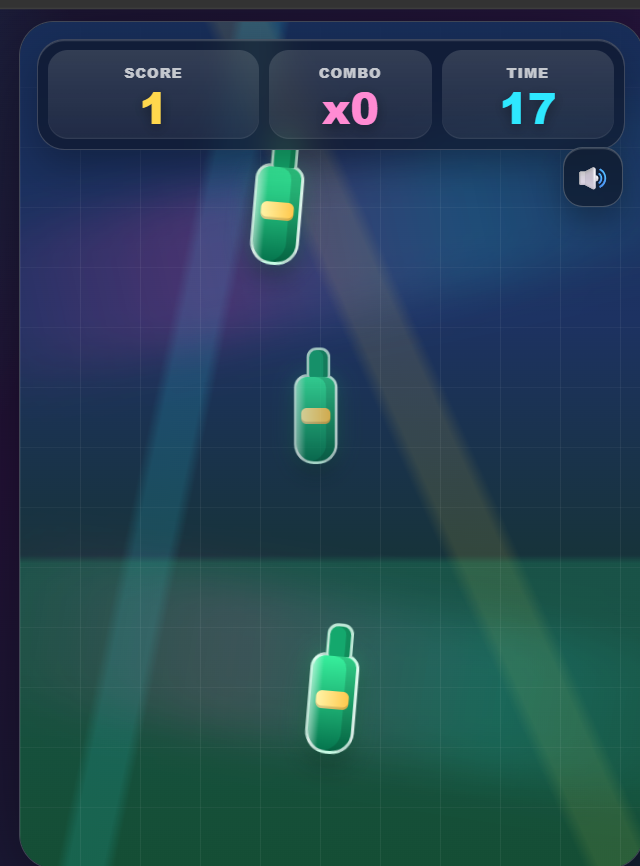
BottleShooter was inspired by simple arcade games that are easy to start but hard to master. I wanted to build a lightweight browser game that feels fast, colorful, and satisfying on both desktop and mobile.
The idea was simple: tap the bottles, avoid the bombs, and keep your combo alive. But the real challenge was making the game feel polished with animations, sound effects, score feedback, and responsive mobile gameplay.
What it does
BottleShooter is a 30-second arcade shooting game where players must tap bottles as quickly as possible while avoiding bombs.
Players get points for hitting bottles, and their score increases through a combo multiplier:
- x1 for normal hits
- x2 after building a stronger streak
- x3 for high combo streaks
The game also tracks accuracy, best combo, final score, and ends immediately if the player hits a bomb.
How we built it
I built BottleShooter as a single-file web game using HTML, CSS, and JavaScript.
The game uses:
- HTML for the game structure and HUD
- CSS for responsive layout, neon arcade visuals, animations, particles, screen shake, and game-over modal
- JavaScript for game state, scoring, combo logic, random spawning, timer, hit detection, sound control, and self-tests
- Pointer events so it works smoothly with mouse and touch input
- Generated WAV sound effects so the game can stay lightweight without external audio files
- localStorage to remember the sound preference
The game is designed to work well on mobile screens, with a full-screen responsive arcade layout.
Challenges we ran into
One major challenge was balancing the game difficulty. If bottles spawn too slowly, the game feels boring. If bombs or bottles appear too fast, the game becomes unfair. I solved this by adding a difficulty ramp that increases spawn speed, object movement, and bomb chance as the round progresses.
Another challenge was making the game feel satisfying without using heavy assets. I added particles, score popups, screen shake, sound effects, animated targets, and a polished HUD to make each hit feel rewarding.
Mobile audio was also tricky because browsers block sound until the user interacts with the page, so I added an audio unlock system that activates sound after the first user gesture.
Accomplishments that we're proud of
I am proud that BottleShooter feels like a complete mini arcade game instead of just a basic clicker.
The game includes:
- Responsive mobile-first design
- Combo-based scoring
- Accuracy tracking
- Bomb penalty system
- Generated sound effects
- Animated bottles and bombs
- Particle effects
- Screen shake and flash feedback
- Game-over result screen
- Built-in self-tests for important game logic
What we learned
While building BottleShooter, I learned how much small details matter in game feel. Animations, sound, timing, feedback, and difficulty balancing can completely change how fun a game feels.
I also learned how to manage game state cleanly in vanilla JavaScript, handle pointer events for both desktop and mobile, generate simple audio effects programmatically, and keep the whole project lightweight without external dependencies.
What's next for BottleShooter
Next, I want to improve BottleShooter with:
- Multiple difficulty modes
- High-score leaderboard
- More target types
- Power-ups
- Better sound effects
- Progressive levels
- Multiplayer score challenges
- PWA support so players can install it like a mobile game
The long-term goal is to turn BottleShooter into a polished casual arcade game that anyone can open and play instantly.


Log in or sign up for Devpost to join the conversation.