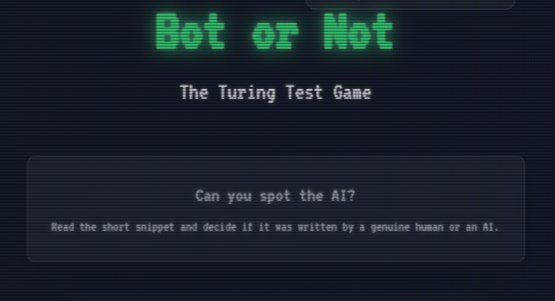
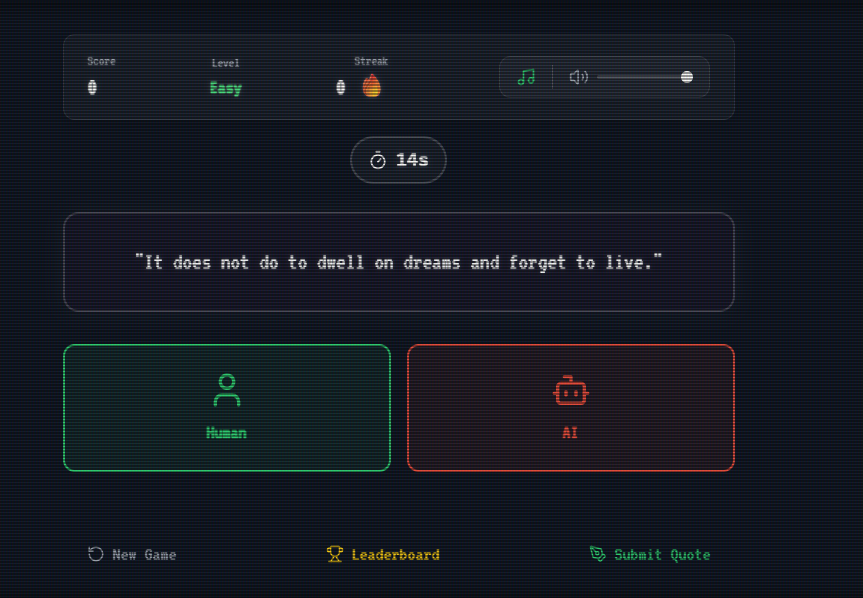
About the Project Bot or Not is an interactive browser game that challenges players to distinguish between quotes written by humans and those generated by AI. Inspired by the classic Turing Test, the game presents players with cryptic, philosophical, or poetic snippets and asks a simple question: Human or AI?
Built as a retro-terminal experience, the game fully immerses players in a CRT monitor aesthetic — complete with scanlines, screen curvature, flicker effects, and a DOS-style boot sequence — evoking the early days of computing and hacking culture.
Inspiration The idea was born from a simple observation: in the age of large language models, the line between human creativity and machine generation has become increasingly blurred. I wanted to create a game that not only entertains but also makes players reflect on the nature of creativity, authorship, and what it means to be "human" in the age of AI.
The visual inspiration came from classic 1980s computing — the green phosphor glow of early terminals, the rhythmic hum of CRT monitors, and the tactile feedback of mechanical keyboards. I sought to recreate that nostalgic feeling of sitting in front of an old IBM PC, booting into a mysterious system, and engaging in a battle of wits against an unseen opponent.
The name itself is a nod to the famous Turing Test, where a human evaluator judges conversations between a human and a machine to see if they can reliably tell which is which.
What We Learned Building this project taught us several valuable lessons:
The Psychology of Pattern Recognition. We discovered that humans rely heavily on grammatical perfection as a cue for AI-generated text — often mistakenly. The most human-like quotes sometimes came from AI, while perfectly grammatical human writing was flagged as machine-generated. This revealed fascinating insights about human intuition and bias.
Audio Context in Web Applications. Implementing a dynamic audio system using the Web Audio API taught us about the complexities of browser audio contexts, user interaction requirements for autoplay policies, and the importance of giving players full control over their audio experience.
The Power of Aesthetic Immersion. We learned that visual and auditory polish can transform a simple quiz game into a memorable experience. The CRT effects, boot sequence, and ambient music work together to create a cohesive world that players genuinely enjoy inhabiting.
How We Built It Architecture Overview The game follows a clean, modular architecture with clear separation of concerns:
$$ \text{Frontend (React)} \xrightarrow{\text{State Management (Zustand)}} \text{Game Logic} \xrightarrow{\text{HTTP/SSE}} \text{Supabase Backend} $$
The frontend is built as a single-page application with multiple screen states managed through Zustand, a lightweight state management library:
// Game state machine type GameState = 'boot' | 'start' | 'playing' | 'feedback' | 'leaderboard' | 'submit_quote'; Core Components Boot Sequence (BootScreen.tsx): A simulated DOS boot process that displays system initialization messages line-by-line, complete with a blinking cursor and retro typography.
Game Engine (GameScreen.tsx): Handles the core gameplay loop — fetching quotes, managing the countdown timer, processing answers, and displaying feedback. Includes visual effects like screen shake for wrong answers and white flash for timeouts.
Audio System (sounds.ts & AudioControl.tsx): A custom Web Audio API implementation featuring:
Procedural sound effects (correct/incorrect/timeout) Ambient background music with LFO modulation Volume control and mute toggles Quote Management (quotes.ts): Fetches quotes from a hybrid source — 70% from a community-driven Supabase database (user-submitted and approved quotes) and 30% from the Quotable API.
CRT Visual Effects The retro aesthetic is achieved through a multi-layered CSS approach:
$$ \text{CRT Effect} = \underbrace{\text{Scanlines}}{\text{CSS gradients}} + \underbrace{\text{Screen Glow}}{\text{Box shadows}} + \underbrace{\text{Flicker}}{\text{Keyframe animation}} + \underbrace{\text{Glitch}}{\text{Random skew/distort}} $$
The scanlines are created using CSS linear gradients overlaying the entire viewport:
.crt::before { background: linear-gradient(rgba(18, 16, 16, 0) 50%, rgba(0, 0, 0, 0.4) 50%), linear-gradient(90deg, rgba(255, 0, 0, 0.09), rgba(0, 255, 0, 0.04), rgba(0, 0, 255, 0.09)); background-size: 100% 3px, 3px 100%; } Difficulty Scaling The game implements an adaptive difficulty system based on player streak:
$$ \text{Level} = \begin{cases} \text{Easy} & \text{if } \text{streak} < 5 \ \text{Medium} & \text{if } 5 \leq \text{streak} < 10 \ \text{Hard} & \text{if } \text{streak} \geq 10 \end{cases} $$
Each level adjusts the timer duration and selects quotes from different complexity tiers.
Challenges We Faced
The "Unclickable Button" Bug Early in development, we used CSS 3D transforms (rotateX, perspective) to simulate screen curvature. While visually impressive, this created a stacking context issue that made interactive elements beneath the pseudo-elements unclickable. We solved this by replacing the 3D transform with an inset box-shadow curvature effect and ensuring pointer-events: none on all overlay layers.
Audio Context Suspension Browsers suspend audio contexts until user interaction. Our ambient background music would fail to start on page load. The solution was to initialize audio only after the first user click and to provide clear visual feedback when audio was enabled.
Quote Authenticity Ensuring a balanced mix of genuinely human and AI-generated quotes was challenging. We implemented a dual-source system: community-submitted quotes (moderated via Supabase RLS policies) and curated AI-generated text. The 70/30 split ensures variety while maintaining gameplay balance.
Timer Synchronization The countdown timer needed to be consistent across renders and edge cases (tab switching, background suspension). We used a setInterval with store-based state checks rather than local state to prevent desynchronization.
Built With
- css
- quotable
- react
- supabase
- tailwind
- typescript
- vite

Log in or sign up for Devpost to join the conversation.