-
-
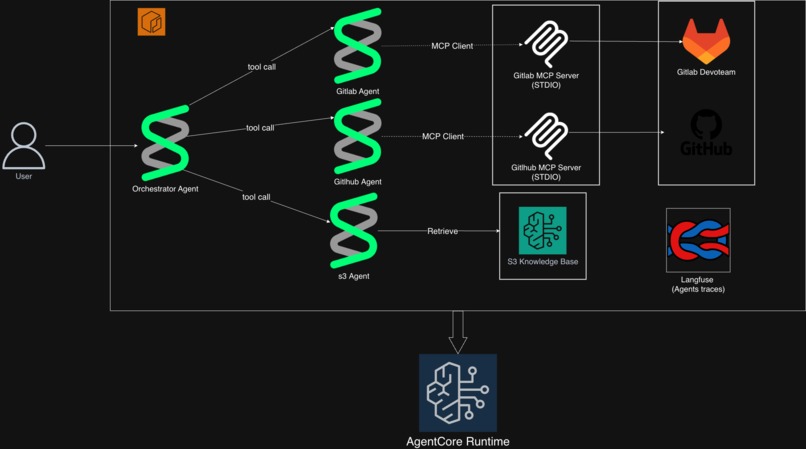
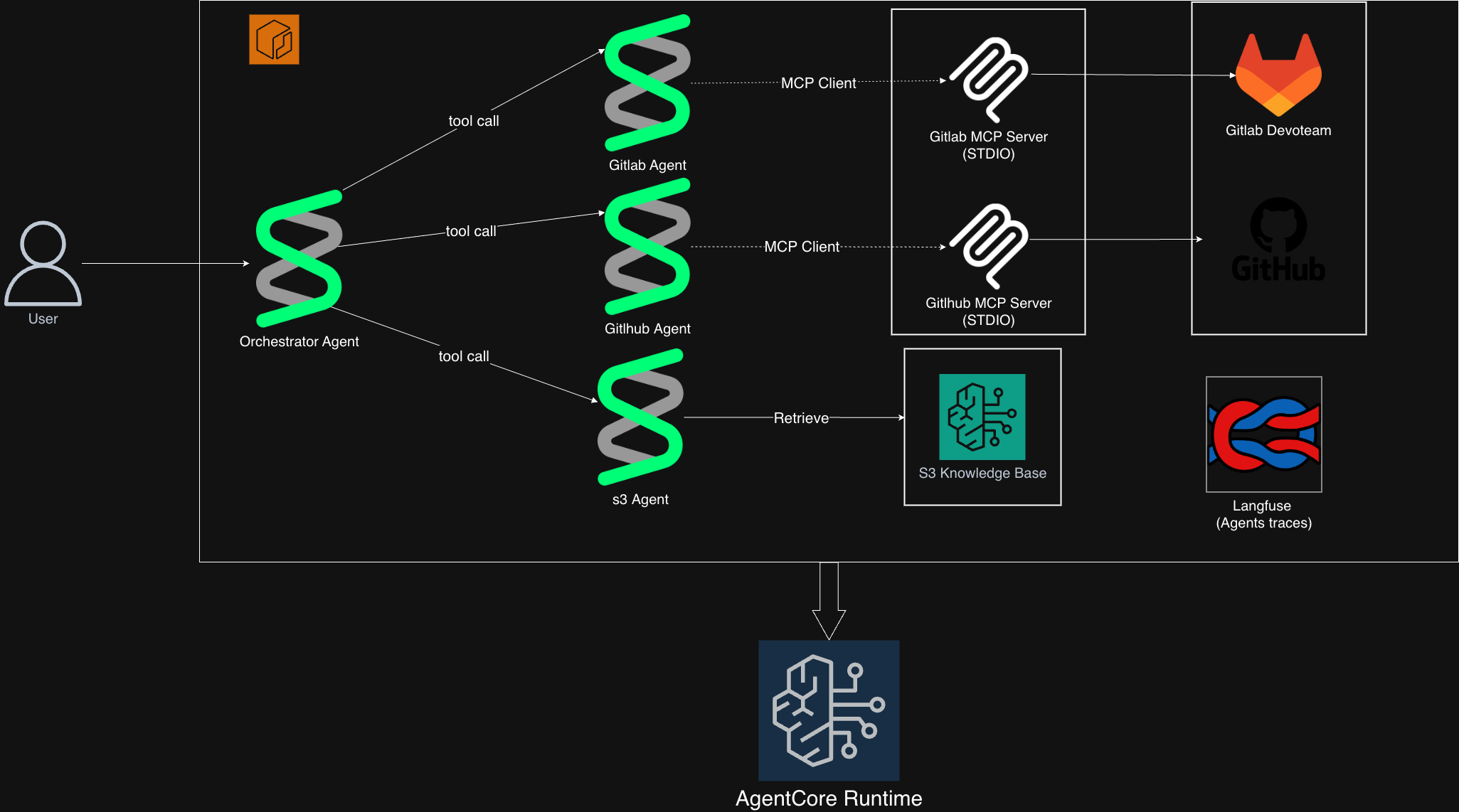
Agentic workflow for bookkeeper
Bookkeeper: Intelligent Multi-Platform Project Discovery
Inspiration
The inspiration for Bookkeeper came from a painful, personal experience at our consulting company. I was tasked with building a knowledge base with a custom SharePoint connector for a client. Two weeks of banging my head against integration errors—OAuth authentication issues, SharePoint API versioning headaches, permission conflicts, throttling limits. Two weeks of Stack Overflow deep dives, Microsoft documentation rabbit holes, and debugging cryptic error messages. Then, in a casual conversation, a colleague mentioned they'd built the exact same thing a few months earlier. Two weeks of frustration, completely unnecessary.
This wasn't an isolated incident. In consulting, we move fast between projects, teams shift constantly, and documentation is often an afterthought—or nonexistent. Knowledge exists in scattered GitLab repositories, client-specific GitHub projects, old Confluence pages that nobody updates, Slack threads that disappear, and the minds of consultants who've moved on to other projects. When you start a new engagement, there's no easy way to ask: "Has anyone done something like this before?"
The fundamental problems we face in consulting:
- Tribal knowledge: Critical information locked in people's heads, not systems
- Poor documentation culture: Deliverables get documented, but internal tools and patterns don't
- Time pressure: Billable hours mean no time to thoroughly search for prior art
- Scale: Hundreds of projects across multiple clients make manual discovery impossible
- Context switching: Moving between projects means you don't know what other teams are building
We realized that with modern AI and vector search, we could build an intelligent orchestrator that doesn't just search—it understands intent and discovers connections that humans would miss. Bookkeeper is the solution I wish I'd had three weeks earlier.
What it does
Bookkeeper is an intelligent orchestrator system designed specifically for consulting environments where documentation is scattered and institutional knowledge is hard to capture. It solves two critical problems:
Problem 1: Discovering Existing Work
When you start a new project, Bookkeeper searches across your organization's repositories to find similar work that's already been done. Instead of rebuilding from scratch, you can learn from (or reuse) existing solutions.
Problem 2: Finding Undocumented Knowledge
In consulting, the best documentation often doesn't exist in official docs—it's in code repositories, commit messages, README files, and project specifications scattered across platforms. Bookkeeper surfaces this hidden knowledge through semantic search.
How it works:
- Intelligently routes queries to specialized AI agents (GitLab, GitHub, and documentation search)
- Performs semantic similarity analysis using Claude Sonnet 4 to understand project intent, not just keywords—meaning you can describe what you want to build and find projects that accomplish similar goals, even if they use different terms
- Searches multiple platforms concurrently for maximum efficiency
- Returns structured results with similarity scores, metadata, and relevant excerpts
- Provides technical documentation from knowledge bases using vector embeddings, surfacing project specs, architecture diagrams, and internal reports that might not have formal documentation
Real-world examples:
- Ask "Find knowledge base implementations with SharePoint connectors" and Bookkeeper analyzes repositories across platforms, identifying similar integrations with OAuth patterns, throttling workarounds, and lessons learned about SharePoint API quirks
- Query "Authentication systems using OAuth2" and find not just code repos, but also architecture decisions, security reviews, and battle-tested solutions to common OAuth edge cases
- Search "React dashboard with real-time updates" to discover past client projects with similar requirements, even if they're described as "web portal with live data feeds"
The value proposition for consulting: Stop reinventing the wheel. Start every project with the collective knowledge of your entire organization, even when formal documentation doesn't exist.
How we built it
Architecture & Design Decisions
We adopted an orchestrator pattern with agents-as-tools, a critical architectural decision that shaped the entire system. After exploring chains and hierarchies, we settled on treating each specialized agent as a tool available to the orchestrator. This pattern allows:
- Concurrent execution: All platforms searched simultaneously, ensuring complete coverage
- Intelligent routing: Claude Sonnet 4 decides which tools to invoke based on the query
- Clean separation: Each agent focuses on one platform; the orchestrator handles strategy
- Extensibility: Adding new platforms just means adding new agent-tools
The key insight: we don't know in advance where the answer lives. By running agents concurrently, we ensure GitLab, GitHub, and documentation are all searched—critical for avoiding the "oops, it was in that other repo" problem that inspired this project.
Technology Stack:
- FastAPI for the REST API layer—fast, async, and excellent for AI workloads
- Strands Agents Framework for building AI agents with tool execution
- Claude Sonnet 4 via AWS Bedrock for intelligent reasoning and routing
- MCP (Model Context Protocol) for standardized platform integrations
- AWS Infrastructure: S3 Vectors, Bedrock Knowledge Base, OpenSearch Serverless
- Terraform for infrastructure as code—repeatable, version-controlled deployments
- Docker for containerization and deployment
- Langfuse for observability and tracing
Implementation Details
1. Infrastructure First: Terraform Before writing a single line of application code, we built the infrastructure with Terraform. This "infrastructure-first" approach meant:
- All AWS resources (ECR, S3, Bedrock Knowledge Base, IAM roles) are version-controlled
- Developers can spin up complete environments with
terraform apply - No manual AWS Console clicking—everything is reproducible
- Infrastructure changes go through code review just like application code
The Terraform modules handle complex dependencies (IAM roles → S3 Vectors → Knowledge Base) automatically, with proper ordering and retry logic.
2. Observability from Day One: Langfuse We integrated Langfuse tracing before building complex multi-agent logic. Every agent call, every tool execution, every Claude invocation gets traced. This meant when debugging complex orchestration issues, we had full visibility into the execution graph rather than trying to add logging after the fact.
Each agent has its own trace context:
github_agent = Agent(
    tools=github_tools,
    trace_attributes={
        "session.id": "github-agent-{}".format(datetime.now()),
        "langfuse.tags": ["github-agent"]
    }
)
3. Agent System Each specialized agent uses the MCP protocol to interact with its platform:
- GitLab Agent: Uses Docker-based MCP client to query private GitLab instances, analyzing repositories, READMEs, commit history, and contributor patterns
- GitHub Agent: Leverages GitHub Copilot's MCP interface for public/private repo search with comprehensive metadata
- S3 Agent: Searches a Bedrock Knowledge Base using vector embeddings (Titan model) to find relevant documentation
4. Orchestrator Intelligence The main orchestrator uses Claude Sonnet 4 with a carefully crafted system prompt that decides:
- Which agents to invoke based on the query
- How to parallelize requests using
ConcurrentToolExecutor - How to synthesize results from multiple sources into a coherent response
5. Deployment Pipeline Complete Docker-based deployment with automated scripts:
deploy.sh: Build and push Docker images to ECR- ARM64 architecture support for AWS Graviton (cost-effective compute)
- Environment variable injection for secure credential management
- Health checks and readiness probes
The combination of Terraform for infrastructure + Docker for application means the entire system can go from zero to production in under 30 minutes.
6. Knowledge Base Management
We created a robust Python utility (knowledge_base.py, ~870 lines) that handles the complex orchestration of creating Bedrock Knowledge Bases with S3 Vectors, including:
- IAM role creation with proper policies
- Vector bucket and index setup
- Data ingestion and synchronization
- Cleanup and resource deletion
7. Vector Search Implementation The knowledge base uses:
- Embeddings: Amazon Titan Text Embeddings v2 (1024-dimensional vectors)
- Vector Storage: S3 Vectors with cosine similarity for efficient search
- Chunking: Fixed-size strategy (512 tokens, 20% overlap) for optimal retrieval
- Distance Metric: Cosine similarity for semantic matching
Challenges we ran into
1. Finding the Right Agent Architecture Pattern
The biggest challenge was figuring out how to structure the multi-agent system. We settled on treating each agent as a tool available to a main orchestrator. This pattern had several advantages:
- Parallel Execution: The orchestrator can call multiple agent-tools concurrently using
ConcurrentToolExecutor - Complete Coverage: All platforms get searched simultaneously, ensuring we don't miss relevant results because of early termination
- Clear Responsibility: The orchestrator decides strategy; agents handle execution
- Observability: Clean trace hierarchy in Langfuse—one orchestrator trace with three agent-tool child traces
Why this matters: When you query "Find SharePoint connector implementations," the orchestrator simultaneously searches:
- GitLab (internal private repos)
- GitHub (public examples and libraries)
- Documentation KB (architecture docs and specs)
Without concurrent execution, we'd risk missing the colleague's GitLab implementation while searching GitHub first. The "agents as tools" pattern ensures comprehensive coverage rather than partial results.
2. S3 Vectors Migration
AWS introduced S3 Vectors as a new storage backend for Bedrock Knowledge Bases, deprecating some OpenSearch functionality. We had to adapt our knowledge base creation logic to work with this new service while maintaining backward compatibility.
Solution: Built a comprehensive abstraction layer in knowledge_base.py that handles both S3 Vectors and OpenSearch Serverless, with proper error handling and retry logic.
3. Concurrent Agent Execution and Error Handling
Once we settled on the "agents as tools" pattern, we had to handle the complexity of parallel execution. Running three agents simultaneously while maintaining proper error handling was tricky. We needed to ensure that if one agent fails (e.g., GitLab API timeout), the other two continue, and the orchestrator can still provide useful results.
Solution: Used Strands' ConcurrentToolExecutor with proper try-catch blocks in each agent tool wrapper. Instead of raising exceptions that would halt execution, we return error messages as strings:
This means even if GitLab is down, GitHub and Documentation search still run and return results. The orchestrator synthesizes whatever partial information is available rather than failing completely.
4. Observability at Scale
Understanding what's happening inside a multi-agent system—which tools are called, what responses are generated, where latency occurs—is critical but complex.
Solution: Integrated Langfuse with proper tracing attributes for each agent, including session IDs, tags, and trace hierarchies. This gives us full visibility into the agent execution graph. The "agents as tools" pattern made this easier—each tool call shows up as a distinct span in the trace hierarchy.
5. The Documentation Bootstrap Problem
To build a system that finds undocumented knowledge, we first needed to ingest the little documentation that does exist. Many projects had no READMEs, outdated architecture docs, or information spread across multiple formats (PDFs, Word docs, Markdown, wikis).
Solution: Built a flexible ingestion pipeline that handles multiple document formats, with chunking strategies optimized for technical content. The S3 Knowledge Base can ingest any text-based format, and the vector embeddings capture semantic meaning even from poorly structured docs.
Accomplishments that we're proud of
1. Infrastructure as Code with Terraform
One of our proudest achievements is the complete infrastructure-as-code implementation. Everything—from ECR repositories to Bedrock Knowledge Bases—is defined in Terraform:
terraform/
├── main.tf          # Provider configuration
├── ecr.tf           # Container registry
├── bedrock.tf       # Knowledge Base setup
├── opensearch.tf    # Vector storage (S3 Vectors)
├── s3.tf            # Data source buckets
├── iam.tf           # Roles and policies
└── outputs.tf       # Resource references
Why this matters in consulting:
- Repeatability: Deploy the same infrastructure for multiple clients with just variable changes
- Version Control: Infrastructure changes are tracked in Git, just like code
- Documentation: The Terraform code IS the documentation of what's deployed
- Cost Transparency: Easy to see exactly what resources are provisioned
- Quick Teardown:
terraform destroyfor quick cleanup after POCs
We didn't just build a demo—we built a system that can be deployed to production in any AWS account with terraform apply.
2. Elegant Orchestrator Pattern
The orchestrator's ability to intelligently route queries and execute agents concurrently, while synthesizing results, showcases the power of modern AI orchestration. The system prompt design enables Claude to make sophisticated decisions about which platforms to search.
3. Langfuse Observability: Seeing Inside the Black Box
Multi-agent AI systems are notoriously difficult to debug. When three agents run concurrently and synthesize results, how do you know what went wrong? How do you measure latency? Which agent is the bottleneck?
Enter Langfuse. We integrated comprehensive observability from day one:
orchestrator = Agent(
    model=bedrock_model,
    tools=[gitlab_assistant, github_assistant, documentation_assistant],
    trace_attributes={
        "session.id": "orchestrator-{}".format(datetime.now(timezone.utc).date()),
        "langfuse.tags": ["orchestrator"]
    }
)
What Langfuse gives us:
- Full trace hierarchy: See the orchestrator's decision to call specific agents, then drill into each agent's tool calls
- Latency analysis: Identify which platform searches are slow (looking at you, GitLab API)
- Token usage tracking: Monitor costs across Claude Sonnet 4 calls
- Error patterns: Quickly identify recurring failures in specific agents
- Session replay: Reconstruct exactly what happened for any query
Why this matters in consulting: When a client asks "Why did this query take 30 seconds?" or "Why didn't it find my SharePoint project?", we can open Langfuse and show them the exact execution graph. This level of transparency is critical for enterprise adoption.
Observability isn't optional for production AI systems—it's the difference between a demo and something clients trust with real work.
4. Scalable Architecture
The modular agent design means adding new platforms (Bitbucket, Jira, Confluence, etc.) is straightforward—just implement a new agent with its MCP tools.
What we learned
Technical Insights
1. AI Orchestration is an Art—And Architecture Matters Effective orchestration requires more than just calling multiple agents—it requires careful architectural decisions:
- Pattern selection: "Agents as tools" proved superior to chains or hierarchies for our use case
- Concurrent execution: Parallel agent calls ensure comprehensive coverage—critical when you don't know where the answer lives
- Thoughtful system prompts: Guide the orchestrator's decision-making about which tools to invoke
- Proper abstractions: Treating agents as tools makes them composable and testable
- Graceful degradation: When one agent fails, others continue—partial results beat no results
The biggest lesson: spend time on architecture before implementation. We tried three patterns before finding the right one, but that exploration time paid dividends in system clarity and observability.
2. Infrastructure Matters The quality of your infrastructure code is as important as your application code. Terraform modules should be modular, reusable, and well-documented. Good IaC saves countless debugging hours.
3. Observability is Non-Negotiable In multi-agent systems, you need to see the execution graph. Langfuse integration was invaluable for debugging and understanding agent behavior.
Engineering Principles
- Abstraction Matters: Our base agent pattern and MCP client wrappers made adding new platforms easy
- Error Handling First: In distributed systems (multiple agents, external APIs), assume failures and design for graceful degradation
- Configuration Over Code: Using YAML configs and environment variables makes the system adaptable without code changes
- Document Everything: Good documentation is infrastructure—it enables others to use and extend your work (yes, the irony of building a system to solve poor documentation while emphasizing good documentation practices is not lost on us!)
Consulting-Specific Lessons
1. The Hidden Cost of Reinvention Those two weeks I spent fighting SharePoint integration errors weren't just wasted time—they were:
- ~80 billable hours the client paid for solving a solved problem
- Opportunity cost of what else could have been built
- Slower time-to-market for the client
- Unnecessary frustration debugging issues my colleague had already solved
- Missing out on battle-tested code that handled edge cases I hadn't even encountered yet
The worst part? My colleague had documented the gotchas—OAuth token refresh patterns, SharePoint throttling workarounds, permission inheritance quirks—but I didn't know where to look. Across a consulting company with hundreds of projects per year, these costs compound into millions of dollars and countless frustrated consultants and clients.
2. Documentation Debt Compounds Just like technical debt, documentation debt grows exponentially. Each undocumented project makes future projects harder. Bookkeeper doesn't require perfect documentation—it works with whatever exists (code, commits, READMEs, specs) and makes it searchable.
3. Semantic Search > Organizational Memory Human memory fails, people leave companies, and institutional knowledge evaporates. A vector database doesn't forget, doesn't go on vacation, and doesn't need to be "in the loop."
4. The "I Didn't Know to Ask" Problem Sometimes you don't know what you don't know. You can't search for something if you don't know it exists. Semantic similarity solves this—describe what you're building and discover related work you didn't know to look for.
AWS & Infrastructure Best Practices
Terraform Changed Everything Writing infrastructure as code wasn't just good practice—it was transformative:
- Reproducibility: Every deployment is identical, no "works on my machine" issues
- Self-documentation: The code explains what's deployed better than any wiki page
- Safe experimentation:
terraform planshows exactly what will change before you apply - Knowledge transfer: New team members can understand the entire infrastructure by reading Terraform files
- Client handoffs: Clients get the Terraform code and can manage their own infrastructure
In consulting, where you're constantly spinning up environments for POCs and handing off to client teams, Terraform is essential. We learned that infrastructure as code is as important as application code.
Langfuse as a Learning Tool Beyond debugging, Langfuse taught us how our agents actually behave:
- Which queries trigger concurrent execution vs sequential?
- What's the average token consumption per query type?
- Where do errors cluster (usually OAuth token expiry)?
- How does latency vary by platform?
This observability fed back into system improvements—we optimized prompts based on token usage data and added caching for slow API calls identified through Langfuse traces.
AWS Best Practices:
- S3 Vectors offer better performance and simpler management than OpenSearch for vector workloads
- Bedrock Knowledge Bases abstract away much of the complexity of RAG systems
- Proper IAM policies with least-privilege principles are worth the extra effort (even though they're painful to debug)
What's next for Bookkeeper
1. Additional Platform Integrations
- Jira: Find similar tickets, sprint planning patterns, workflow templates
- Confluence: Search internal documentation and wikis
- Bitbucket: Support for teams using Atlassian ecosystem
- Linear: Modern project management integration
2. Enhanced Similarity Metrics Beyond basic similarity, we want to add:
- Tech stack compatibility scoring (e.g., Python ↔ Node.js projects)
- Activity/maintenance status (last commit, issue response time)
- Team expertise mapping (who worked on similar projects)
3. Code-Level Similarity Go beyond project-level to function-level similarity:
- Find implementations of specific algorithms
- Discover common patterns and anti-patterns
- Suggest refactoring based on similar code evolution
4. Collaborative Features
- Teams can annotate projects with tags and notes
- Create "collections" of related projects
- Share discovery insights across organizations
- Build institutional knowledge repositories
5. Multi-Modal Search
- Image recognition for architecture diagrams
- Unified search across all content types
Conclusion
Bookkeeper represents a step toward solving one of consulting's most expensive and frustrating problems: wasted effort from reinventing the wheel and undiscoverable knowledge. By combining modern AI, robust infrastructure, and thoughtful design, we've built a system that doesn't just search—it understands, connects, and preserves institutional knowledge.
The future of consulting productivity isn't about working harder or hiring more people—it's about making organizational knowledge truly accessible. It's about systems that can think across platforms, codebases, teams, and time. It's about turning documentation debt into searchable intelligence.
The complete package:
- Terraform infrastructure: Deploy to any AWS account in minutes
- Langfuse observability: Full transparency into AI decision-making
- Multi-platform search: GitLab, GitHub, and documentation in one query
- Production-ready: Not a demo, but a system ready for real consulting work
Bookkeeper is that future. And I wish I'd had it weeks earlier.
Built With
- amazon-web-services
- docker
- langfuse
- python
- strands
- terraform

Log in or sign up for Devpost to join the conversation.