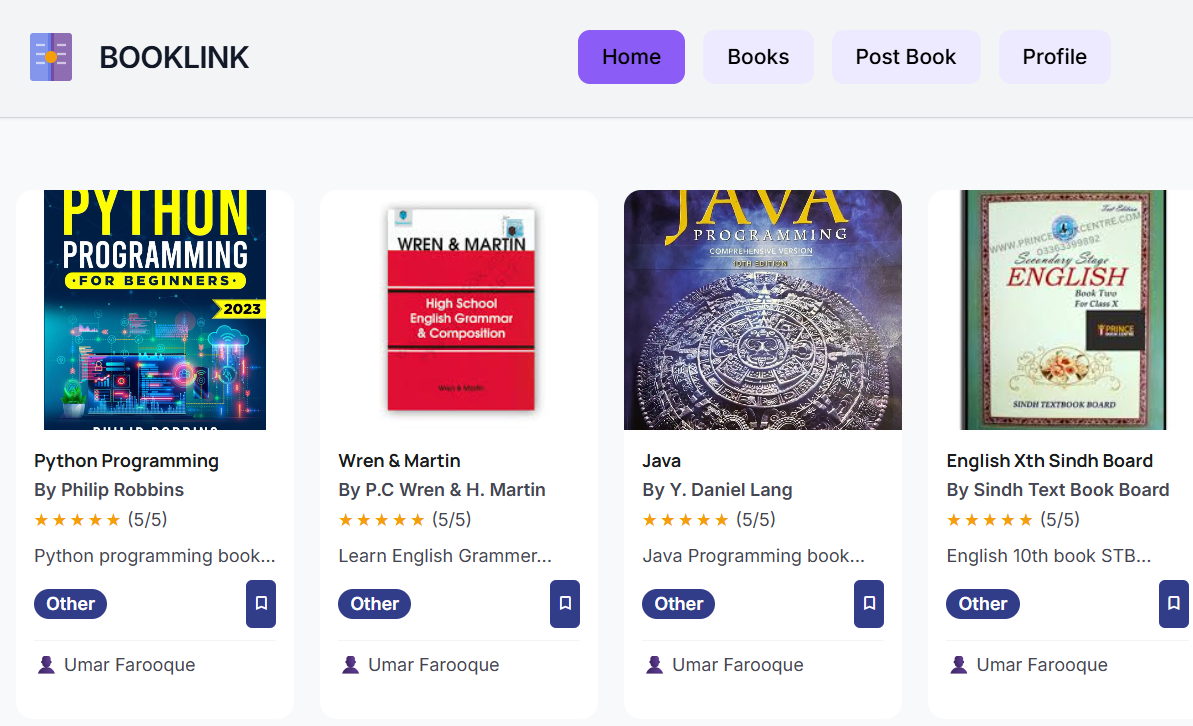
Inspiration
The inspiration behind BookLink came from the difficulty students face when trying to find the correct academic books for their class and subjects. Many students waste time searching through different websites or physical stores to locate the right book editions.
We wanted to create a simple, centralized platform where students can quickly select their class, subject, and term and instantly find the books they need. The goal was to make academic resources more accessible, organized, and time-saving, especially for school students who rely heavily on textbooks.
BookLink aims to reduce confusion and provide a smooth digital experience for finding educational books.
What it does
BookLink is an educational web application that helps students easily locate books based on their academic needs.
Key Features: 📖 Select Class 📚 Choose Subject 🗂️ Select Term 🔍 Instantly find relevant books 💻 User-friendly interface ⚡ Fast book search and navigation 📱 Responsive design (works on mobile & desktop) User Flow: User opens BookLink website Selects class Chooses subject Selects term Clicks Get Book Relevant book details are displayed
This saves time and improves productivity for students.
How we built it
BookLink was built using modern web technologies to ensure simplicity, speed, and responsiveness.
Technologies Used:
Frontend:
HTML5 CSS3 JavaScript
Frameworks/Libraries (if used):
Bootstrap / Tailwind CSS (optional based on your build) React.js (if your project used React)
Deployment:
Netlify (for hosting the website)
Development Tools:
VS Code Git & GitHub Web browsers for testing Development Steps: Designed UI layout Created book selection interface Implemented dropdown filters Added search functionality Connected book data Styled pages using CSS Made the website responsive Deployed to Netlify
Challenges we ran into
While building BookLink, we faced several technical and design challenges.
Major Challenges:
Organizing Book Data Managing multiple classes, subjects, and books required structured data handling.
Responsive Design Issues Ensuring the website worked smoothly on both mobile and desktop devices required extra testing and adjustments.
UI Design Simplicity Creating an interface that is simple yet functional took several design iterations.
Dropdown Linking Logic Connecting class → subject → term → books dynamically was technically challenging.
Deployment Issues Hosting the website and fixing broken paths during deployment required troubleshooting.
Accomplishments that we're proud of
We achieved several milestones during the development of BookLink.
Key Achievements: ✅ Successfully built a fully working book search platform ✅ Created a clean and simple user interface ✅ Made the website responsive across devices ✅ Implemented structured filtering system ✅ Deployed the project live on Netlify ✅ Reduced manual book searching process
Most importantly, we built a system that solves a real student problem.
What we learned
Working on BookLink helped us gain valuable technical and problem-solving skills.
Technical Learnings: Frontend web development (HTML, CSS, JavaScript) UI/UX design principles Responsive web design Data structuring techniques Debugging JavaScript logic Website deployment process Version control using GitHub Soft Skills Learned: Teamwork Problem-solving Project planning Time management Debugging patience
What's next for Book-Link
BookLink has strong potential for future improvements and expansion.
Future Plans:
- Add Login System
Student accounts Personalized book lists
- Expand Book Database
More classes More subjects More book editions
- Add Download Feature
PDF books Notes Past papers
- Add Search Bar
Search by book name Search by author
- Add Recommendation System
Suggest books based on subject
- Mobile App Version
Android app iOS app
- Admin Panel
Add/remove books Manage database
- Multi-language Support
English Urdu Arabic
Built With
- css3
- github
- html5
- javascript
- netlify
- supabase
- tailwind


Log in or sign up for Devpost to join the conversation.