-
-
Logo
-
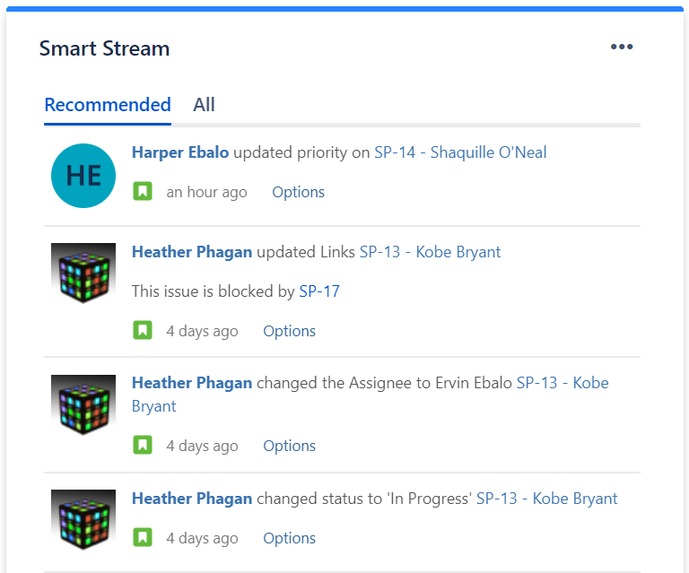
Gadget screenshot: Recommended updates
Inspiration
Different sources in Atlassian products, such as the activity stream, in-app notifications, and email notifications, inundate users with updates on activities and information. The goal of these features is to provide an easy way for users to stay informed and help them be more efficient and effective. Users commonly complain about these features though and they think the features are not as helpful as they could be.
Common complaints
Too much information – Users can’t find the information they care about quickly and they don’t have the time or desire to sift through the information. This causes users to miss valuable information and be less effective at their job.
Too little information – Users know that there are activities happening that they want to know about, but the product isn’t telling them the activities occurred. This is usually due to a product configuration problem. The system may have been configured to provide minimal updates to users to prevent the too much information problem. Users may or may not have sufficient rights to change the configuration.
Too difficult to configure – These users know there is a way to change or customize the system’s configuration to provide more of the information they need and less of the information they don’t want Most users don’t go through the trouble though because changing the configuration is too difficult. It would require significant effort to configure the system and keep the configuration correct for their changing needs. They may not even have sufficient privileges to change some of the settings themselves. Also, the rigid configuration options would still cause them to get too much or too little information.
One of the key benefits of widely using Atlassian products across an organization is users can find information relevant to their work even when they’re not directly involved with it. The rate information changes and the amount of information available in Atlassian products increases exponentially as usage of the products increases. Users need a solution to the issues with the current features so they can stay informed about the information important to them despite information rapidly changing and growing. Well informed users perform better and make better decisions.
Our goal is to provide an easy way for users to stay informed and up-to-date on things related to their work without requiring them to spend a lot of time configuring a system or searching for information that may or may not exist. A solution that understands their unique needs. Also, a solution that understands their needs change over time.
What it does
Smart Stream is a dashboard gadget allows you to stay up-to-date and informed about topics related to you. It requires minimal effort to use, personalizes the information to you, and adapts quickly to your changing needs. It overcomes the challenges of the rigid built-in activity stream.
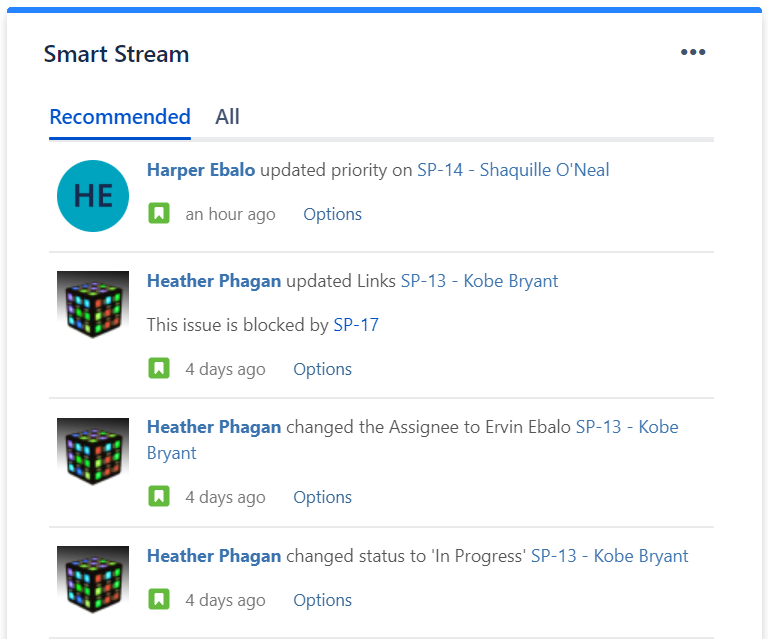
The gadget is an AI powered activity stream. It looks at all the information you would see in your unfiltered activity stream and shows you a refined list of activities it is recommends you review. The recommendations are based on what the system has learned you are interested in. It is constantly learning and improving its recommendations. The recommended list hides all the extra noise while allowing you to see activity for things you didn't even know you needed to watch. No AI is perfect though, so the gadget also provides access to the unfiltered activity stream, so you never miss anything.
Smart Stream starts learning from the first time the gadget is added to your dashboard. The system creates a baseline for your interests by recording the issues you are watching when the gadget is added. It uses the information in the Summary and Description fields of those issues to match activities to your interests. For example, if you're watching issues that mention "shopping cart" in Description, Smart Stream will recommend that you review activities that occur on any issues with "shopping cart" in the Description or Summary.
You can improve your recommendations by telling the system what you want to see. Each activity has an option to "see more" or "see less" activities for issues similar to it. For example, if you see an activity in your unfiltered stream that is not in your recommendations, you can select to "see more activities like this" and in the future the system will show in your recommendations activities for the issue and issues with similar subjects in the Summary in Description.
How I built it
The Jira app (gadget) was built with Atlassian Connect for Node.js Express. I wanted to be able to use new AtlasKit components so I integrated a React.js webapp on top of Express. There wasn't a whole lof of "new" UI to create because we felt that the Jira Activity gadget patterns already worked so well.
The "smarts" of the application was in AWS. Data storage in DynamoDB, gets and sets of information with Lambdas triggered by API gateway. Basic gets & sets of information was written in Javascript (node) but the machine learning part of it was in Python using Pandas for data preparation and manipulation. Used SciKit Learn to "make the recommendations".
Data storage is GDPR compliant and no intellectual property left Jira. Meaning, I did not store any details about Jira issues.
I would've gone all AWS but I had issues deploying the Jira app itself with Beanstalk so I went the Heroku route.
Challenges I ran into
Atlassian products have a very versatile set of users. There is no one way a company or users use the product. It is difficult to know if the solution will work for most users. You can't judge it based on how you, your team, or even your company use the product. We tackled this challenge by focusing our product on the needs of engineers and talking to engineers from several companies to understand their challenges.
Machine learning is a big part of how the solution determines what a user sees in their recommended feed. There isn't a simple machine learning algorithm that accounts for all the factors that influence what a user wants though. Any changes to the algorithm have to be tested to ensure they provided the expected improvement. It is challenging to have the right data for testing and to validate the algorithm is working. We limited the algorithm to finding related items items based on issue content to minimize this challenge for the hackathon.
Accomplishments that I'm proud of
- This is my first machine learning application I've ever built
- This is my first Atlassian app I've ever built
What I learned
- There are many types of models to use and layer to get different recommendations for a user. We stuck with one that produce 'good enough' results for the hackaton. We have more that we want to experiment with on real data sets.
- I'm a product manager by day and a tinkerer by night. I learned new that I don't know a lot... There's lots of performance gains that I can still make to benefit the user as well as keep service costs down. For example, I can choose a different database or I can refactor some code.
What's next for Smart Stream
There are a lot of enhancements that can be done to Smart Stream to improve it's ability to allow users to stay informed and perform optimally. Some improvements are:
Incorporate on-going activity directly related to the user, such as being mentioned in comments, into the recommendation feed so users can rely less on email notifications or the in-app notification pane
Provide alternate categorized views of activities to allow users to even more quickly find what they need. For example, providing a list only of activates where the user is mentioned so they can take action on items directly related to them.
Improve the user experience so the user doesn't have to wait so long for the gadget to load
Improve the recommendations by accounting for more factors and allowing users more ways to train the system on what they need to see.


Log in or sign up for Devpost to join the conversation.