-
-
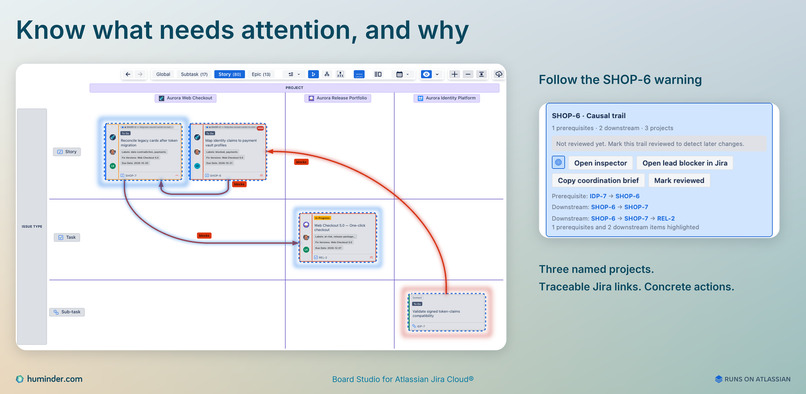
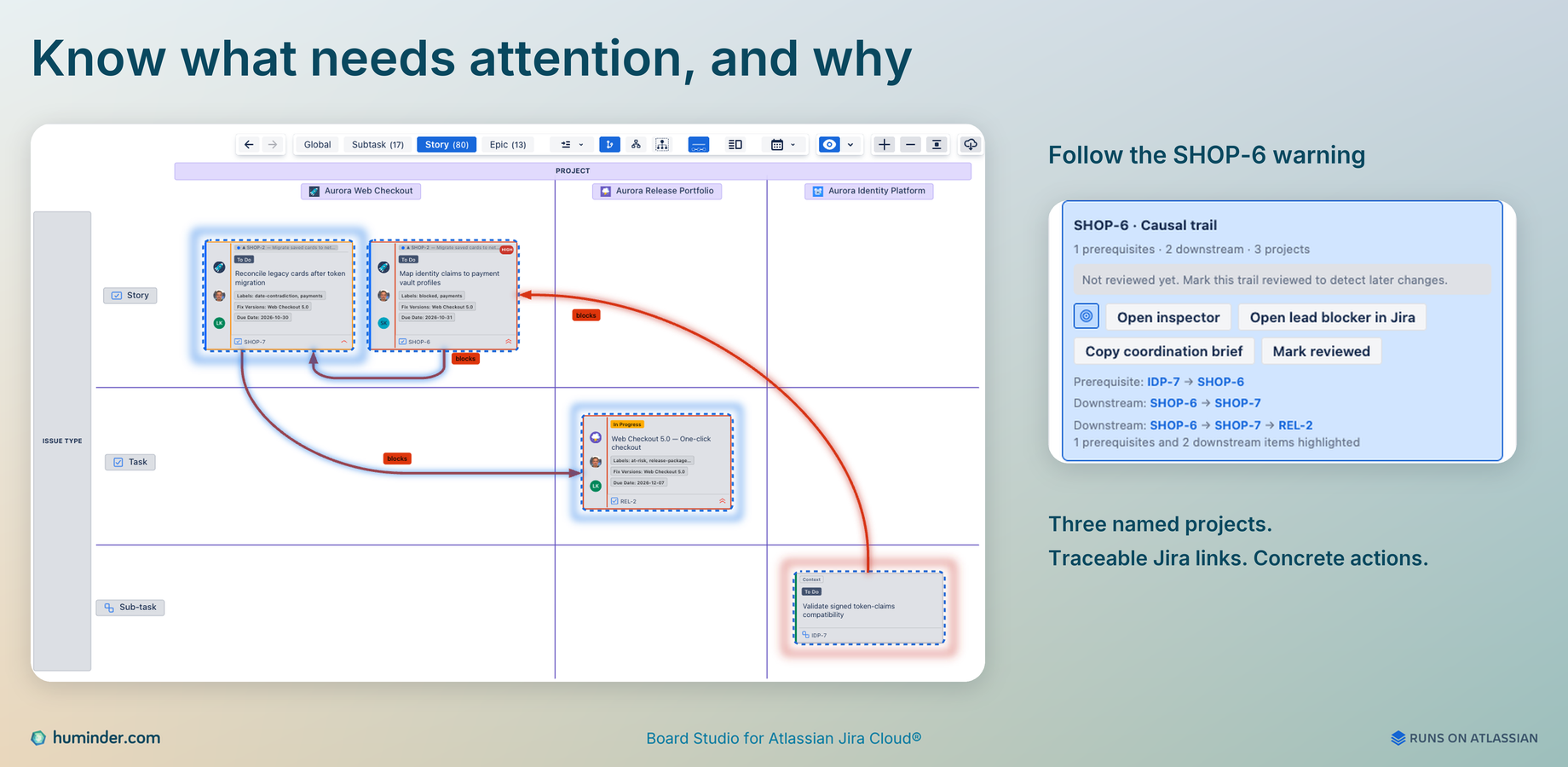
Identify what needs attention
-
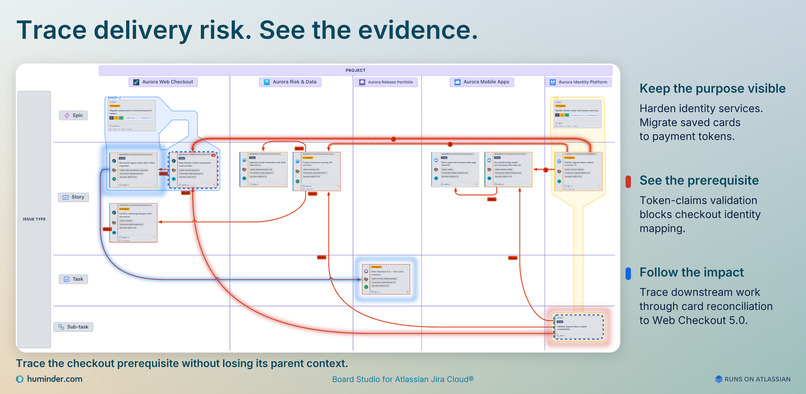
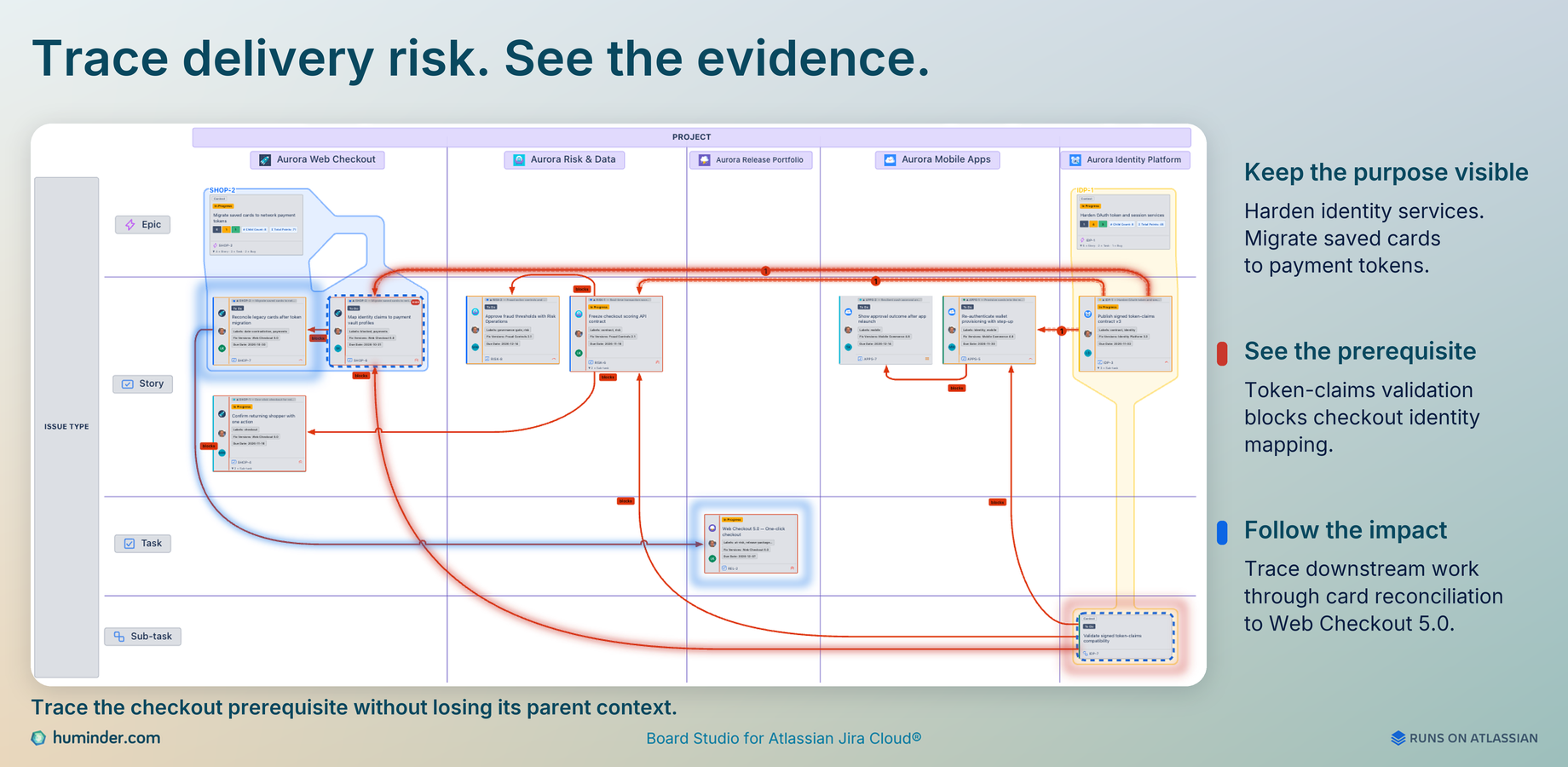
Trace blockers across projects and hierarchy
-
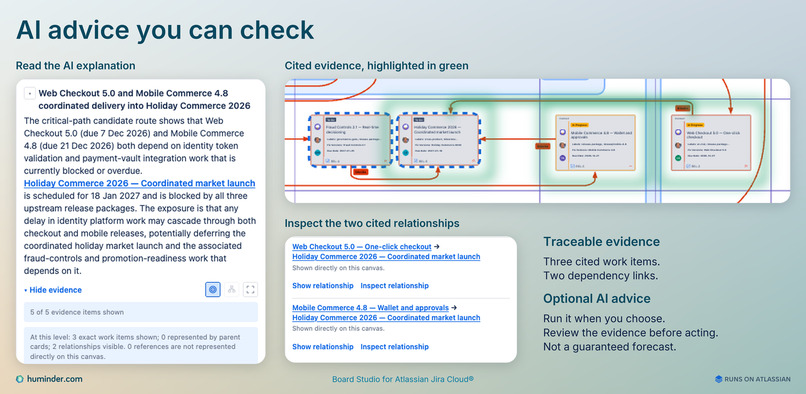
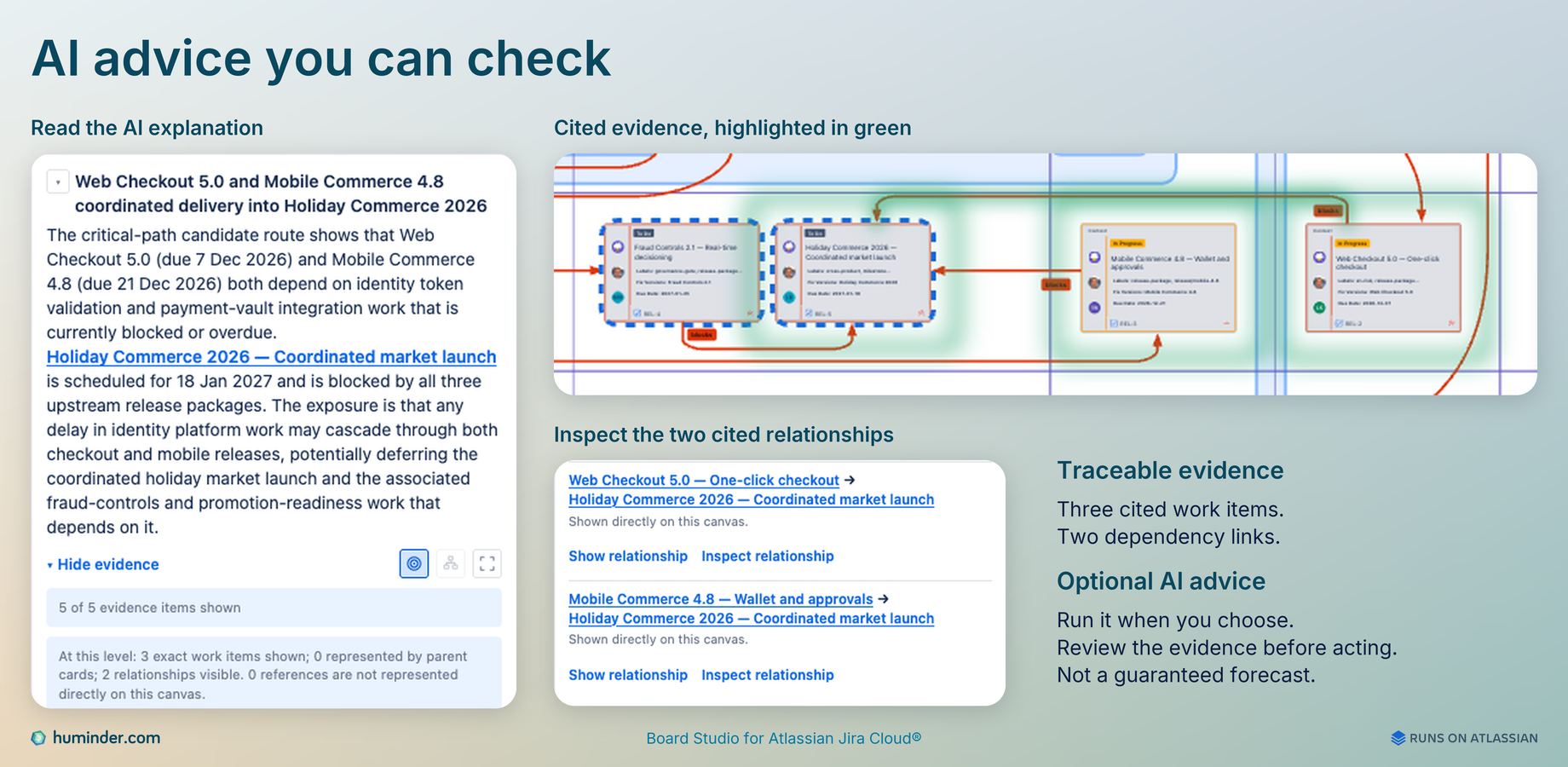
AI advice you can check
-
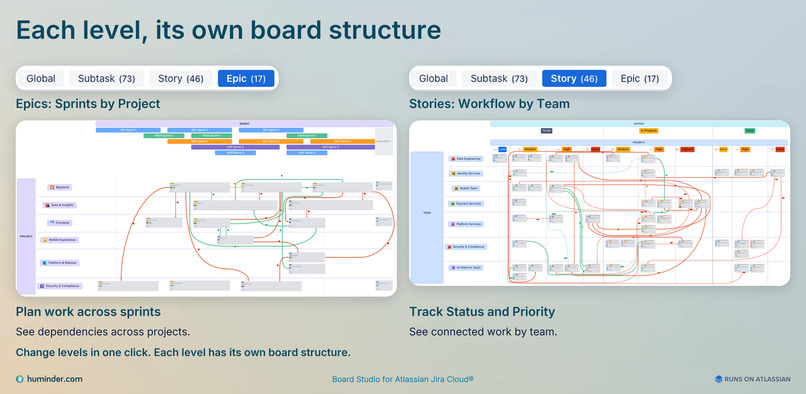
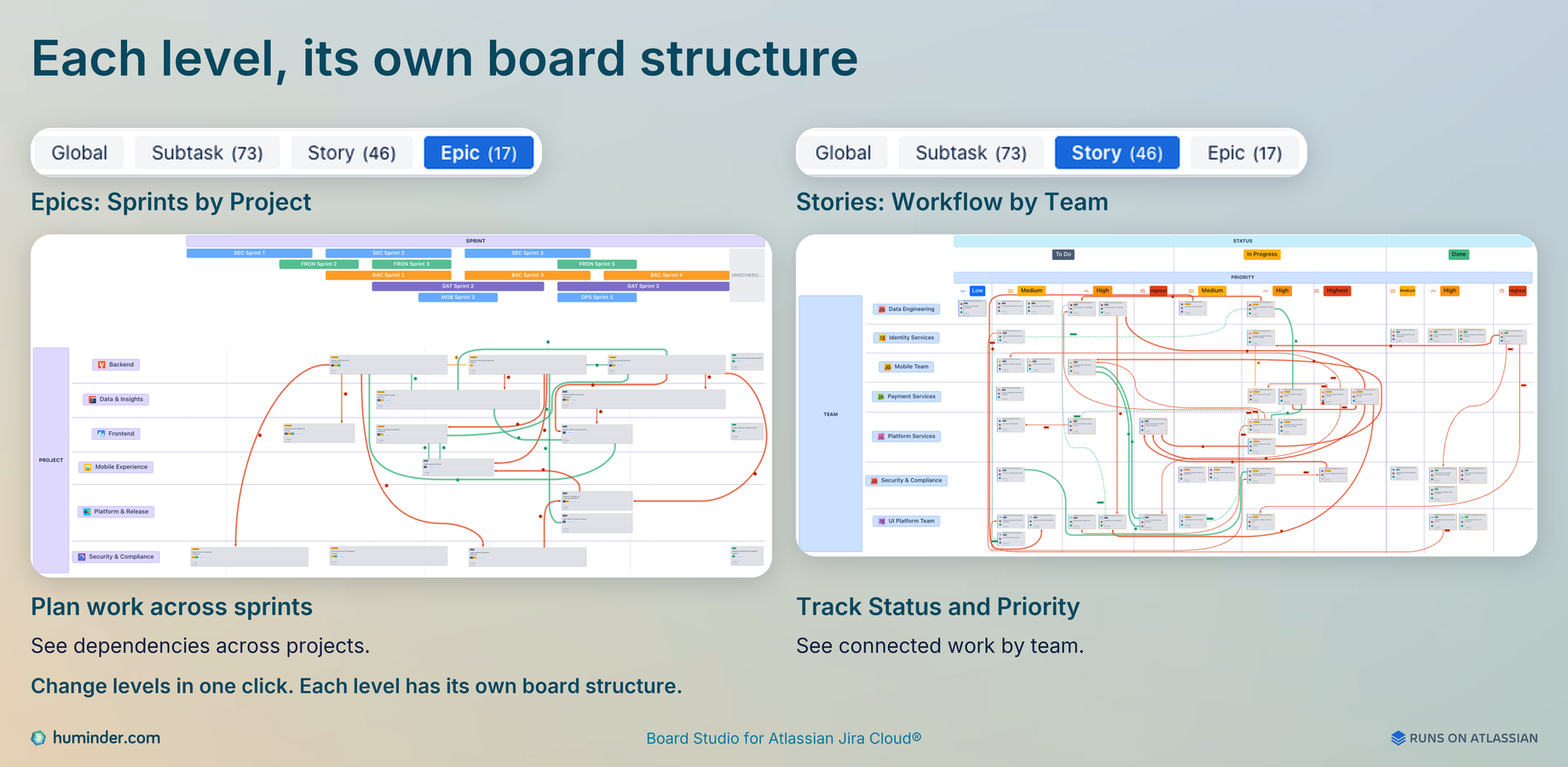
Each hierarchy level, its own board structure
Inspiration
A release can look healthy until you follow the dependency that puts it at risk.
Jira holds the details of our work. But the questions that matter most often sit between those details: What is blocking this outcome? Which teams depend on it? Where should we act first?
Answering those questions can mean jumping between issues, boards, and projects, mentally reconstructing relationships that already exist in the data.
We created Board Studio to make those relationships visible and explorable. Then we asked a second question: What if AI could explain a delivery risk and let us inspect the evidence directly in the same workspace?
Not another chatbot. Not another disconnected summary. A way to move from seeing the work to understanding what needs attention.
Our guiding principle: See delivery risk. Know why.
What it does
Board Studio transforms Jira work items, hierarchies, and dependencies into an interactive visual workspace.
Teams can explore work across projects, organize it into swimlanes, examine timelines, and move between individual tasks and higher-level outcomes without maintaining a separate planning system.
Evidence-backed AI adds a focused decision-support capability. On request, it assesses the selected work item within the available context and explains:
- What outcome is at risk
- Which evidence supports the assessment
- What actions could help
- What information is missing or uncertain
Users can follow Jira references and highlight supporting work items directly on the board. The explanation and the visual evidence remain connected.
Imagine a checkout release that depends on unfinished identity work owned by another team. Board Studio helps users explore that dependency, assess its implications, and identify the commitment that needs a conversation.
The AI answer is the beginning of an investigation, not the end of one.
How we built it
We built Board Studio on Atlassian Forge, using React, Atlassian Design System components, and yFiles for HTML for graph rendering and interactive layouts.
A shared processing layer transforms Jira data into a consistent model of work items and relationships. Different visual perspectives use that same model. Incremental updates and animated layout transitions help users keep their bearings as they explore.
We integrated Forge LLMs into the board’s Inspector, placing AI alongside the work being examined.
When a user requests an assessment, the backend re-reads relevant Jira data with that user’s permissions, prepares a limited and structured context, and requests a structured response. We validate the result and its evidence references before displaying it.
The experience combines deterministic processing of Jira relationships with AI-generated explanations. The model explains the supplied evidence; it does not replace the underlying work graph.
Assessments run on explicit request. Simply browsing, selecting a card, or opening the Inspector does not trigger AI generation.
Challenges we ran into
Making complex work understandable. Drawing a graph is only the starting point. Too much detail overwhelms people; too little hides the dependency they need to see. Balancing hierarchy, layout, and navigation meant continually asking which information helps someone make a decision.
Keeping AI grounded. Fluent text can sound more certain than the evidence allows. A missing due date does not prove a delay, and a partial board does not represent every dependency. We made assessment scope explicit, validated references, and surfaced caveats. We chose categorical risk levels instead of misleading confidence percentages.
Respecting permissions and control. AI needed to operate within the user’s Jira access. That required permission-aware retrieval, per-user caching, and visibility checks before reusing results. Jira content also had to be treated as untrusted input rather than as instructions to the model.
Keeping the workflow coherent. Loading data, updating layouts, and generating assessments happen at different speeds. The interface needed to remain navigable without losing the user’s context or pulling them away from their current work.
Accomplishments that we're proud of
We connected three activities that are often separated: exploring work, understanding risk, and inspecting evidence.
A user can move from a high-level outcome to its supporting work, request an explanation, and investigate the cited evidence without switching to a separate AI interface.
We are also proud of making AI a deliberate, bounded capability. Assessments are user-triggered, permission-aware, and visibly advisory. They support judgment rather than pretending to automate it.
Above all, Board Studio builds on the work teams already maintain in Jira. It offers another way to understand that work, not another plan to keep synchronized.
What we learned
The strongest AI experience is not necessarily a conversation. Sometimes it is a focused explanation placed exactly where a decision is being made.
Visualization and AI contribute different strengths. A visual graph helps people explore relationships; AI helps articulate why those relationships may matter. Connecting them makes the explanation easier to question and investigate.
We also learned that uncertainty belongs in the interface. Assessment scope, missing information, and generation time are essential context, not secondary details.
Finally, useful decision support is about more than identifying a problem. It should help someone work out what to verify, which commitment to clarify, and who needs to be involved.
What's next for Board Studio for Jira Cloud
We want to shorten the path from “Something needs attention” to “We understand why and know what to discuss.”
Our priorities are to refine evidence navigation, test against more real-world cross-team planning scenarios, and make complex dependency relationships easier to explore.
We will continue improving how assessments communicate their scope and uncertainty, while keeping people in control of generation and decisions.
The ambition is simple: help teams understand not only what they are working on, but what their outcomes depend on.
Built With
- emotion
- forge
- javascript
- jira
- llm
- node.js
- react
- rest
- yfiles
