-
BMO
-
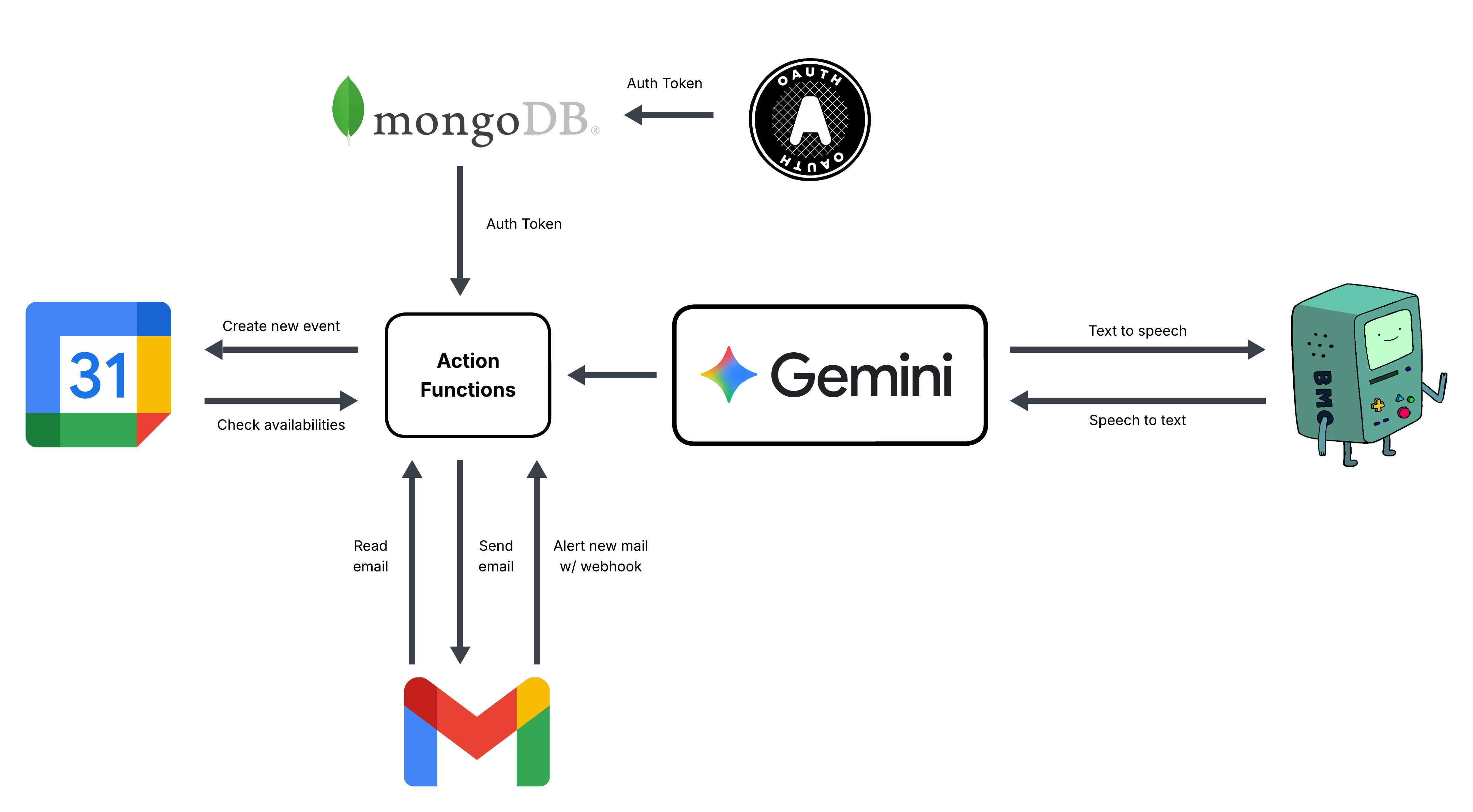
BMO workflow
-
logo
Inspiration
We got inspire from our own daily lives. When we are so busy with our schools, we don't get the time to check our emails and schedule the meetings one by one. We have missed many events and regret not taking part in it. Hence, we created BMO: Baby Meeting Organizer. The meeting organizer that automatically schedules meetings and put in the calendar for us and create email drafts to send.
What it does
When we come back from school, work or wherever back to our home, we have a bunch of emails that we haven't read with a lot of meeting requests. By just a click of the button, our BMO will talk about these emails to you and ask you if you're good to schedule the meeting and put it in calendar. If you say yes, it will automatically create meeting events for you. If you say no, it will suggest the availability times and you can choose when to schedule it. It will then make a draft email to send the meeting requester. You can stay organized in your busy life without the need to worrying about all those emails you get!
How we built it
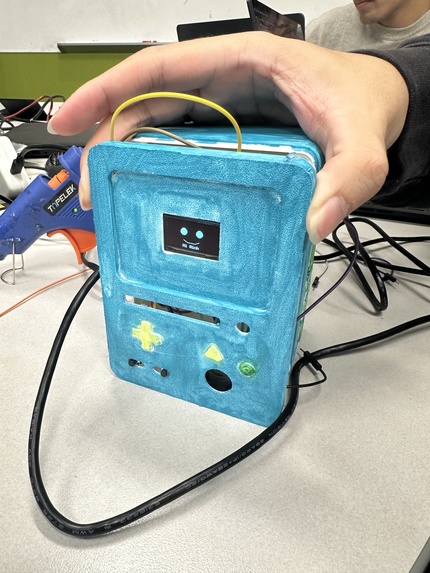
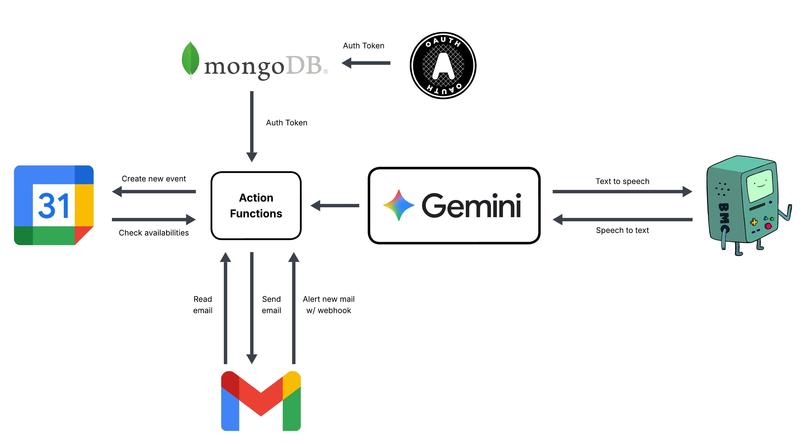
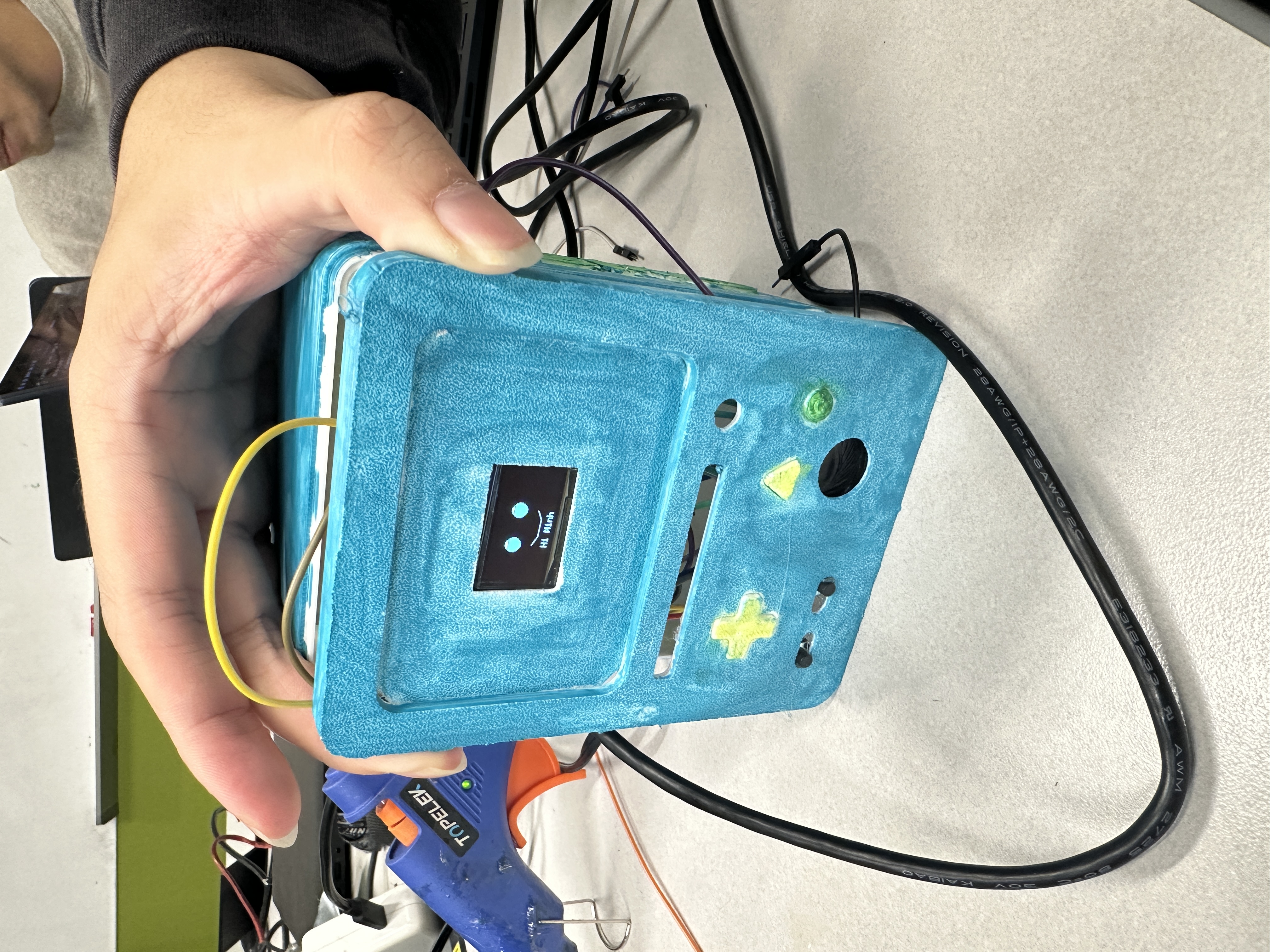
We built a React web app that lets users sign in securely with Google OAuth, powered by a FastAPI backend that manages authentication and integrates with Google services like Gmail and Calendar. Our hardware side uses an ESP32 device that records audio and sends it to the backend, where the audio is transcribed and processed using Google Speech-to-Text. The backend then interprets spoken commands (like “schedule a meeting”) and responds back with a response. The system acts as a virtual assistant that bridges your voice, Google account, and IoT device which creates a seamless experience where you can talk to your hardware, and it talks back.
Challenges we ran into
Integrating hardware with software: Connecting the ESP32 with our FastAPI backend was challenging by managing binary audio streams, ensuring compatibility, and handling timeouts required deep debugging.
AI inaccuracy: The speech-to-text model occasionally produced inaccurate or inconsistent transcriptions, which made intent detection unreliable. We had to adjust sample rates, clean up audio, and filter out background noise to improve results.
Hardware connectivity issues: Getting the ESP32 to connect reliably to Wi-Fi (and maintain a stable connection while streaming audio) was one of the biggest technical hurdles. Also, making sure analog amplifiers could work with the speaker was our challenging part when figuring out how to work with the library for the DAC.
OAuth complexity: Setting up secure Google authentication and token handling across React and FastAPI was tricky, especially when managing refresh tokens safely.
CORS and networking: Testing locally across multiple devices, ports, and Wi-Fi networks caused communication issues we had to carefully resolve.
Accomplishments that we're proud of
Built a fully functional voice assistant capable of transcribing speech accurately and understanding user intent.
Integrated Google Calendar and Gmail APIs, allowing the assistant to automatically create events and draft emails.
Achieved smooth real-time interaction between the ESP32, FastAPI, and Google services.
Implemented secure Google OAuth with token encryption and refresh logic.
Created a system that feels truly interactive which is a step toward an agentic AI assistant that listens, understands, and acts.
What we learned
Google Cloud integration: We learned how to work with Google Cloud APIs, especially Speech-to-Text, Calendar, and Gmail, and how to securely manage authentication through OAuth and service accounts.
Configuring AI responses: We gained experience fine-tuning AI-driven responses — making sure transcribed text is interpreted correctly and transformed into meaningful, context-aware actions like event creation or email drafting.
Hardware–software integration: We learned how to bridge physical devices (ESP32) with cloud services and AI models, handling real-time data transfer, Wi-Fi reliability, and synchronization between embedded systems and web servers.
End-to-end system design: From frontend authentication to backend processing and hardware communication, we discovered how all layers must work together smoothly for a truly interactive user experience.
What's next for BMO
Cloud deployment: We plan to host BMO on a production-grade cloud server to ensure reliable uptime, scalability, and accessibility from anywhere — not just local testing environments.
Reducing latency: We aim to optimize both the ESP32–backend communication and the transcription pipeline to make responses faster and more natural in real-time interactions.
Smarter scheduling: Future versions of BMO will use contextual AI to recommend meeting times based on users’ past scheduling habits and calendar availability, making it an even more intelligent personal assistant.
Expanded integrations: We plan to connect BMO with additional Google Workspace tools and potentially other smart home platforms for broader automation capabilities.
Conversational improvements: Enhancing the natural language understanding layer to make BMO’s responses feel more fluid, adaptive, and human-like.


Log in or sign up for Devpost to join the conversation.