BluePine — Create A Game Level In Unreal Engine By Talking
Inspiration
I'm a gamer and an artist. Being creative doesn't mean game development comes easy.
Back in the day, I'd spend hours searching Google trying to find textures and materials online — hoping they'd come with normal maps and ambient occlusion maps so I could just plug and play. But it was incredibly hard to find assets that matched the exact style of my project. I'd get stuck on textures. I'd get stuck inside the game engine itself, not knowing how to use it. And there was no one I could just talk to — no live person sitting next to me who could answer my questions in real time.
But now AI has advanced to a point where it can see your screen, talk to you, and do things for you.
So I decided to build BluePine — a voice-first AI co-pilot for Unreal Engine 5. You talk to it, it sees your screen, and it builds things directly in your project. It comes in two parts: a desktop app that acts as your AI assistant, and a C++ plugin that lives inside Unreal Engine and executes commands. No more searching for answers alone. Just speak, and watch your game world come to life.
What It Does
Category: Live Agents — Real-time Interaction (Audio/Vision)
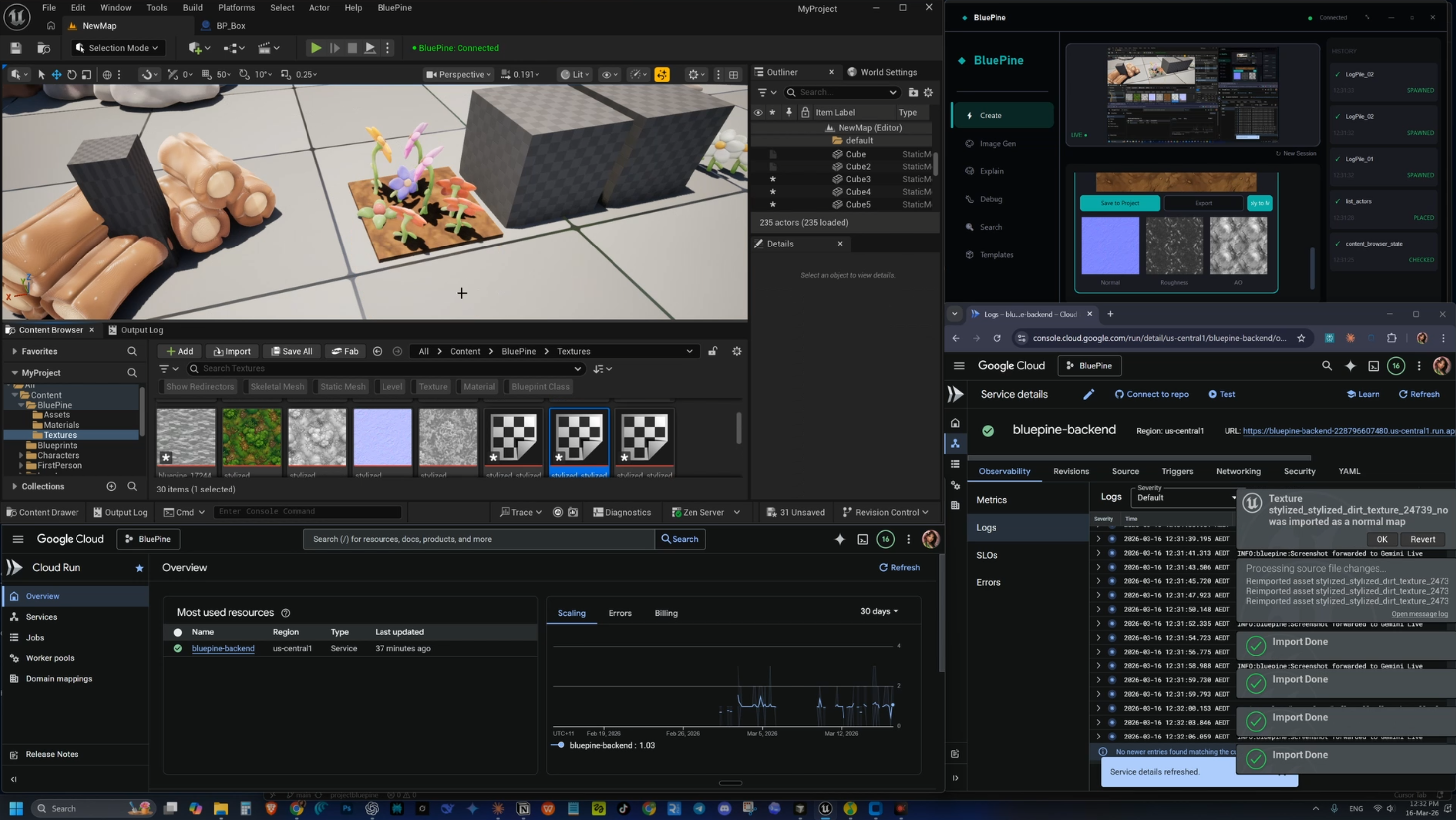
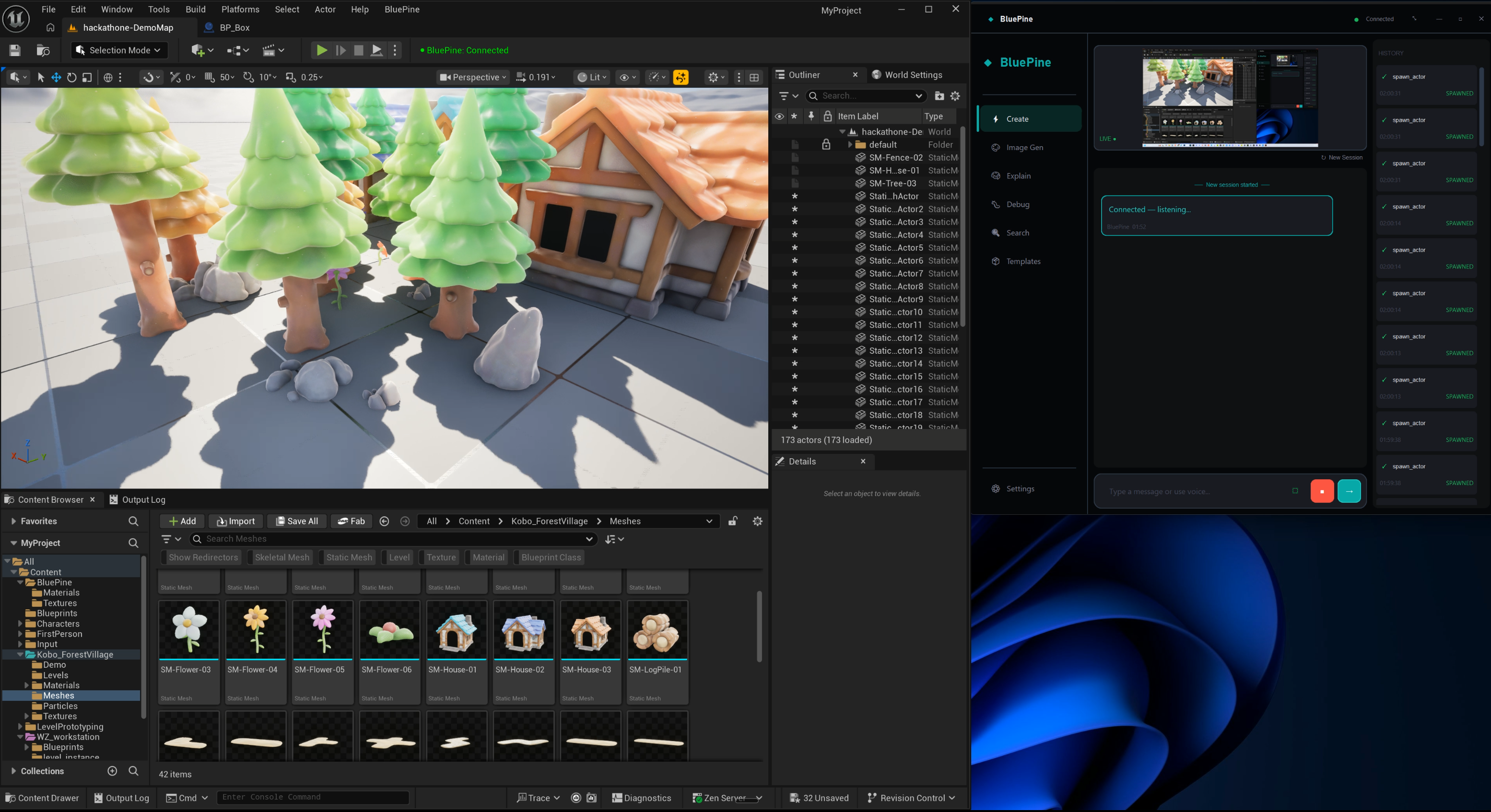
BluePine is a real-time AI assistant for Unreal Engine 5 developers that operates through voice, text, and vision — all at once. The Create tab is the main hub where all three modalities work simultaneously: start a live voice call, share your screen, type messages, and watch the AI build directly in your Unreal Editor.
Multimodal Inputs & Outputs
| Inputs | Outputs | |
|---|---|---|
| Audio | Real-time voice commands via microphone | AI speaks back with natural voice responses |
| Vision | Live screen sharing — AI sees your Unreal Editor viewport (multi-monitor support) | AI analyzes scenes, guides you based on what's on screen |
| Text | Typed chat messages in the Create tab | Structured text plans, Blueprint wiring diagrams |
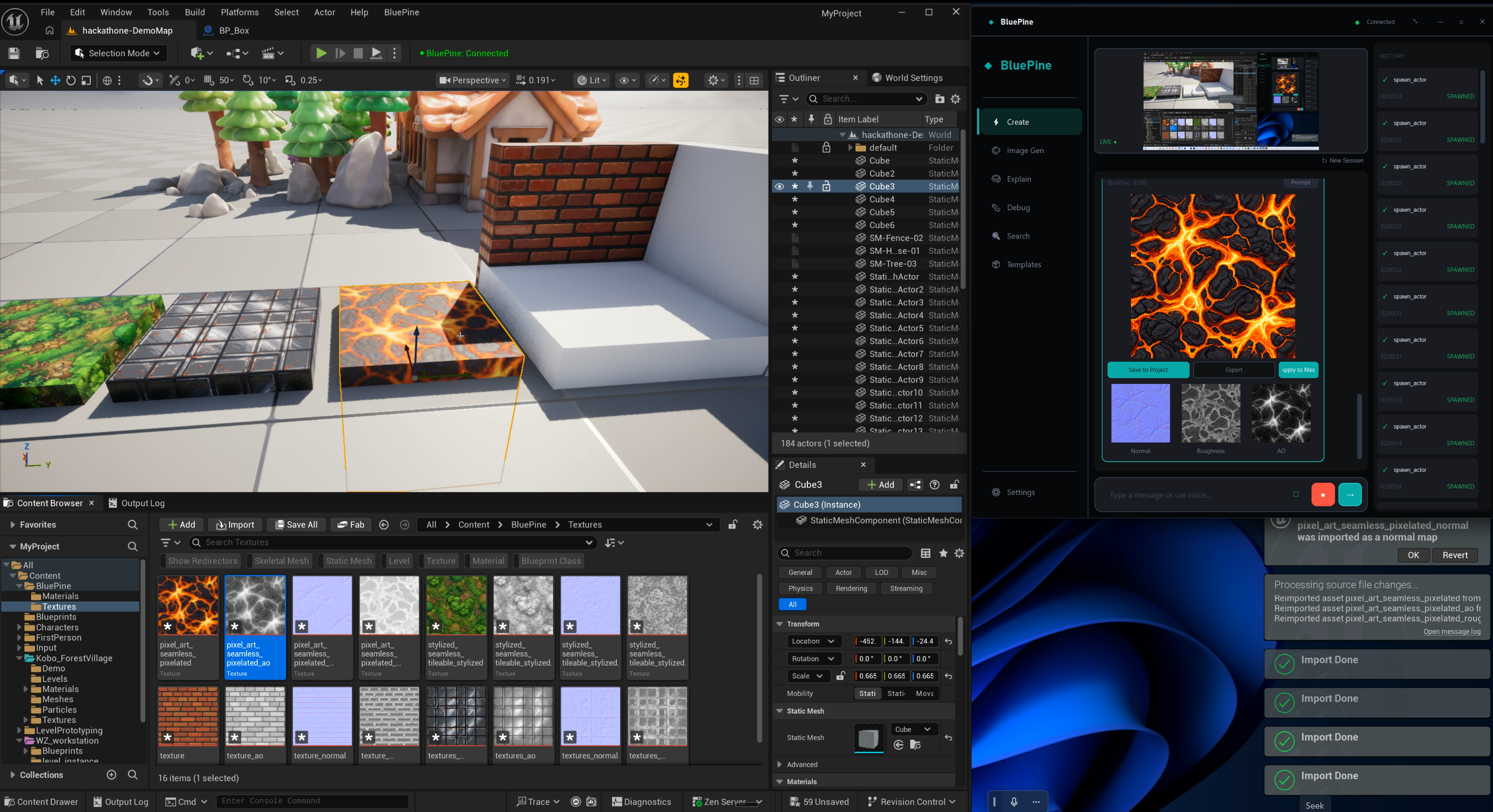
| Image | Screenshots of Blueprint graphs for analysis | AI-generated game textures with full PBR map pack (Normal, Roughness, AO) |
| Actions | — | Executes commands directly inside Unreal Engine (spawns actors, creates materials, builds scenes) |
🎤 Voice-First Interaction (Live Agent)
Talk to BluePine like you'd talk to a colleague. It listens, understands, and executes commands directly in Unreal Engine in real time.
"Spawn a directional light above the house and set it to warm yellow." → Light appears in your viewport. No menus touched.
- Natural, real-time voice conversation powered by Gemini 2.5 Flash Native Audio via Google ADK on Cloud Run (Vertex AI)
- Full barge-in support — interrupt the AI mid-sentence and it stops immediately, just like a real conversation. The agent handles interruptions gracefully without losing context.
- Distinct AI persona — BluePine speaks like a warm, encouraging senior UE5 developer sitting next to you
- Smart echo suppression filters out speaker audio so only your voice reaches the AI
- Seamless fallback to text chat when you prefer typing
👁️ Screen Sharing — The AI Sees What You See
BluePine can watch your Unreal Editor viewport in real time:
- Screenshots stream to Gemini every 3 seconds
- The AI analyzes your scene — notices floating objects, bad spacing, missing elements
- Ask "What do you see?" and it describes your viewport
- Ask "Where is the Material settings panel?" and it guides you based on what's actually on your screen
This creates a visual feedback loop:
┌─────────────────────────────────────────────────┐
│                                                 │
│   You speak ──► AI builds ──► You see result    │
│       ▲                           │             │
│       │                           ▼             │
│       └──── AI sees screenshot ◄──┘             │
│             suggests improvements               │
│                                                 │
└─────────────────────────────────────────────────┘
🏗️ World Building With Real Assets
BluePine doesn't just spawn cubes — it uses your actual project assets:
- Queries your Content Browser to find real meshes, materials, and Blueprints
- Spawns actors using exact asset paths from your project
- Handles intelligent placement — proper spacing based on mesh bounds, rotation variety, clustered foliage
- Builds entire scenes in batches (up to 20 commands per request)
📐 Blueprint Planning With Verified Nodes
Ask BluePine to plan a Blueprint and it:
- Searches a verified catalog of 562 UE5 Blueprint nodes (not hallucinated — real node IDs and pin names)
- Presents a clear text plan with components, variables, and exact wiring
- Renders an interactive visual wiring diagram in the desktop app
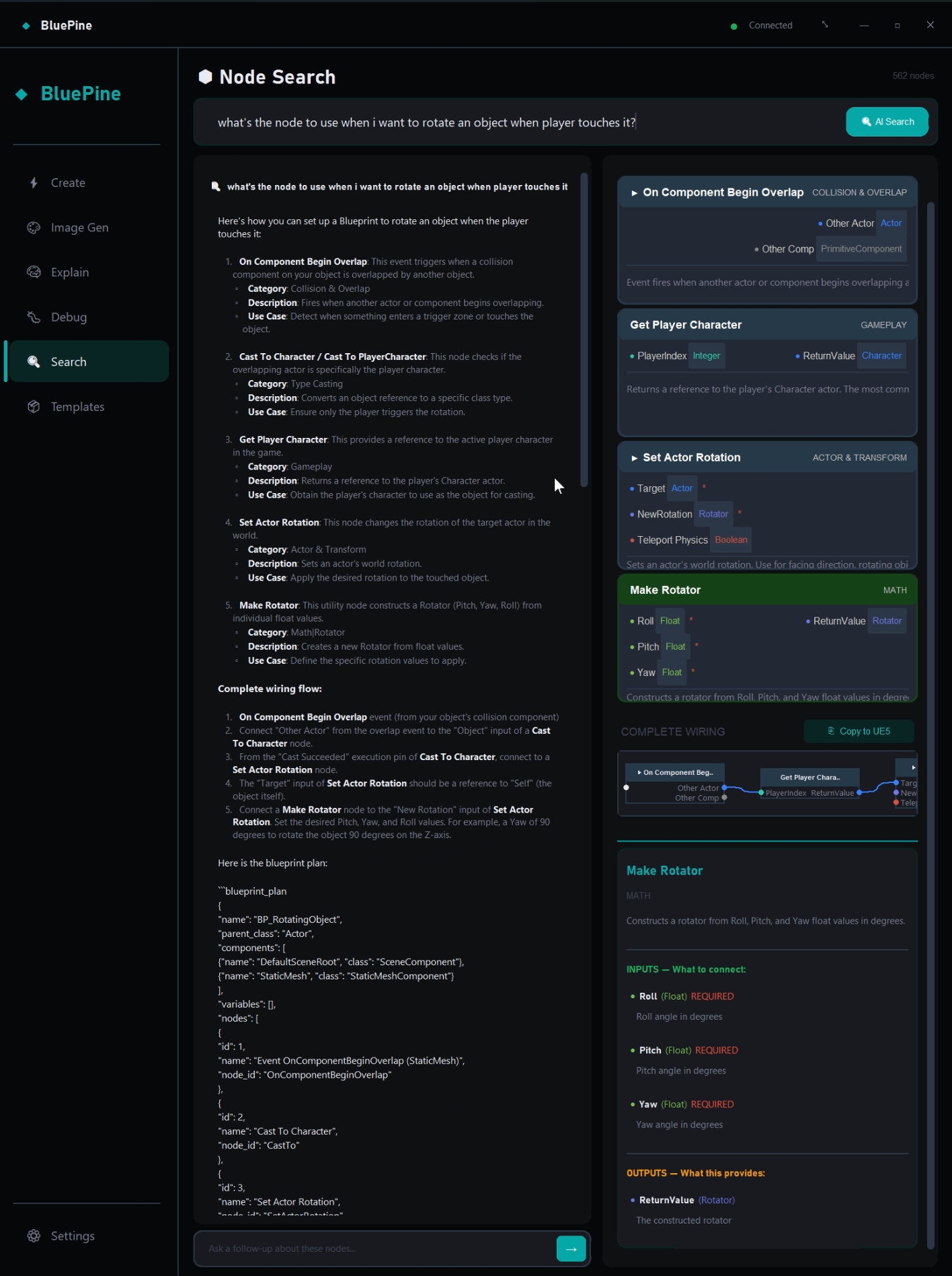
🔎 Node Search — Grounded Blueprint Knowledge
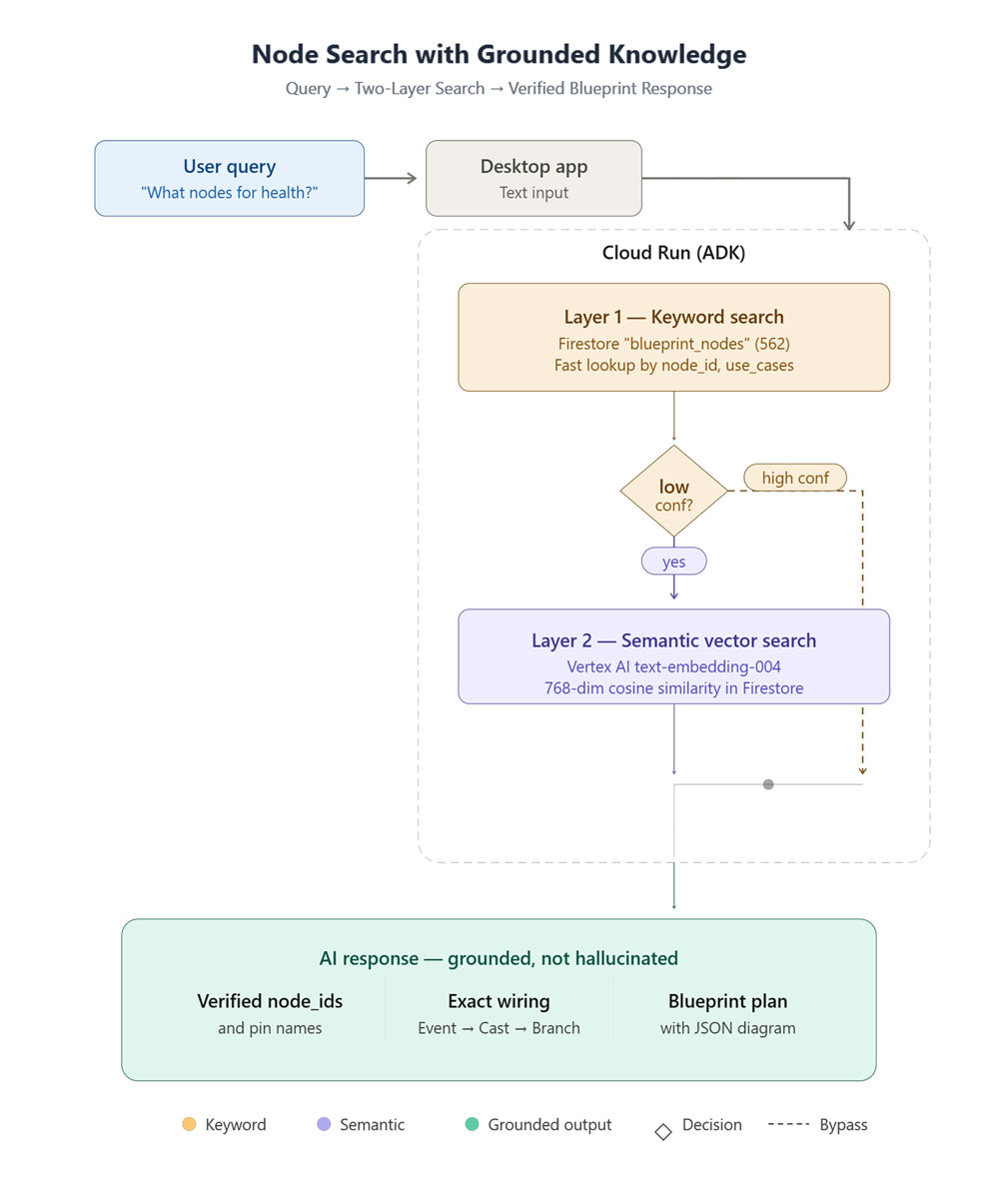
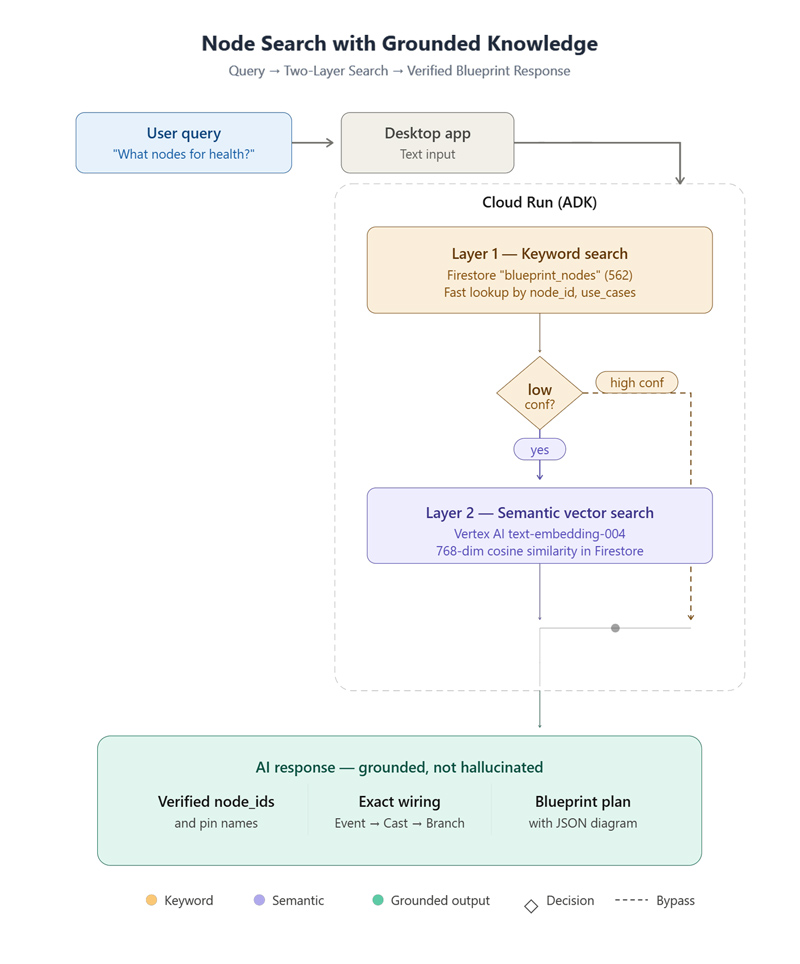
BluePine includes a dedicated Node Search screen powered by a two-layer grounding system built on Firestore and Vertex AI Embeddings:
- 562 verified UE5 Blueprint nodes stored in Firestore — each with exact
node_id, pin names, pin types, descriptions, and use cases - Layer 1 — Keyword Search: Type a query like "apply damage" → instant Firestore lookup returns verified nodes with exact wiring details
- Layer 2 — Semantic Search: For natural language queries like "how do I make something happen on a timer?" → Vertex AI
text-embedding-004finds the closest matching nodes by meaning, not just keywords - Results show pin-level detail with color-coded types, common wiring patterns, and copy-to-clipboard for easy use
- The AI agent uses this same grounding system during voice and text sessions — it never guesses node names, it always queries the verified catalog first
This is how BluePine avoids hallucinations: every Blueprint suggestion is grounded in real, verified Unreal Engine data.
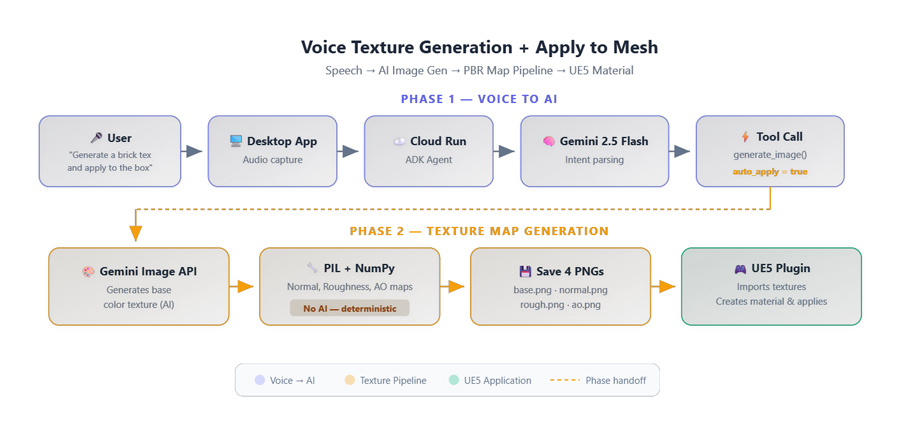
🎨 AI Texture Generation + PBR Material Pipeline
Generate game-ready textures and full PBR materials through conversation:
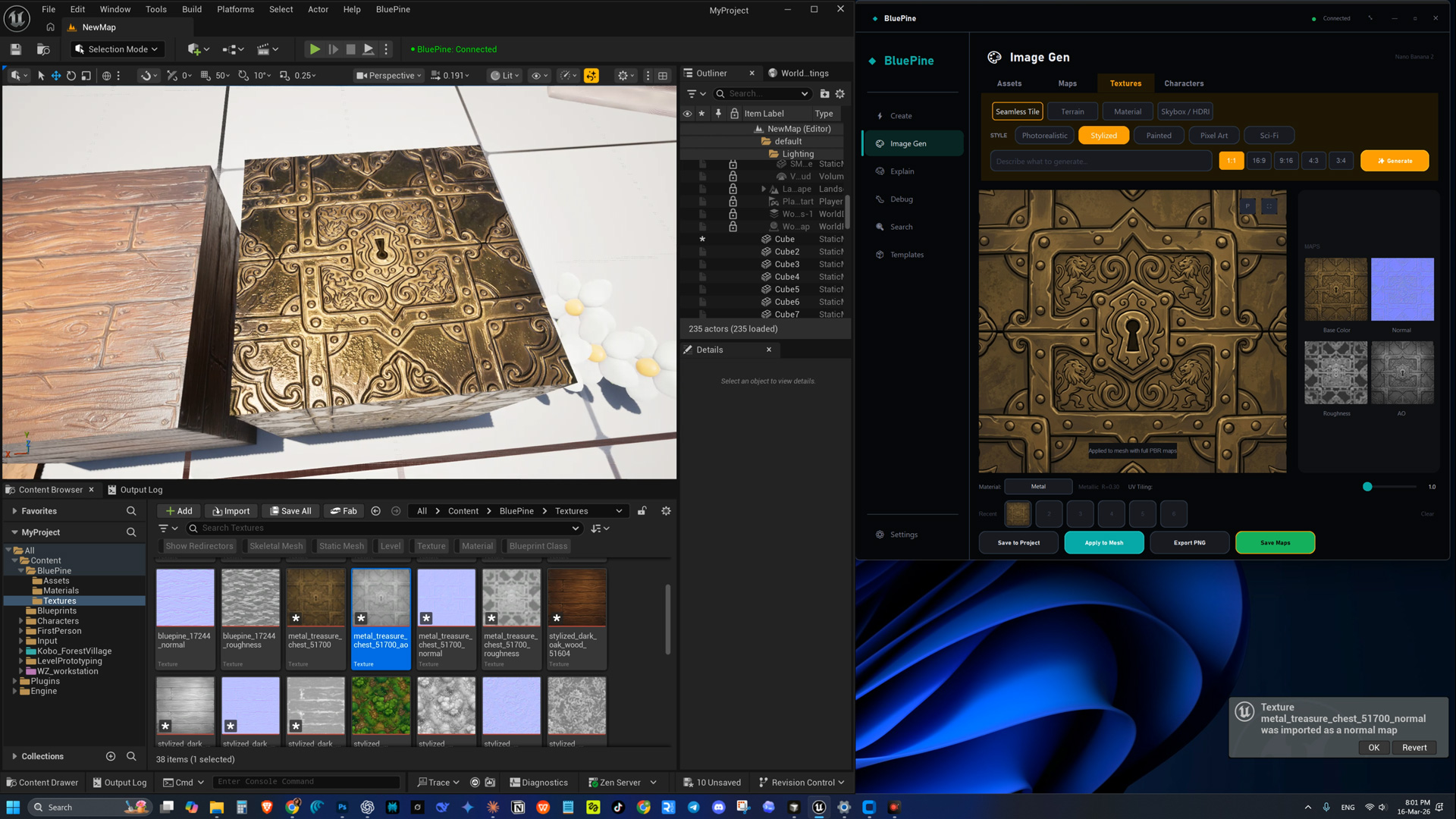
- "Generate a seamless stone wall texture" → Image appears with PBR material parameters
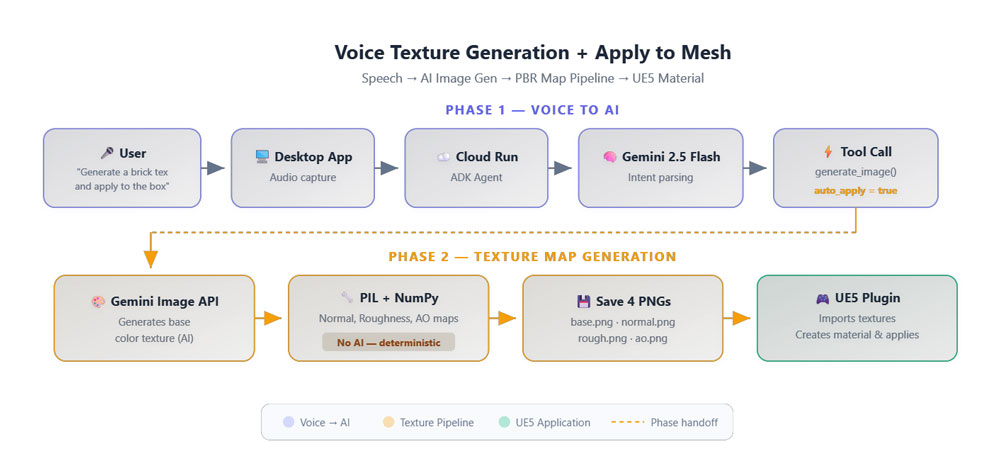
- "Apply it to the selected mesh" → Full pipeline executes automatically:
- AI generates the base color texture
- PBR Map Pack auto-generates Normal Map, Roughness Map, and Ambient Occlusion Map from the base texture using deterministic algorithms (PIL + NumPy — no AI needed, pixel-perfect every time)
- Material is created with correct PBR settings from 17 material presets (Wood, Metal, Stone, Glass, Fabric, etc.) — auto-detected from the prompt
- All 4 textures are imported into UE5 and connected to the material's shader graph (BaseColor, Normal, Roughness, AO)
- Material is applied to the selected mesh in the editor
- Say "generate a brick texture and apply it to the box" → entire pipeline runs from a single voice command (
auto_applymode) - Supports multiple art styles: pixel art, photorealistic, stylized, hand-painted
- Image Gen tab provides manual control: upload any image, generate map pack, pick material type, adjust UV tiling, and apply to mesh
- Multi-monitor support for screen sharing — select which monitor to capture
🔍 Blueprint Inspector & Debugger (Work in Progress)
- Explain Mode: Screenshot your Blueprint graph → AI explains each node chain in plain English
- Debug Mode: AI checks for disconnected wires, red errors, type mismatches + pulls UE5 console logs for compile errors
These features are currently under active development.
Architecture

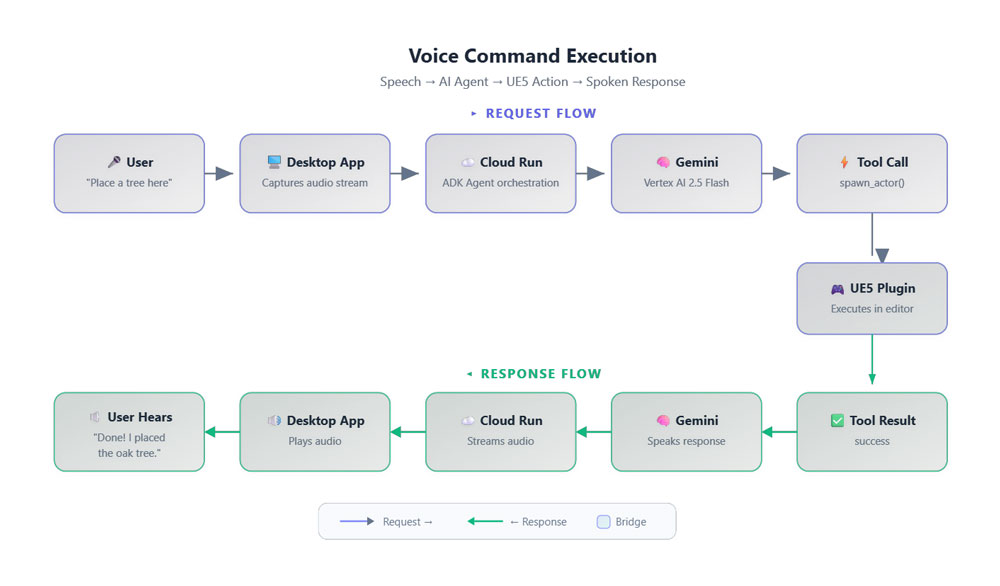
Data Flow — Voice Command Execution

Data Flow — Voice Texture Generation + Apply to Mesh
Data Flow — Node Search with Grounded Knowledge
How We Built It
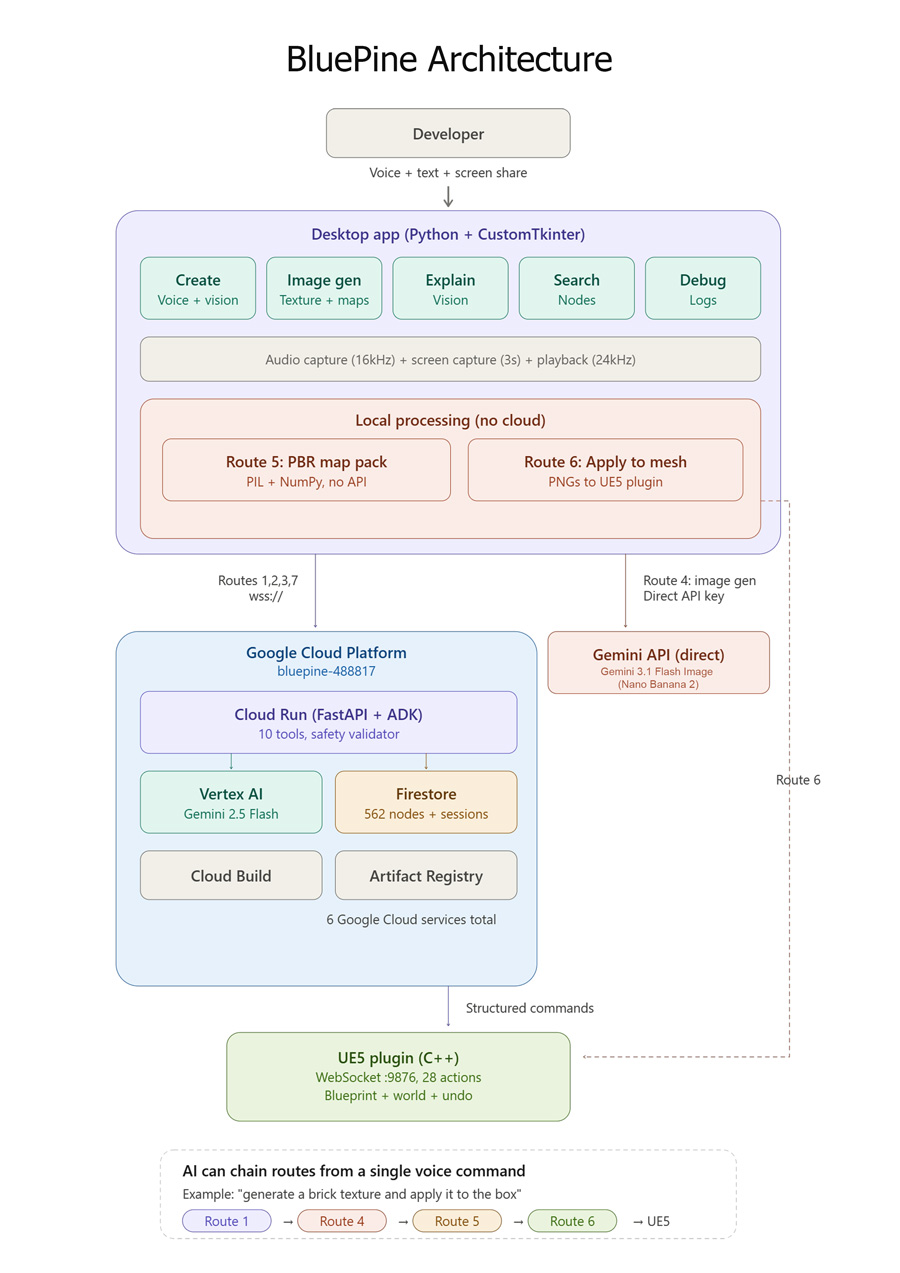
BluePine is a three-tier system — a desktop app, a cloud backend, and a UE5 plugin — all communicating over WebSockets.
The Voice Engine (Desktop → Cloud Run → Vertex AI)
The most technically challenging part was real-time voice. The desktop app captures microphone audio at 16kHz, streams it via WebSocket to our Cloud Run backend, which connects to the Gemini 2.5 Flash Native Audio model through the Google ADK. AI voice responses stream back at 24kHz. Both voice and text sessions are cloud-hosted — all AI processing runs on Google Cloud.
The tricky part: when Gemini needs to execute a tool call (like spawning an actor), we must pause audio input to prevent Gemini policy violations. The system detects tool calls, silences the mic, executes the command in Unreal, sends the result back, and resumes audio — all transparently in the background.
The Cloud Backend (FastAPI + Google ADK on Cloud Run)
Text sessions route through our FastAPI backend on Google Cloud Run, which uses the Google Agent Development Kit (ADK) to orchestrate Gemini 2.5 Flash for intelligent reasoning and tool execution. The ADK agent defines tools, system instructions, and handles the full request/response lifecycle with Gemini via the Google GenAI SDK.
The backend also hosts our two-layer grounding system for Blueprint nodes — ensuring the AI never hallucinates node names:
- Layer 1 — Keyword Search: Fast Firestore query across 562 verified UE5 Blueprint nodes (grounding the AI with real data)
- Layer 2 — Semantic Search: Vertex AI
text-embedding-004vector similarity for complex or unusual queries
Every AI-generated command passes through a safety validator — a whitelist-based system that blocks dangerous operations (console execution, file system access, project deletion) before anything reaches Unreal Engine.
Error Handling & Edge Cases
- API timeouts: WebSocket connections auto-reconnect with exponential backoff if the Cloud Run backend drops
- Tool call failures: If a UE5 command fails (e.g., asset not found), the error is returned to Gemini which informs the user and retries with corrected parameters
- Audio lifecycle management: Microphone input is paused during tool execution to prevent Gemini policy violations (error 1008), then gracefully resumed
- Session limits: Live voice sessions enforce a time limit with countdown timer to manage API costs
- Plugin disconnection: Desktop app detects if the UE5 plugin is unreachable and shows a retry banner instead of silently failing
The UE5 Plugin (C++ WebSocket Server)
A C++ plugin runs inside Unreal Editor as a WebSocket server on port 9876. It receives structured JSON commands and translates them into Unreal API calls — spawning actors, wiring Blueprint nodes, setting materials, querying the scene hierarchy. Every mutation is wrapped in FScopedTransaction for full undo support.
The Image Pipeline
Texture generation uses Gemini 3.1 Flash Image (Nano Banana 2) via the Gemini API to create game-ready assets. When auto-apply is enabled, the system generates the base color texture, then uses deterministic PIL + NumPy algorithms to generate Normal, Roughness, and Ambient Occlusion maps (no AI needed — pixel-perfect results). It auto-detects the material type from the prompt (choosing from 17 PBR presets like Wood, Metal, Stone, Glass), creates a full material in Unreal with all 4 textures connected to the shader graph, and applies it to the selected mesh — all from a single voice command.
Technologies Used
| Component | Technology |
|---|---|
| Desktop App | Python, CustomTkinter, sounddevice, Pillow |
| Voice AI | Gemini 2.5 Flash Native Audio (Vertex AI via Cloud Run + ADK) |
| Text AI | Gemini 2.5 Flash (via Google ADK) |
| Image Generation | Gemini 2.5 Flash |
| Image Generation | Gemini 3.1 Flash Image / Nano Banana 2 (via Gemini API) |
| Cloud Backend | FastAPI, Google ADK, Cloud Run |
| Node Catalog | Firestore (562 verified nodes) |
| Semantic Search | Vertex AI text-embedding-004 |
| UE5 Plugin | C++, WebSocket (port 9876) |
| Deployment | Google Cloud Run, Cloud Build, Artifact Registry |
Google Cloud Services Used
| Service | Purpose |
|---|---|
| Cloud Run | Hosts FastAPI backend (auto-scales 0→3 instances) |
| Vertex AI | Gemini 2.5 Flash (voice and text via ADK) |
| Vertex AI Embeddings | text-embedding-004 for semantic Blueprint node search |
| Gemini API | Gemini 3.1 Flash Image / Nano Banana 2 (texture generation, direct API) |
| Firestore | Stores 562 verified Blueprint nodes + session state |
| Cloud Build | Builds Docker container on deploy |
| Artifact Registry | Stores container images |
Proof of Google Cloud Deployment
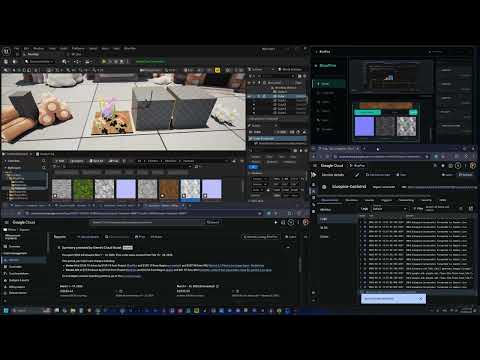
👉 Watch the GCP deployment proof video
Challenges We Ran Into
Audio + Tool Calls Don't Mix
The hardest bug: the Gemini voice model (via Vertex AI) will disconnect with error code 1008 if audio data arrives while a tool call is pending. We had to build an audio pause/resume system that detects tool calls, silences the microphone, waits for the tool result to be sent back, and only then re-enables audio streaming. Getting the timing right — especially with network latency — took many iterations.
Echo Suppression Without a DSP Library
When the AI speaks through your speakers, the microphone picks it up and creates a feedback loop. We built a smart energy gate (RMS threshold of 0.025) with a grace period — during AI playback, we suppress microphone input, but with a 500ms buffer after playback ends to prevent cutting off the start of the user's next sentence.
Blueprint Node Accuracy
Large language models love to hallucinate node names. "Use the ApplyDamage node with the DamageAmount pin" sounds right but might not match Unreal's actual API. Our solution: a verified ground truth database of 562 nodes seeded from the Unreal Engine source, with exact node_id values and pin names. The AI is forced to look up nodes before suggesting them — no guessing allowed.
Keeping Unreal Editor Responsive
The C++ plugin runs inside Unreal Editor's main thread. Long-running commands could freeze the editor. We had to carefully scope all mutations, batch operations, and ensure the WebSocket server doesn't block the game thread.
Accomplishments We're Proud Of
- Voice → Unreal in under a second: Speak a command and watch it happen live in the viewport. The latency is low enough to feel like magic.
- Screen sharing feedback loop: The AI doesn't just execute blindly — it sees the result, comments on the composition, and suggests improvements. It feels like pair programming with a senior dev.
- 562 verified Blueprint nodes: No hallucinations. Every node ID and pin name comes from a verified Firestore database, giving developers trustworthy plans.
- Safety-first design: A whitelist validator ensures the AI can never execute arbitrary code, delete projects, or access the file system. Every command is validated before it reaches Unreal.
- One-command texture pipeline: "Generate a wood texture and apply it to the floor" → generates image, auto-creates Normal/Roughness/AO maps, builds material with correct PBR presets, applies to mesh. One sentence, five steps, fully automatic.
- Deterministic PBR map generation: Normal, Roughness, and AO maps are generated using Sobel filters and local variance algorithms — not AI. Same input always produces the same output, pixel-perfect.
What We Learned
- Gemini's native audio model on Vertex AI is incredibly powerful but demands careful state management. The bidi-streaming works beautifully through Cloud Run + ADK, but you have to precisely manage the audio/tool-call lifecycle or risk disconnections.
- Ground truth databases beat prompt engineering for accuracy. Instead of telling the AI "please don't make up node names," we gave it a verified catalog to query. Result: zero hallucinated nodes.
- Game developers want to talk, not type. In testing, voice commands felt 3-5x faster than clicking through Unreal's menus for common operations like spawning and positioning actors.
- Screen sharing changes everything. The moment the AI can see what you see, the quality of guidance jumps dramatically. It goes from generic advice to "click the third button in the Details panel on your right."
What's Next for BluePine
- Blueprint Execution: Move from plan-only to full automated Blueprint creation and compilation from voice commands
- Multiplayer Collaboration: Multiple developers talking to the same BluePine session, building together in real-time
- Asset Store Integration: Browse and preview Unreal Marketplace assets through voice
- Custom Voice Personas: Let developers choose the AI's personality — from casual buddy to formal architect
- Full Production Node Catalog: Expand from 562 nodes to the complete UE5 node library with vector search
- Plugin Marketplace: Publish BluePine as a one-click install on the Unreal Engine Marketplace
Disclaimer
BluePine is an independent project and is not affiliated with, endorsed by, or associated with Epic Games, Inc. Unreal Engine, Unreal, and their logos are trademarks or registered trademarks of Epic Games, Inc. in the United States and elsewhere. All other trademarks referenced herein are the property of their respective owners. BluePine integrates with Unreal Engine as a third-party tool via a plugin interface.
Built With
- c++
- fastapi
- firestore
- gemini-ai
- google-cloud
- python
- unreal-engine
- vertex-ai
- websocket

Log in or sign up for Devpost to join the conversation.