Inspiration
Data loss doesn't discriminate — it hits a student who accidentally formats the wrong USB drive the night before a deadline just as hard as it hits a small business that loses years of records to a corrupted hard drive. What struck our team early on was how many people facing this exact situation had two bad options: pay for expensive, overcomplicated recovery software built for IT professionals, or risk their data with free tools that offer no way to preview what's actually recoverable before committing.
We wanted to build something in between — recovery software powerful enough to handle real corruption, formatting, and deletion scenarios, but simple enough that someone without technical experience could use it confidently, without gambling on results they couldn't verify first.
What It Does
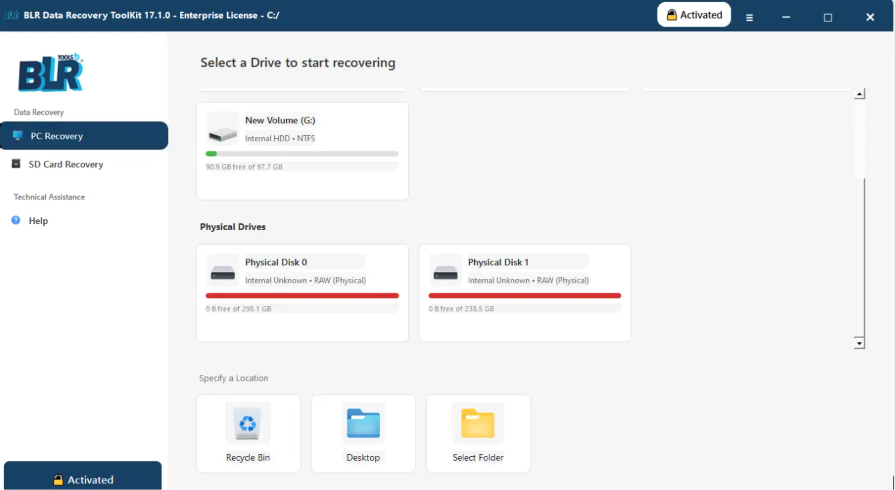
BLR Data Recovery Toolkit recovers deleted, formatted, and corrupted data from a wide range of storage devices — internal and external hard drives, SSDs, USB flash drives, memory cards, NAS devices, and RAID arrays (RAID 0, 5, and 6). It offers two scan modes: a Quick Scan for straightforward, recently deleted files, and a Deep Scan that reconstructs data from formatted, RAW, or otherwise corrupted drives by reading past a damaged file system directly.
Every recovery goes through a preview step first — users can browse and open recovered files before restoring anything, so they know exactly what they're getting back instead of hoping for the best. The toolkit also supports recovery from BitLocker-encrypted drives, provided the user has a valid recovery key or password, and works across common file systems including NTFS, FAT32, and exFAT on Windows.
How We Built It
We started by focusing on the recovery engine itself — the part responsible for scanning raw disk sectors and identifying file signatures and structures even when the file system's own index is damaged or missing entirely. Getting this right meant testing extensively against real-world corruption scenarios: partial formats, interrupted transfers, sudden power loss, and various stages of file system damage, rather than just clean, idealized test cases.
From there, we built the scanning engine to run in two modes — a fast, index-based Quick Scan and a slower, more exhaustive Deep Scan — so users aren't forced into a lengthy scan when a simple one will do the job. The preview layer came next: rendering recovered files (documents, images, spreadsheets) directly in the interface so users could verify integrity before committing to a restore, which meant handling a wide range of file formats correctly at the preview stage, not just the recovery stage.
Support for RAID arrays and NAS devices required building logic to reconstruct array structures automatically, rather than requiring users to manually rebuild a RAID configuration just to get their files back — a step that trips up even experienced users. BitLocker support came later, once we validated that decryption with a properly supplied recovery key could be integrated cleanly into the same scan pipeline used for unencrypted drives.
Challenges We Ran Into
Balancing scan depth with speed. A deep scan that finds everything but takes hours isn't useful if users need their data back quickly — and a fast scan that misses recoverable files isn't useful either. Tuning this balance, and being transparent with users about which mode fits their situation, took a lot of iteration.
Handling severely corrupted file systems reliably. Some corruption scenarios damage a drive's structure in inconsistent, unpredictable ways. Building a scanning engine robust enough to handle that variability — without crashing or producing false positives (files that appear recoverable but aren't actually intact) — was one of the harder technical problems we worked through.
RAID and NAS reconstruction. Automatically detecting and rebuilding array structures across different RAID configurations, without requiring manual input from the user, required significantly more edge-case testing than a standard single-drive recovery.
Adding BitLocker support without overpromising. We were careful that this feature needed to work strictly within Microsoft's security model — recovery with a valid key or password, never a way around encryption. Communicating that boundary clearly, both in the product and in how we describe it, mattered as much as the engineering itself.
Accomplishments We're Proud Of Building a Deep Scan engine that reliably recovers data from formatted and RAW drives, not just simple deleted-file scenarios A preview-before-recovery workflow that lets users verify their data is intact before committing to anything — removing the "hope it works" uncertainty that a lot of recovery software leaves users with Extending support to RAID 0/5/6 and NAS devices without requiring users to manually reconstruct array structures Successfully integrating BitLocker-encrypted drive recovery into the same core scanning pipeline, rather than treating it as a bolted-on separate feature What We Learned
Building recovery software taught us that the hardest problems aren't always the ones you expect going in. Getting a scan to work on a clean, healthy test drive is the easy part — the real work is in the long tail of real-world corruption scenarios that never look quite like your test cases. We also learned how much trust matters in this category of software: users are often in a stressful moment when they reach for a recovery tool, and features like preview-before-recovery aren't just nice-to-haves, they're what actually makes the product usable under pressure.
What's Next for BLR Data Recovery Toolkit Broader file system and platform support, extending recovery capabilities beyond the current Windows-focused feature set Faster Deep Scan performance on very large drives, where scan time is still the biggest friction point for users Expanded encrypted-drive support, building on what we learned from BitLocker integration Improved reporting, giving users a clearer, more detailed summary of exactly what was found and recovered in each scan Continued work on making the recovery process approachable for non-technical users, without sacrificing the depth power users and IT professionals need

Log in or sign up for Devpost to join the conversation.