The Problem
Canada is a global game development powerhouse, but opportunity is heavily concentrated. If you don't live in a major hub like Montreal, Toronto, or Vancouver, accessing the venture capital, specialized hardware, and multi-disciplinary teams required to build 3D games is incredibly difficult. This geographic monopoly creates a massive barrier to entry, pricing out brilliant creators across the rest of the country.
The Solution
Our tool collapses the entire 3D studio pipeline, concept art, modeling, rigging, and animation, into a single, accessible workspace. We are democratizing game development for the rest of Canada. Now, a solo creator in rural Saskatchewan or an indie team in the Maritimes no longer needs a massive budget, a complex multi-software pipeline (like juggling ZBrush, Maya, and Blender), or proximity to a major city to produce high-fidelity 3D assets.
What it does
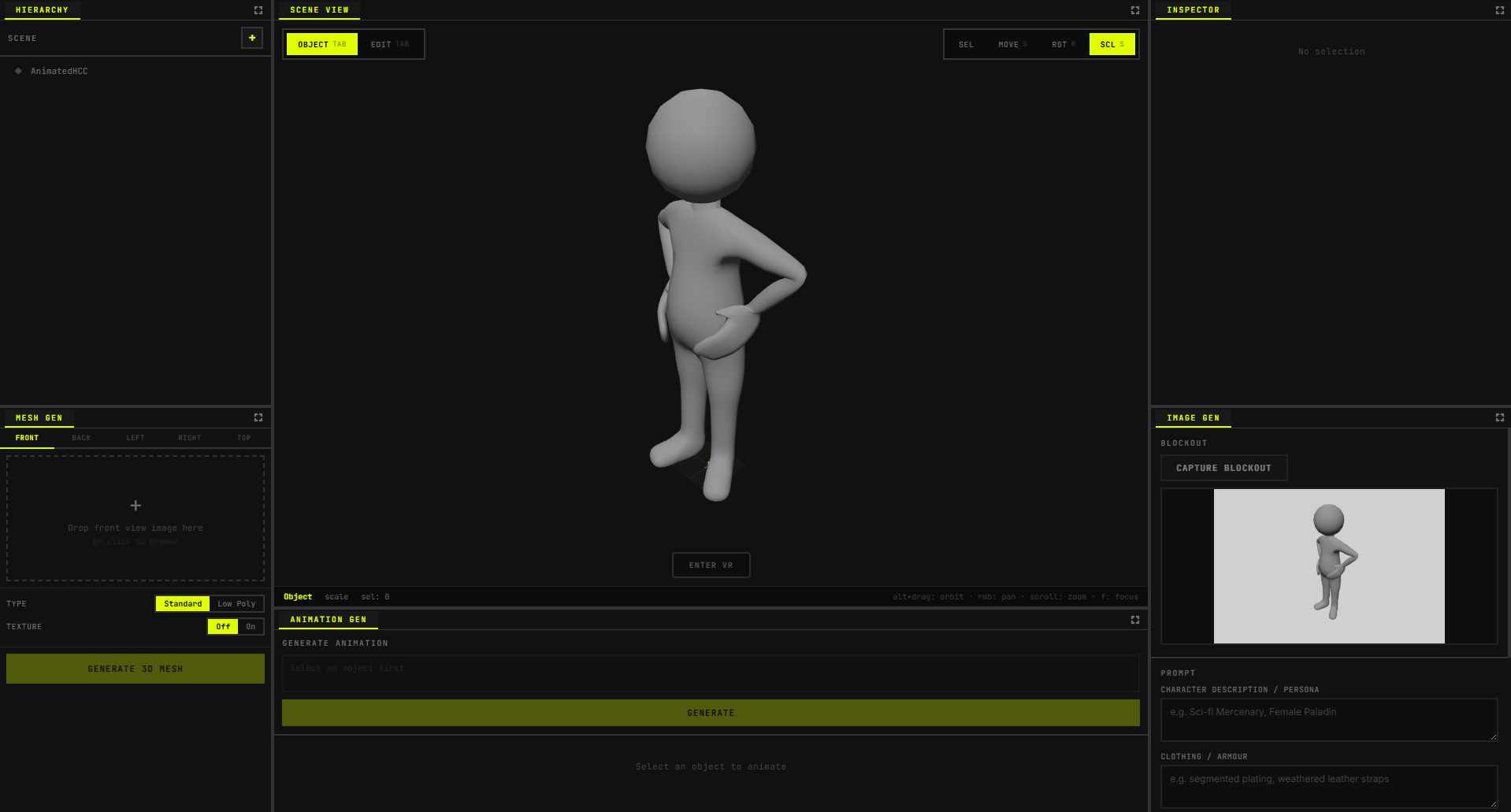
Blox is a browser-based 3D scene editor that ties together AI image generation, image-to-3D, and natural-language animation in one workflow:
- Image Gen — Capture a viewport screenshot of a blockout character, then describe persona, clothing, accessories, and face. Google Gemini produces a refined concept-art image (neutral lighting, gray background) that you can reuse for image-to-3D or as a visual reference.
- Mesh Gen — Upload reference images (front, back, left, right, top). The app sends them to the Meshy API to generate 3D models (standard or low-poly, with optional textures) and adds the result to the scene or replaces the selection.
- Animations — Select a mesh and describe the motion in words (e.g. “wave,” “walk”). Gemini picks the best match from a preset animation library; Meshy handles rigging and animation. You can preview and scrub animations in the viewport.
- Editing — Object mode (select, move, rotate, scale) and edit mode with vertex/edge/face selection, extrusion, and axis-constrained manipulation.
- Export — Export the scene or selected objects as GLB for use in games or other 3D tools.
The UI uses a resizable panel layout (hierarchy, inspector, viewport, Mesh Gen, Enhance, Animations) so you can arrange the workspace the way you like.
How we built it
- Frontend: React 19 + Vite, Three.js for the 3D viewport and scene graph, Zustand for editor state, and flexlayout-react for the panel layout.
- 3D logic: Custom scene manager, selection/transform and edit-mode engines (raycasting, vertex/edge/face overlays, extrusion), GLB import/export, and animation playback.
- APIs: Gemini for natural-language animation choice and character image refinement; Meshy for image-to-3D and rigging/animation.
Challenges we ran into
- Keeping the edit-mode mesh (vertices/edges/faces) in sync with the scene graph and with Meshy-generated meshes.
- Designing the Enhance flow so Gemini’s output (lighting, background) stays suitable for downstream image-to-3D.
- Handling long-running Meshy jobs (polling, progress, cancel) and wiring them into the React UI without blocking the editor.
Accomplishments that we're proud of
- Shipping a full pipeline from reference images → AI-enhanced concept art → 3D mesh → rigging → natural-language animation in one app.
- Building a usable edit mode (vertex/edge/face selection, extrusion, axis constraints) on top of Three.js without an existing editor framework.
- Integrating three separate AI/API workflows (Gemini image gen, Gemini animation picker, Meshy image-to-3D and rigging) into a single, coherent UX.
What we learned
- How to structure editor state (selection, mode, edit geometry) so viewport, hierarchy, and panels stay in sync.
- Practical tradeoffs when prompting Gemini for image-to-image (e.g. lighting and background constraints for later 3D conversion).
- Polling and progress UX for async 3D generation APIs like Meshy.
What's next for Blox
We’d like to add more animation presets, support for uploading existing GLBs into the pipeline for rigging/animation, and optional texture baking or LOD export for game-ready assets.


Log in or sign up for Devpost to join the conversation.