-
-
Research Numbers
-
Landing Page
-
Hair Passport
-
Personal Guide Agent
-
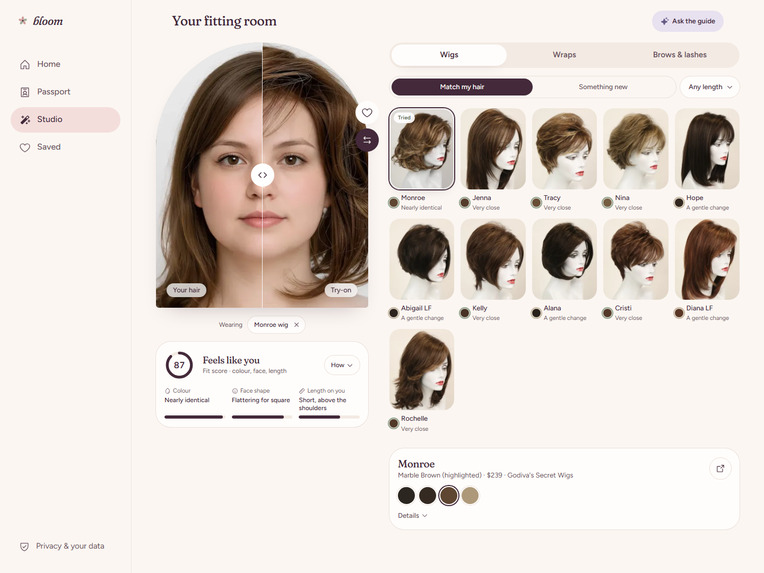
Wig try on and fit
-
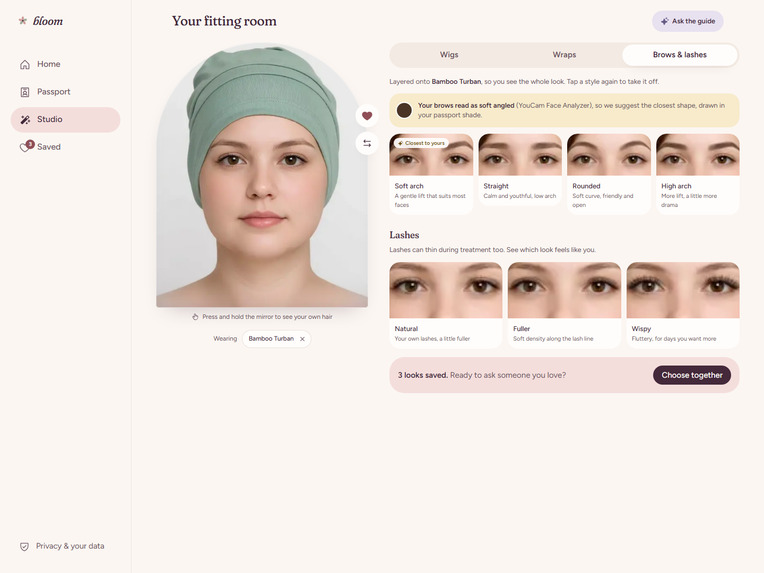
Wraps & Beauty Options
-
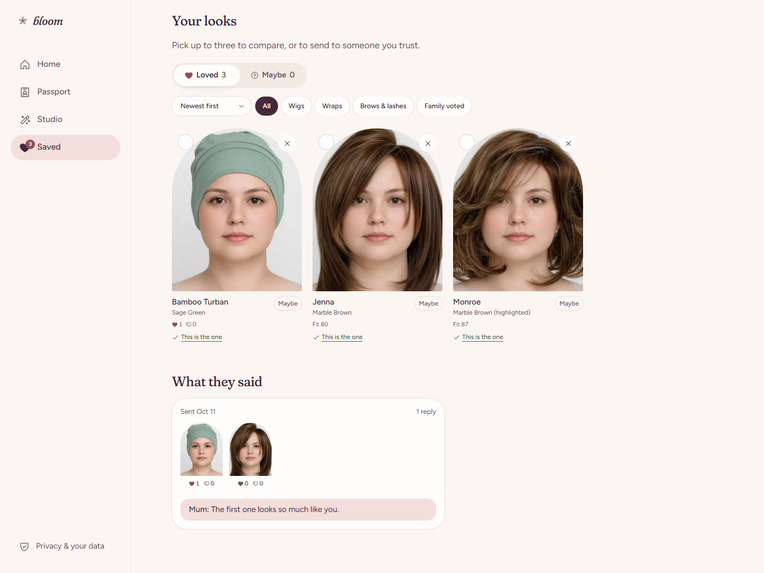
Saved Looks & Family Votes
-
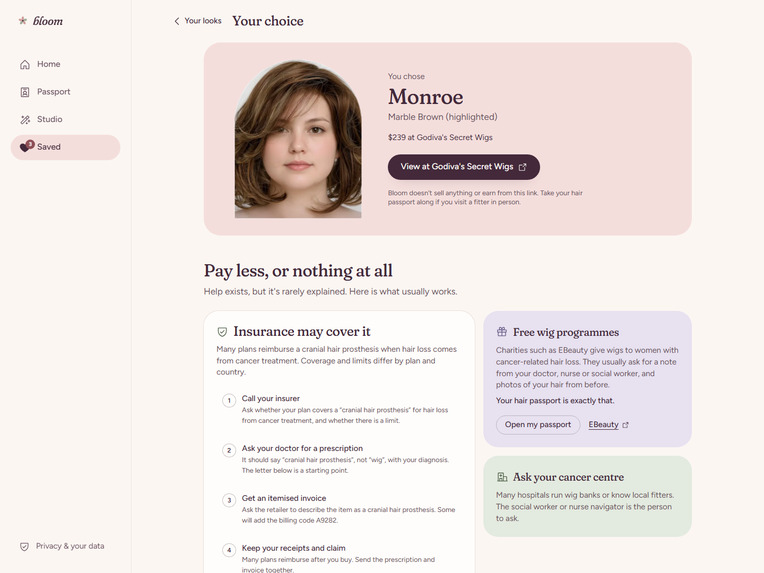
Choice & Next Steps
Bloom: Choose your hair before treatment does
“I did not know the stranger looking back at me from the mirror.” Renita shared those words with Macmillan Cancer Support after chemotherapy took her hair, eyebrows, and eyelashes. On Christmas Day, she wore a wig and drew on her brows to spend time with her family. For a few hours, she felt more like herself.
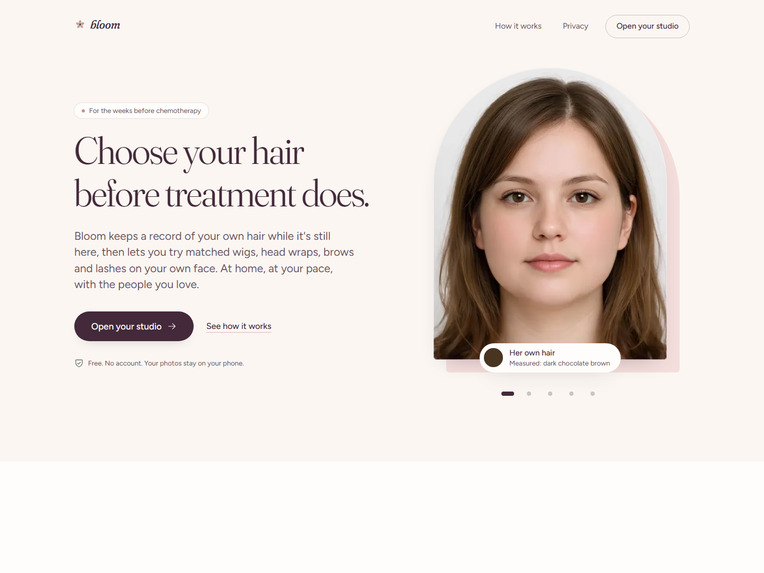
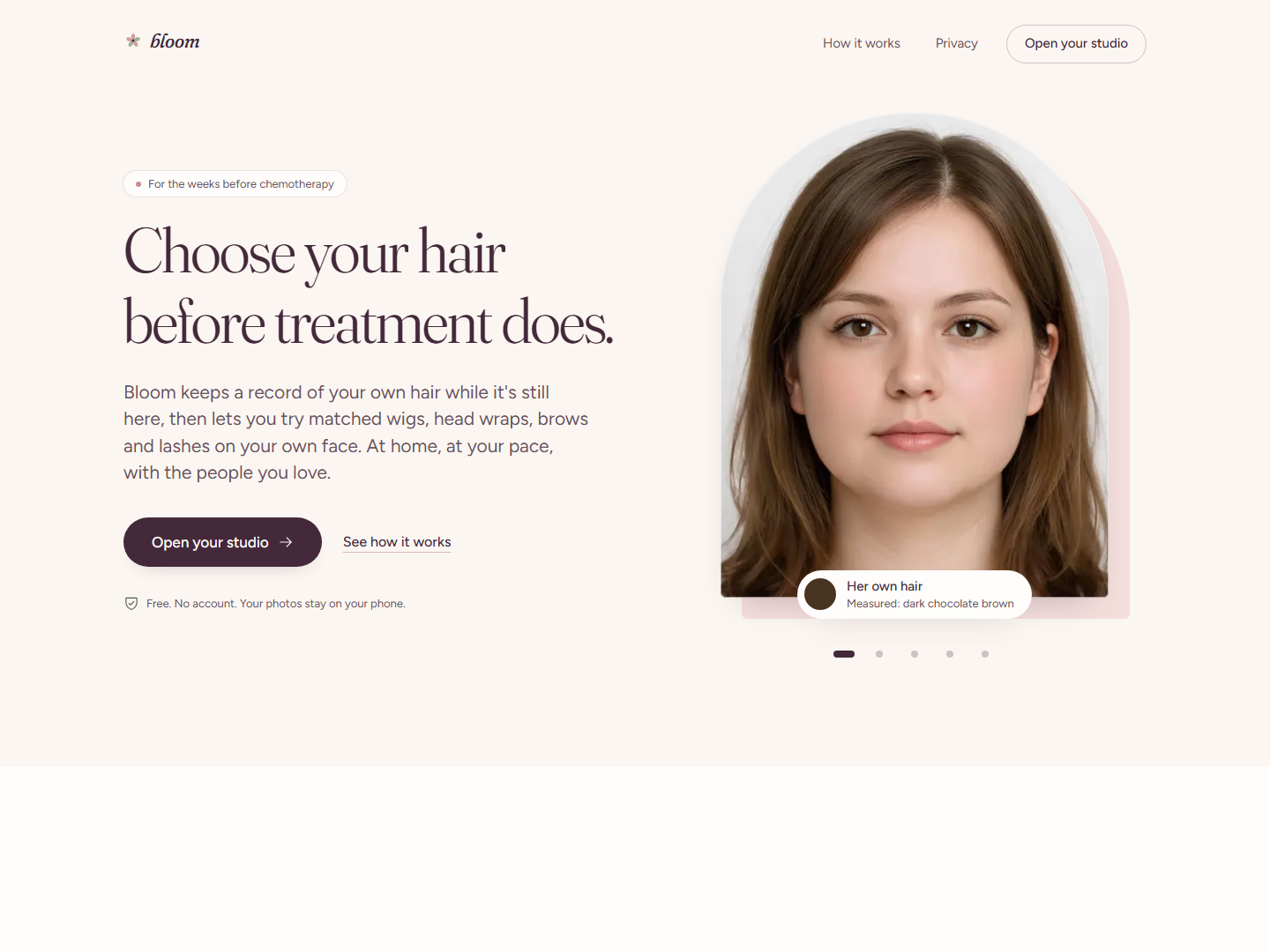
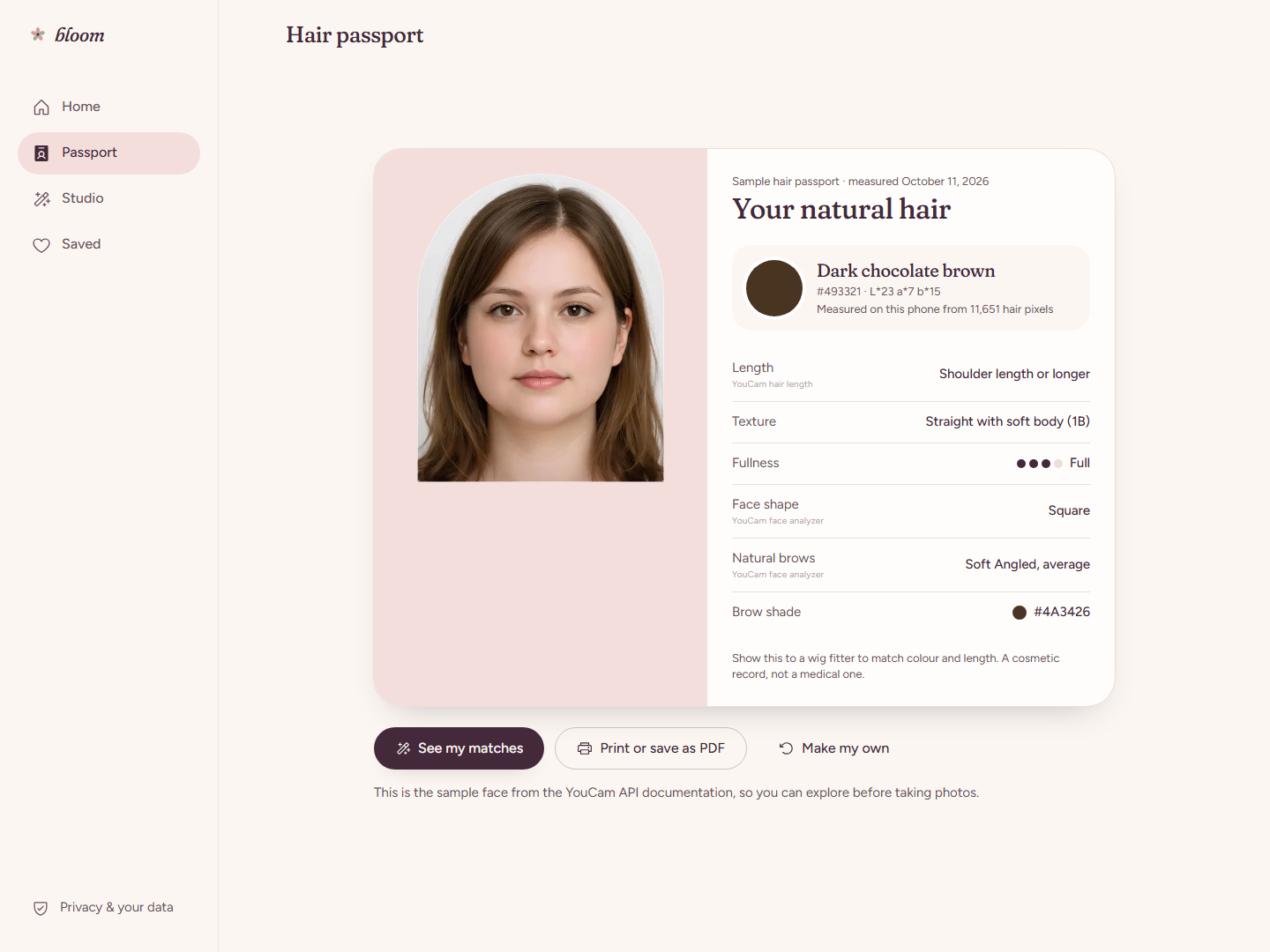
Bloom gives women a way to prepare for moments like that. It turns photos of natural hair into a Hair Passport, finds real wigs that resemble it, and lets someone try wigs, head wraps, brows, and lashes on her own face. A personal AI guide helps her find and compare options; family can help her choose. When she is ready, Bloom takes her directly to the retailer's product page. The journey begins with “this is my hair” and ends with “this is my choice.”
Try it in 30 seconds:
- Open the link and tap Use the sample face. There's no login and no photo needed.
- Try a wig, a wrap, or brows and lashes.
- Save a few looks, then ask the guide which one suits the sample face best.
The first load can take up to a minute while our free server wakes up.
This recording uses a sample face and pre-rendered YouCam results:
Inspiration
A choice before hair loss. Writer Judith Harris described shopping for a wig with her sister and a hairstylist after her first chemotherapy session. She still had her own hair as she tried to choose what might replace it. Her account showed us why personal reference photos, time to prepare, and the opinions of trusted people belong in one experience.
The options must reflect the person. Dianne Austin, a Black breast cancer survivor, could not find a wig that resembled her tightly coiled hair at hospitals near her home. She and her sister later founded a company offering textured wigs. Her story is why Bloom matches wigs to each woman's own measured hair, and why textured and coiled styles are the next addition to our catalogue. A review of 11 qualitative studies involving 225 women found that treatment-related hair loss can profoundly affect body image and identity.
A personal decision in a short window. A wig, a wrap, or neither should be her choice. The American Cancer Society recommends photographing current hair to help match a wig's style or colour, and Breastcancer.org recommends preparing before treatment if a wig is something someone may want. Bloom turns those photos into a Hair Passport she can keep, use to find matches, and share with a wig fitter.
The need in numbers
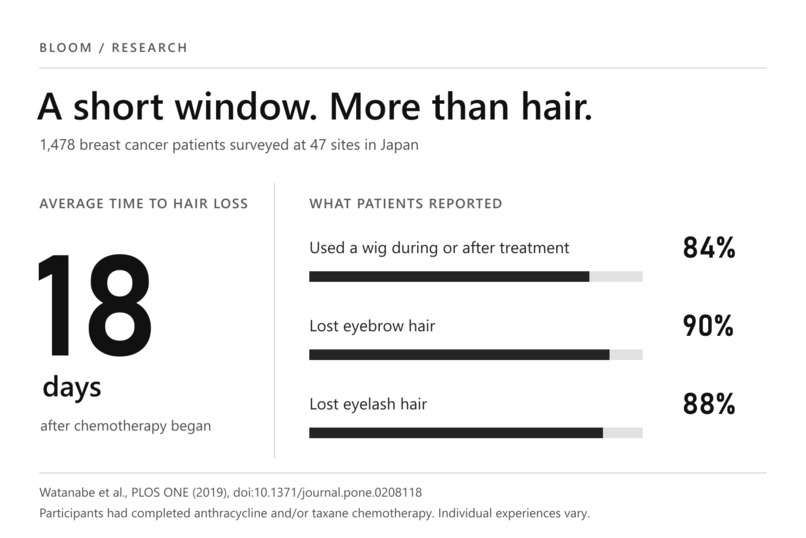
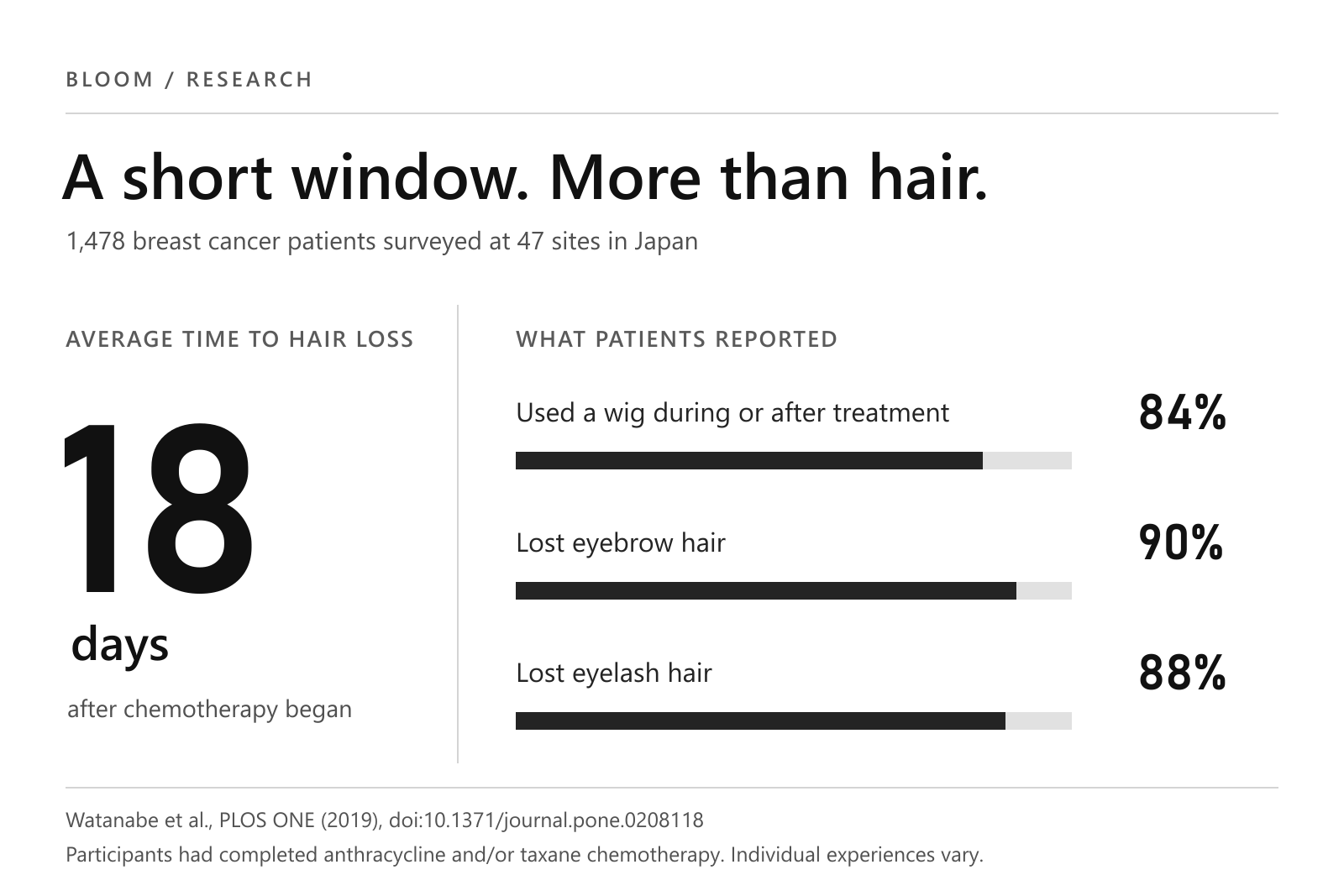
- The preparation window can be short. In a survey of 1,478 breast cancer patients at 47 hospitals and clinics in Japan, hair loss began an average of 18 days after chemotherapy started. 84% used a wig during or after treatment, 90% lost eyebrow hair, and 88% lost eyelash hair. The participants had received anthracycline and/or taxane chemotherapy; individual experiences vary.
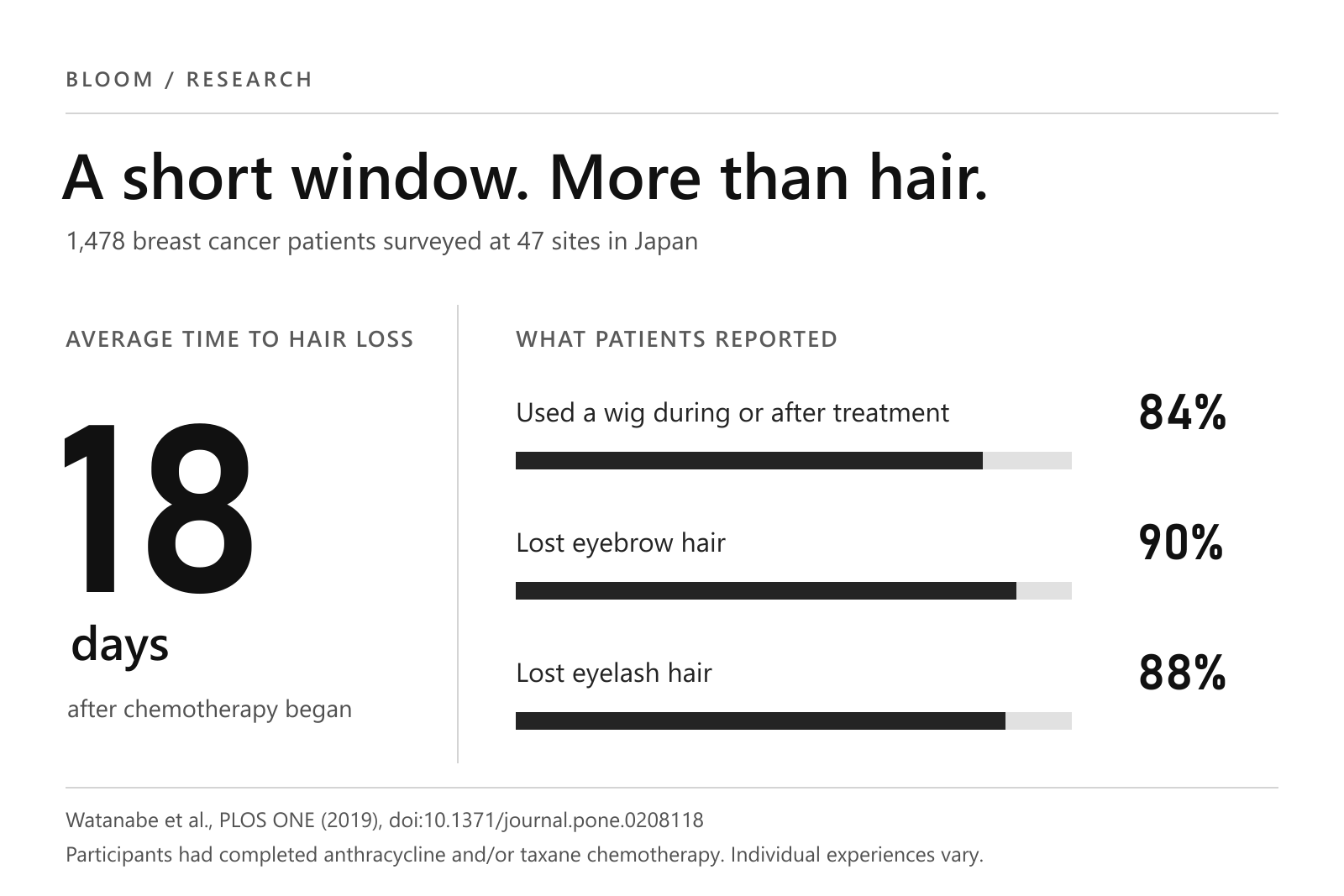
- The evidence shaped the product.
- The short preparation window led to a quick capture flow.
- Wide wig use called for a real catalogue and a fitting-room mirror.
- Eyebrow and eyelash loss is why the experience covers the whole face.
What it does
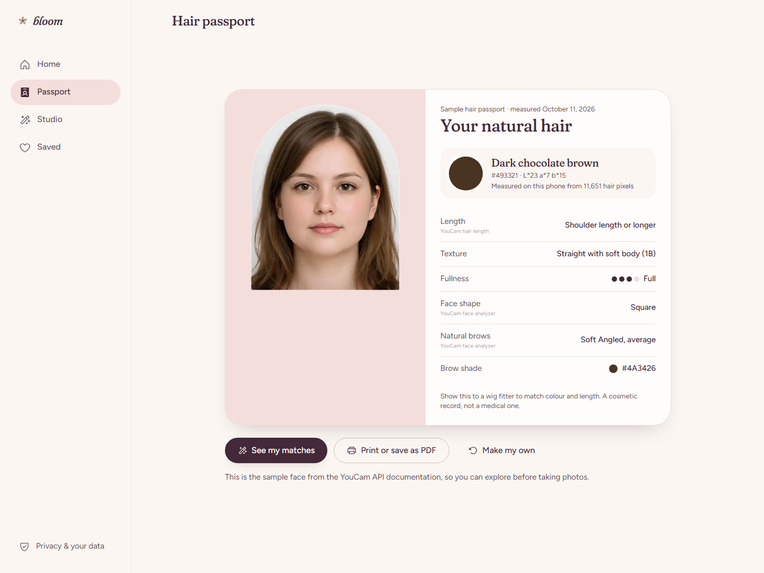
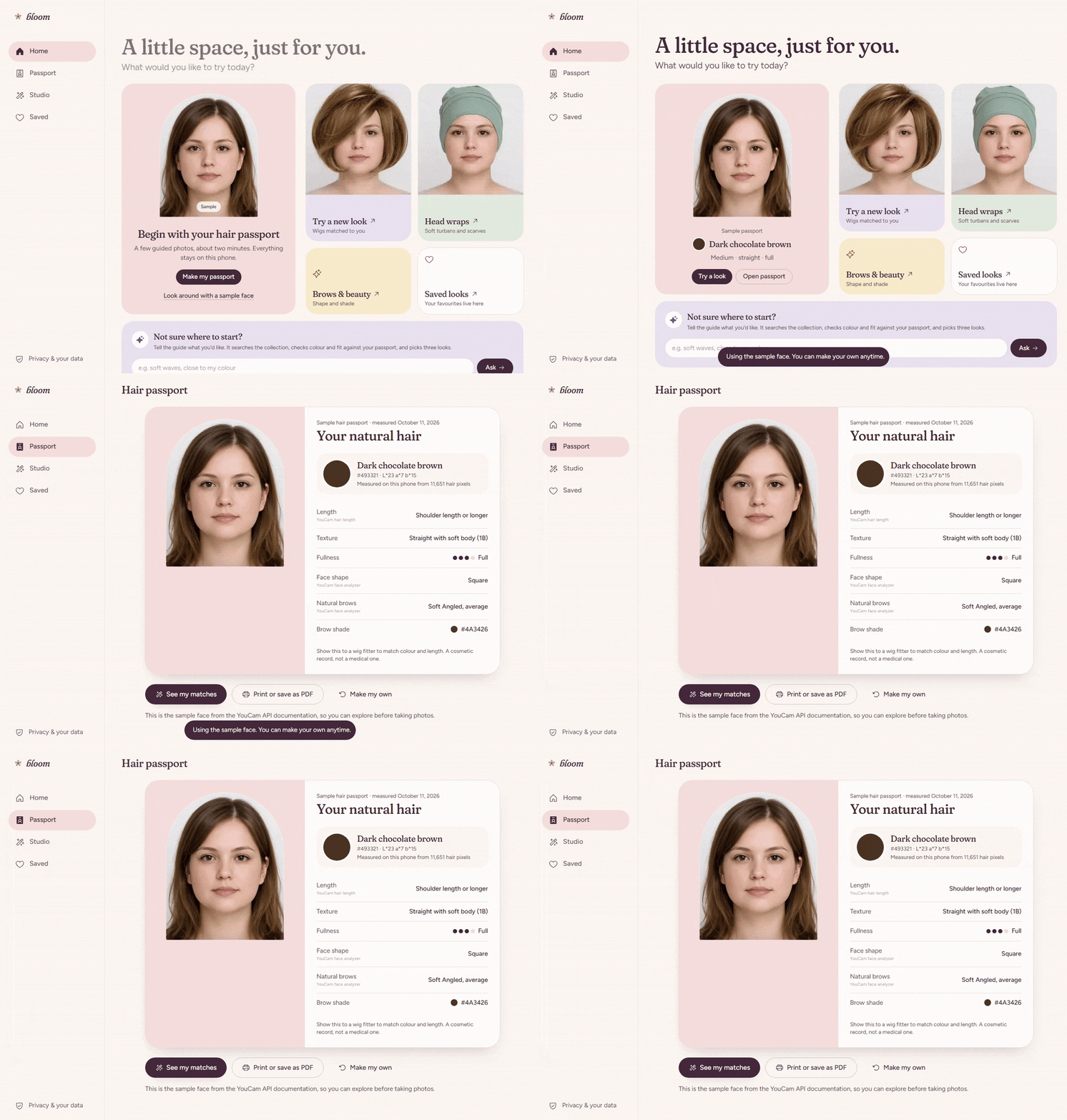
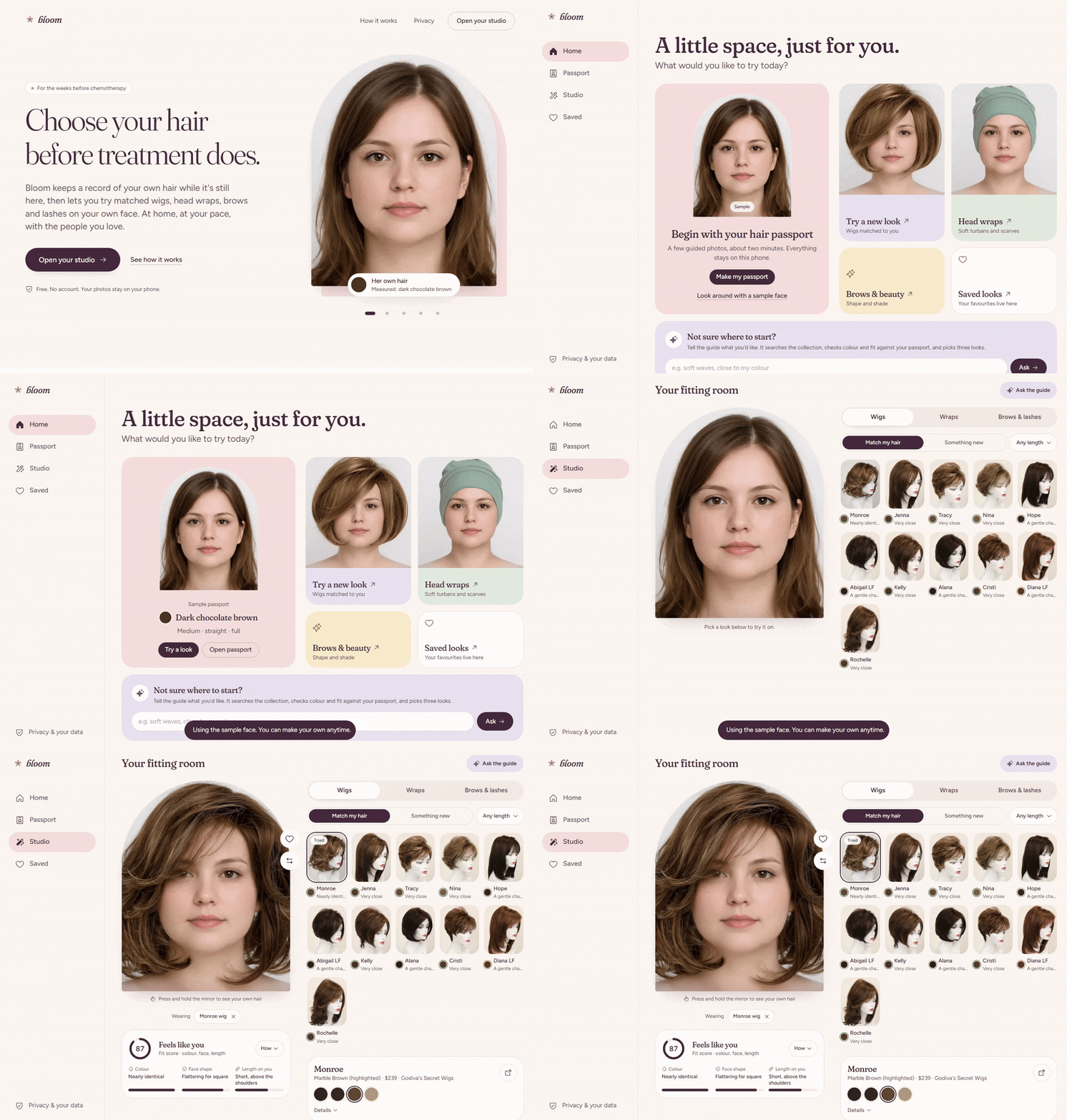
- Make a Hair Passport. A guided camera or upload flow starts with a front photo; side and top photos are optional. MediaPipe checks framing and segments hair, then Bloom measures natural hair colour from those pixels on the device. YouCam adds face attributes and, when the relevant photos are available, hair length, type, and density. The passport names the source of each reading.
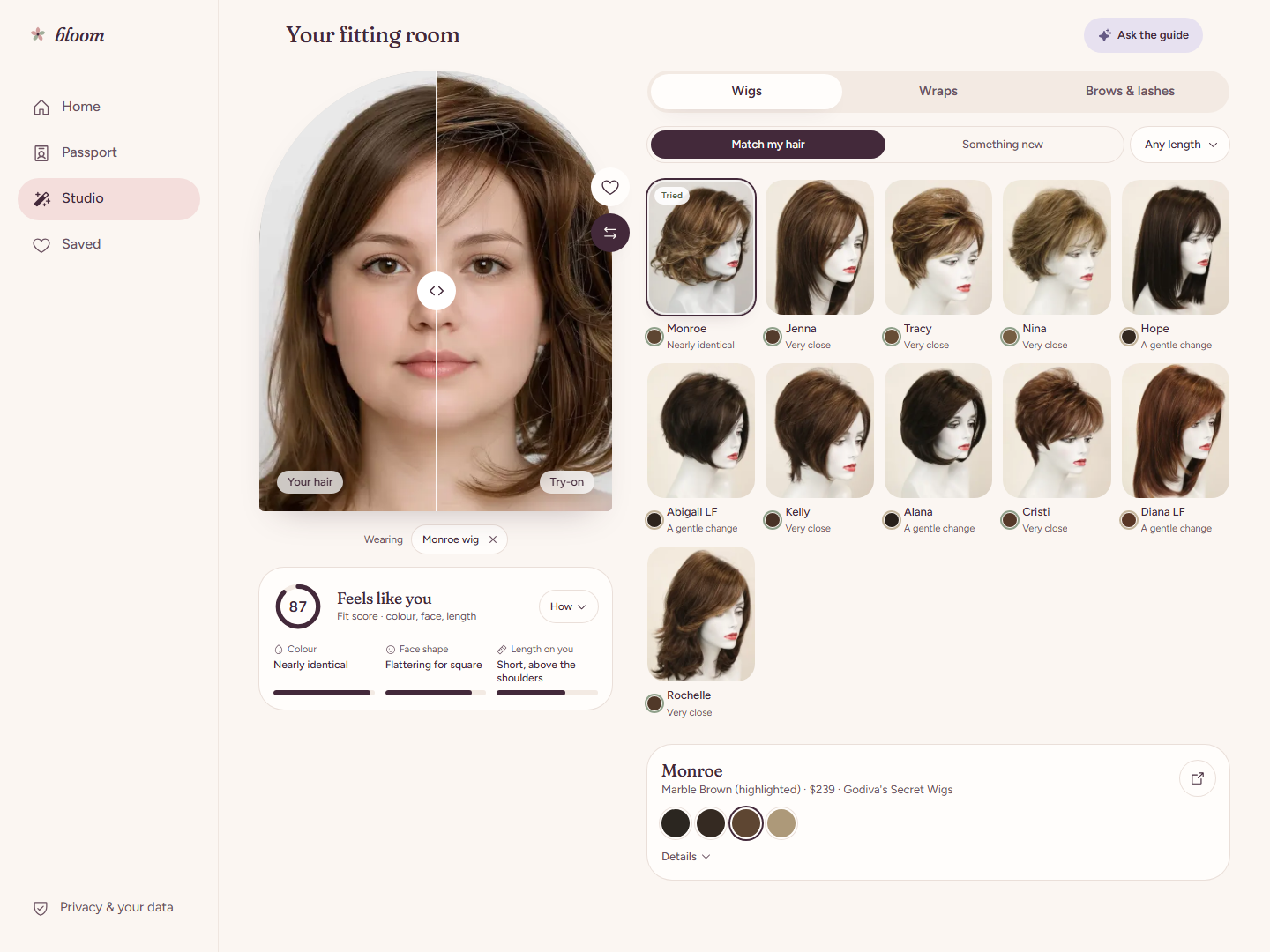
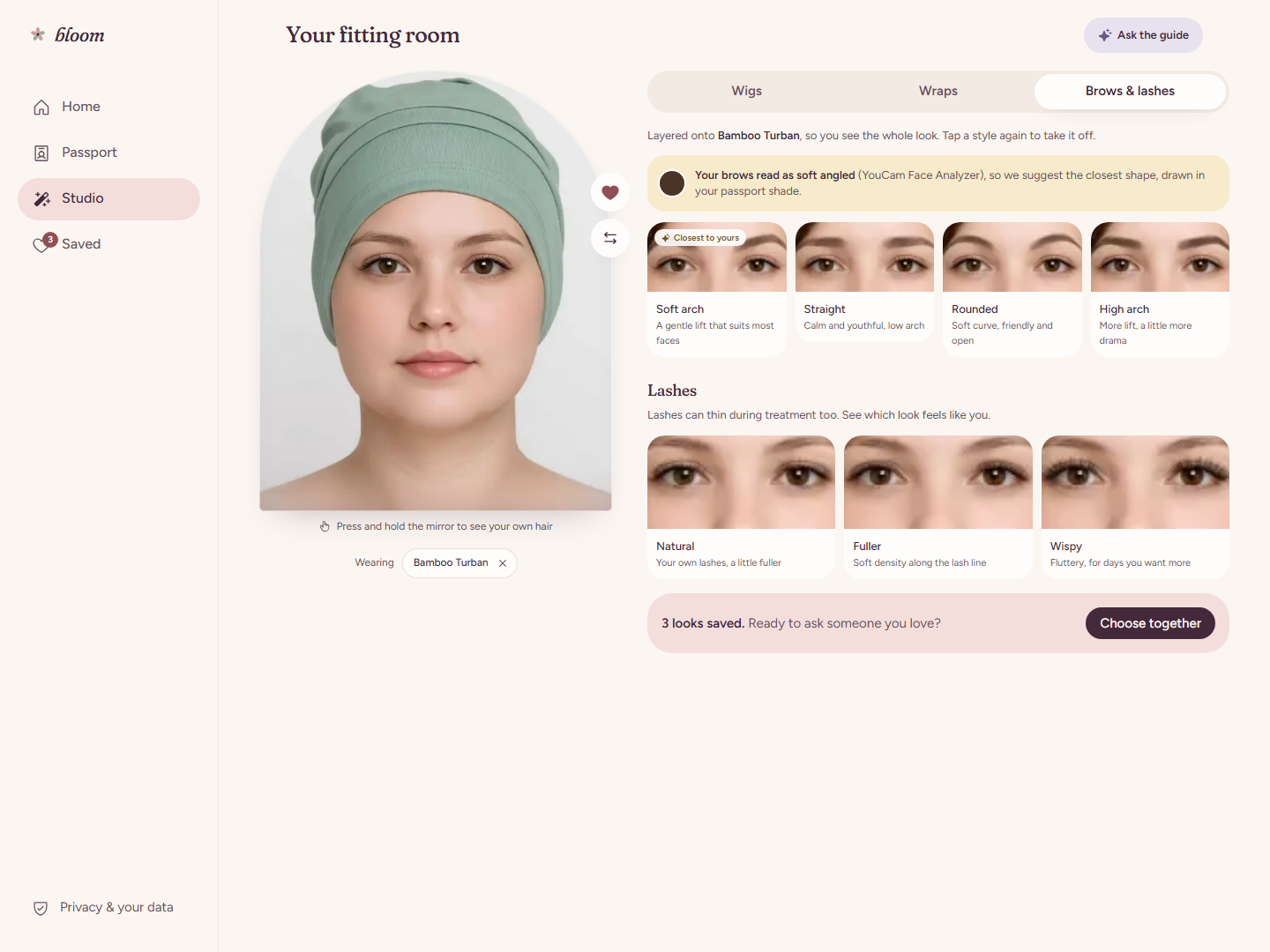
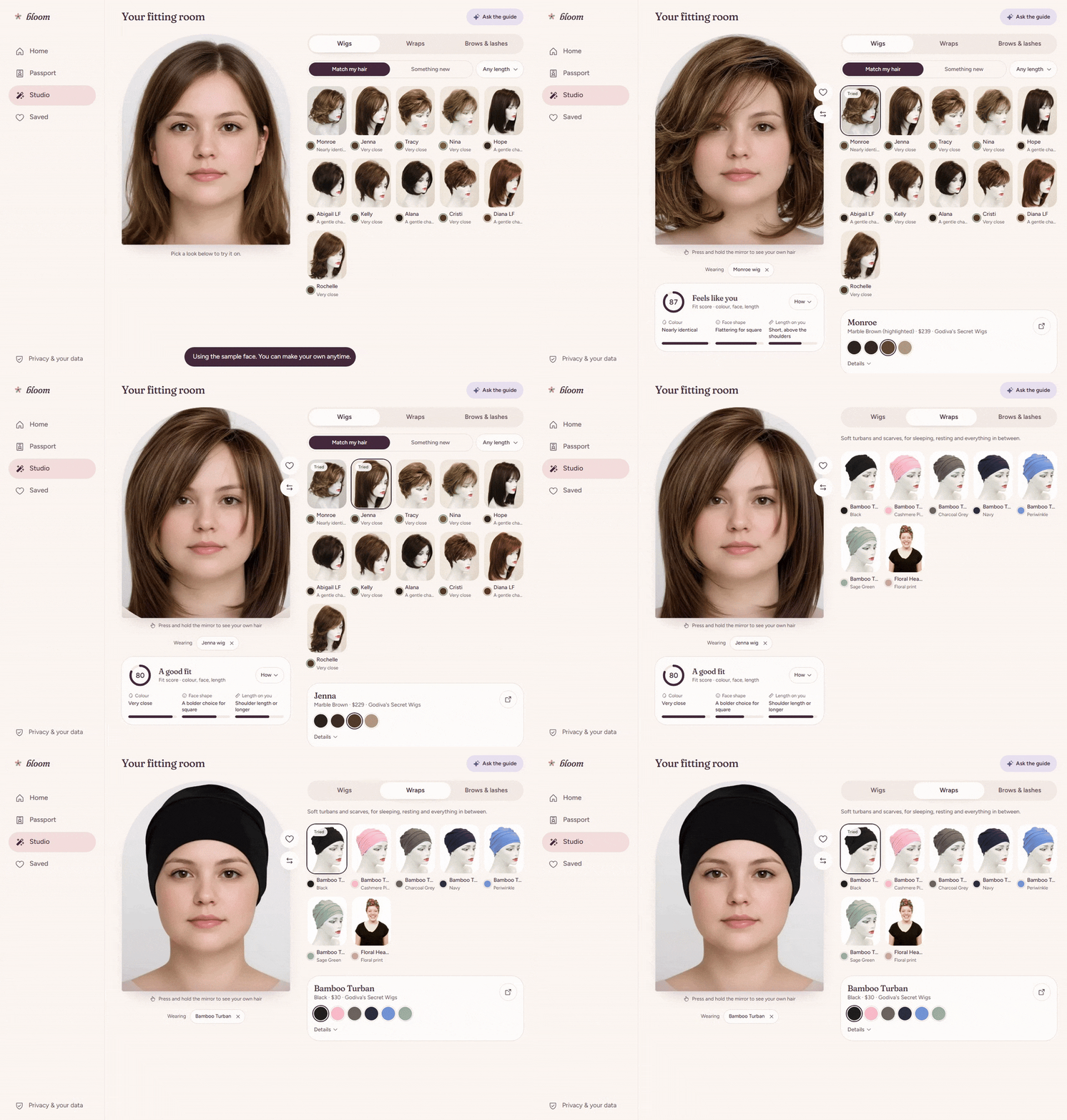
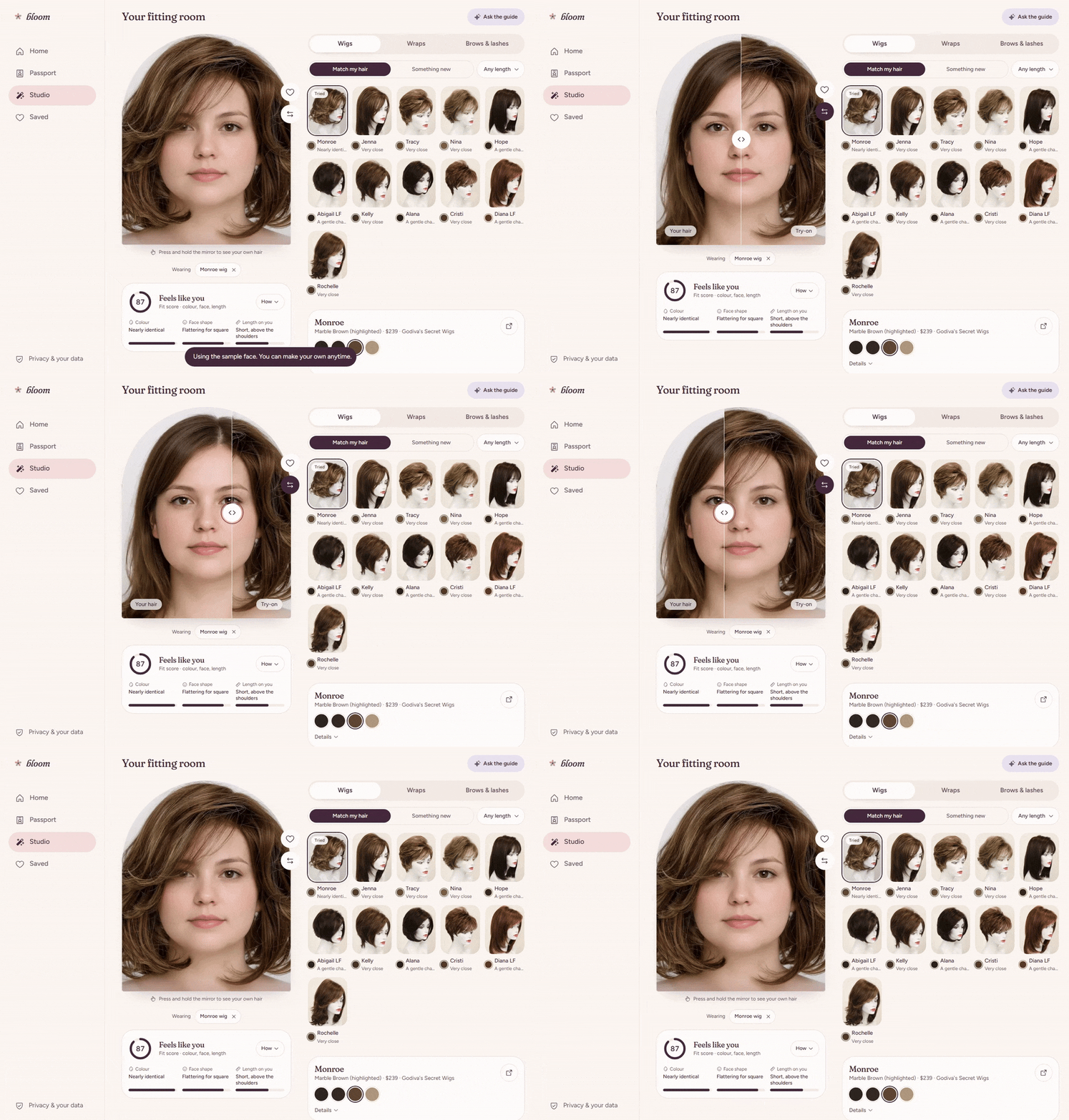
Find and try looks. Bloom ranks catalogue wigs against the passport and uses YouCam to render a selected wig or head wrap on her photo. She can layer brows and lashes over a wig or wrap, compare the result with her original photo, and save looks to Loved or Maybe. Each product panel shows its colour, price, and retailer.
Check the finished image. The on-device process that measures natural hair colour also checks the completed try-on. Bloom uses CIEDE2000 (ΔE00) to quantify colour difference and explain how closely the result resembles her own hair. Its styling score weighs colour, face-shape guidance, and rendered length at 45% / 35% / 20%.
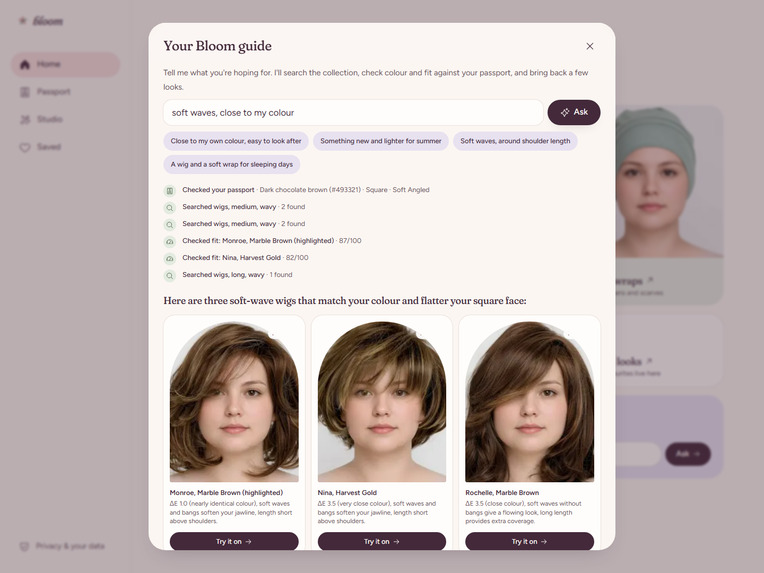
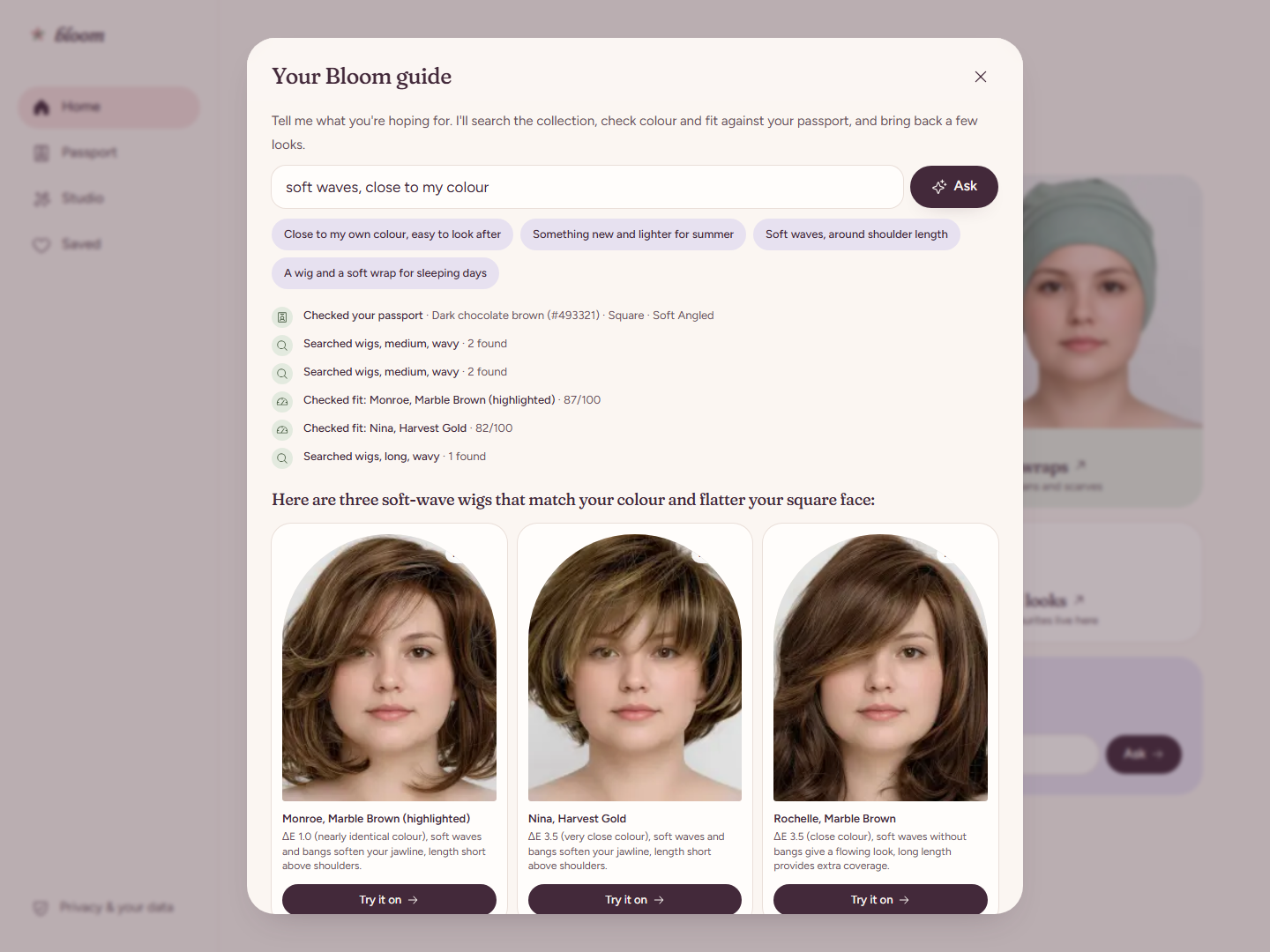
Ask the personal AI guide. She can describe what she wants in everyday language, such as a wig close to her natural colour and within her budget. The guide reads her Hair Passport, searches real products, checks fit, and returns a short list with reasons and a Try it on action for each pick. It can also compare looks she saved, including their fit details and family votes. Its steps appear on screen as it works.
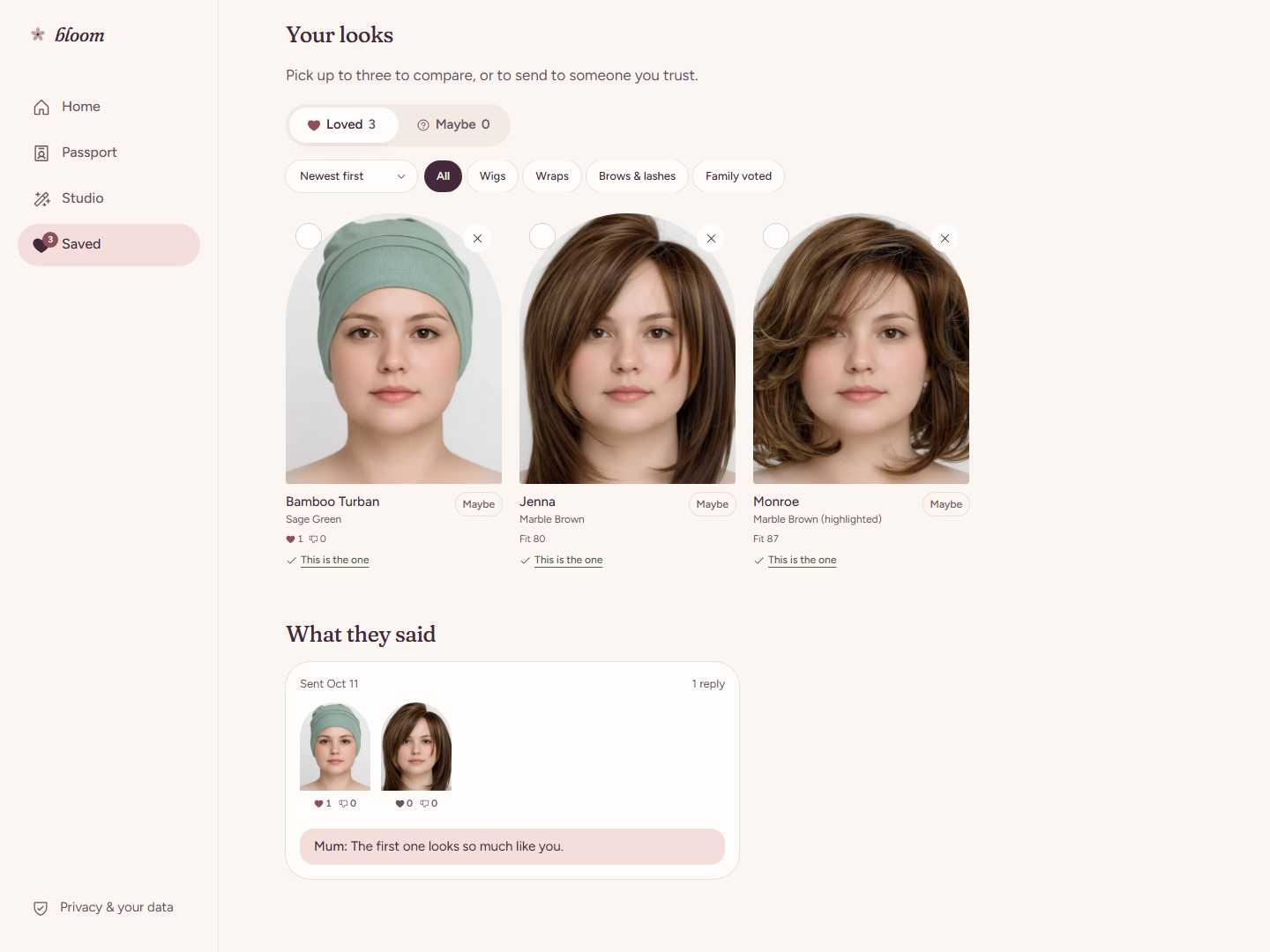
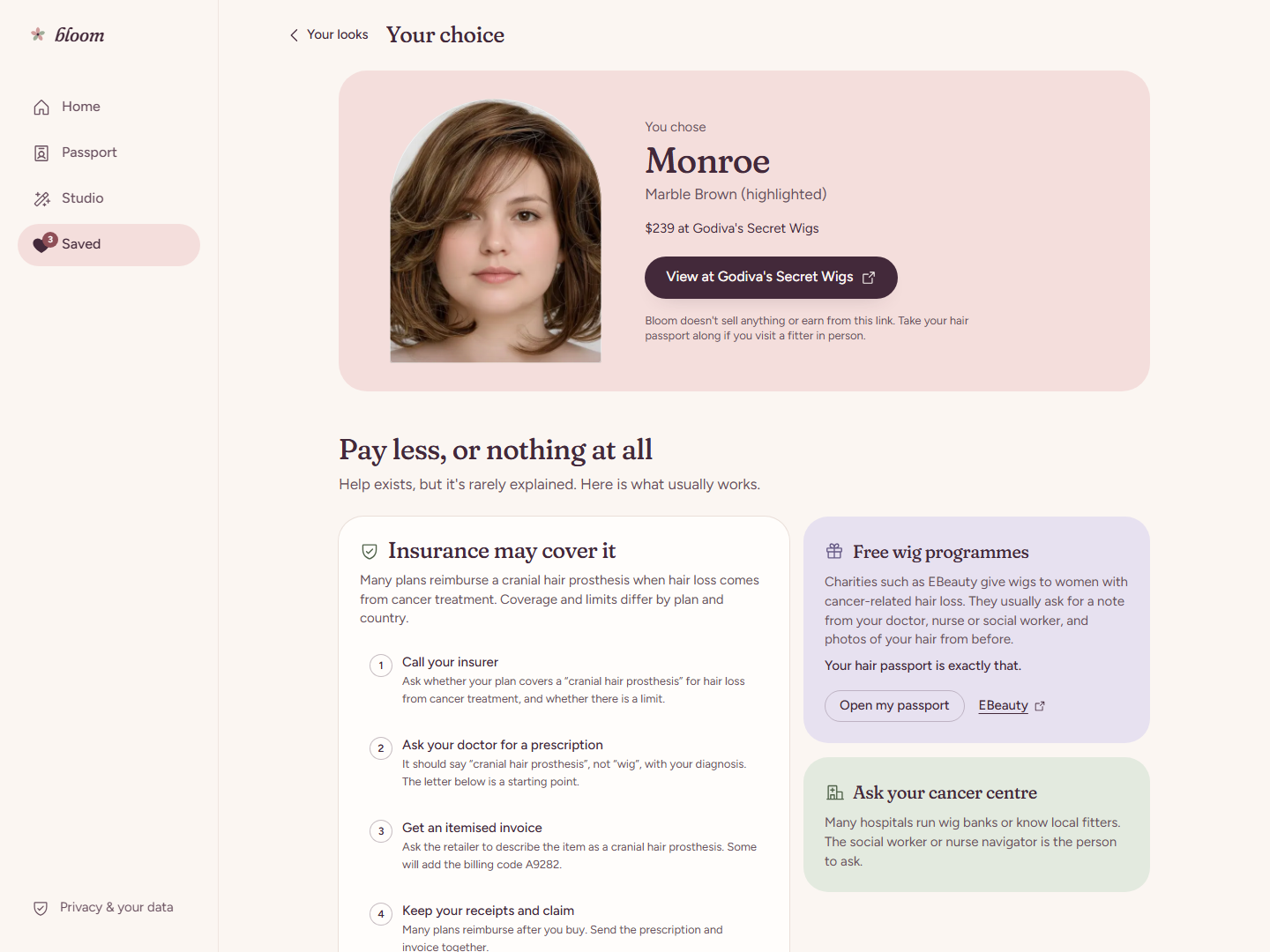
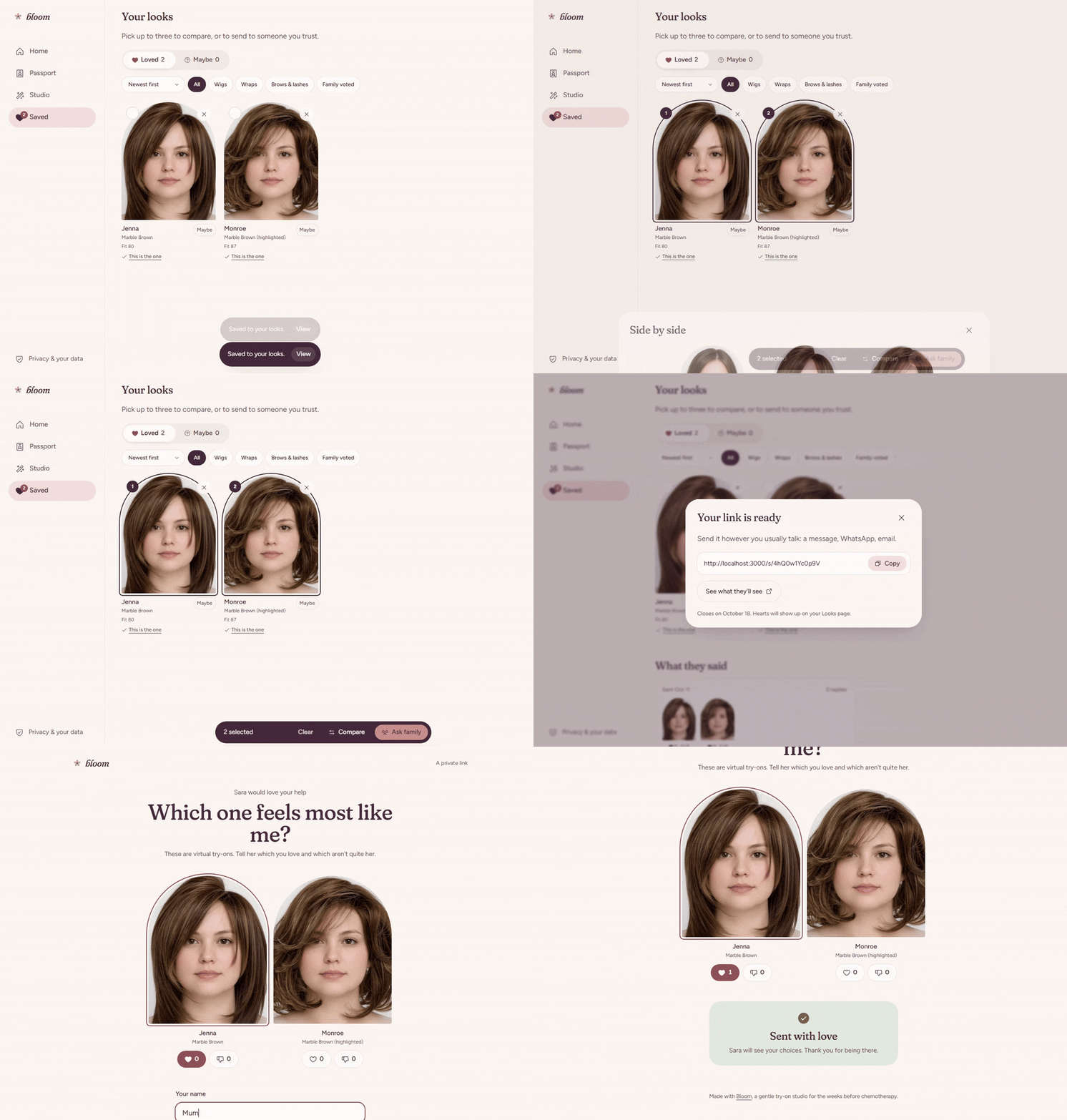
Choose together. She can compare saved looks, share up to three through a seven-day family link, and see love it / not for me votes. The link shows only the looks she selects. When she chooses a wig, a printable decision page gathers its style, colour, price, retailer, product link, and practical insurance questions.
- Explore without a camera. A sample Hair Passport and pre-rendered YouCam try-ons let anyone explore the journey before sharing a personal photo.
Consumer and retail value
The virtual try-on is often the only try. Many wigs are sold as final sale, or can't be returned once opened or worn, and the American Cancer Society advises checking return policies before buying. Seeing a wig on her own face, in a colour checked against her own hair, lets a shopper commit with confidence. She doesn't have to gamble on a product photo.
A direct path from try-on to the store. Every product in Bloom's catalogue links to its retailer's product page:
- from the fitting room;
- again from a prominent View at [retailer] button on the decision page.
The retailer handles availability, sizing, checkout, and delivery.
- A more informed visitor for the retailer. By the time she clicks through, she has matched the product to her own hair, seen it on her face, checked its price, and discussed it with family. Retailers gain a shopper who has already chosen a specific product.
How Bloom handles personal photos
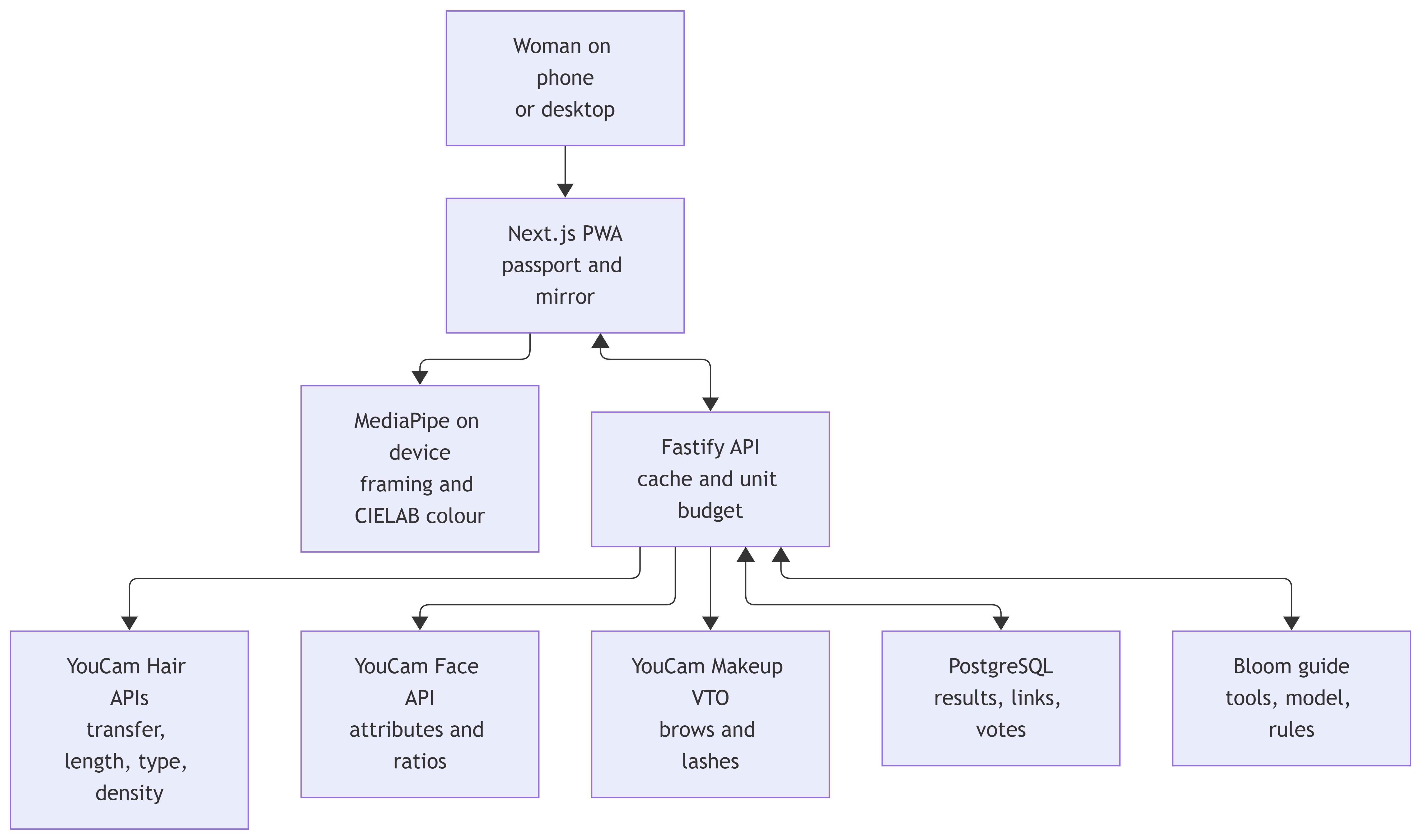
The Hair Passport and saved looks are stored in the user's browser through IndexedDB. MediaPipe handles framing and hair segmentation; Bloom calculates hair colour from those pixels on the device. When a user requests a YouCam analysis or virtual try-on, Bloom sends the selected image through its backend to YouCam for that operation. The backend manages tasks and caches reusable results; PostgreSQL stores results, family links, and votes.
Sharing requires a separate choice. A family link displays only the looks the user selects, up to three, and closes after seven days. The Bloom guide receives passport facts, product details, and saved-look IDs, not photographs.
The journey

How we built it
Six YouCam capabilities, each doing real work:
- AI Hairstyle / Hair Transfer renders wigs and head wraps on her photo.
- AI Hair Length Detection reads both the original photo and the finished wig render.
- AI Hair Type Detection uses the optional side photos.
- AI Hair Density Detection uses the optional top photo.
- AI Face Attributes & Ratio Analyzer informs face-shape and brow guidance.
- AI Makeup VTO renders brows and lashes.
Layered looks in one render. Brows and lashes are drawn on top of the finished wig or wrap render, in a single Makeup VTO call. She sees the complete look in one image.
Colour measured twice. MediaPipe Tasks Vision checks face framing and segments hair in the browser. We convert hair pixels to CIELAB, take their median colour, and use CIEDE2000 to compare shades. We measure the finished wig render the same way. When that measurement is available, it replaces the product photo's colour in the fitting room's comparison.
A full stack built for the journey.
- The interface is a Next.js 16 / React 19 progressive web app.
- A Fastify API keeps YouCam credentials on the server, prepares images with Sharp, and starts and polls YouCam tasks.
- Identical requests are cached by a hash of the image and settings, so a repeat render costs no units.
- A per-visitor unit budget protects the account.
- PostgreSQL stores reusable results, family links, and votes.
An agent that acts through product tools. In live mode, the Bloom guide uses a model through Groq or OpenRouter to decide which tool to call next:
get_passport,search_styles,fit_report,get_saved_looks, orsuggest_brows_and_lashes. It then callsshortlistto return actionable picks, and the API streams each step to the interface with Server-Sent Events. Bloom's tools supply every catalogue ID, price, colour distance, and fit score. Before showing a shortlist, the backend checks it in code:- each pick must come from a real search result;
- each pick must match the colour and length she asked for;
- any reason that claims a feature the style doesn't have is replaced with one built from measured facts.
If a model is unavailable or its answer fails a check, a rules-based planner finishes the shortlist with the same tools.
The engineering path
Challenges we ran into
Rendering headwear faithfully. We tried YouCam's hair transfer, hat, and scarf routes with wigs and wraps. Hair transfer preserved the face and gave us the most faithful head-wrap result in Bloom's mirror, so we used it for both categories.
Explaining colour with evidence. Product photos vary with lighting and backgrounds. We measured catalogue colours, then checked the finished render using the same scale as the Hair Passport. Bloom can explain how a shade appears on the person, rather than relying only on a product image.
Handling incomplete readings. Optional photos leave some fields unmeasured, and an image can fail analysis. We track each result separately, give clear capture guidance, and explain when a field could not be read. The fitting room continues with the measurements that succeeded.
Keeping an AI guide truthful. Early tests showed models adding filters nobody asked for, or describing a straight wig as wavy. We moved the facts into deterministic tools and added code checks on every shortlist. The guide now writes the warmth; Bloom supplies the facts.
Accomplishments that we're proud of
- An end-to-end product. A woman can:
- create a Hair Passport from her photo;
- find a matching product and see a YouCam render on her own face;
- check its colour and length;
- compare saved looks and invite family votes;
- follow the chosen product to its retailer, or take the printable decision page to a wig fitter.
These steps work together in the app and API. The catalogue contains 11 wig styles and 2 wrap styles across 51 variants.
A considerate interface. The arched mirror carries the visual language of the landing page into the studio. Responsive layouts, guided capture, sample mode, comparison controls, and plain explanations make a sensitive decision easier to explore. Bloom is a cosmetic shopping aid and makes no diagnosis or treatment claim.
Tested and live. The personal-photo journey runs through the Next.js app, Fastify API, PostgreSQL, and live YouCam calls. Frontend and backend tests cover matching, API behaviour, sharing, the guide's checks, and the main user journey.
What we learned
A preview should support a decision. A try-on is most useful when she can compare it with her own hair and act on it.
Personalisation needs clear sources. We distinguish between what the device measured, what YouCam measured, and what a styling rule inferred. The guide uses a warm tone while grounding its numbers and product claims in those results.
Choice is the outcome. One woman may want a familiar wig; another may prefer a wrap, a new style, or no head covering. Bloom gives each person room to decide what feels right for her.
Why Bloom fits this challenge
It meets every judging criterion. The official criteria weigh technology, design, potential impact, and quality of the idea equally:
- Technology: six YouCam capabilities, original colour analysis, and catalogue matching.
- Design: one coherent journey.
- Potential impact: a real problem with a short window, solved at home and carried through to purchase.
- Quality of idea: saving her hair before she loses it, then using it to choose.
Its agentic workflow has a purpose. The challenge welcomes agentic AI workflows. Ours chooses product and fit tools from a woman's request, shows its steps, and opens each pick in the mirror.
Team
Women in Tech. Nourin Richi leads our two-person team. She identified the problem, conducted research, designed the UI/UX, shaped the project plan, helped finalise the architecture, and worked on documentation and video editing. Ahammad Shawki is Bloom's full-stack developer and AI engineer.
Rising Star. Both teammates are currently enrolled students:
- Ahammad Shawki studies at the Bangladesh University of Engineering and Technology (BUET) (
[email protected]). - Nourin Richi studies at BRAC University (
[email protected]).
- Ahammad Shawki studies at the Bangladesh University of Engineering and Technology (BUET) (
Together, they turned research and design into a working PWA, API, database, YouCam pipeline, colour analysis, and grounded guide.
What's next for Bloom
Use first prize to launch a public pilot. The funding would support reliable hosting, YouCam usage, stronger controls for personal photos, and help for people using Bloom during treatment.
Expand who can see herself in the catalogue. We plan to add textured and coiled styles, plus more colours, lengths, price points, cap designs, and headwear. We also want to work with wig makers and fitters, so that a look someone likes in Bloom leads to a product she can obtain.
Build the next version with the people it serves. We plan to invite women facing treatment, patient advocates, wig fitters, and cancer support organisations into the pilot. Their feedback will shape accessibility, photo guidance, privacy, and buying information before a wider launch. We want someone facing the moment Renita described to have choices she can explore and act on.
Built With
- ciede2000
- cielab
- fastify
- groq
- indexeddb
- mediapipe-tasks-vision
- motion
- next.js
- node.js
- openrouter
- perfect-corp-youcam-api
- playwright
- postgresql
- pwa
- sharp
- tailwind-css
- typescript
- vitest
- youcam-ai-face-attributes-&-ratio-analyzer
- youcam-ai-hair-density-detection
- youcam-ai-hair-length-detection
- youcam-ai-hair-type-detection
- youcam-ai-hairstyle-(hair-transfer)
- youcam-ai-makeup-vto
- zustand


Log in or sign up for Devpost to join the conversation.