Here's everything written in this exact format — ready to paste into Devpost.
Inspiration We started with a simple observation: the same student who won't open a 24-page PDF will spend two hours grinding a mobile game to hit the next rank. That gap bothered us. It wasn't a laziness problem — it was a motivation design problem. Research from the University of Sydney shows that up to 80% of university students don't engage with assigned readings. A University of Nebraska-Lincoln study found students check their phones 11 times per class and spend 20% of every lecture off-task. The tools professors use haven't changed since 2009. A PDF viewer. A discussion board nobody opens. A grade at the end of semester. No feedback loop, no immediate reward, no reason to care today. We grew up playing Mini Militia on school Wi-Fi. We spent hours in Minecraft building things nobody asked us to build. We memorised Super Mario levels not because we had to — but because the progression felt good. That energy never made it into education. We wanted to change that. The brief asked us to recapture what made 2016 internet feel alive — the imperfection, the serendipity, the doing over watching. Our answer was BLITZ: a classroom that feels like a battle.
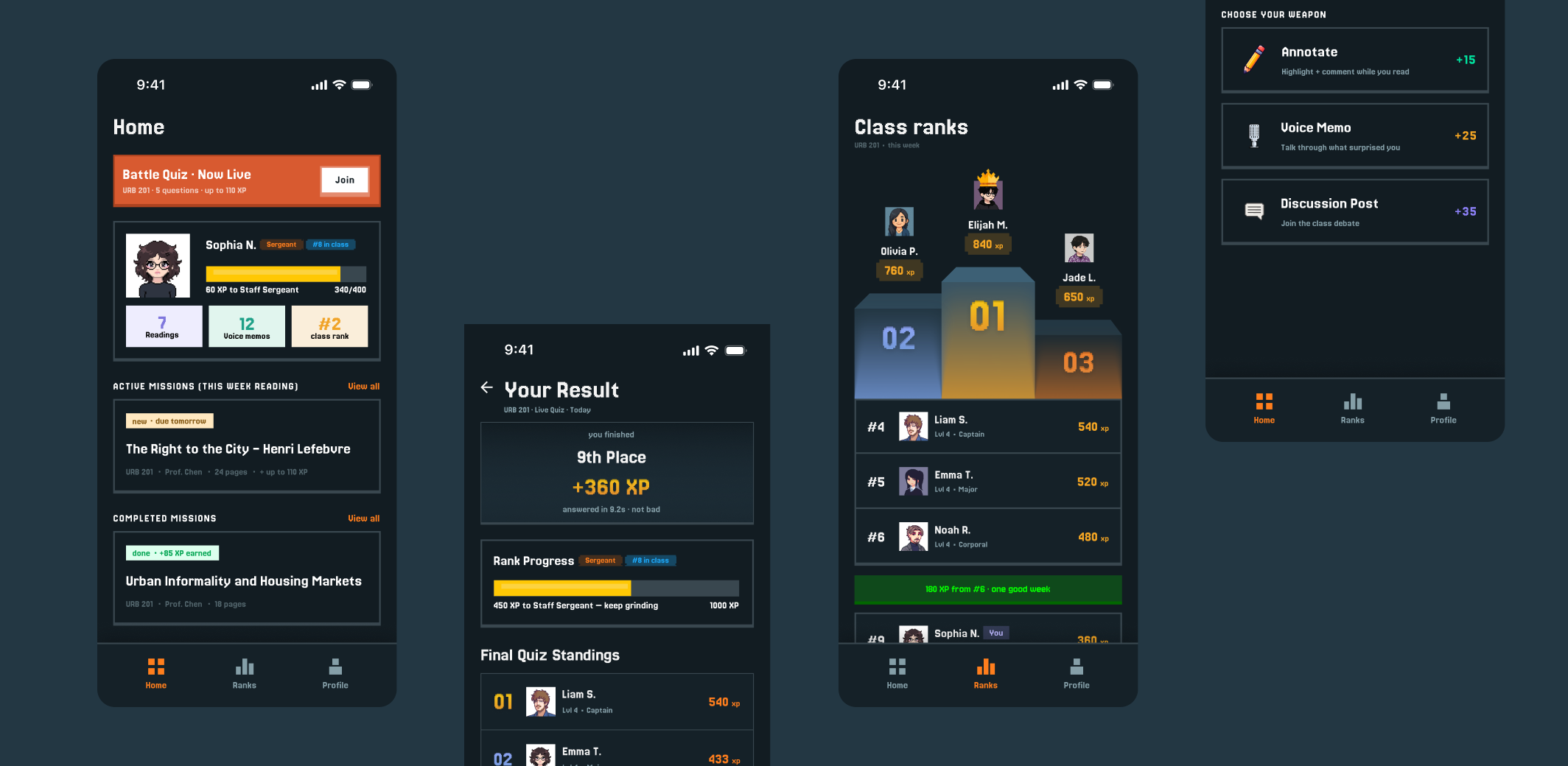
What It Does BLITZ is a mobile learning platform that turns passive students into active competitors through four XP-earning engagement methods and a military rank system borrowed directly from Mini Militia. Students earn XP four ways:
Annotate (+15 XP) — Highlight and comment directly inside the reading. Timestamps prove you actually opened the text. Voice Memo (+25 XP) — Record a 60-second reaction. Rambling is fine. Cut off mid-sentence? Still counts. Your voice is genuinely unfakeable. Discussion Post (+35 XP) — Reply to the professor's prompt in a class-visible thread. Social accountability replaces anti-cheat tech. Live Quiz (+200 XP) — Professor launches mid-lecture. Every phone buzzes simultaneously. Fastest answer wins. 1st: +200 XP · 2nd: +100 XP · 3rd: +50 XP.
XP builds a military rank — Private, Corporal, Sergeant, all the way to Commander-in-Chief, which is awarded only to the top student of the entire semester. The leaderboard shows only the top 5 students plus your personal rank. Not the full class list. Because "5 spots from the podium" is motivating. "20th out of 30" is not. Every class is a battle. Show up. Grind. Rank up.
How We Built It We designed BLITZ as a high-fidelity mobile prototype in Framer over 48 hours. We started with the problem — three real academic research stats that established the scale of student disengagement. From there we defined our HMW statement and moved into competitive research, studying three games that shaped how our generation thinks about motivation and progression: Mini Militia, Minecraft, and Super Mario Bros. Each game gave us a specific design principle we applied directly to the product. We went through three major design iterations. V1 was a light purple pixel RPG with design career ranks. V2 introduced the dark HUD, military ranks, and the live quiz battle. V3 is the current version — clean, focused, with four unfakeable XP methods and the social discussion layer. We built and connected all key user flows: HQ home screen, mission select, annotate flow, voice memo flow with live transcript, discussion thread with first-poster bonus, live quiz battle with real-time leaderboard, results screen, Hall of Fame, and the full rank ladder. We also iterated on every piece of UX copy — changing "Home" to "HQ," "Submit" to "Fire Answer," "Back to Home" to "Back to Base," and writing the line that became the heart of the product: "imperfect is fine · this is yours."
Challenges We Ran Into Designing against our own features. Our first version rewarded students for uploading photos of handwritten notes. Halfway through we asked honestly: can this be faked? The answer was yes — AI tools can generate realistic handwriting at scale. Cutting a feature we had already designed and built was difficult, but it made the product more defensible. We replaced it with in-app annotation with live timestamps. Balancing game energy with usability. Early versions of the UI leaned too hard into the game aesthetic — gritty dark textures, heavy Mini Militia-style buttons, very literal retro styling. It looked cool but felt confusing for an academic context. We had to find the line between "feels like a game" and "usable by a student at 11pm who just wants to earn XP and go to sleep." The final version is cleaner than our instinct wanted it to be, and it's better for it. Making nostalgia feel earned, not forced. The brief asked for 2016 internet energy. Our first instinct was to recreate it visually — pixel fonts, lo-fi colours, retro UI. But we realised the 2016 feeling was never about aesthetics. It was behavioural. People were doing things, competing, sharing without being asked to. That insight forced us to redesign around behaviour rather than skin. A clean UI that launches a chaotic live quiz is more nostalgic than a gritty UI that shows you a PDF. The cold start problem in discussion. An empty discussion thread creates anxiety — nobody wants to go first. We had to design a specific mechanic to break that inertia: the first-poster bonus (+10 XP for the first three posts). "2 spots left · go" as urgency copy. Once three posts exist, social momentum takes over. Getting that mechanic right took several iterations.
Accomplishments That We're Proud Of Cutting handwritten notes mid-process. Removing a feature we had already designed — because we identified it as fakeable — is the decision we're most proud of. It showed honest self-critique under time pressure. "Imperfect is fine · this is yours." This line on the voice memo review screen is the most carefully placed copy in the app. It appears at the exact moment a student is most likely to abandon the submission. It reframes "handing in homework" as "this belongs to you." We think it's the most human sentence in the product. The leaderboard design. Showing only top 5 and your personal rank — with a gap row that says "180 XP from #6 · one good week" — is the most deliberate design decision in BLITZ. It solves a real psychological problem: making competitive ranking motivating rather than demoralising. Four genuinely unfakeable XP methods. Every engagement method in BLITZ requires you to actually be there, actually thinking. Live timestamps on annotations. Your voice on voice memos. Public social accountability on discussion posts. Real-time competition on live quizzes. We're proud that the anti-cheat strategy is embedded in the product design, not bolted on as a policy. The live quiz moment. When a professor launches a quiz and every phone in the room buzzes at the same second — the class reacts out loud. People gasp, laugh, groan. That unscripted physical reaction in a lecture hall is the 2016 internet energy the brief was asking for. We designed the conditions for that moment to happen. We're proud of that.
What We Learned Nostalgia is behavioural, not aesthetic. The biggest insight of the project. We spent early hours trying to make the UI look like 2016. We eventually realised the feeling was never about how things looked — it was about what they let you do. A clean dark UI that enables a chaotic live quiz is more nostalgic than a retro-skinned UI that shows you a PDF. That reframe changed everything. The best UX copy removes fear, not just friction. Most UX writing focuses on clarity — making things easy to understand. But the most important copy in BLITZ removes anxiety. "You don't need to be right — just be honest." "Rambling is fine." "Even one word is fine." "Imperfect is fine · this is yours." These lines don't explain features. They give students permission to use them. That's a different kind of writing and we learned it by iteration. Design decisions are stronger when you can say what you didn't do. The leaderboard decision — showing only top 5, not everyone — is stronger because we can explain what we didn't do and why. The handwritten notes removal is a stronger story because it shows we changed our minds honestly. The best design decisions come with a clear reason for the road not taken. 48 hours teaches you what actually matters. With limited time, you can't overdesign. Every feature has to earn its place. Every screen has to do one job clearly. That constraint forced us to prioritise the moments that actually create the feeling we were designing for — and cut everything that was just decoration.
What's Next for BLITZ Professor dashboard. BLITZ is currently designed from the student side. The next version needs a full professor view — uploading readings, writing quiz questions, launching live battles, seeing annotation data across the class, pinning discussion posts. The product is incomplete without the professor as an active participant. Streak system. A daily engagement streak — like Duolingo's — would create a habit loop beyond individual sessions. Seven consecutive days of engagement unlocks a bonus XP multiplier. This adds the daily retention mechanic that BLITZ currently lacks. Shareable rank card. When a student hits a new rank, BLITZ generates a personal rank card — name, rank title, pixel avatar, XP, class. One tap exports it as an image. This is the organic social sharing moment: something small you earned, that escapes into the world. Students will post it to Instagram without being asked. That's the 2016 internet behaviour the brief was asking for, and it's one screen away from existing. Multi-class support. Right now BLITZ is scoped to one class. The next version expands to a full student profile across multiple courses — a different rank for each class, a combined XP total, a profile that shows your full academic engagement history. Your character card across your whole degree. Real integration. BLITZ as a standalone app is a proof of concept. The real version integrates with existing LMS platforms — Canvas, Blackboard, Moodle — so professors can upload readings and launch quizzes without switching tools. The student experience stays in BLITZ. The professor experience lives inside the tools they already use.
Built With
- claude
- figma
- framer

Log in or sign up for Devpost to join the conversation.