-
-
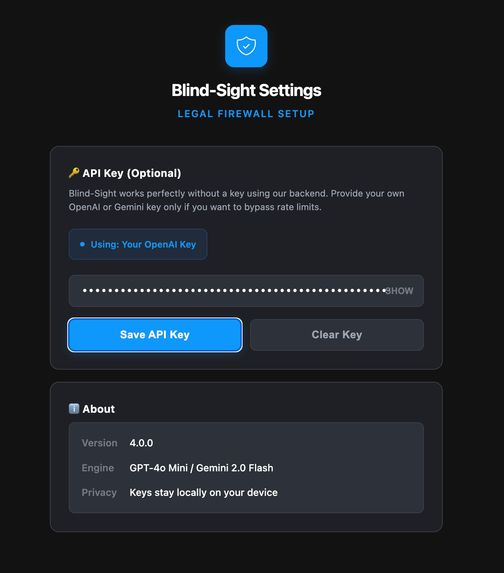
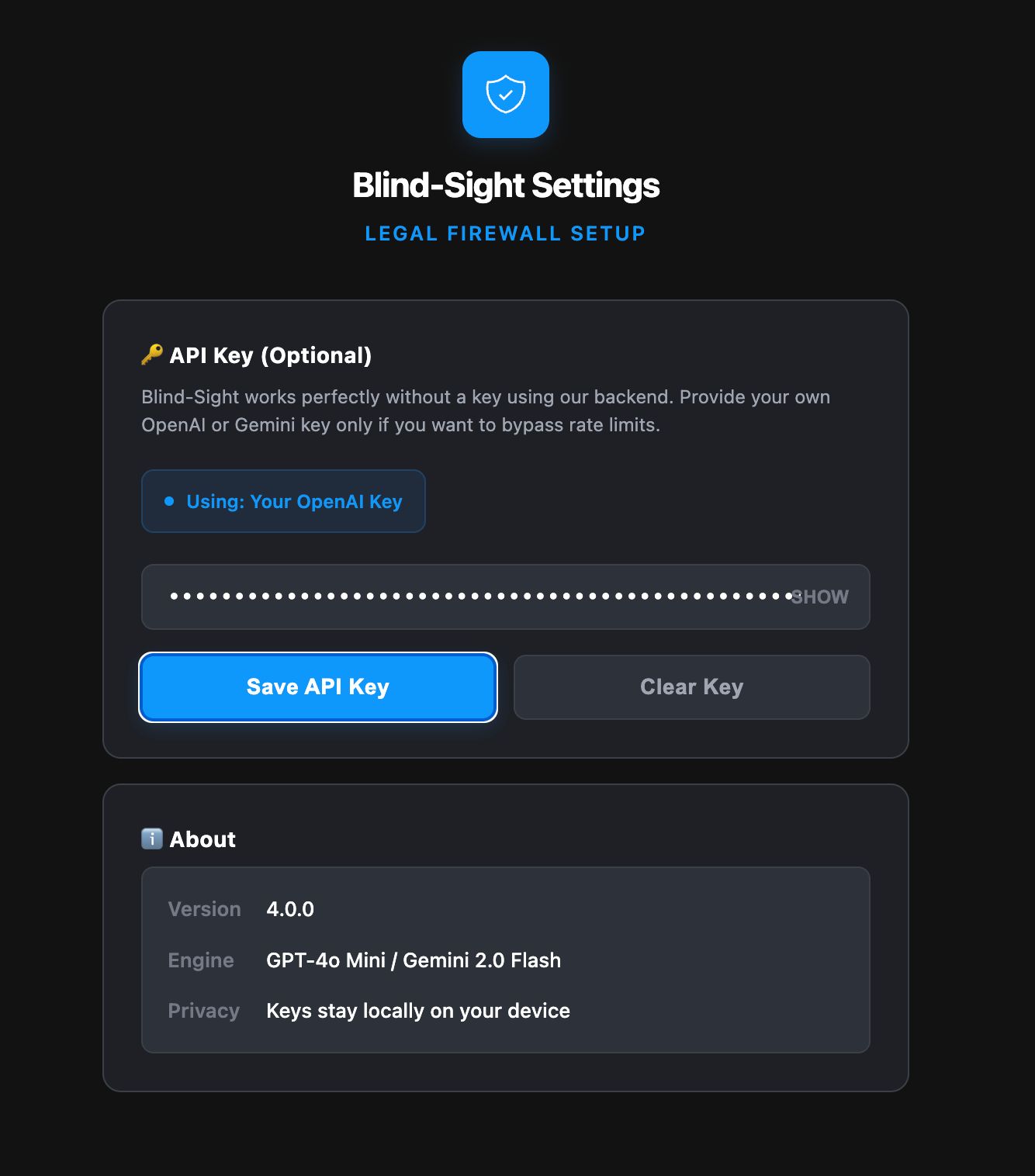
The extension settings page. Users can add an optional API key, see the engine used, version details, and confirm keys stay local.
-
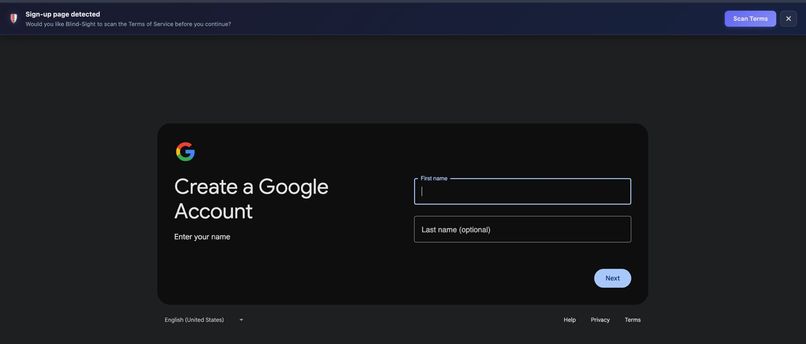
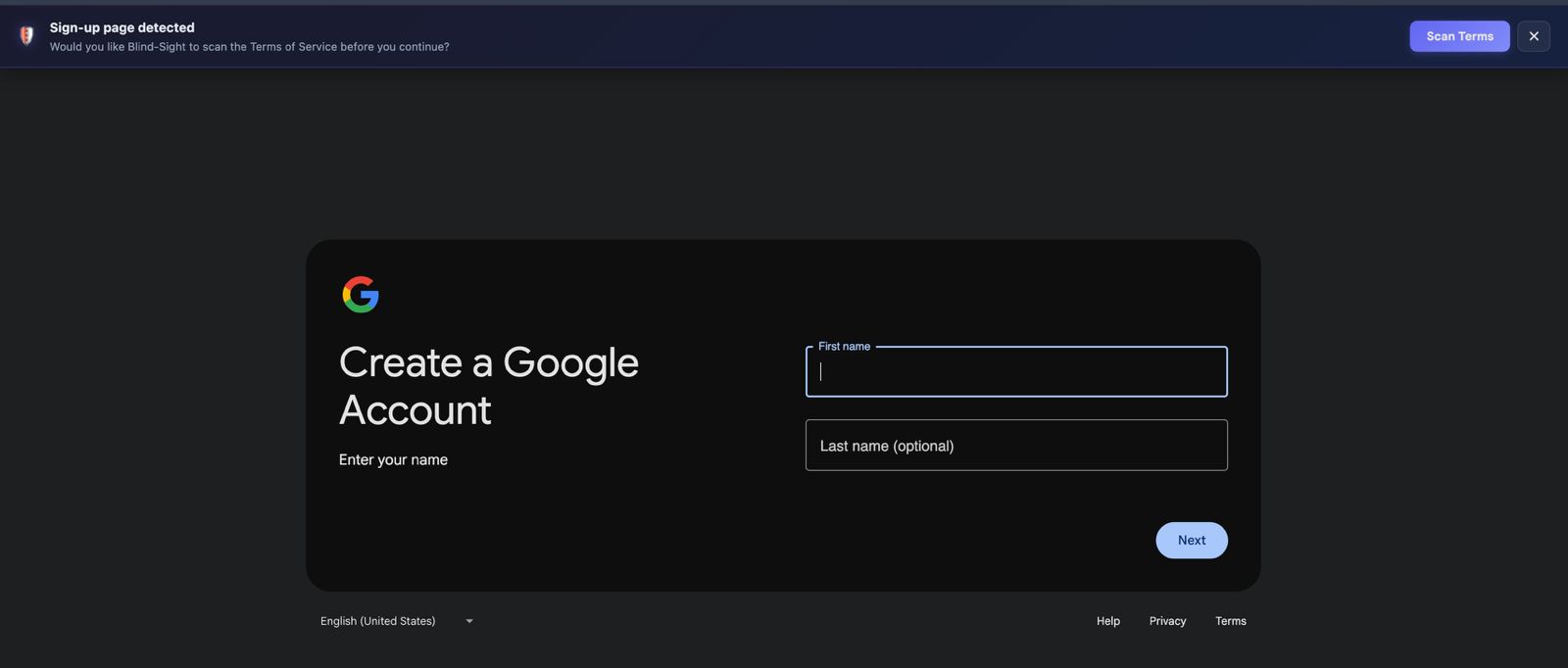
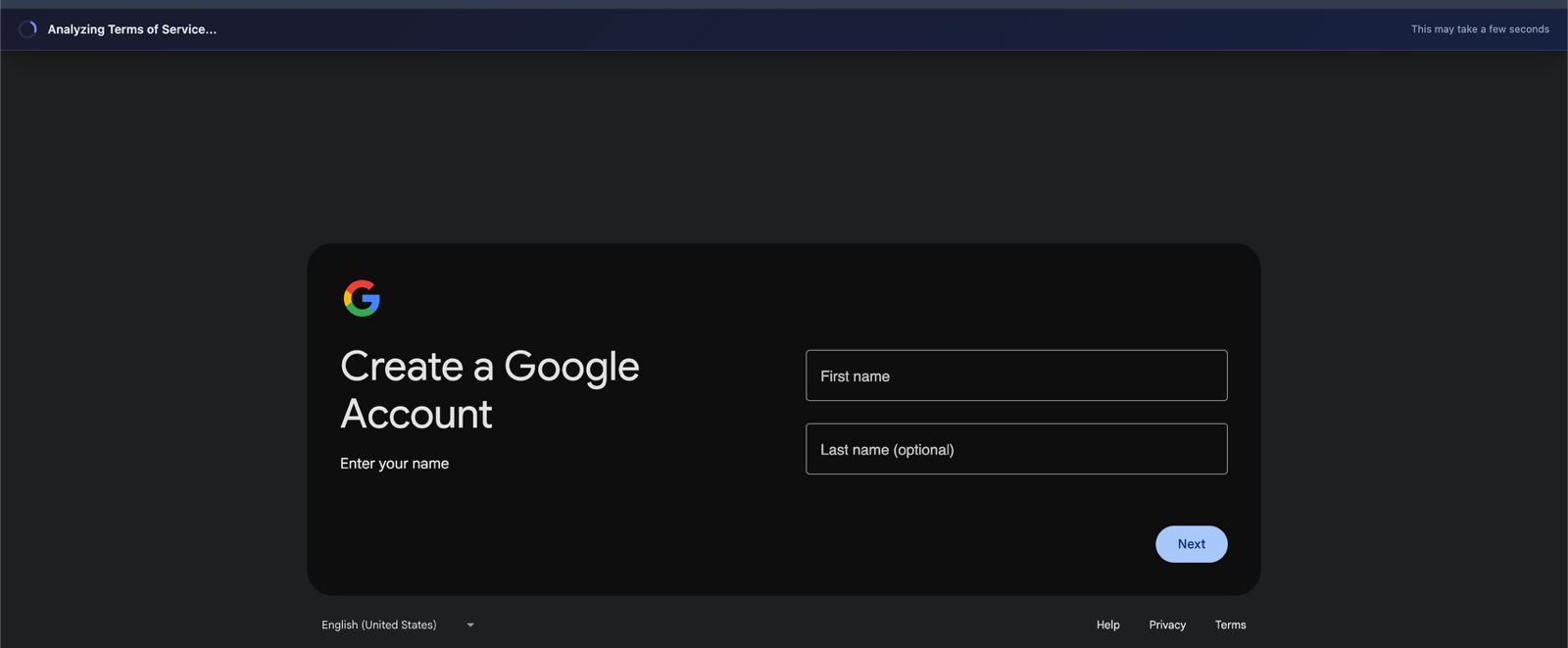
Sign-up page detection. The extension prompts users before they accept Terms of Service and offers to scan them first.
-
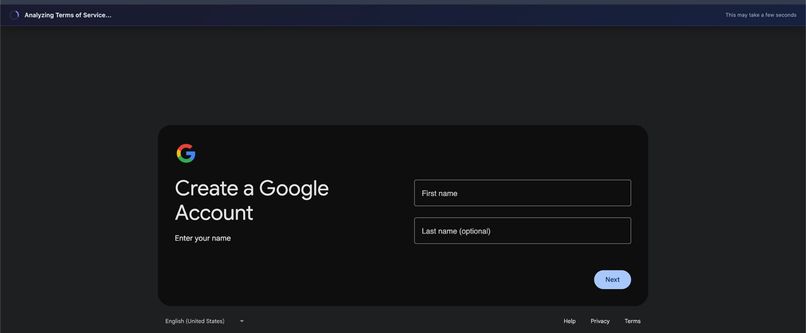
Shows live analysis. The system is extracting and processing the Terms of Service in real time.
-
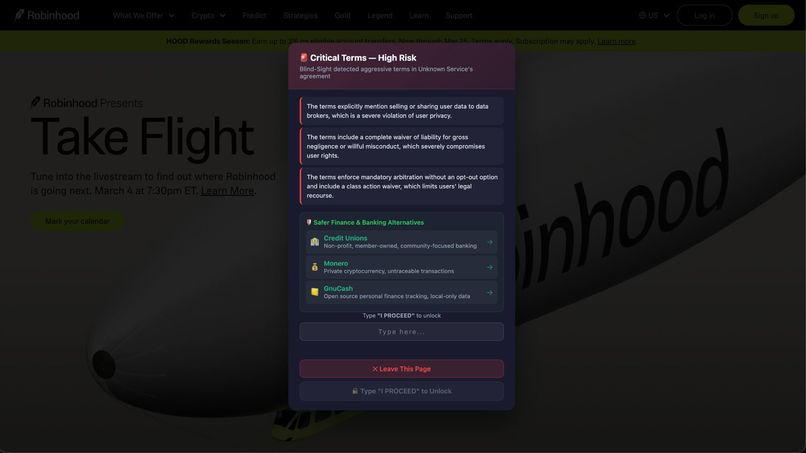
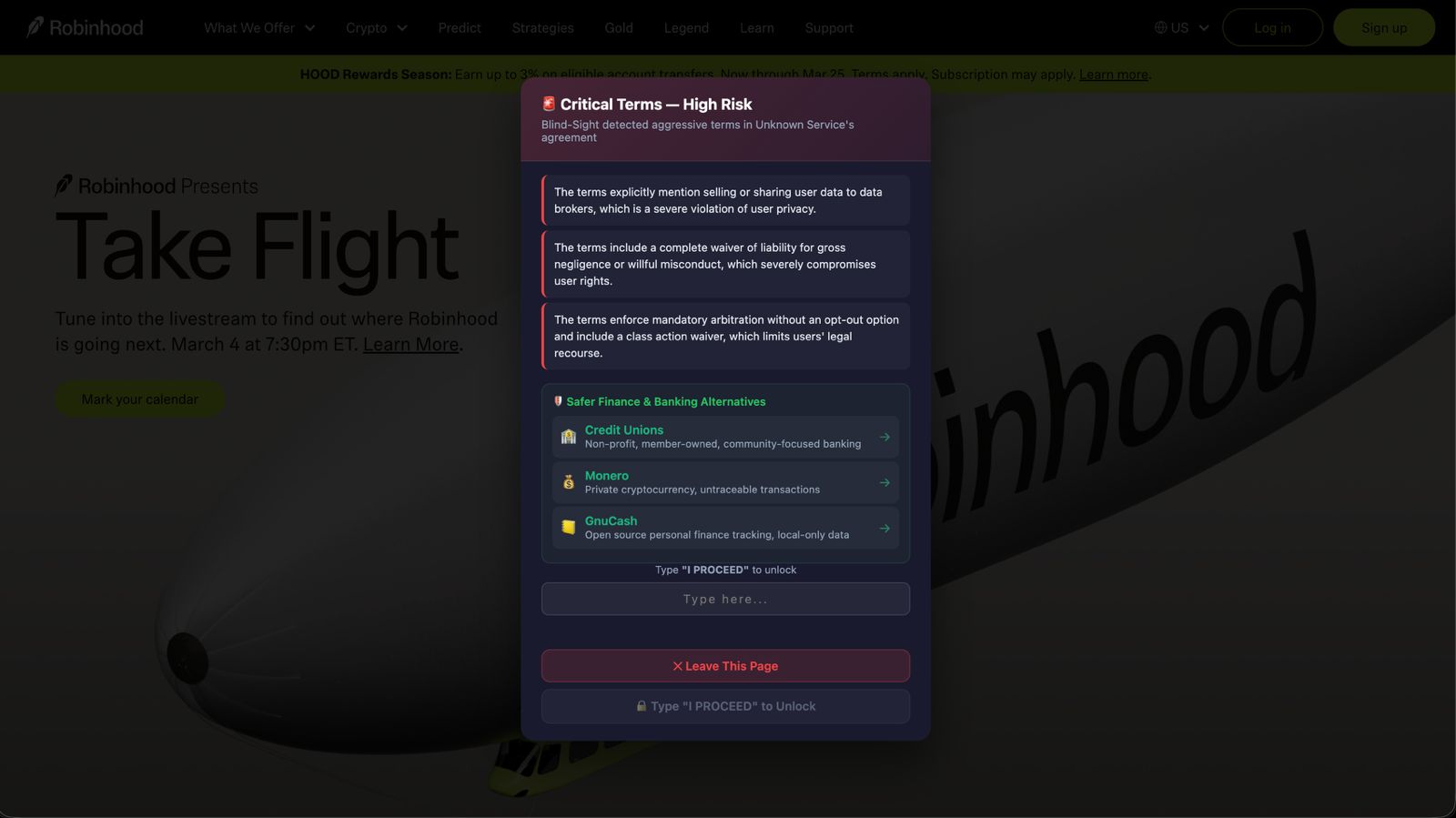
Displays critical warning. It blocks acceptance, highlights risky clauses, suggests alternatives, and requires typing “PROCEED” to continue.
-
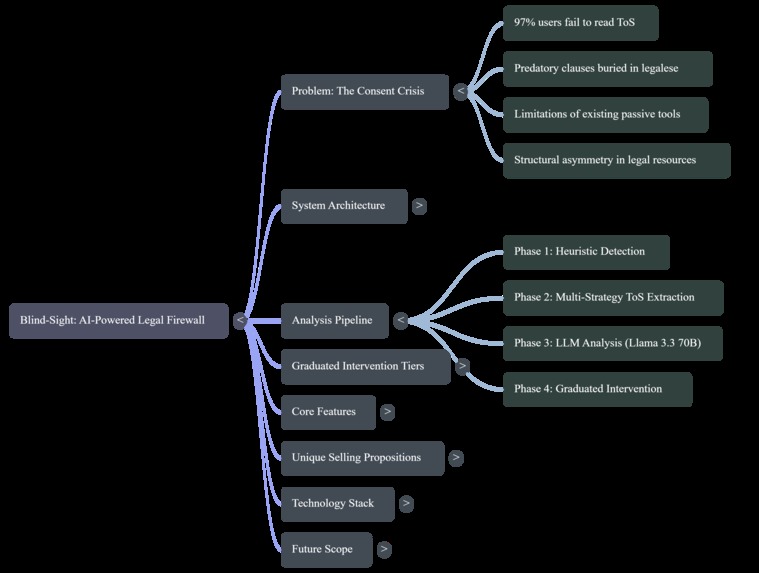
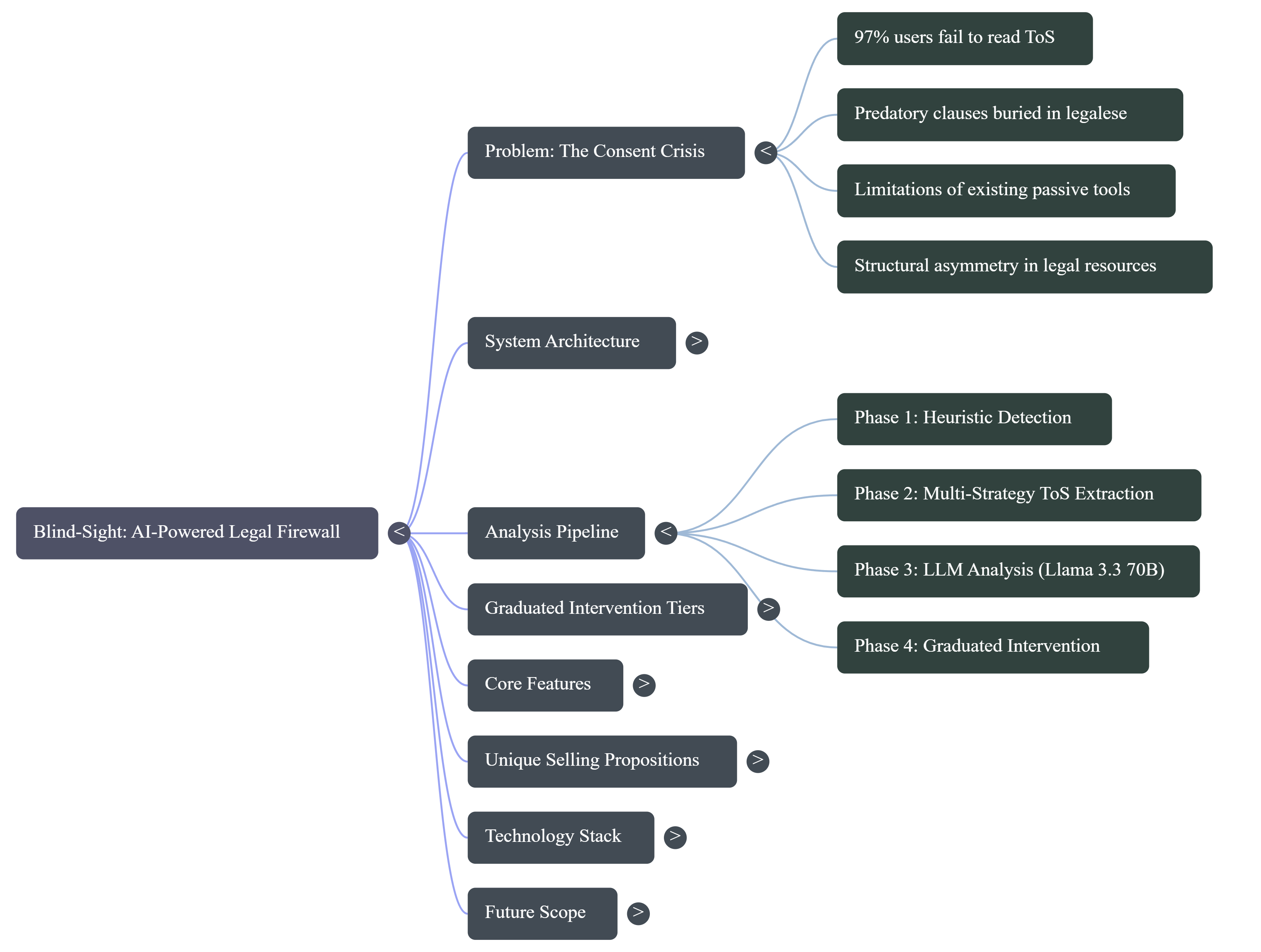
A mind map of the system. It highlights the consent crisis, analysis pipeline phases, intervention tiers, core features, and workflow.
-
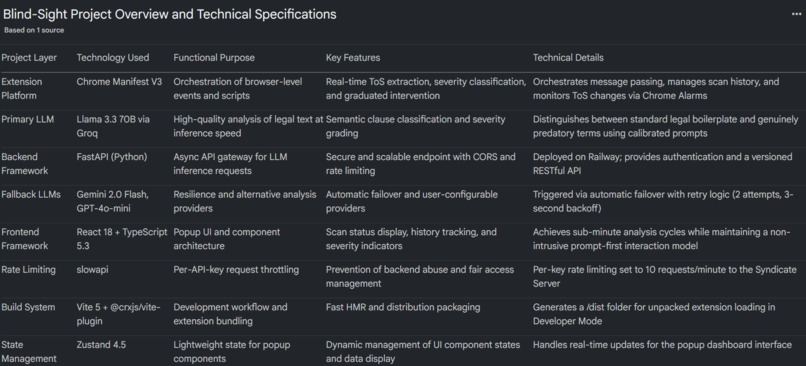
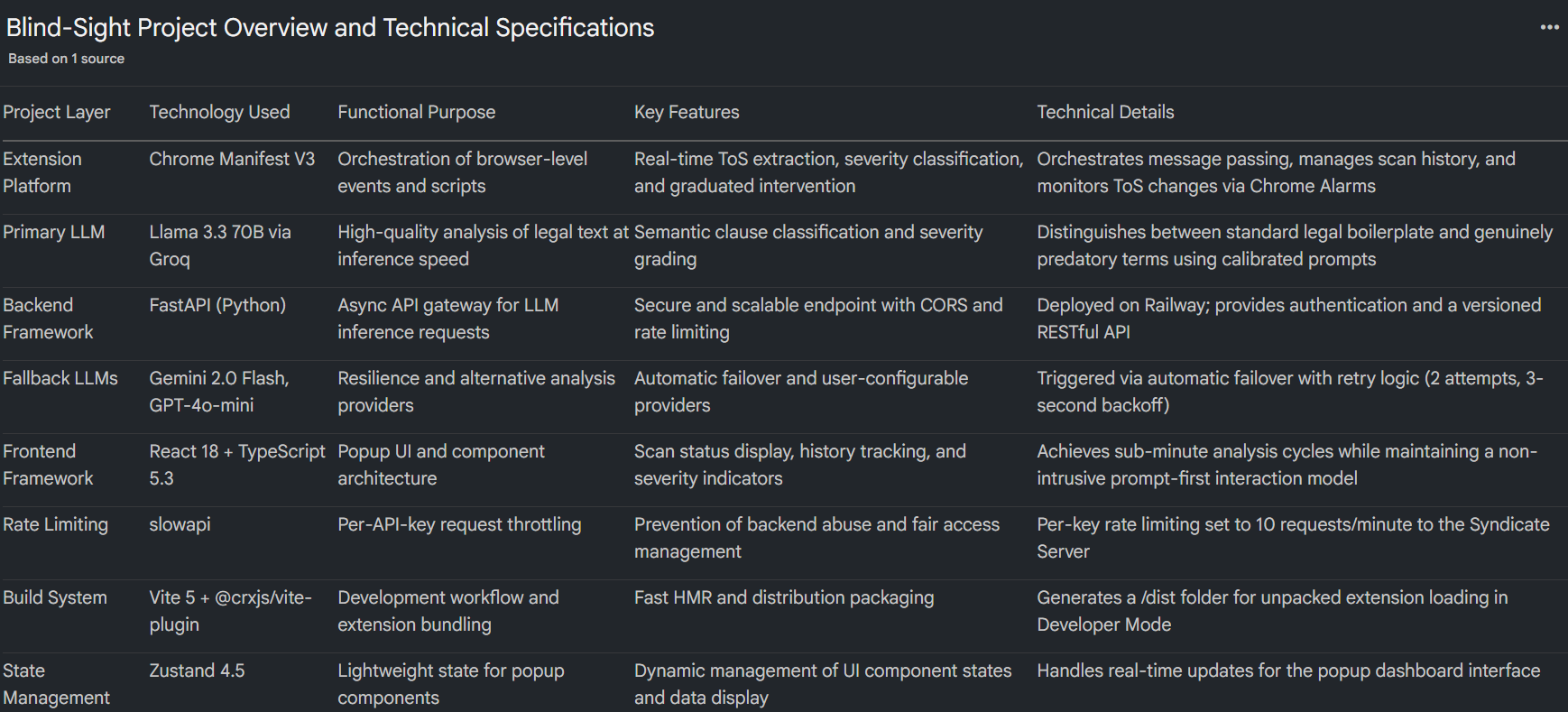
Shows the full technical architecture of Blind-Sight. It explains the FastAPI, LLM models, rate limiting, and deployment structure.
Inspiration
Every day, billions of people click "I Agree" without reading a single line of what they're consenting to. A widely cited study found that 97% of users never read Terms of Service before accepting them (Obar & Oeldorf-Hirsch, 2020). The average ToS document runs 4,000–8,000 words — roughly 15–30 minutes of dense legal reading — and the average internet user maintains accounts across 70–100 services. If you tried to read every ToS in full, you'd need hundreds of hours per year.
We weren't just alarmed by the statistics. We were alarmed by what's hiding inside those agreements:
- Blanket data-selling authorisations buried on page 12.
- Perpetual content licensing — your photos, your posts, your voice, signed away forever.
- Class-action waivers that strip you of your right to sue collectively.
- Unilateral amendment rights — "we can change these terms at any time, and your continued use constitutes acceptance."
Existing tools like ToS;DR offer crowdsourced ratings but can't keep up with real-time changes. Privacy Badger blocks trackers, but doesn't touch the legal agreements that authorise the tracking in the first place. Static keyword scanners flag the word "arbitration" regardless of whether it's a benign opt-out clause or a predatory lock-in.
None of these solutions operate at the point of consent — the exact moment a user is about to sign their rights away.
That gap — the 2-second window between hovering over "Accept" and clicking it — is where BLINDSIGHT was born.
What It Does
BLINDSIGHT is an AI-powered Chrome extension that acts as a legal firewall between you and the Terms of Service you're about to accept.
When you land on a sign-up or login page, BLINDSIGHT:
- Detects the consent event using a heuristic confidence-scoring system that evaluates DOM elements (password fields, sign-up buttons, terms checkboxes) and URL/title patterns.
- Extracts the ToS text through five cascading strategies: current-page analysis, inline ToS detection, link discovery, well-known path guessing, and cross-origin background fetching.
- Analyses the extracted text using Llama 3.3 70B (served via our FastAPI backend), with automatic fallback to Gemini 2.0 Flash and GPT-4o-mini.
- Classifies every clause into a four-tier severity system:
| Tier | Grade | Meaning | Intervention |
|---|---|---|---|
| Standard | A (Green) | Clean terms | Toast: "Terms Look Good" |
| Notable | B (Yellow) | Minor concerns | Toast with clause summary |
| Cautionary | C (Orange) | Significant risks | Full overlay + 5-second countdown lock |
| Critical | F (Red) | Predatory terms | Full overlay + button locked until you type "I PROCEED" |
- Recommends alternatives — drawing from a curated database of 200+ privacy-respecting services across 45+ categories (e.g., ProtonMail instead of Gmail, Mastodon instead of Twitter/X).
- Monitors your tracked services for ToS changes every 5 minutes, re-analysing and alerting you to new risks.
The key idea is simple: informed consent should be the default, not the exception.
How We Built It
Architecture
BLINDSIGHT is a three-layer system:
Browser Client (React 18 + TypeScript 5.3)
        │
        ▼
Chrome Extension (Manifest V3)
  ├── Content Scripts: detector.ts, extractor.ts, blocker.ts
  ├── Background Service Worker: orchestration, alarms, badges
  └── Popup UI: scan history, status dashboard
        │
        ▼
Syndicate Server (FastAPI, Python)
  ├── Groq API → Llama 3.3 70B (primary)
  ├── Gemini 2.0 Flash (fallback)
  └── GPT-4o-mini (fallback)
Tech Stack
| Component | Technology |
|---|---|
| Frontend | React 18, TypeScript 5.3 |
| Build | Vite 5 + @crxjs/vite-plugin |
| Styling | Tailwind CSS 3.4 |
| State | Zustand 4.5 |
| Extension | Chrome Manifest V3 |
| Backend | FastAPI (Python) |
| Primary LLM | Llama 3.3 70B via Groq |
| Fallback LLMs | Gemini 2.0 Flash, GPT-4o-mini |
| Rate Limiting | slowapi (per-key throttling) |
| Deployment | Railway |
The Detection Engine
The sign-up page detector uses a weighted confidence score system. Each DOM signal contributes points:
score = Σ wᵢ · 𝟙[signalᵢ present]
For example:
| Signal | Weight (wᵢ) |
|---|---|
| Password field | +25 |
| Confirm password | +30 |
| Sign-up button | +30 |
| Terms checkbox | +25 |
| URL pattern match | +20 |
If score ≥ 50 (configurable threshold), the detection pipeline fires.
The Analysis Prompt
We invested significant effort into prompt engineering for the severity classification. The system prompt includes explicit calibration instructions to:
- Avoid brand-name anchoring bias (don't flag Google as red just because they're big).
- Distinguish between standard legal boilerplate and genuinely predatory clauses (arbitration with a 30-day opt-out ≠ mandatory arbitration with no opt-out + class-action waiver).
- Escalate severity when multiple moderate-risk clauses stack — three yellow-tier clauses together can tip into orange.
Challenges We Ran Into
1. Reliably Extracting ToS Text Across the Wild West of Web Design
Every website structures its ToS differently. Some embed it inline. Some link to a /terms page. Some use dynamically loaded modals. Some hide it behind CORS-restricted subdomains. Some serve it as a PDF.
We had to build a five-strategy cascading extractor that tries progressively more aggressive methods until it finds the text. The most challenging edge case was cross-origin fetching — content scripts can't make requests to different origins due to CORS, so we had to escalate to the background service worker, which has broader network permissions under Manifest V3.
2. LLM Severity Calibration — Avoiding Both False Positives and False Negatives
Early versions of our prompt were either too aggressive (flagging every service as dangerous because most ToS contain standard arbitration clauses) or too lenient (shrugging off stacked predatory terms because each individual clause seemed "moderate").
Getting the calibration right — especially the clause-stacking escalation logic — required dozens of iterations against a benchmark set of both benign (Signal, Mozilla) and predatory (real-world examples) ToS documents.
3. Manifest V3 Constraints
Chrome's Manifest V3 replaced persistent background pages with ephemeral service workers. This means:
- No persistent state — everything must be serialised to
chrome.storage. - Service workers can be killed at any time — long-running operations (like LLM analysis) risk being interrupted.
- Alarm granularity is limited to 1-minute minimums.
We had to architect around these constraints, using message-passing patterns and Chrome Alarms for our ToS change monitoring loop.
4. Latency vs. Accuracy Trade-off
A 70B-parameter model produces excellent analysis but introduces latency. We solved this with:
- Groq's inference acceleration for the primary Llama 3.3 70B path.
- Text truncation to 30,000 characters to control token costs.
- Multi-provider fallback with automatic failover (2 retries, 3-second backoff).
- Client-side caching — scan results are stored per-tab in session storage, so revisiting a page doesn't re-trigger analysis.
5. Not Being Annoying
The hardest UX challenge: how do you block a user from doing what they want to do without making them uninstall you instantly?
The answer was the prompt-first interaction model. BLINDSIGHT never auto-scans. It detects the sign-up page, slides in a non-intrusive banner, and asks if you'd like to scan. Blocking only happens after the user has opted in and the analysis reveals genuine risk. Even then, the intervention is graduated — a 5-second timer for orange, a confirmation phrase for red. You're never trapped; you're just... slowed down enough to think.
Accomplishments That We're Proud Of
- A working, end-to-end AI pipeline — from DOM detection to LLM analysis to graduated blocking — running inside a Chrome extension with sub-minute analysis cycles.
- The four-tier intervention system — especially the Tier 3 "type I PROCEED" lock. It's dramatically effective at forcing users to consciously acknowledge risk, and it's never triggered by clean services.
- 200+ curated alternatives across 45+ service categories — this isn't just a scanner, it's an actionable tool that tells you what to use instead.
- Autonomous ToS change monitoring — BLINDSIGHT doesn't just protect you at sign-up; it watches your tracked services and alerts you when terms change, re-analysing the updated agreement automatically.
- The multi-provider LLM architecture — three providers, automatic failover, zero downtime. If Groq goes down, Gemini picks up. If Gemini goes down, OpenAI catches it.
- The prompt calibration — achieving nuanced severity classification that can distinguish between "arbitration with a 30-day opt-out" (standard) and "mandatory arbitration + class-action waiver + no opt-out" (critical) was one of the most intellectually satisfying engineering challenges.
What We Learned
Technical Lessons
- Prompt engineering is a first-class engineering discipline. The difference between a prompt that flags everything as dangerous and one that provides nuanced, calibrated severity grades is dozens of iterations and a deep understanding of the problem domain.
- Manifest V3 forces better architecture. The constraints (ephemeral service workers, no persistent background) initially felt limiting, but they pushed us towards a cleaner, more resilient message-passing design.
- Multi-strategy extraction is essential for real-world web scraping. No single extraction method works across all websites. Cascading fallbacks are not a nice-to-have — they're a requirement.
- LLM fallback chains provide production-grade resilience. By designing for failure (multi-provider architecture), we achieved effectively zero-downtime analysis.
Domain Lessons
- ToS documents are far worse than we expected. Before building BLINDSIGHT, we assumed predatory clauses were rare edge cases. They are not. A significant fraction of popular services contain terms that most users would object to if they understood them.
- Privacy-respecting alternatives exist for almost everything. Compiling the alternatives database was eye-opening — for nearly every mainstream service with concerning terms, there is a viable, privacy-respecting alternative.
- Informed consent is a design problem, not a literacy problem. Users don't skip ToS because they're lazy — they skip them because the system is designed to make reading impractical. BLINDSIGHT doesn't ask users to become lawyers; it brings the analysis to them.
What's Next for BLINDSIGHT
- Cross-Browser Support — extend to Firefox, Safari, and Edge with browser-specific adapters.
- Historical ToS Diff Analysis — clause-level diffs showing exactly what changed between ToS versions, with severity-graded change impact scoring.
- Community-Powered ToS Database — a crowdsourced repository of pre-analysed ToS for instant results on popular services, eliminating per-user LLM inference for common agreements.
- Enterprise Deployment — managed mode for organisations with enforced scanning policies, minimum acceptability thresholds, and audit logs.
- Mobile Integration — a companion app intercepting ToS consent in native mobile applications, not just browsers.
- Regulatory Compliance Mapping — automatically mapping detected clauses to GDPR, CCPA, and DPDPA frameworks to flag legal non-compliance.
- Fine-Tuned Domain-Specific Model — training a specialised 7B–13B model on annotated ToS corpora to reduce inference costs while maintaining accuracy:
Goal: Accuracy(7B, fine-tuned) ≥ Accuracy(70B, general) — at 1/10th the cost.
- Browser-Native LLM Inference — as on-device models like Chrome's Gemini Nano mature, shift analysis entirely client-side for zero-server, fully private ToS analysis.
Built with conviction by **Team Syndicate* — because "I Agree" should mean something.*
Built With
- chrome
- chrome-manifest-v3
- extensions
- fastapi
- google-gemini-2.0-flash
- groq
- llama-3.3-70b
- openai-gpt-4o-mini
- python
- railway
- react-18
- slowapi
- tailwind-css-3.4
- typescript
- vite-5
- zustand

Log in or sign up for Devpost to join the conversation.