-
-
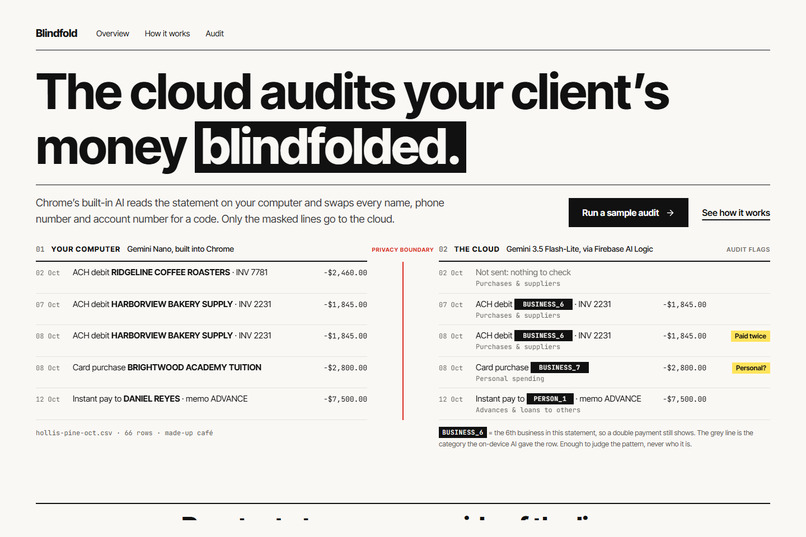
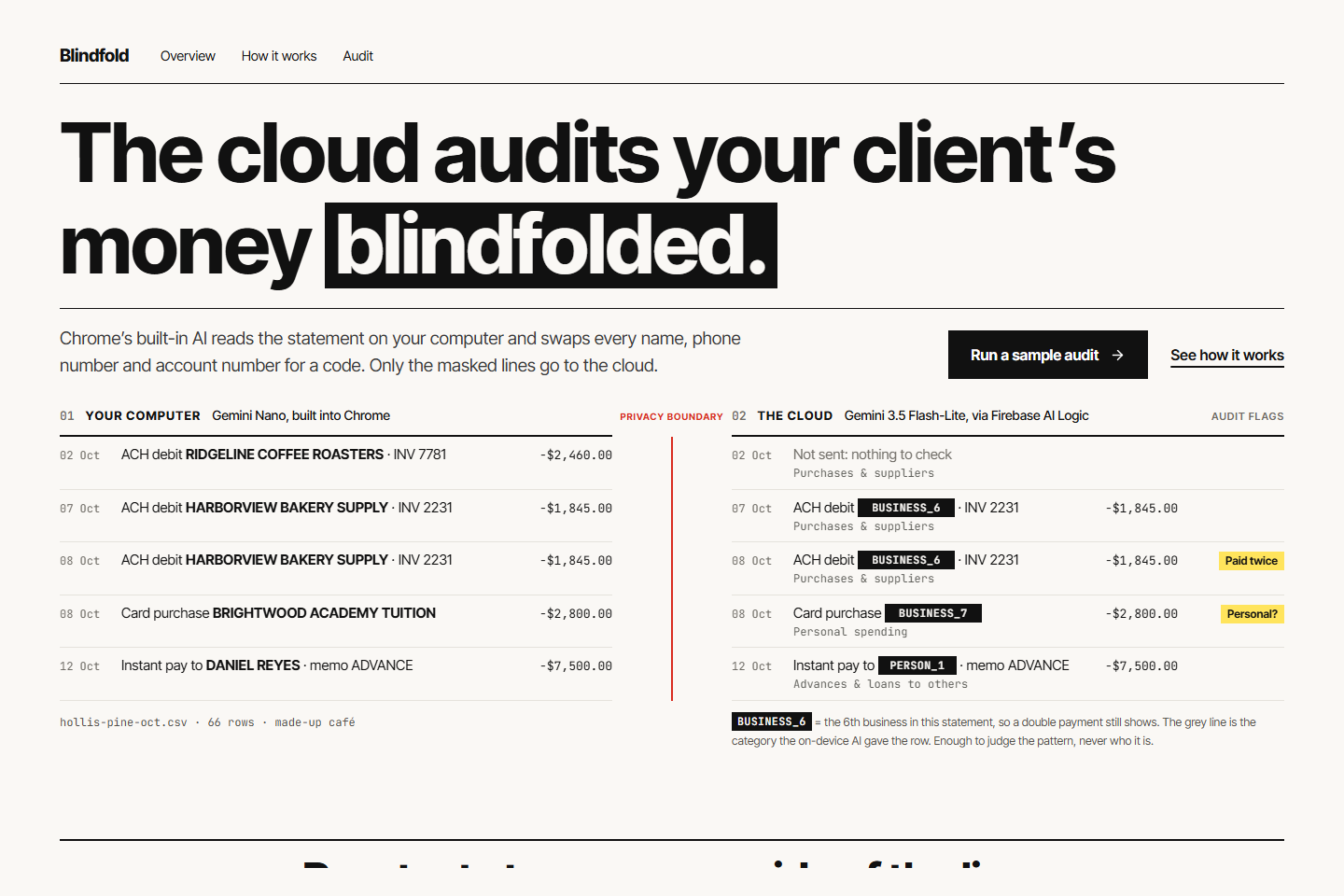
Each statement line on your computer (left) and the only copy the cloud receives (right), with the privacy boundary between them.
-
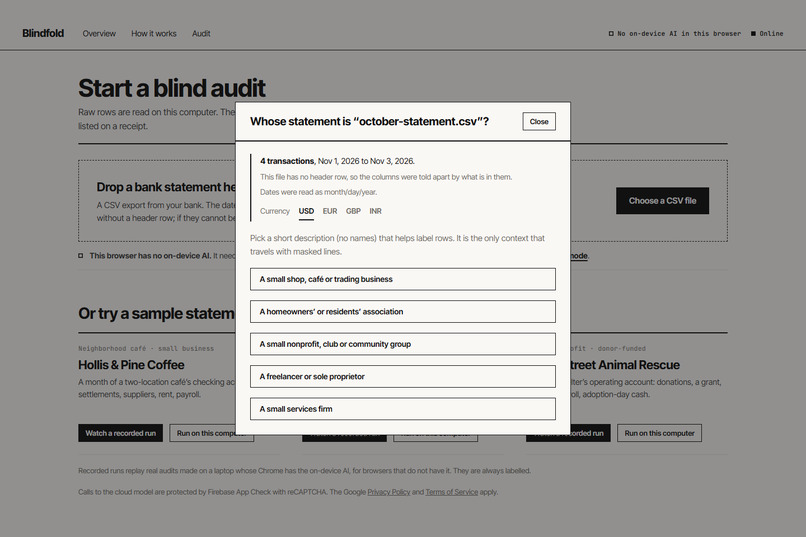
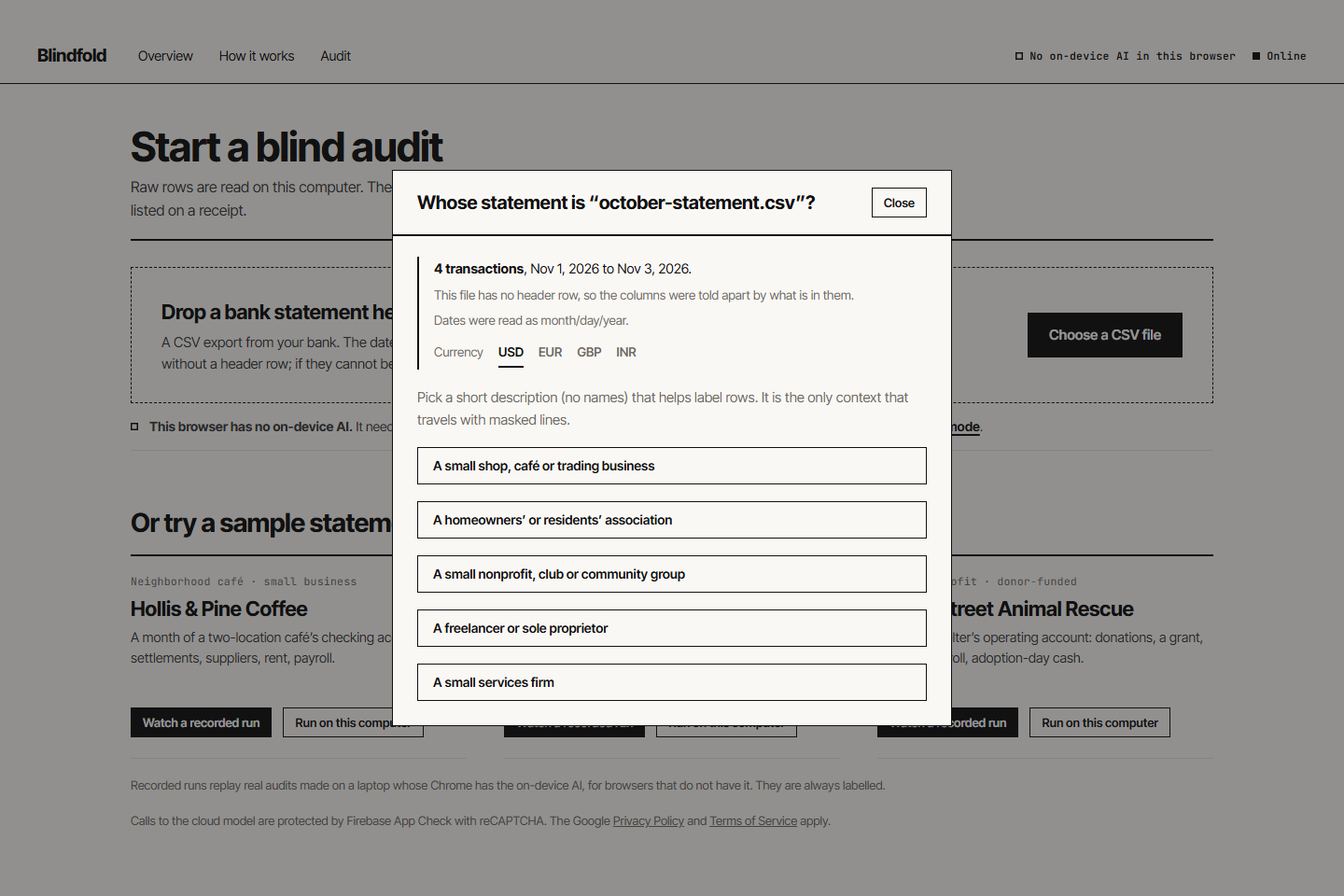
Your own bank export: the app shows how it read the file before the audit starts.
-
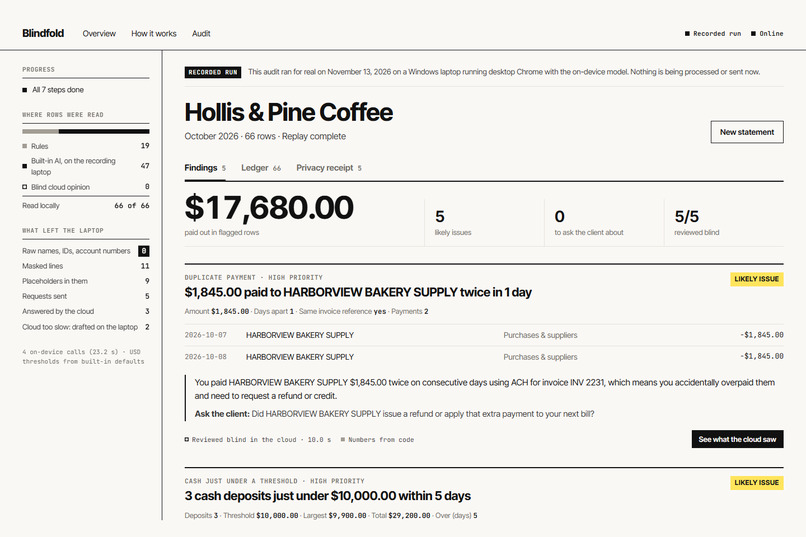
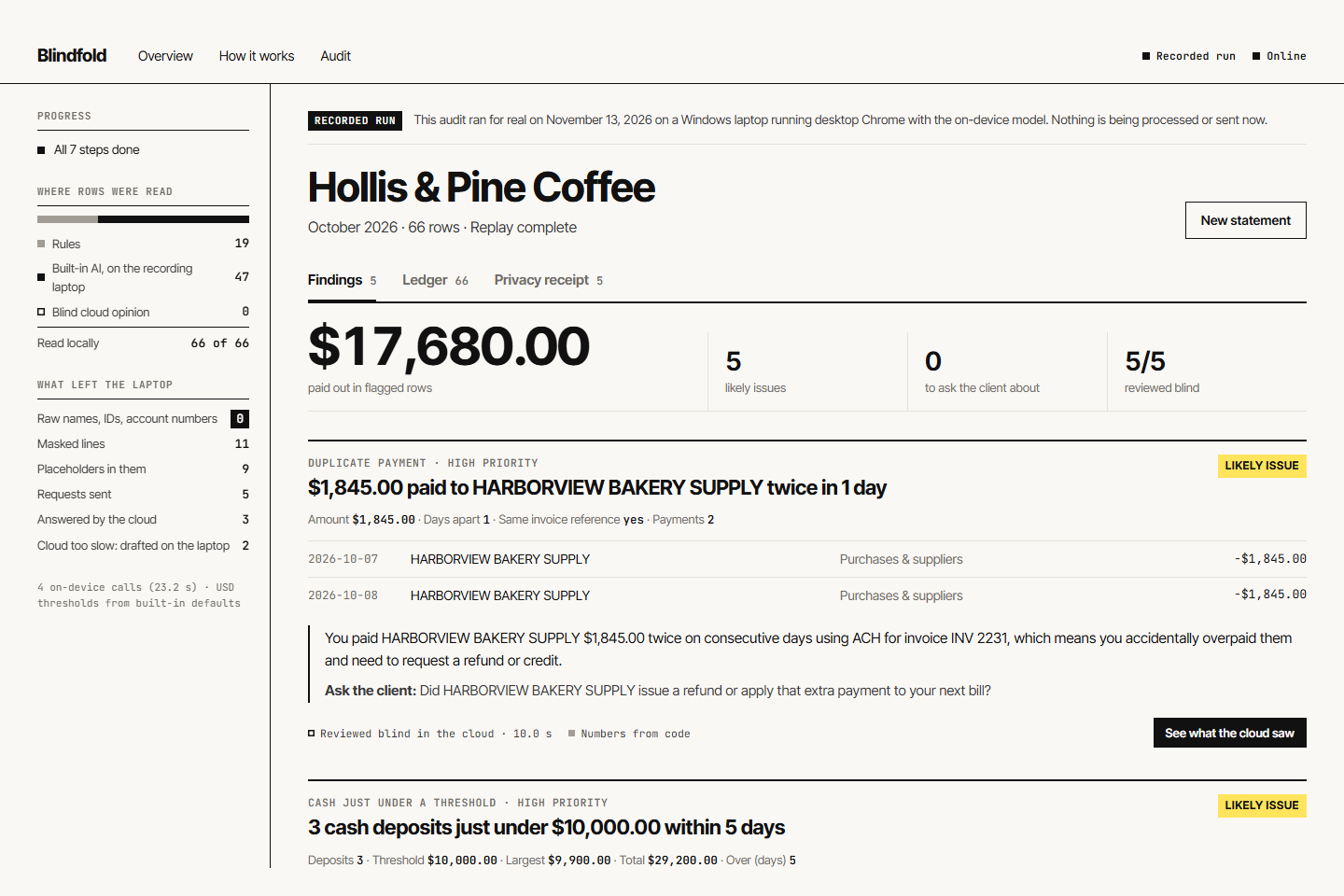
Findings for a made-up café: every number comes from code, each pattern reviewed blind in the cloud.
-
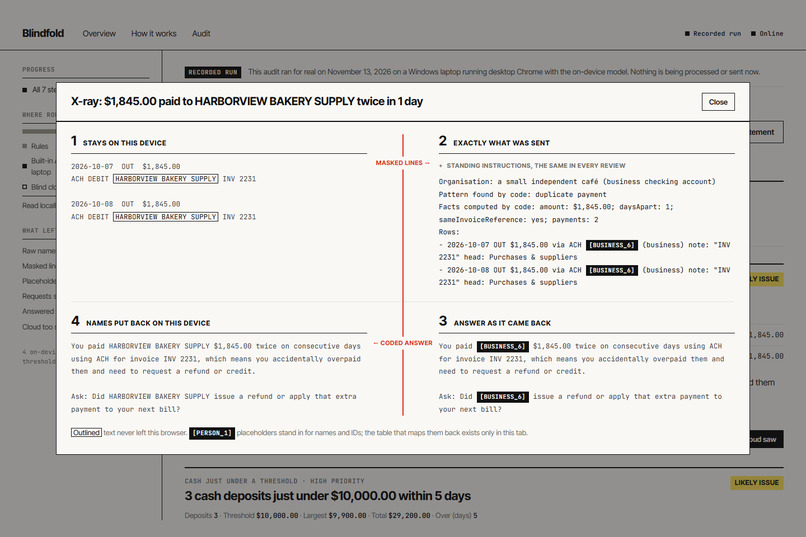
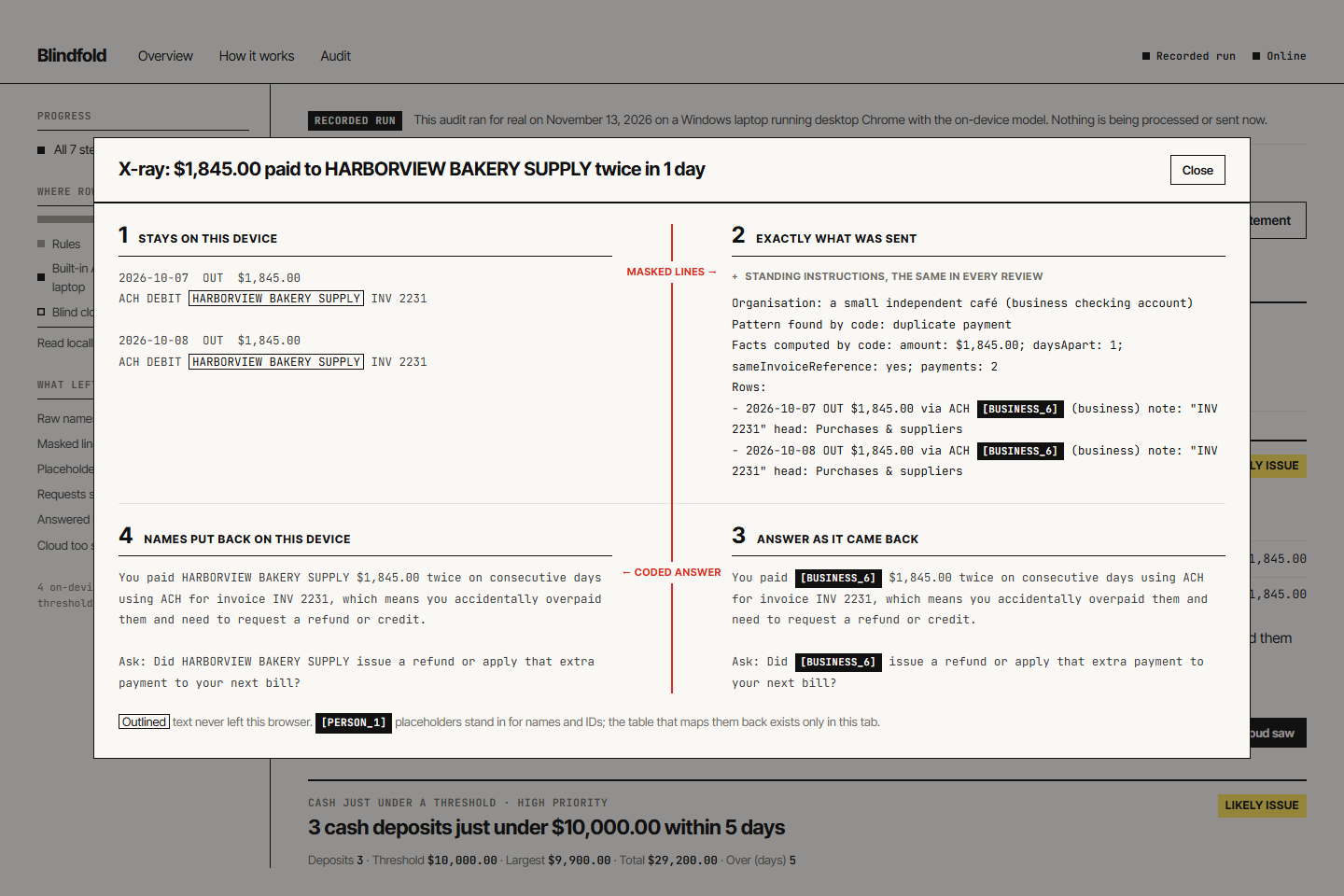
The X-ray of a finding: what stayed on the computer, exactly what was sent, the coded answer, and the names put back.
-
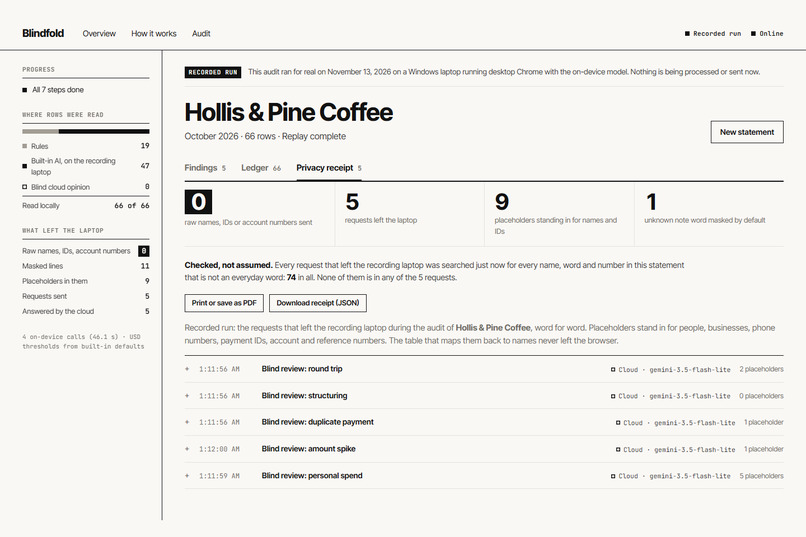
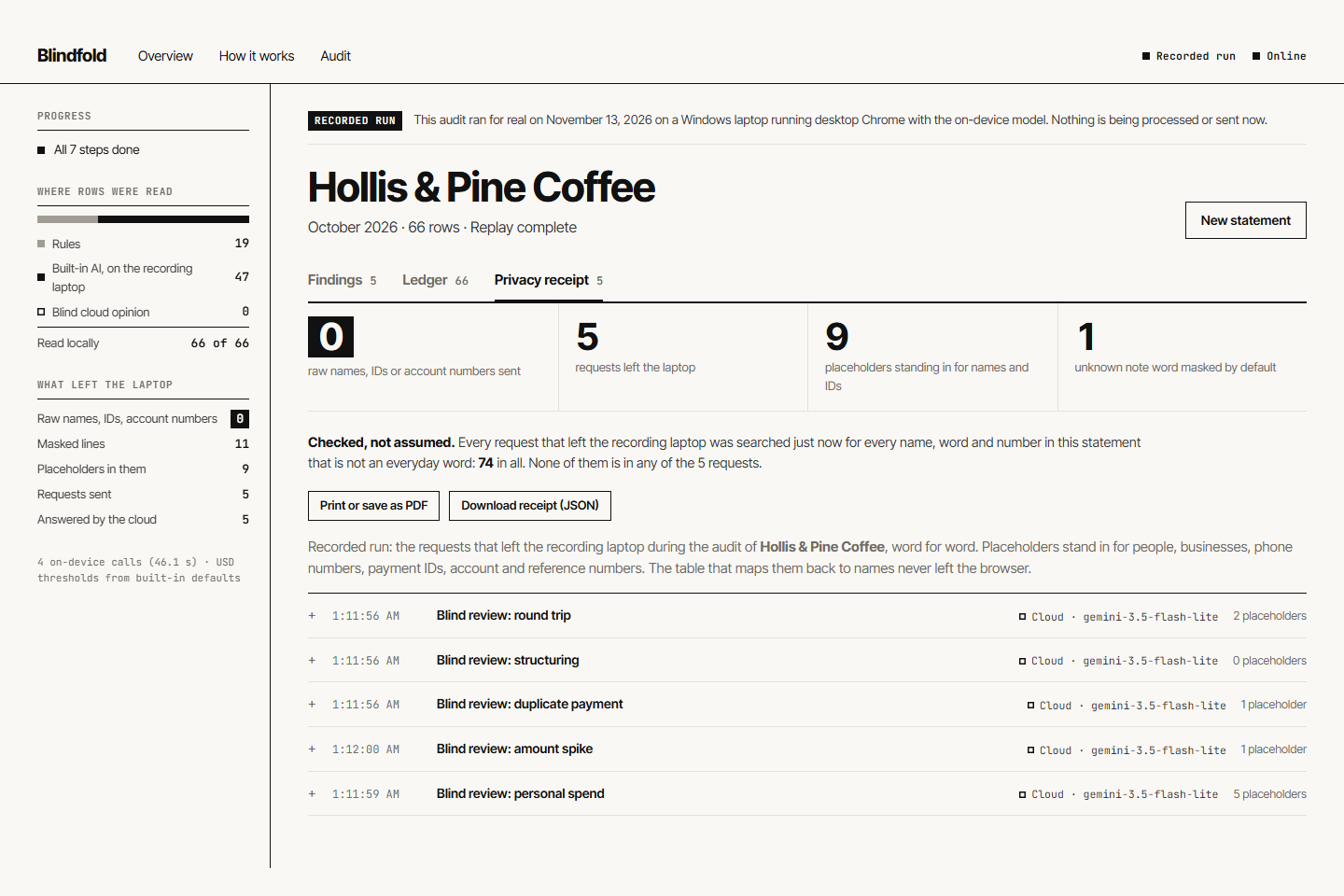
The privacy receipt. Its first number is measured in the browser: every request is searched for the statement’s own words.
Inspiration
Someone has to check the books of a homeowners' association, a small charity or a one-person business, and often that someone is a volunteer treasurer or a solo bookkeeper with no audit software. They are expected to catch double payments, money that quietly comes back, and cash deposits kept just under a reporting limit. A cloud AI model would help, but pasting a client's statement into one hands names, account numbers and spending habits to a third party.
We noticed that the cloud does not need to know who anyone is to judge a pattern. "The same invoice was paid twice to the same supplier, one day apart" is just as clear when the supplier is called BUSINESS_6.
What it does
Blindfold audits a bank statement (a CSV export) without the statement ever leaving the computer:
- Reads it on the computer. Plain rules label the obvious rows; Gemini Nano, built into Chrome, labels every other payee.
- Finds the patterns with code. Double payments, round trips, cash just under a reporting limit, payments split under an approval limit, personal spending and unusual amounts. Code does every sum; the AI never calculates.
- Masks before anything leaves. Every payee becomes a numbered code, unfamiliar note words and account-style numbers are masked by default, Gemini Nano re-reads every outgoing line as a leak guard, and plain code then searches each request for the statement's own words and stops it if one is still there.
- Reviews blind in the cloud. A larger model judges each finding from codes, amounts and dates, and drafts a question for the client.
- Puts the names back and prints a receipt. The answers are restored on the computer, and the privacy receipt lists every request word for word. Its first number is measured, not asserted: the browser searches every request for every name, word and number in the statement that is not an everyday word, and shows how many it looked for and how many it found.
- Reads real bank files. The date, description and amount columns are worked out from the file, with or without a header row; if they cannot be, you point at them.
The X-ray view shows the whole round trip for any finding: what stayed on the computer, exactly what was sent, the answer as it came back, and the answer with names put back.
How we built it
Every AI call goes through Firebase AI Logic (the firebase/ai SDK), with the mode chosen by what the text contains:
| Step | Mode | Why |
|---|---|---|
| Label payees from raw text | ONLY_ON_DEVICE |
Raw text may only meet the built-in model. If it is missing, the call fails instead of falling back to the cloud. |
| Leak guard on outgoing text | ONLY_ON_DEVICE |
The last reader before anything leaves runs locally. |
| Blind review and second opinion on masked text | PREFER_IN_CLOUD |
The larger cloud model does the judging; if it fails or is too slow, the built-in model drafts the answer and the app labels it as a draft. |
Both sides return structured output: responseConstraint (a JSON schema with an enum per line) on the device and responseSchema in the cloud. Each answer records inferenceSource, which the app shows next to every finding and in the receipt. The on-device model is downloaded with initializeDeviceModel only after the user clicks.
Around the model calls:
- App Check with reCAPTCHA Enterprise protects the cloud model on the hosted site (enforced for Firebase AI Logic; a request without a token is refused), with a debug provider for local development.
- Remote Config holds the reporting and approval limits per currency, the model names and how many cloud requests one audit may use, so they change without a redeploy.
- Firebase Hosting serves the app. The audit page, Firebase and App Check load only when the audit is opened.
- The masking is plain TypeScript: a vault that registers every party in statement order (so
BUSINESS_6is stable across lines and a duplicate still shows), a default-deny filter for free-text notes, pattern masks for phone, email, card, account and ID numbers, and a last check by exact match that stops a request if anything from the raw statement is still readable in it. - No step is a single point of failure: a broken answer from the built-in model sends those payees for a blind second opinion instead of stopping the audit, and if the cloud fails, the findings (which come from code) still appear, each with a "Try again" button.
React, Vite and TypeScript for the interface; Vitest for 45 tests that run without a browser or a network, including whole audits with stand-in models and injected failures.
Results on the sample statements
Three made-up organisations (a café, a homeowners' association and an animal rescue) with problems planted for the audit to find. Measured on the recorded runs that ship with the app:
| Sample | Rows | Labelled by rules | Labelled on device | Requests sent | Raw identifiers sent | Categories correct |
|---|---|---|---|---|---|---|
| Café | 66 | 19 | 47 | 5 | 0 | 64 / 66 |
| Homeowners' association | 45 | 29 | 16 | 4 | 0 | 45 / 45 |
| Animal rescue | 34 | 25 | 9 | 5 | 0 | 31 / 34 |
No raw row went to the cloud; 30 masked lines with 16 codes did. 13 of the 14 reviews came back from the cloud and one was drafted on the device after the cloud missed the deadline.
On statements it had never seen. After the prompts were final we wrote three more made-up statements with an answer key (a dental practice, a youth soccer club and a freelance designer) and audited each once: 81 of 95 categories correct (85%), 41 of 52 of the on-device model's labels correct (79%), 6 of 7 planted problems found with one false alarm, and 0 raw identifiers in 7 requests. The false alarm (two unrelated businesses that both had "DENTAL" in their names, paired as a round trip) led us to tighten how related parties are matched; we report the numbers from before that fix.
Challenges we ran into
- Free-text notes leak names. A note such as "for jenny piano lessons, call 415-555-0143" slipped past name lists. We switched to default-deny: only everyday words, short numbers, dates and invoice codes survive, and the on-device leak guard re-reads what is left.
- A slow cloud should not stall the audit. In our tests a slow response did not trigger the SDK's fallback, so each cloud call has its own deadline, and the built-in model takes over and says so.
- Keeping patterns visible after masking. Codes had to be stable and numbered in statement order, or the cloud could not see that two payments went to the same supplier.
- Judges without the built-in model. The app offers a labelled replay of a real recorded run, and a masked cloud-only mode where rules mask the rows before anything is sent.
- Our own samples flattered us. They were written for the app, so they loaded and masked perfectly. When we wrote statements in the layouts real banks export, most would not load, and a payee the parser took for a bank or a tax office was sent as text. We rebuilt the importer, made every payee a code whatever its kind, and added the exact-match check so that a masking mistake cannot leave the computer unnoticed.
Accomplishments that we're proud of
- Zero raw names, phone numbers or account numbers sent across all 14 requests in the sample runs. The app re-checks this in your browser every time a recorded run is replayed: 156 words and numbers searched for, none found.
- The privacy receipt: a measurement, not a promise, of exactly what left the computer.
- One visual idea carried through the whole product: a single red line between your computer and the cloud, on the landing page, in the X-ray and on the receipt.
What we learned
Splitting the work by what needs identity, rather than by which model is bigger, gave a design where the small model handles everything sensitive and the large model handles judgement. Structured output on both sides made the hand-off reliable, and keeping arithmetic in code made the findings trustworthy.
What's next
- More unseen statements, from more banks and countries, to keep measuring labelling accuracy.
- More statement formats (OFX and QIF exports).
- Sending the client questions straight from the receipt.
Built With
- chrome-built-in-ai
- firebase-ai-logic
- firebase-app-check
- firebase-hosting
- firebase-remote-config
- gemini
- gemini-nano
- react
- recaptcha-enterprise
- typescript
- vite
