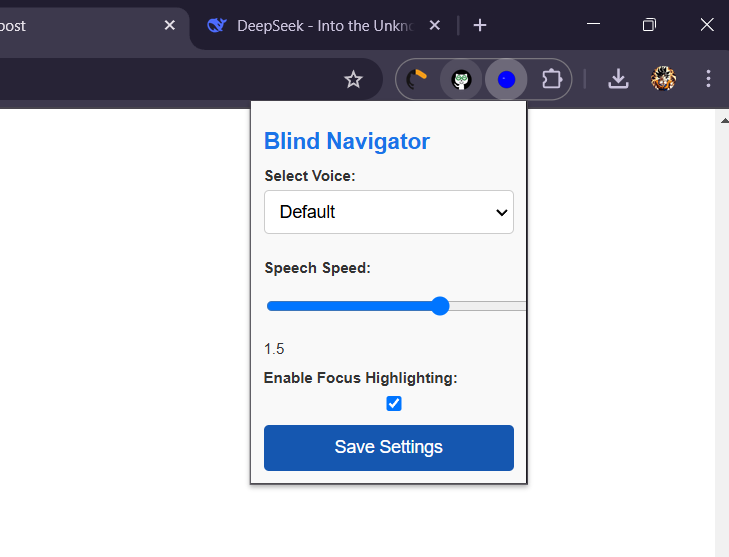
Blind Navigator, designed to help visually impaired users navigate websites more effectively. This description can be used for documentation, project proposals, or sharing with collaborators.
Project Description: Blind Navigator Overview Blind Navigator is a Chrome extension designed to assist visually impaired users in navigating websites with ease. The extension leverages text-to-speech (TTS) technology, keyboard navigation, and accessibility-focused features to make web content more accessible. It provides an intuitive and customizable interface, allowing users to interact with websites using audio feedback and keyboard controls.
Problem Statement Visually impaired individuals often face significant challenges when navigating websites. Many websites are not designed with accessibility in mind, making it difficult for screen readers and other assistive technologies to interpret content accurately. This creates barriers to accessing information, services, and opportunities online.
Solution Blind Navigator addresses these challenges by providing the following features:
Text-to-Speech (TTS):
Reads out text content as the user hovers over or focuses on elements.
Supports customizable voice, speed, and volume settings.
Keyboard Navigation:
Enables users to navigate websites using keyboard shortcuts (e.g., Tab, Arrow Keys).
Highlights the currently focused element for low-vision users.
Audio Descriptions:
Provides descriptions for non-text elements like images, buttons, and links using alt text or AI-generated descriptions.
Customizable Settings:
Allows users to adjust TTS settings, toggle features, and save preferences.
Focus Highlighting:
Visually highlights the focused element to assist low-vision users.
Compatibility:
Works seamlessly with popular screen readers like JAWS, NVDA, and VoiceOver.
Complies with WCAG (Web Content Accessibility Guidelines) and ARIA (Accessible Rich Internet Applications) standards.
Key Features Voice Selection:
Users can choose from a variety of TTS voices.
Supports multiple languages and accents.
Speech Speed Control:
Adjustable speech speed to suit individual preferences.
Focus Highlighting:
Visual highlighting of focused elements for low-vision users.
Easy-to-Use Popup Interface:
A simple and accessible popup for adjusting settings.
Cross-Website Compatibility:
Works on all websites, including dynamic and single-page applications (SPAs).
Technical Details Technologies Used:
Frontend: HTML, CSS, JavaScript
Chrome Extension APIs: chrome.tts, chrome.storage, chrome.runtime, chrome.tabs
Text-to-Speech: Web Speech API
Accessibility: ARIA roles, WCAG compliance
Architecture:
Popup: Provides a user interface for adjusting settings.
Content Script: Injects functionality into web pages to enable TTS and keyboard navigation.
Background Script: Handles voice fetching and message passing between components.
Compatibility:
Works on all major browsers (Chrome, Firefox, Edge) with minimal adjustments.
Target Audience Visually Impaired Users:
Individuals who rely on screen readers and other assistive technologies.
Low-Vision Users:
Users who benefit from high-contrast modes and focus highlighting.
Web Developers:
Developers looking to test and improve the accessibility of their websites.
Impact Improved Accessibility:
Makes the web more accessible to visually impaired users.
Enhanced Independence:
Empowers users to navigate websites without relying on external assistance.
Awareness:
Raises awareness about the importance of web accessibility.
Future Enhancements AI-Powered Descriptions:
Use AI to generate detailed descriptions for images and other non-text elements.
Voice Commands:
Enable hands-free navigation using voice commands.
Gamification:
Add interactive tutorials to help users learn how to use the extension.
Cross-Browser Support:
Extend compatibility to Firefox, Edge, and Safari.
Analytics Dashboard:
Provide insights into usage patterns and accessibility issues on websites.
How to Use Install the Extension:
Download and install the extension from the Chrome Web Store.
Open the Popup:
Click the extension icon to open the settings popup.
Adjust Settings:
Customize voice, speed, and other preferences.
Navigate Websites:
Use keyboard shortcuts or hover over elements to hear audio feedback.
Project Goals Accessibility:
Ensure the extension is fully accessible to all users.
Usability:
Provide a simple and intuitive user interface.
Scalability:
Design the extension to support future enhancements and features.
Team and Collaboration This project can be developed by:
Developers: To build and maintain the extension.
Designers: To create an accessible and user-friendly interface.
Testers: To ensure compatibility and usability for visually impaired users.
Community: To provide feedback and suggest improvements.
Conclusion Blind Navigator is a powerful tool that bridges the gap between visually impaired users and the digital world. By making websites more accessible, it empowers users to navigate the web independently and confidently. This project not only addresses a critical need but also promotes inclusivity and equality in the digital space.
Let me know if you need further assistance or additional details! 🚀

Log in or sign up for Devpost to join the conversation.