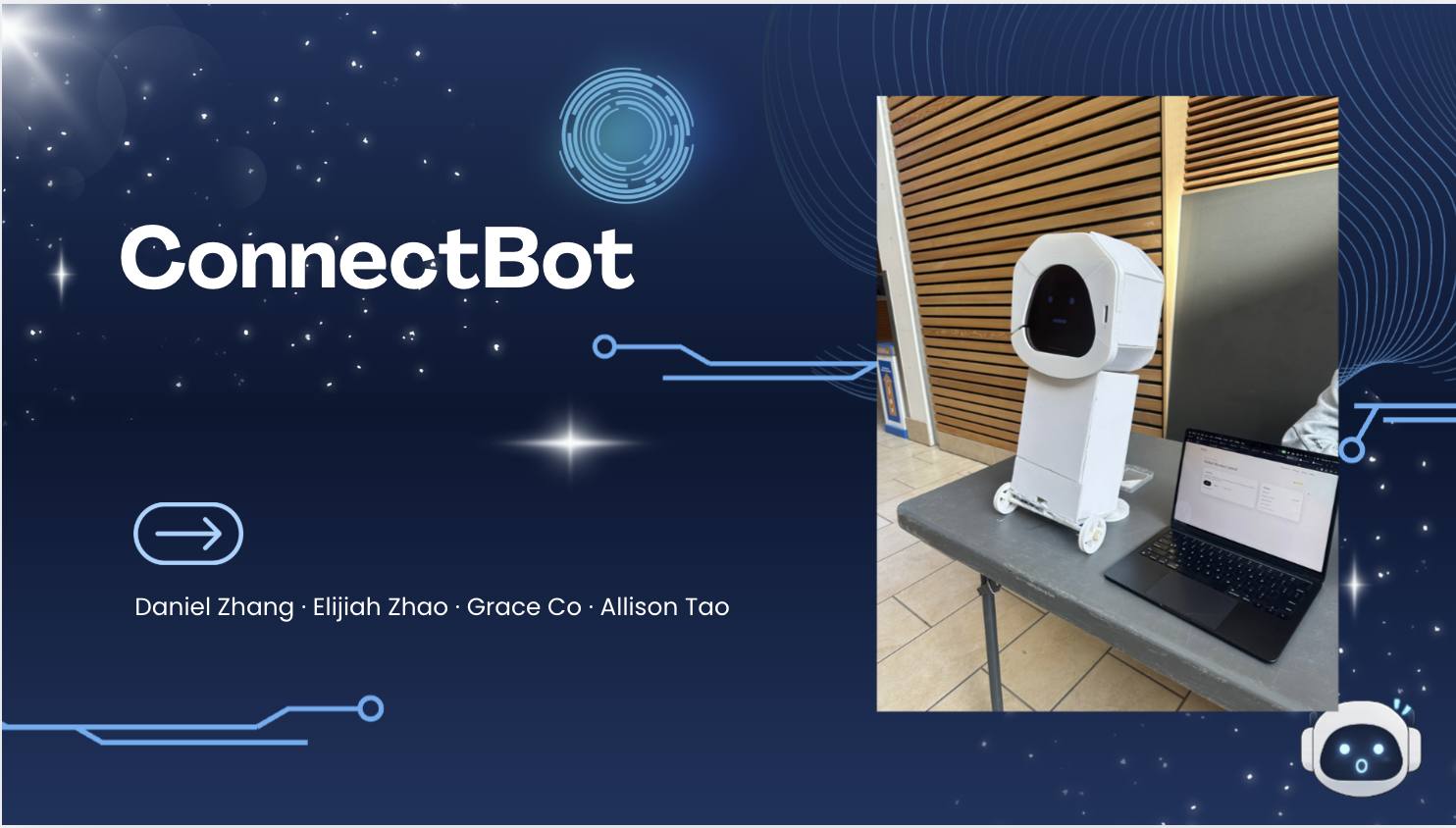
What it does
BIZBOT is a robot “event photographer” designed for real environments: crowded rooms, messy backgrounds, unpredictable lighting, and lots of motion.
Our goal is simple. Create a robot photographer that captures moments people actually want to keep, and make it easy to look back on an event without dumping hundreds of random low-quality shots on attendees.
BIZBOT can set up to roam in an event, and it will automatically detect hot spots and take candid and B roll photos. BIZBOT also runs an AI quality gate and only releases photos that meet a configurable standard. This makes the system more reliable, more respectful, and more “real-world ready.”
How we built it and the system flow
The BIZBOT is directly connected and controlled through our web app. Our web app has a Control Panel, a gallery, and an Admin Dashboard.
In the Control Panel, we can directly start the robot, which calls our back end to start the main robot loop and set BIZBOT in roam mode. When roaming, BizBot continuously captures frames and listens for control/stop events. The main loop runs CV inference on incoming frames including person detection and scene quality checks. When a frame meets capture conditions (sharpness, framing, exposure), it is promoted to a “candidate photo.” Candidate photos are passed to the PhotoPipeline.
Our photoPipeline first scores the Image using Gemini for technical quality (blur, exposure, framing of subject, clutter, distracting items). We want to ensure we are only passing photos of high standard to the gallery, checking for issues like blur/motion blur, exposure (too dark/bright), subject framing/cropping (cut off or awkward placement), and clutter/distracting elements. PhotoPipeline uploads the image to Supabase Storage (bucket images), and the full results of storage_path and score are stored in a postgres table (in SupaBase).
Our Gallery Page only serves photos where score >= threshold, hiding photos that have technical problems or make anyone look bad in any way. This can include blurry photos, images that have too many distracting elements, or the subject is awkwardly placed or cut off. As a fallback plan if the AI is not functioning or not available, or we need to make an intervention, in the admin dashboard, we can directly approve and remove photos by hand, as well as change the score of individual images, and the threshold score for which images are realized to the gallery.
In the case where Gemini fails, the is set to score = NULL. The image will be hidden until admin review.
Tech Stack (fast overview)
- FastAPI backend for upload + admin/public endpoints
- Supabase Storage for image hosting
- Supabase Postgres for photo metadata (id, storage_path, score)
- Google Gemini API for multimodal image scoring (0–1)
- For our CV flow, YOLOv8 for people bounding and detection, PyTorch for running the inference model, and OpenCV for frame capture.
- Next.js frontend for our web application.
[Block] Best Real-World Ready AI Product stream
We really focused on reliability and responsibility, not just a cool AI feature. Every image goes through Gemini with a strict instruction: rate only technical photo quality, not people. The score is based only on factors like:
- blur / motion blur,
- poor exposure (too dark / too bright),
- bad framing (subject cut off),
- clutter / distractions,
- resolution / compression artifacts.
We explicitly do not ask Gemini to judge attractiveness, identity, demographics, or “how good someone looks.” The model is used as a technical quality rater so we avoid discriminatory filtering and keep the criteria objective and explainable.
Then we apply a simple publish rule: Publish if: GeminiScore(photo) ≥ Threshold Our AI output is a single numeric score plus a technical explanation. Only images that pass the threshold are shown in the client gallery. The threshold can be tuned live depending on the event (e.g., stricter for a formal event, more relaxed for casual party shots).
Fallback plan: Admin Mode AI can fail, so we designed a clear fallback. If Gemini is unavailable, photos still upload and get saved, but remain unpublished until reviewed.
In Admin Mode, a human can set the score manually, delete anything that shouldn’t be shown, and adjust the threshold to control what goes public.
For the hackathon we made Admin Mode accessible to everyone so it’s easy to demo, but the design cleanly supports adding authentication later.
As a result, attendees see a clean gallery of high-quality shots, not an unfiltered dump.
Challenges we ran into
For 3/4 of our team, this was our first hardware project ever, so using arduinos, CAD, and 3d printers to create our robot was definitely a challenge, but fun experience.
The integration of hardware, our computer vision pipeline, and web application was also hard.
Accomplishments that we're proud of
the robot has a face.
What we learned
Having more emphasis on the User Experience and making sure we are tailoring and filtering the images to the standard clients want and need!
What's next for BizBot
Using a high quality camera module instead of our phones for the camera.


Log in or sign up for Devpost to join the conversation.