-
-
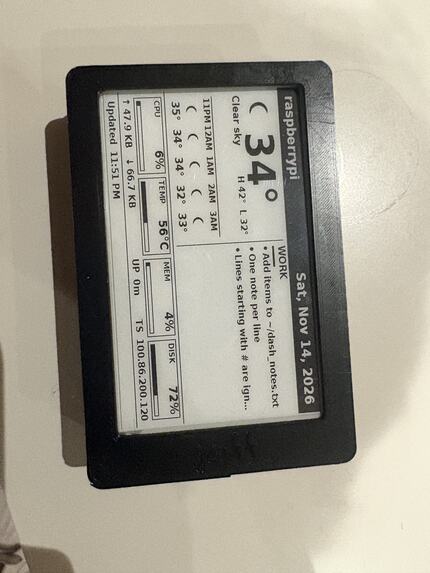
A picture of the assembled product
Inspiration
We wanted to develop the base for a tiny, always-on home server that you could access securely from wherever you wanted. We also wanted to appeal to the hobbyists out there, as seeing how people customize and build on projects is really cool! We also wanted a simple display readout that could tell you what exactly was going on with the server at any given time, without it being too distracting.
What it does
BitsyCasa (internally: Geoff) is a home server that works as soon as you power it on while also being extensible, compact, and secure.
Always-on e-ink dashboard
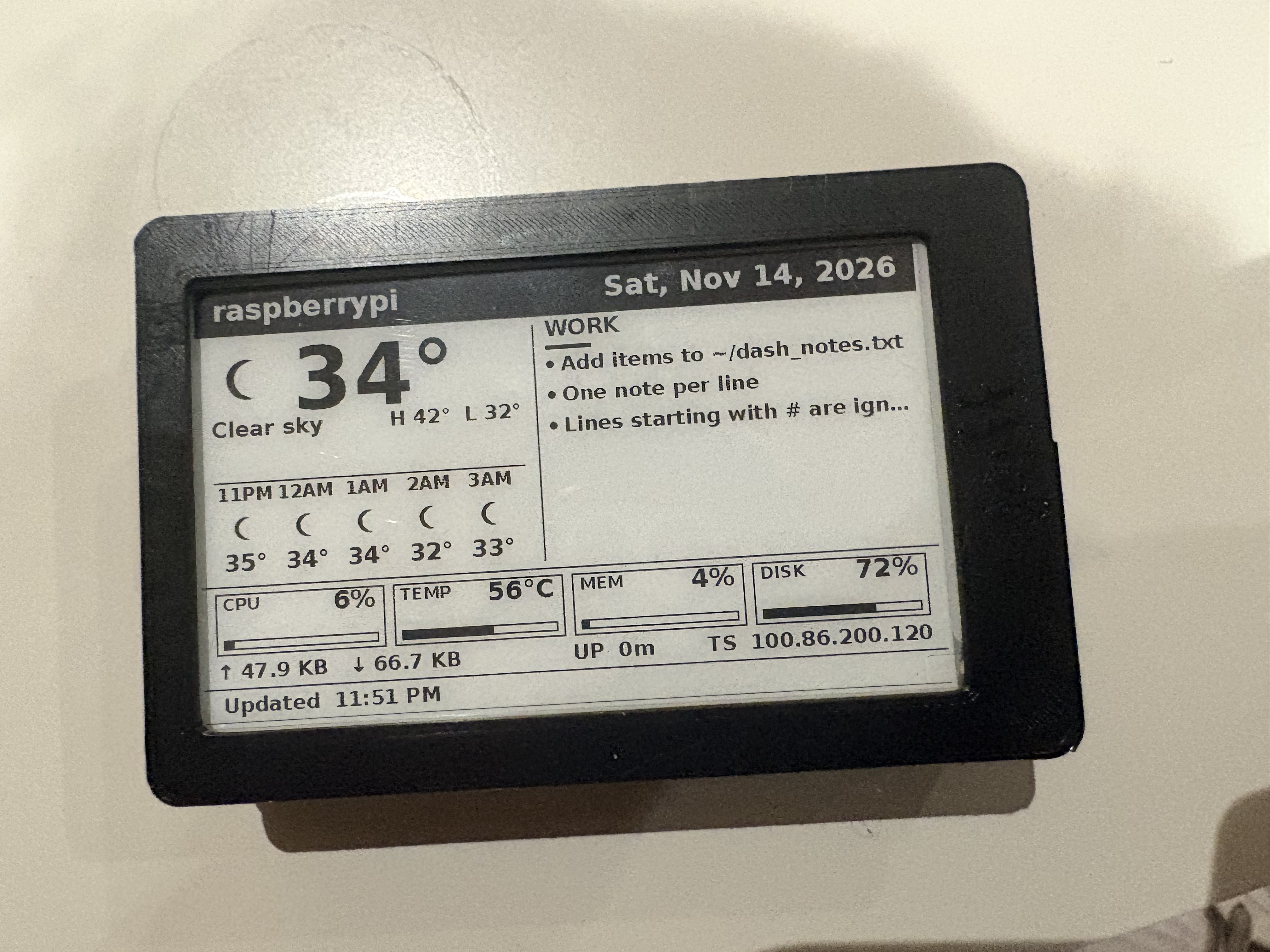
The 3.97" Waveshare HAT+ shows live system metrics (CPU, memory, disk, network, Tailscale IP, temperature, and uptime) in a clean, readable layout directly on the system itself. Two hidden modes are built in, but we'll leave that up to you to find!
Private file server
A lightweight copyparty instance runs in Docker, bound only to localhost. Caddy reverse-proxies it over Tailscale with automatic HTTPS on bitsy.casa. Files are reachable from any device on your tailnet and nowhere else. If you decide you don't want a file server (or want a different one), your files are stored as regular folders and files, not a complicated DB system that you'd have to wrangle your data out of.
Plug-and-play networking
Tailscale is configured from the start, so the Pi is reachable from anywhere without port forwarding or a public IP. Systemd units bring both the dashboard and the file stack up automatically after every reboot.
Expandable base
The whole stack is deliberately minimal and well-documented: one Python script for the display, a single docker-compose.yml for the file server, and clear service files. We made sure to build on a well-known base (the Raspberry Pi Model 4B), so modding the device for your own use would be as easy as possible.
How we built it
We started at 3 PM and focused on keeping the Pi as the brains of the operation from the beginning. Tailscale handled remote access; a GoDaddy URL was used to ensure easy access and no need to memorize IP addresses. The e-paper driver came from Waveshare’s official repo, as it was an unpackaged driver set. Metrics and the dual hidden modes live in a single Python script using PIL and the official driver, running in a venv.
The file server is a minimal copyparty container bound to localhost, proxied by Caddy so it can bind the Tailscale IP. Certificates are obtained via Porkbun’s DNS so we could access our server using https. There is a systemd service for every segment, so it persists across reboots and can be disabled if desired. Currently, we're running everything off of an 8GB Micro SD card, but this can obviously be expanded.
The greatest assistance we received in this challenge came from SpaceX's Grok. Using the Project and Bots feature, we were able to delegate and speed up our development. It was able to make a good-looking dashboard for the e-Ink display, write configuration files, create STL files for the system that we could 3D print, come up with novel solutions to specific challenges, and recover the e-Paper panel from a stuck state.
Challenges we ran into
Time
We started development at 3:00 PM after obtaining the required parts the day before. Grok was able to assist us greatly in this regard by essentially adding 3 experienced teammates to our project. We were able to knock out 80% of the required system functions by 6:30 PM from a hardware-only base only 3.5 hours before.
Storage
Running a home server on only 8 GB of space (it was all we were able to get from the parts section) proved to be quite a challenge. The final product has been slimmed down as much as possible, with 1.7 GB free out of 8. At one point, we were unable to build our reverse proxy because a plugin it required brought the build environment to over 2 GB, which was beyond what we could store. We were able to locate a prebuilt version of the exact binary we needed, which came out to about 50 MB instead. Our Docker stack now uses this binary, and it's as performant as ever.
Networking and Drivers
Connecting the Pi to eduroam proved to be a bit of a hassle. eduroam requires more configuration on Linux hosts than simply entering an SSID and Password, so we ended up trying wpa_supplicant and nmcli, which didn't work. In the end, we shuttled the SecureW2 wizard and required packages to run said wizard from our laptops to the Pi using USB, after which we were able to connect.
The e-Paper display used Python drivers that were only stored in a GitHub repo, and were not accessible via pyPi or pip. We had to clone Waveshare's repository, get rid of everything that wasn't strictly necessary in the interest of space saving, and then use the local driver files to get our setup working.
We also had issues with website configuration, as UMass automatically blocks 100.x.y.z IPs (Tailscale ones) on their network. To resolve this, we had to get on another network for testing and modify the /etc/hosts file on connected machines to get website-based connectivity working.
Accomplishments that we're proud of
No compromises
We did not compromise on our initial vision, and actually exceeded it in some aspects. Our system had issues connecting to the network, but we didn't let that stop us from making sure it did. We ran out of storage partway through, but managed to fix that by finding prebuilt binaries. We also made our box accessible via a website, even though UMass's DNS blocked that approach.
We're proud of what we built, and we hope you are too.
Clean solution
After initial setup (Tailscale, Internet), the system works exactly as intended and just needs to be powered on to be reachable by everyone. No other tinkering needed, and we can always extend its capabilities in the future.
Form factor
It's exactly what we wanted it to be; a compact, nice-looking box that acts as a tiny slice of home.
What we learned
The power of delegating tasks to agents
We were able to simultaneously work on STL files, the e-Ink dashboard, and the guts of the system itself using Grok Bots and a central project to tie them around. When given a target and clear instructions, agents are really powerful and effective at getting things done. I would estimate that this sped up our development time by at least 4x.
Managing storage
We really do take for granted how much storage we have available to us these days. By working on this (with storage close to what's found in embedded systems), we learned to value every single byte. The fact that we came out with 1.8 GB free is an accomplishment in itself.
What's next for BitsyCasa
Changing filesystems
Raspberry Pi OS comes with ext4 installed as standard. While it's a very widely used filesystem, I would put moving to BTRFS on the roadmap, as it offers compression support, snapshots, and copy-on-write, all of which I would rather have than not.
More screen options!
3.97" is great, but working with more screen sizes and aspect ratios would allow for greater flexibility when it comes to the quantity and quality of the information presented. We're looking at 8" for now.
