Inspiration
Imagine you're at a toll booth, but the price changes every 10 minutes. Sometimes it's $0.10, sometimes it's $50 — and you have no idea which one you'll get until you're already there. That's what sending Bitcoin feels like today.
Every Bitcoin transaction needs a fee. Think of it like a delivery charge — you're paying miners to include your transaction in the next block. But here's the problem: fees change constantly. When the network is busy, fees spike. When it's quiet, they drop to almost nothing. Pick the wrong fee and you either waste money or wait hours for confirmation.
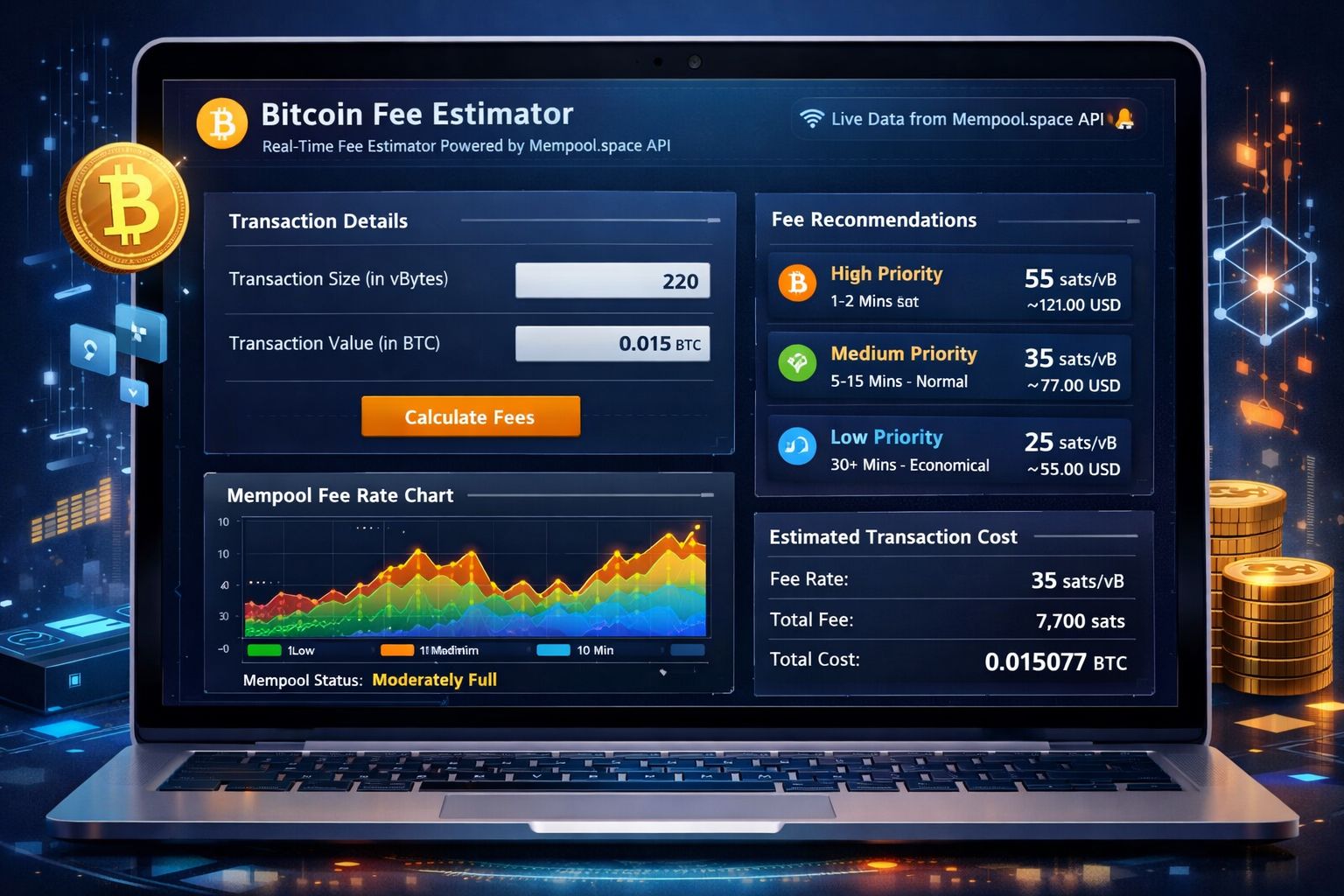
Tools like mempool.space exist, but they're built for developers — packed with raw data, charts, and technical jargon that overwhelms everyday Bitcoin users.
We asked ourselves: What if checking Bitcoin fees was as simple as checking the weather? Open the app, see if it's "expensive" or "cheap" right now, get a recommendation, and know exactly what your transaction will cost — all in under 5 seconds.
That's BitFee. A fee weather report for Bitcoin.
We were also inspired by the idea that Bitcoin fee estimation is fundamentally a math problem. The cost of a transaction is:
$$\text{Total Fee} = \text{Fee Rate (sat/vB)} \times \text{Transaction Size (vB)}$$
Where transaction size follows the formula:
$$\text{Size} = (\text{Inputs} \times 148) + (\text{Outputs} \times 34) + 10 \text{ vB}$$
We wanted to make this math accessible and visual for everyone.
What it does
BitFee is a real-time Bitcoin fee intelligence dashboard with 7 key features:
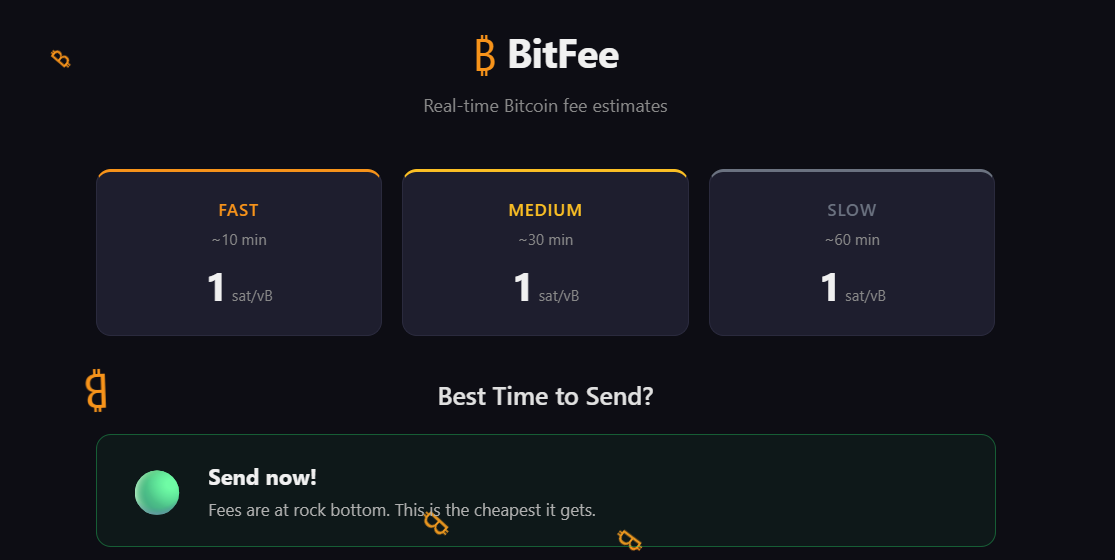
1. Live Fee Rate Cards — Displays current recommended fees for three confirmation speeds pulled directly from the Bitcoin network:
- ⚡ Fast (~10 min) — Next block confirmation
- 🟡 Medium (~30 min) — Within 3 blocks
- ⏳ Slow (~60 min) — Within 6 blocks
All rates shown in sat/vB (satoshis per virtual byte), auto-refreshing every 30 seconds.
2. "Best Time to Send?" Advisor — A smart recommendation engine that compares current fees against the 24-hour average:
- 🟢 Green = Fees are below average — great time to send
- 🟡 Yellow = Fees are normal — fine to send
- 🔴 Red = Fees are above average — consider waiting
Shows the exact percentage above or below average so users can make informed decisions.
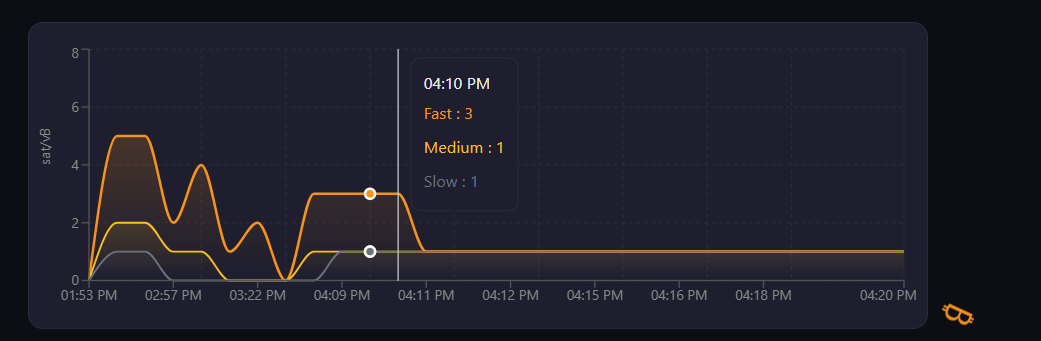
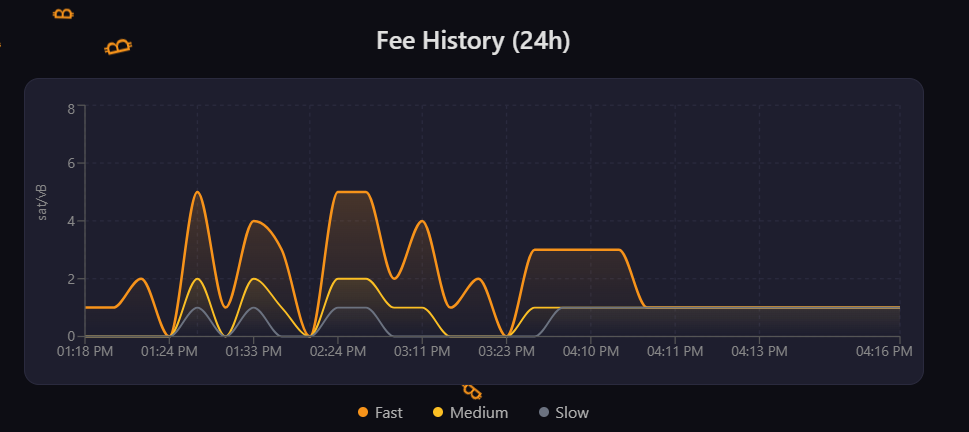
3. 24-Hour Fee History Chart — An interactive area chart visualizing how Fast, Medium, and Slow fees have trended over the past 24 hours. Three color-coded lines (orange, yellow, gray) help users spot patterns like "fees drop on weekends" or "fees spike during US market hours."
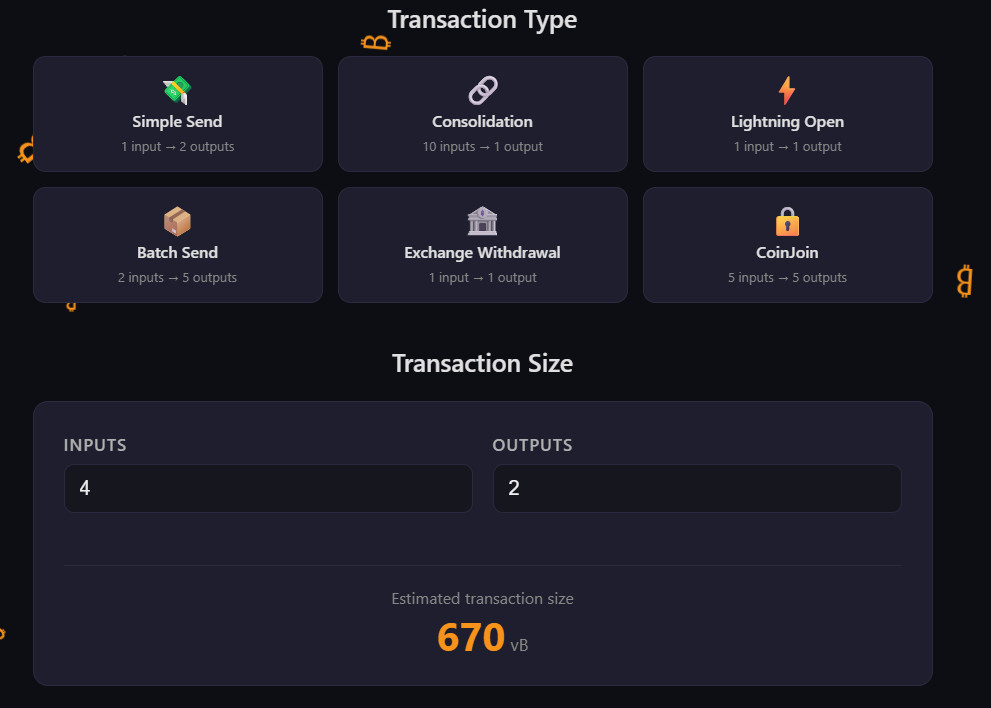
4. Transaction Type Presets — Six one-click preset buttons for common Bitcoin transaction types:
- 💸 Simple Send (1 input → 2 outputs) — Standard person-to-person payment
- 🔗 Consolidation (10 inputs → 1 output) — Combining small UTXOs into one
- ⚡ Lightning Open (1 input → 1 output) — Opening a Lightning Network channel
- 📦 Batch Send (2 inputs → 5 outputs) — Sending to multiple recipients at once
- 🏦 Exchange Withdrawal (1 input → 1 output) — Moving Bitcoin off an exchange
- 🔒 CoinJoin (5 inputs → 5 outputs) — Privacy-enhancing mixed transaction
Clicking a preset instantly updates the calculator and cost estimates.
5. Transaction Size Calculator — Manual input fields for custom transactions. Users enter the number of inputs and outputs, and the app calculates the estimated transaction size in virtual bytes using the standard Bitcoin formula. Includes real-time validation — only positive integers accepted.
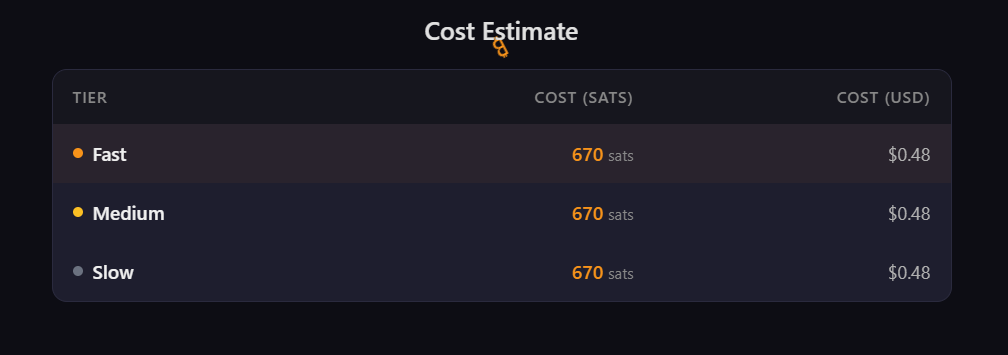
6. Cost Estimate Table — A clean table showing the total fee for each speed tier in both satoshis and US dollars. The USD conversion uses the live BTC/USD exchange rate. If the price API is unavailable, it gracefully falls back to showing sats only.
Bonus features:
- Auto-refresh every 30 seconds — data stays current without manual reload
- Stale data handling — if a refresh fails, the app keeps showing the last good data with a warning
- Loading states — spinner shown while fetching data
- Error handling — friendly error messages when the API is unavailable
- Responsive design — works on mobile (375px) to desktop (1440px)
All data is 100% real and live from the Bitcoin network.
How we built it
Architecture
┌─────────────────────────────────────────────────┐
│                   BitFee App                     │
│                                                  │
│  ┌──────────┐  ┌──────────┐  ┌───────────────┐  │
│  │ useFees  │  │useBtcPrice│  │useFeeHistory │  │
│  │  Hook    │  │  Hook     │  │    Hook       │  │
│  └────┬─────┘  └─────┬────┘  └──────┬────────┘  │
│       │              │              │            │
│       ▼              ▼              ▼            │
│  ┌─────────────────────────────────────────────┐ │
│  │              App Component                  │ │
│  │         (State: inputs, outputs)            │ │
│  └──┬──────┬──────┬──────┬──────┬──────┬───────┘ │
│     │      │      │      │      │      │         │
│     ▼      ▼      ▼      ▼      ▼      ▼         │
│  ┌─────┐┌─────┐┌─────┐┌─────┐┌─────┐┌────────┐  │
│  │ Fee ││Send ││ Fee ││ Tx  ││ Tx  ││ Cost   │  │
│  │Displ││Reco ││Chart││Pres ││Calc ││Estimat │  │
│  │ ay  ││mend ││     ││ets  ││ulat ││  e     │  │
│  └─────┘└─────┘└─────┘└─────┘└─────┘└────────┘  │
│                                                  │
│  ┌─────────────────────────────────────────────┐ │
│  │         FloatingBitcoins (background)       │ │
│  └─────────────────────────────────────────────┘ │
└──────────────────────┬──────────────────────────┘
                       │
                       ▼  Every 30 seconds
        ┌──────────────────────────┐
        │   mempool.space API      │
        │                          │
        │  /api/v1/fees/recommended│
        │  /api/v1/prices          │
        │  /api/v1/mining/blocks/  │
        │    fee-rates/24h         │
        └──────────────────────────┘
                       │
                       ▼
        ┌──────────────────────────┐
        │   Bitcoin Network        │
        │   (Real live data)       │
        └──────────────────────────┘
Data flows top-down: Bitcoin Network → mempool.space API → React Hooks → App State → UI Components. No backend in between.
- Frontend: React 19 + TypeScript with Vite as the build tool
- Data: Three endpoints from the free mempool.space public API — no API key needed
/api/v1/fees/recommended— live fee rates/api/v1/prices— BTC/USD price/api/v1/mining/blocks/fee-rates/24h— historical fee data
- Charts: Recharts library for the interactive 24-hour fee history visualization
- Styling: CSS Modules with a custom dark Bitcoin-themed design (dark background, orange accents)
- Testing: Vitest + fast-check for property-based testing of core calculation functions
- Architecture: Custom React hooks (
useFees,useBtcPrice,useFeeHistory) handle all data fetching with auto-polling, AbortController timeouts, and stale data handling - Deployment: Vercel for instant static hosting
No backend. No database. No authentication. Pure client-side.
Challenges we ran into
- API data consistency: The mempool.space fee history endpoint returns data in a different format than the real-time fees endpoint. We had to map between
avgFee_90,avgFee_50,avgFee_10fields and our Fast/Medium/Slow tiers. - Stale data handling: When a periodic API refresh fails (network blip, rate limit), we needed to keep showing the last good data while subtly warning the user it might be outdated — not just show an error screen.
- Preset-to-calculator sync: Making the transaction type presets update the calculator inputs in real-time required careful state management with React's
keyprop to force re-renders with new initial values. - Low-congestion demo problem: During our development, Bitcoin fees were at the minimum (1 sat/vB across all tiers), making all three speed tiers look identical. We had to explain in the UI and demo that this is real data reflecting actual network conditions.
Accomplishments that we're proud of
- 100% real live data — nothing is mocked or hardcoded. You can open mempool.space side by side and verify the numbers match.
- Built and deployed in under 3 hours — from idea to live URL during a hackathon.
- Clean, polished UI — dark Bitcoin-themed design with floating ₿ animations, responsive from mobile to desktop.
- Smart "Best Time to Send" feature — goes beyond just showing numbers by actually advising users whether to send now or wait, using trend analysis.
- Property-based testing — we used fast-check to verify our core math functions hold true across thousands of random inputs, not just a few hand-picked test cases.
What we learned
- Bitcoin fee mechanics: How transaction size is calculated from inputs and outputs, how miners prioritize transactions by fee rate, and why fees fluctuate with network congestion.
- mempool.space API: A powerful, free, and well-documented API for Bitcoin network data. No API key required, generous rate limits.
- Property-based testing with fast-check: Instead of writing individual test cases, we defined properties that must hold true for ALL inputs — like "transaction size is always ≥ 192 vB" — and let the framework generate thousands of random test cases.
- React polling patterns: Building custom hooks with
setInterval+AbortControllerfor reliable auto-refreshing data that handles errors gracefully.
What's next for Bitcoin Fee Estimator
- Fee alerts — Push notifications when fees drop below a user-defined threshold ("notify me when Fast fee drops below 5 sat/vB")
- SegWit/Taproot support — More accurate size estimation for different address types (P2PKH, P2SH, P2WPKH, P2TR) since they have different byte sizes
- Multi-currency support — Show costs in EUR, GBP, JPY, not just USD
- Historical analysis — Expand the chart to 7-day and 30-day views with pattern detection ("fees are usually cheapest on Sunday mornings")
- Wallet integration — Connect to popular Bitcoin wallets to auto-detect transaction details instead of manual input
- Mobile app — React Native version for on-the-go fee checking
Built With
- css-modules
- fast-check
- mempool.space-api
- react
- recharts
- typescript
- vercel
- vite
- vitest


Log in or sign up for Devpost to join the conversation.