Inspiration
We've all been there: the sudden sinking feeling when you realize you missed a close friend's or family member's birthday. I wanted a reliable way to keep track of important dates, but I was frustrated by the existing apps on the market. They were either cluttered with ads, required mandatory account sign-ups, or, worst of all, harvested personal contact data to sell to third parties.
I built Birthday Reminder to solve this. I wanted a beautiful, premium, and 100% offline-first application that respects user privacy while delivering smart, timely notifications so you never miss an important milestone again.
What it does
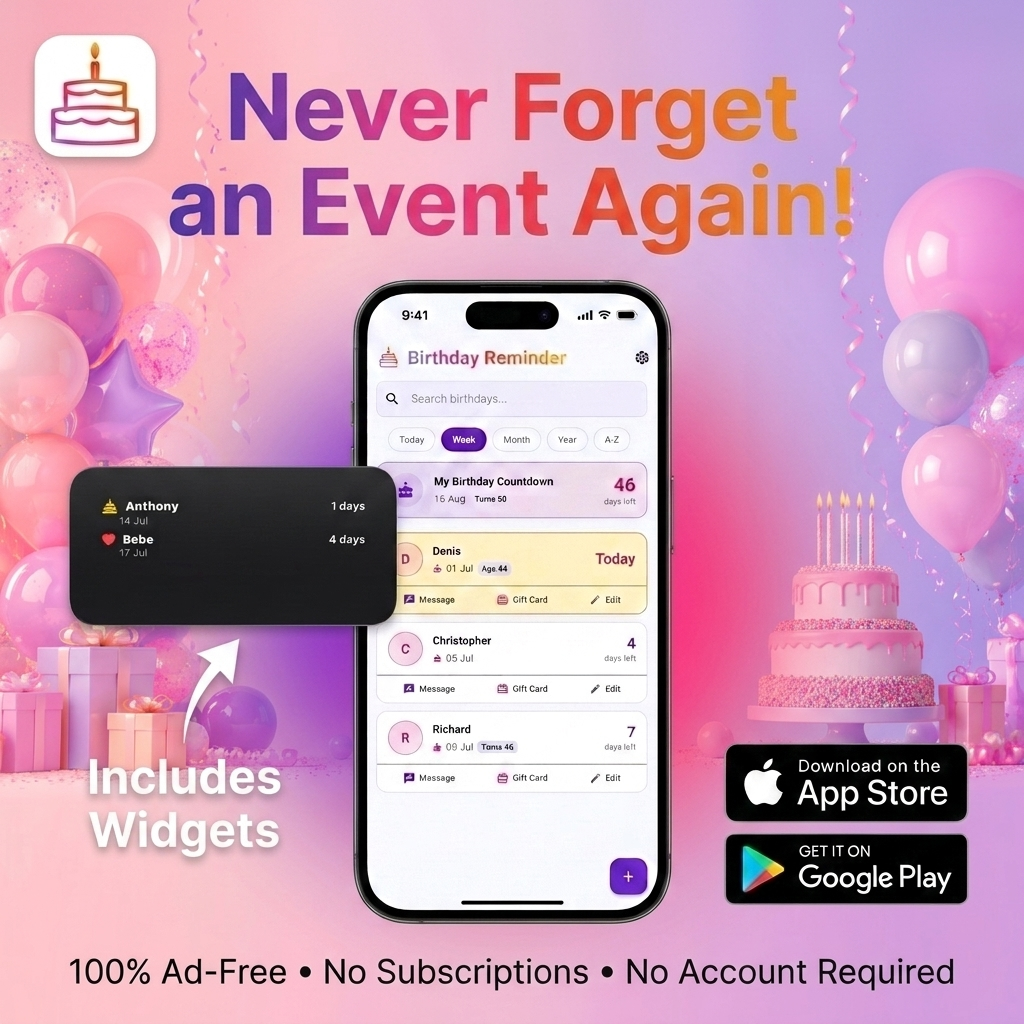
Birthday Reminder is a cross-platform (iOS and Android) utility that tracks birthdays, anniversaries, and custom events.
- Smart Notifications: Users can receive alerts on the actual day of the event, as well as a customizable "7-Day Summary" digest to give them a heads-up to buy a gift.
- Privacy-First Facebook Import: Instead of forcing users to log in with Facebook and give up their data, the app uses on-device OCR (Optical Character Recognition) to scan a screenshot of a Facebook birthday page and seamlessly extract names and dates.
- Astrology & Zodiac: The app automatically calculates both Western (Star Signs) and Chinese Zodiac signs, perfectly accounting for exact Lunar New Year threshold dates from 1900 to 2030. It even highlights the Jiazi (60-year lifecycle) milestone.
- Greeting Generator: Can't think of what to say? The app includes a template engine to generate warm, funny, or professional birthday messages that you can share directly via SMS or WhatsApp.
- Home Screen Widgets: Beautifully designed iOS and Android home screen widgets keep upcoming events right on the user's dashboard.
How I built it
The app was engineered from the ground up using Flutter and Dart to ensure a native, fluid experience on both iOS and Android from a single codebase.
- Architecture: I utilized Riverpod for robust, reactive state management and dependency injection.
- Local Storage: Because privacy is a core tenet of the app, all data is stored securely on the device using Drift (SQLite). There are no backend databases or trackers.
- On-Device Machine Learning: I integrated Google ML Kit for the text recognition engine powering the Facebook screenshot importer.
- Notifications: I leveraged the
flutter_local_notificationsandtimezonepackages to build a highly reliable local scheduling engine that works entirely in the background.
Challenges I ran into
One of the biggest hurdles was managing the complexities of local notifications across two drastically different operating systems. Ensuring that summary notifications and actual-day alerts were decoupled and fired reliably in the background—especially given modern battery-saving restrictions on Android and iOS—required a deep dive into platform-specific background execution policies.
Another significant challenge was the Chinese Zodiac calculation. Unlike the Western Zodiac, which is tied to static Gregorian dates, the Chinese Lunar New Year shifts every year. I had to build a comprehensive historical threshold map (spanning over 130 years) to ensure users born in January or February were assigned the correct animal and element.
Accomplishments that I'm proud of
I am incredibly proud of the Facebook Screenshot Importer. Rather than taking the easy route of using an invasive API integration, I built a feature that uses on-device ML to read a standard screenshot. It perfectly sorts through the noise of the image, pairs names with dates, and imports them in seconds. It’s a magical UX moment that perfectly aligns with the app’s privacy-first philosophy.
I'm also very proud of the optimistic UI updates in the settings screen. By removing asynchronous loading states during database writes, the UI reacts instantly to user input (like toggling switches) without losing scroll position or dropping frames.
What I learned
I deepened my understanding of local data persistence, particularly schema migrations and reactive database streams using Drift. I also learned a great deal about handling mobile keyboards and accessibility, eventually implementing a custom DateInputFormatter to automatically insert slashes (DD/MM/YYYY) and force a numeric keypad for a flawless date-entry experience on any device.
What's next for Birthday Reminder
The immediate roadmap includes expanding the automated greeting generator with more personalization options. Long-term, I plan to introduce an optional, end-to-end encrypted cloud sync feature via iCloud/Google Drive for users who want to back up their data across multiple devices without sacrificing their privacy.


Log in or sign up for Devpost to join the conversation.